How to Change Radio Stations in the 2023 Mazda CX 5
Changing radio stations in the 2023 Mazda CX 5 is simple once you know the controls. This guide walks you through every method, from using the tuning knob to accessing presets and connecting your phone. You will learn how the Mazda CX 5 radio system works, how to troubleshoot issues, and how to get the best sound from your vehicle audio system.
There is something satisfying about finding the perfect radio station while driving. Whether you love talk radio, sports updates, or your favorite music mix, the Mazda CX 5 radio system makes it easy to switch between stations on the go. The 2023 Mazda CX 5 comes with a modern infotainment system that offers several ways to tune your car radio. Whether you prefer the classic tuning knob or the touch screen, this guide covers everything you need to know.
If you are new to the Mazda CX 5 or just want to get better at using the audio controls, you are in the right place. This article breaks down every method for tuning radio stations in simple, easy-to-follow steps. We also share tips for getting the best sound, setting up presets, and fixing common problems. By the end, you will feel confident using every feature of the Mazda audio system.
The 2023 Mazda CX 5 is a popular compact SUV known for its sharp design, strong performance, and smart technology. The radio and entertainment system is just one part of what makes this vehicle stand out. Understanding how to use it well can make every drive more enjoyable. Let us dive into the details.
Key Takeaways
- Multiple Methods: You can change stations using the tuning knob, steering wheel controls, the Mazda infotainment touchscreen, or your phone.
- Presets Save Time: Setting up radio presets lets you jump to your favorite stations instantly without scanning.
- Scan Mode Is Handy: The scan function automatically cycles through available stations so you can discover new music.
- Phone Integration Helps: Connecting your phone via Bluetooth or USB gives you access to streaming apps and more station options.
- Troubleshooting Is Easy: Most radio issues in the Mazda CX 5 have simple fixes you can do at home.
- Keep It Clean: Regular care of your car interior and audio system ensures the best performance over time.
📑 Table of Contents
- Understanding the 2023 Mazda CX 5 Radio System
- How to Change Radio Stations Using the Controls
- Using Presets and Scan Mode
- Connecting Your Phone to the Mazda Audio System
- Troubleshooting Common Radio Issues
- Tips for Getting the Best Radio Experience
- Common Mistakes to Avoid
- Expert Insights on Car Audio Systems
- How the 2023 Mazda CX 5 Compares to Other Models
- Final Thoughts on Changing Radio Stations in the 2023 Mazda CX 5
Understanding the 2023 Mazda CX 5 Radio System
The 2023 Mazda CX 5 comes with a Mazda infotainment system that supports both FM and AM radio stations. The system is designed to be intuitive, so even first-time drivers can figure it out quickly. Depending on your trim level, you may have different audio features, but the basic radio functions stay the same across all models.
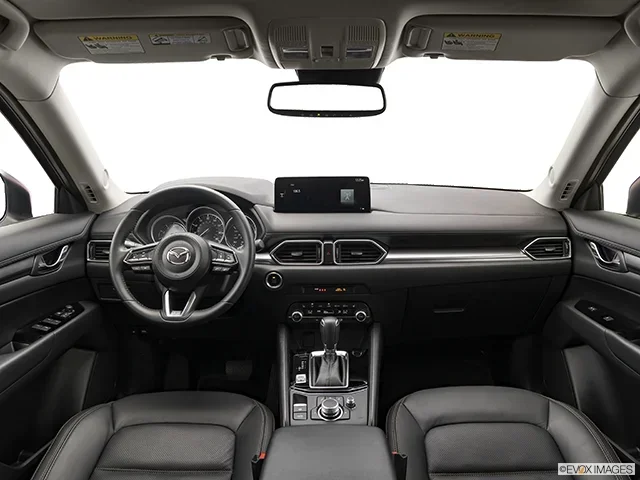
The Mazda CX 5 features a central display screen that controls most of the audio settings. Around the screen, you will find physical buttons and a tuning knob. This combination of digital and physical controls gives you flexibility. You can use the screen for advanced options and the knobs for quick, hands-free adjustments.
What Makes the Mazda Audio System Special
Mazda designed the audio system in the CX 5 with driver experience in mind. The speakers are positioned to deliver clear sound throughout the cabin. The car stereo system supports multiple audio sources, including FM radio, AM radio, Bluetooth streaming, USB connections, and even Apple CarPlay and Android Auto.
One thing that sets the Mazda vehicle audio apart is the balance between simplicity and functionality. You do not need a tech degree to use it. The controls are well-labeled and easy to reach. This means you can focus on the road while still enjoying great music.
How to Change Radio Stations Using the Controls
There are several ways to tune radio stations in the 2023 Mazda CX 5. Each method works well in different situations. Let us look at each one in detail.
Using the Tuning Knob
The most traditional way to change stations is by using the tuning knob. This knob is located on the center console, usually to the left of the infotainment screen. Turning it clockwise or counterclockwise moves the radio frequency up or down through the FM or AM band.
Here is how to use it:
- Press the radio button on the control panel to turn on the radio.
- Select FM or AM using the mode button.
- Turn the tuning knob slowly to scan through stations.
- Stop turning when you hear the station you want.
This method gives you precise control. You can find stations that auto-scan might skip. It is especially useful when you know the exact frequency of a station you want to hear.
Using the Steering Wheel Controls
If you prefer to keep your hands on the wheel, the steering wheel controls are your best friend. The 2023 Mazda CX 5 has buttons on the left side of the steering wheel dedicated to radio functions. These buttons let you change radio stations without taking your eyes off the road.
The steering wheel controls typically include:
- A seek button that jumps to the next available station.
- A scan button that automatically cycles through FM and AM stations.
- Preset buttons (usually numbered 1 through 6) for quick access to saved stations.
- Volume controls for adjusting sound levels.
Using the seek button is the fastest way to move between stations. One press skips to the next strong signal. This is great for highway driving when you want to quickly find a new station.
Using the Infotainment Touch Screen
The 2023 Mazda CX 5 also lets you control the radio through the center screen. The touchscreen displays a visual radio interface that shows the current frequency and available stations. This method is great for making quick adjustments while parked or at a stoplight.
To use the touchscreen for radio:
- Tap the radio icon on the home screen.
- Select FM or AM mode.
- Use the on-screen tuning slider to move across the frequency range.
- Tap a station to lock in the frequency.
The touchscreen also shows your saved presets and recently tuned stations. This makes it easy to go back to a station you liked earlier in your drive.
Using Presets and Scan Mode
Once you find a station you enjoy, saving it as a preset is a smart move. Presets let you skip the tuning process entirely and jump straight to your favorite radio stations. The 2023 Mazda CX 5 supports multiple presets for both FM and AM bands.
How to Save Radio Presets
Saving a preset is quick and easy. Follow these steps:
- Tune to the station you want to save using any method.
- Press and hold the preset number button you want to assign.
- Hold it for about two seconds until you hear a confirmation beep.
- The station is now saved to that preset number.
You can save up to six presets per band. This means you can have six FM favorites and six AM favorites ready at your fingertips. To use a preset, simply press the number once. The radio jumps straight to that station.
How Scan Mode Works
The scan mode is perfect for discovering new stations. When you activate scan, the radio automatically pauses on each strong signal for a few seconds before moving on. This lets you hear a snippet of every available station in your area.
To use scan mode:
- Press the scan button on the steering wheel or control panel.
- Listen to each station as the radio pauses automatically.
- Press the scan button again to stop on the station you like.
Scan mode is especially useful when you are driving through a new area and want to find local stations. It saves you from manually tuning through every frequency. If you want to learn more about car features and how different models compare, check out the difference between Mazda CX 5 and CX 30 for a helpful comparison.
Connecting Your Phone to the Mazda Audio System
The 2023 Mazda CX 5 does not just play traditional radio. It also lets you connect your phone for a much wider range of audio options. Whether you stream music, listen to podcasts, or use navigation apps, phone integration takes your car entertainment to the next level.
Bluetooth Connection
Bluetooth is the most common way to connect your phone to the Mazda audio system. Once paired, you can stream music, make hands-free calls, and even access certain apps through the infotainment screen.
To connect via Bluetooth:
- Go to the settings menu on the infotainment screen.
- Select Bluetooth and turn it on.
- On your phone, search for available devices.
- Select your Mazda CX 5 from the list.
- Confirm the pairing code on both devices.
After pairing, your phone connects automatically when you get in the car. This means less hassle and more time enjoying your music.
USB and Aux Connections
If you prefer a wired connection, the Mazda CX 5 offers USB ports and an auxiliary input. USB connections charge your phone while playing music. The aux input works with any device that has a standard 3.5mm headphone jack.
These wired options are great when Bluetooth is not available or when you want a more stable connection. Some drivers find that wired connections deliver better audio quality, especially for high-bitrate music files.
Adding Pictures to Uconnect
While the Mazda CX 5 uses its own infotainment system rather than Uconnect, many car owners enjoy personalizing their dashboard display. If you are interested in adding personal photos to your car’s display system, you can learn how to add pictures to Uconnect from your phone for vehicles that support this feature. The process is similar across many modern car systems and can add a personal touch to your driving experience.
Troubleshooting Common Radio Issues
Even the best car radio systems can have occasional issues. The 2023 Mazda CX 5 is no exception. Most problems are easy to fix without a trip to the dealership. Here are the most common issues and their solutions.
No Sound from the Speakers
If your radio turns on but you hear no sound, start by checking the volume. It sounds simple, but the volume may be turned down or muted. Next, check if the audio source is set correctly. The system might be set to a Bluetooth device or USB input instead of the radio.
You should also check if the mute button is active on the steering wheel. Pressing the mute button again usually restores sound. If none of these steps work, try turning the radio off and back on by holding the power button.
Static or Poor Reception
Static on the radio is often caused by external factors. Driving through tunnels, under heavy tree cover, or near tall buildings can weaken your signal. AM radio is more prone to static than FM radio because AM signals travel differently.
To improve reception:
- Move the antenna position if your model has an adjustable antenna.
- Avoid driving through areas with heavy electrical interference.
- Switch from AM to FM for clearer sound in most conditions.
- Try resetting the radio system by disconnecting the battery for a few minutes.
Radio Not Turning On
If the radio will not turn on at all, the issue might be with the power supply. Check that the ignition is in the correct position. Some Mazda CX 5 models require the engine to be running or the ignition to be in accessory mode for the radio to work.
If the radio still does not turn on, try resetting the infotainment system. You can usually do this by holding the power button for 10 to 15 seconds. If the problem persists, it may be a fuse issue that requires a quick check under the hood.
Tips for Getting the Best Radio Experience
Getting the most out of your Mazda CX 5 radio is about more than just changing stations. A few simple habits can improve your listening experience significantly.
Keep Your Presets Organized
Take a few minutes to organize your presets with your most-listened-to stations. Put your morning news station on preset 1, your favorite music station on preset 2, and so on. This saves time and makes your daily drive more enjoyable.
Use the Seek Function Wisely
The seek function is great for quickly finding stations, but it can sometimes skip over stations you like. If you hear a station you enjoy while scanning, press the seek button again to pause on it. This way, you do not miss stations with weaker signals.
Maintain Your Car Interior
Keeping your car interior clean helps maintain the overall driving experience. Dust and debris can sometimes affect electronic components. Regular cleaning of the dashboard and audio controls keeps everything working smoothly. If you have window tint, proper auto tint care also contributes to a comfortable cabin environment, reducing glare and keeping the interior cooler.
For more tips on maintaining your vehicle, you might want to read about how to care for your auto tint to keep your car looking and feeling its best.
Explore Different Audio Sources
Do not limit yourself to just FM and AM radio. The 2023 Mazda CX 5 supports many audio sources. Try connecting a USB drive with your favorite playlists. Explore streaming apps through your phone’s Bluetooth connection. You might discover a new way to enjoy music on the road.
Update Your Infotainment System
Mazda occasionally releases software updates for the infotainment system. These updates can improve radio performance, add new features, and fix bugs. Check with your Mazda dealer to see if any updates are available for your 2023 CX 5. Keeping your system updated ensures the best possible experience.
Common Mistakes to Avoid
Even experienced drivers sometimes make mistakes when using their car radio. Here are a few to watch out for:
- Forgetting to switch between FM and AM: This is the most common mistake. If you cannot find a station, check that you are on the right band.
- Leaving the radio on when the engine is off: This can drain your battery over time. Turn off the radio when the engine is not running.
- Not saving presets: If you always tune to the same stations, save them as presets. It saves time and frustration.
- Ignoring static issues: Persistent static might indicate a bigger problem. Address it early before it gets worse.
- Cranking the volume too high: High volume can damage your speakers over time. Keep the volume at a comfortable level.
Expert Insights on Car Audio Systems
Car audio technology has come a long way in recent years. The 2023 Mazda CX 5 represents the current generation of vehicle entertainment systems. According to automotive experts, the key to a great car audio experience is understanding your system and using it intentionally.
Experts recommend taking the time to explore all the audio settings in your Mazda CX 5. The equalizer settings, balance controls, and fade options let you customize the sound to your preference and the size of your cabin. Adjusting these settings can make a noticeable difference in audio quality.
Another expert tip is to keep your audio sources organized. If you use both radio and Bluetooth streaming, create a routine for switching between them. This keeps your drive smooth and distraction-free. For more information on vehicle features and specifications, the seating capacity comparison across different SUV models can give you a broader perspective on what different vehicles offer.
How the 2023 Mazda CX 5 Compares to Other Models
The 2023 Mazda CX 5 is not the only compact SUV with a great audio system. Many competitors offer similar features. However, the Mazda CX 5 stands out for its balance of quality and ease of use. The Mazda infotainment system is straightforward without being overly complicated.
If you are curious about how the CX 5 compares to other models in the Mazda lineup, the difference between Mazda CX 5 and CX 30 article provides a detailed look at how these two popular models differ in features, size, and technology.
The CX 5’s radio system holds its own against competitors in this class. The tuning is responsive, the sound quality is clear, and the range of audio inputs is generous. Whether you are a casual listener or an audio enthusiast, the CX 5 delivers a satisfying experience.
Final Thoughts on Changing Radio Stations in the 2023 Mazda CX 5
The 2023 Mazda CX 5 makes it easy to enjoy your favorite radio stations while on the road. From the simple tuning knob to the advanced touchscreen interface, there is a method that fits every driving style. Setting up presets, using scan mode, and connecting your phone all add to the convenience and enjoyment of your drive.
Remember that getting the most from your Mazda audio system comes down to knowing your controls and using them regularly. Take a few minutes to explore the features, save your favorite stations, and keep your system updated. These small steps make a big difference in your daily driving experience.
With this guide, you now have everything you need to confidently navigate the Mazda CX 5 radio system. The next time you get behind the wheel, try a new method or discover a station you have never heard before. Happy listening!
Frequently Asked Questions
Can I change radio stations without using the touchscreen in the 2023 Mazda CX 5?
Yes, you can use the tuning knob on the center console or the steering wheel controls to change stations. These physical controls let you tune the radio without touching the screen at all.
How many radio presets can I save in the 2023 Mazda CX 5?
You can save up to six presets for FM and six presets for AM radio. This gives you a total of twelve saved stations for quick access during your drive.
Why does my Mazda CX 5 radio have static interference?
Static is usually caused by weak signals, driving through tunnels, or interference from tall buildings. Switching from AM to FM often reduces static. If the problem persists, check your antenna connection.
Can I listen to internet radio through the Mazda CX 5 audio system?
Yes, you can stream internet radio by connecting your phone via Bluetooth or USB. Apps like Spotify, Pandora, and iHeartRadio work through the Mazda infotainment system when paired with your phone.
How do I reset the radio system in my 2023 Mazda CX 5?
You can reset the radio by holding the power button for 10 to 15 seconds. You can also try turning the radio off and back on. For persistent issues, a full infotainment system restart may be needed.
Is the radio system the same across all 2023 Mazda CX 5 trims?
The basic radio functions are the same across all trims. However, higher trims may include additional features like premium audio, more speaker channels, and enhanced infotainment system capabilities.