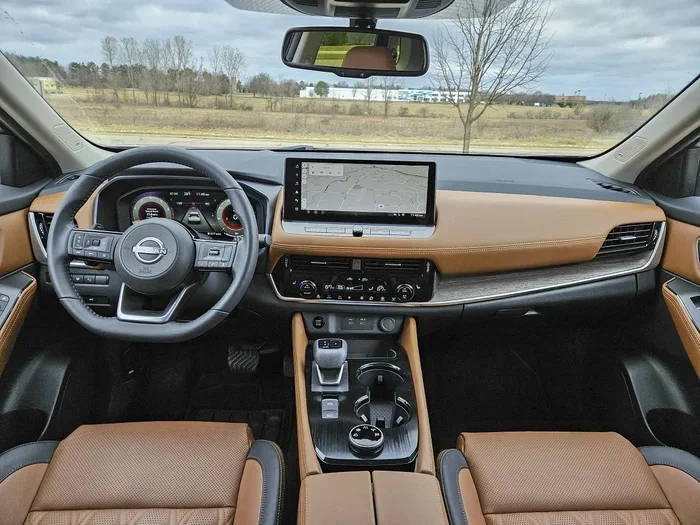
How to Reset the Distance to Empty on Nissan Rogue
Resetting the distance to empty on your Nissan Rogue is a quick and easy process that helps you track your fuel range accurately. Whether you just filled up, completed a long trip, or noticed the reading seems off, this guide walks you through every step. You will learn what the distance to empty feature does, why resetting it matters, and the exact buttons to press on your dashboard or infotainment system.
Have you ever glanced at your Nissan Rogue dashboard and wondered what that “Distance to Empty” number really means? It is one of those handy features that tells you roughly how many miles you have left before your tank runs dry. But sometimes that number gets thrown off, and you need to know how to reset it. This guide will show you exactly how to reset the distance to empty on Nissan Rogue models, step by step. We will also cover why this feature matters, common problems you might run into, and tips to keep it working right.
The distance to empty feature is more than just a number on your screen. It is a fuel management tool that helps you plan your trips, avoid running out of gas, and understand your driving habits. Whether you drive a 2024 Nissan Rogue or an older model, knowing how to reset and interpret this reading puts you in control of your fuel economy. Let us dive into everything you need to know.
Key Takeaways
- Easy Reset Process: Resetting the distance to empty on a Nissan Rogue takes just a few simple steps using the steering wheel controls or the infotainment screen.
- Accurate Fuel Tracking: A properly reset distance-to-empty reading gives you a reliable estimate of how far you can drive on your current fuel level.
- Multiple Methods Available: You can reset the feature through the instrument cluster, the display screen, or by following the owner manual instructions.
- Regular Maintenance Matters: Keeping your fuel system and sensors in good shape ensures the distance-to-empty reading stays accurate over time.
- Common Issues Are Fixable: Most problems with the distance-to-empty display are simple to resolve without visiting a mechanic.
📑 Table of Contents
- What Does Distance to Empty Mean on a Nissan Rogue?
- Why You Should Reset the Distance to Empty
- How to Reset the Distance to Empty on Nissan Rogue: Step-by-Step
- Common Problems When Resetting the Distance to Empty
- Tips for Keeping Your Distance to Empty Reading Accurate
- When to See a Professional
- How the Distance to Empty Compares Across Nissan Models
- Final Thoughts
What Does Distance to Empty Mean on a Nissan Rogue?
The distance to empty display shows an estimate of how many miles you can still travel with the fuel currently in your tank. Your Nissan Rogue calculates this number based on your recent driving patterns, fuel consumption rate, and the amount of fuel remaining. It is not a fixed number. It changes constantly as you drive, accelerate, idle, and coast.
Think of it as a smart fuel gauge that goes beyond the basic needle or bar. While the fuel gauge tells you how much gas is in the tank, the distance to empty tells you what that amount of gas can actually do. This is especially helpful on long road trips or when you are searching for a gas station in a rural area.
How the System Calculates Your Range
The Nissan Rogue uses a small computer in the trip computer system to estimate your remaining range. It looks at several factors in real time:
- Current fuel level: How much gas is left in the tank.
- Recent fuel consumption: How much fuel you have been using over the last several miles.
- Driving style: Aggressive acceleration and high speeds use more fuel, which the system accounts for.
- Vehicle load: Heavier loads and towing can reduce your estimated range.
When you reset the distance to empty, you are essentially telling the system to start fresh with new calculations. This is useful after a fill-up, a long trip, or any time you want a more accurate reading based on your current driving conditions.
Why You Should Reset the Distance to Empty
You might be wondering why resetting matters at all. If the system is already calculating your range, why mess with it? There are several good reasons to reset the distance to empty on your Nissan Rogue regularly.
After a Fuel Fill-Up
The most common reason to reset is after you fill up the tank. When you add a full or partial tank of fuel, the previous calculations no longer reflect your current situation. Resetting the system allows the Nissan Rogue trip computer to start fresh and give you a more accurate estimate based on the new fuel level.
After a Long Road Trip
Long trips often involve different driving conditions than your daily commute. Highway driving, mountain roads, and towing a Nissan Rogue towing a boat or trailer all affect fuel consumption in different ways. Resetting after a trip helps the system recalibrate to your normal driving patterns.
When the Reading Seems Off
Sometimes the distance to empty number just does not seem right. Maybe it dropped too fast or stayed stuck at the same number for a while. Resetting the system can clear up minor glitches and get the reading back on track. It is a simple first step before assuming something is seriously wrong with your fuel system.
How to Reset the Distance to Empty on Nissan Rogue: Step-by-Step
Now let us get into the actual process. Resetting the distance to empty on a Nissan Rogue is straightforward. The exact steps can vary slightly depending on your model year, but the general process is very similar across most Rogue models.
Method 1: Using the Steering Wheel Controls
Most Nissan Rogue models allow you to reset the distance to empty directly from the steering wheel. Here is how to do it:
- Locate the steering wheel controls: Look at the left side of the steering wheel. You will see a small pad or set of buttons that control the instrument cluster display.
- Press the OK or Menu button: Use the arrow buttons to scroll through the display options until you see the trip or distance information.
- Find the Distance to Empty reading: Scroll through the trip screens until the distance to empty number appears on the display.
- Press and hold the RESET button: Press and hold the reset button (usually marked with a “RESET” label) for about two to three seconds.
- Confirm the reset: The number should reset to the full estimated range based on your current fuel level. You may see the display flash or change briefly to confirm the reset.
Method 2: Using the Infotainment Display Screen
Some newer Nissan Rogue models, especially those with larger touchscreens, let you reset the distance to empty through the infotainment system:
- Start the vehicle: Press the start button or turn the key to power on the Nissan Rogue.
- Navigate to the Vehicle Information menu: Use the touchscreen to find the settings or vehicle info section.
- Select Trip Computer: Look for the trip computer or trip information option in the menu.
- Choose Distance to Empty: Select the distance to empty display option.
- Tap Reset: Look for a reset option on the screen and tap it to clear the previous reading.
Method 3: Using the Instrument Cluster Button
On some older Nissan Rogue models, there is a dedicated button near the instrument cluster or on the dashboard:
- Turn the ignition to the ON position: You do not need to start the engine fully, just power on the dashboard.
- Press the trip button repeatedly: Cycle through the trip display options until the distance to empty appears.
- Press and hold the trip button: Hold it down for a few seconds until the number resets.
- Start driving: The system will now calculate your range based on the current fuel level.
Quick Tip: If you are not sure which method works for your specific Nissan Rogue model year, check the owner manual. The manual will have the exact steps tailored to your vehicle. You can also download a product manual online if you do not have a physical copy.
Common Problems When Resetting the Distance to Empty
While resetting the distance to empty is usually simple, sometimes you might run into issues. Here are the most common problems Nissan Rogue owners face and how to fix them.
The Display Will Not Reset
If the distance to empty number will not change when you press and hold the reset button, try these steps:
- Check the ignition position: Make sure the vehicle is in the ON or RUN position. Some reset functions do not work when the car is completely off.
- Hold the button longer: Some models require a longer press, up to five seconds.
- Try the steering wheel controls: If the dashboard button is not working, use the steering wheel controls instead.
- Turn the vehicle off and back on: A simple restart of the electrical system can sometimes clear display glitches.
The Reading Is Inaccurate After Reset
After resetting, you might notice the distance to empty number seems unrealistic. Here is what could be causing this:
- Recent aggressive driving: If you were driving fast or accelerating hard before the reset, the system may still be adjusting.
- Low fuel level: When the tank is nearly empty, the system can become less accurate.
- Temperature extremes: Very hot or very cold weather can affect fuel consumption and sensor readings.
- Fuel quality: Lower quality fuel or a tank that is not completely full can throw off the calculations.
The Distance to Empty Display Is Not Showing
If the distance to empty reading is missing from your display entirely, the issue might be a display setting problem:
- Check the display settings: Use the infotainment system to verify that the trip computer display is enabled.
- Inspect the fuse: A blown fuse related to the instrument cluster can cause display issues.
- Look for software updates: Some Nissan Rogue models benefit from infotainment software updates that fix display bugs.
Expert Insight: If you are comfortable checking under the hood, you can also inspect the fuel sensor and connections near the exterior bonnet area. A loose fuel level sensor connector can sometimes cause inaccurate distance-to-empty readings. However, if you are not familiar with vehicle electronics, it is best to let a professional handle it.
Tips for Keeping Your Distance to Empty Reading Accurate
Once you have successfully reset the distance to empty, you want to keep it accurate. Here are some practical tips to help your Nissan Rogue trip computer give you the best readings possible.
Reset After Every Fill-Up
Getting into the habit of resetting the distance to empty every time you fill up the tank is one of the best things you can do. It ensures the system always starts with a fresh fuel baseline. Over time, this gives you a much more reliable picture of your actual fuel range.
Drive Consistently
The trip computer in your Nissan Rogue calculates range based on your recent driving patterns. If you drive aggressively one day and then gently the next, the reading will fluctuate. Try to maintain steady speeds and smooth acceleration for the most consistent results.
Keep Your Fuel Tank at Least a Quarter Full
Running the tank very low can stress the fuel pump and also make the distance-to-empty reading less reliable. Keeping at least a quarter tank of fuel at all times helps both your fuel system and the accuracy of the range estimate.
Monitor Fuel Economy Over Time
Pay attention to how your distance-to-empty number changes over several tanks. If you notice a big drop in estimated range even when driving normally, it could be a sign of a fuel system issue, a clogged fuel filter, or a problem with the fuel level sensor. Catching these problems early can save you from bigger repairs later.
Keep Software Updated
Nissan occasionally releases software updates for the infotainment system and trip computer. These updates can improve the accuracy of the distance-to-empty feature and fix known bugs. Check with your Nissan dealer or look for updates in the vehicle settings menu.
When to See a Professional
Most of the time, resetting the distance to empty is a simple DIY task. But there are situations where you should take your Nissan Rogue to a professional mechanic or dealership.
- The display remains blank after multiple reset attempts: This could indicate a deeper electrical or display issue.
- The distance to empty reading fluctuates wildly: If the number swings dramatically from one moment to the next, the fuel level sensor may need calibration or replacement.
- You notice other dashboard warning lights: If the distance-to-empty issue comes with other warning lights, such as a check engine light or ABS warning, have the vehicle diagnosed promptly.
- You recently had fuel system work done: If a mechanic recently serviced your fuel system and the distance-to-empty feature stopped working, they may need to recalibrate the sensors.
Many auto parts stores and dealerships can read diagnostic codes and check the fuel system sensors. Some even offer free diagnostics. If you are concerned about the cost, you can always ask for a quote before any work is done. You might also want to check how to read ABS codes without a scanner as a general guide to understanding vehicle diagnostic codes, which can sometimes point to the root cause of display issues.
How the Distance to Empty Compares Across Nissan Models
The distance to empty feature is not unique to the Nissan Rogue. Most modern Nissan vehicles include this helpful display. However, the exact reset process can differ between models. Here is a quick comparison of how the feature works across some popular Nissan vehicles:
- Nissan Rogue: Reset via steering wheel controls or infotainment screen depending on model year. The feature is standard across all trim levels.
- Nissan Altima: Similar reset process using the steering wheel pad. The distance to empty display is integrated into the trip computer.
- Nissan Sentra: Uses the same trip computer system with a straightforward reset button on the instrument cluster.
- Nissan Pathfinder: Larger infotainment screen makes the reset process easy through the vehicle settings menu.
While the basic function is the same, always refer to your specific vehicle owner manual for the exact reset procedure. The Nissan Rogue is one of the most popular crossover SUVs on the road, and its trip computer is designed to be user-friendly and intuitive.
Final Thoughts
Resetting the distance to empty on your Nissan Rogue is a small task that makes a big difference in how you manage your fuel and plan your trips. Whether you use the steering wheel controls, the infotainment screen, or the instrument cluster button, the process takes only a few seconds. Once you know how to do it, you will never have to wonder about your remaining fuel range again.
Keep in mind that the distance to empty reading is an estimate, not a guarantee. It is based on your recent driving and current fuel level, so it will change as conditions change. Use it as a helpful guide, not a precise measurement. And if you ever notice something seems off, the reset process is always your first troubleshooting step.
Take a moment the next time you fill up to reset the distance to empty on your Nissan Rogue. It is one of those small habits that keeps you informed, prepared, and in control of your driving experience. Your fuel gauge will thank you, and you will have peace of mind knowing exactly how far you can go before your next stop at the pump.
Frequently Asked Questions
How do I reset the distance to empty on a Nissan Rogue?
To reset the distance to empty, press the steering wheel controls and scroll to the trip computer display showing the distance to empty. Then press and hold the reset button for two to three seconds until the number refreshes. The exact steps can vary slightly depending on your model year, so check your owner manual if needed.
Why is the distance to empty not working on my Nissan Rogue?
The distance to empty feature may stop working due to a display setting issue, a blown fuse, or a problem with the fuel level sensor. Try resetting the system, checking the display settings, and restarting the vehicle. If the problem persists, a professional diagnostic check can identify the cause.
How accurate is the distance to empty reading on the Nissan Rogue?
The distance to empty reading is a good estimate but not perfectly precise. It is based on your recent driving patterns, fuel consumption rate, and current fuel level. Factors like aggressive driving, temperature, and vehicle load can all affect the accuracy of the reading.
Should I reset the distance to empty after every fill-up?
Yes, resetting the distance to empty after every fill-up is a great habit. It ensures the trip computer starts with a fresh fuel baseline and gives you the most accurate estimate of your remaining driving range based on the current fuel level.
Can I reset the distance to empty while driving?
Yes, you can reset the distance to empty while driving. The process is quick and safe to do on the road. Just make sure to use the steering wheel controls so you do not have to take your hands off the wheel for long.
What should I do if the distance to empty display is completely blank?
If the display is blank, first check that the trip computer display is enabled in your vehicle settings. Try turning the vehicle off and back on. If the display remains blank, check for a blown fuse related to the instrument cluster or visit a Nissan dealer for a diagnostic check.
=== CONCLUSION ===
Resetting the distance to empty on your Nissan Rogue is one of those simple maintenance tasks that pays off every time you drive. It keeps your fuel range estimate accurate, helps you avoid unexpected fuel stops, and gives you confidence on the road. Whether you are a new Rogue owner or have been driving one for years, taking a few seconds to reset the trip computer after each fill-up is a habit worth building.
The process is quick, easy, and requires no special tools or mechanical knowledge. With the steps outlined in this guide, you now have everything you need to reset the distance to empty and keep your Nissan Rogue running at its best. Apply what you learned today, and enjoy a more informed and stress-free driving experience every time you hit the road.