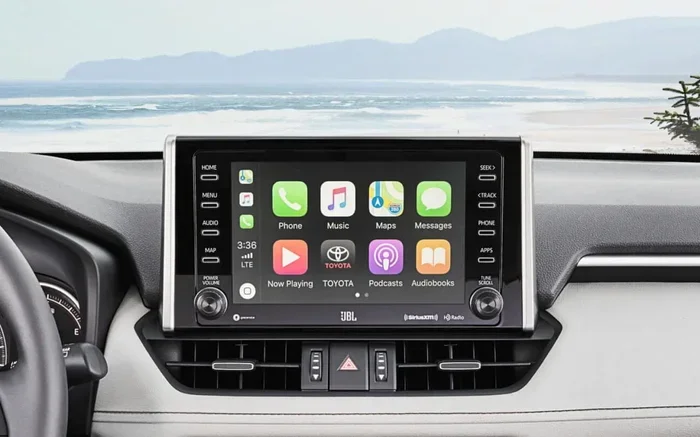
How Do I Know If My Toyota Has Entune Infotainment
Figuring out whether your Toyota has Entune is simple once you know what to look for. You can check your infotainment screen, look for the Entune or App Suite button, and verify your model year. This guide walks you through every method so you can confirm your Toyota Entune status in minutes.
You just bought a used Toyota, or maybe you are trying to figure out what features your current ride has. Either way, you have probably wondered about the infotainment system sitting in the center of your dashboard. Toyota calls its system Entune, and it has gone through several big updates over the years. But how do you actually know if your Toyota has Entune? The answer is simpler than you might think.
In this guide, we will walk you through every method to check whether your Toyota comes with Entune infotainment. We will cover the screen, the buttons, the model year, and even the Toyota App. By the end, you will know exactly what you are working with. Let us get into it.
Key Takeaways
- Check the Infotainment Screen: The easiest way to know if your Toyota has Entune is to look for the Entune or App Suite icon on your touchscreen.
- Model Year Matters: Entune became standard on most Toyota models starting around 2018, but older models may have it as an optional upgrade.
- Entune 3.0 Is the Latest Version: If your Toyota has Entune 3.0, you get enhanced navigation, Wi-Fi hotspot, and smartphone integration.
- You Can Upgrade: If your Toyota does not have Entune, you may be able to upgrade your Toyota Entune system at a dealership.
- Toyota App Works with Entune: You can unlock your car with the Toyota App if your system supports connected services.
- Phone Integration Is a Clue: If your Toyota supports Apple CarPlay or Android Auto, it likely runs Entune 3.0 or a newer infotainment platform.
📑 Table of Contents
- What Is Toyota Entune Infotainment?
- How to Check If Your Toyota Has Entune
- Which Toyota Models Come With Entune?
- Entune 3.0 vs. Older Entune Versions
- Can You Upgrade to Entune If Your Toyota Does Not Have It?
- Common Signs Your Toyota Has Entune
- Quick Tips for Getting the Most Out of Entune
- Common Mistakes People Make When Checking for Entune
- Final Thoughts
What Is Toyota Entune Infotainment?
Toyota Entune is the brand name for Toyota’s infotainment and connected services platform. It powers the touchscreen display in your Toyota vehicle. The system lets you access navigation, audio, phone calls, and smart phone integration all in one place. Think of it as the brain behind your Toyota’s audio and tech features.
Over the years, Toyota has released different versions of Entune. The most recent is Entune 3.0, which brought major improvements. Entune 3.0 includes a Wi-Fi hotspot, over-the-air updates, and better navigation. If your Toyota has Entune 3.0, you are getting a pretty modern tech experience.
Key Entune Features to Look For
Here are some of the standout features that come with the Entune system:
- Touchscreen Display: The main interface for accessing all Entune functions.
- Navigation: Built-in GPS with real-time traffic updates on newer versions.
- Smart Phone Integration: Apple CarPlay and Android Auto support on Entune 3.0.
- Wi-Fi Hotspot: Entune 3.0 can turn your Toyota into a mobile Wi-Fi hub.
- Remote Services: Lock, unlock, and start your car using the Toyota App.
- Audio Streaming: Play music from apps like Spotify, Pandora, and iHeartRadio.
- Bluetooth Connectivity: Hands-free calling and audio streaming wirelessly.
Not all Entune versions have every feature listed above. Older versions like Entune 2.0 may lack Wi-Fi or smart phone integration. That is why knowing which version you have matters so much.
How to Check If Your Toyota Has Entune
Now let us get to the part you came here for. There are several reliable ways to check if your Toyota has Entune. You can try them in order from easiest to most thorough.
Method 1: Look at the Infotainment Screen
The fastest way to check is to simply look at your center screen. Start the car or turn the ignition to accessory mode. If you see a touchscreen display, press the home button or look for the App Suite icon on the main screen.
On vehicles with Entune, you will typically see one of these icons:
- ENTUNE written directly on the home screen
- App Suite with a grid of application icons
- Toyota Connected Services in the settings menu
If you see any of these, your Toyota has Entune. If your screen is basic and only shows radio, CD, and a simple display, you likely do not have Entune.
Method 2: Check for the Entune or App Suite Button
Many Toyota models have a dedicated button on the dashboard or steering wheel that opens the Entune system. Look for a button labeled “App Suite,” “Entune,” or a touchscreen icon. Press it, and if the Entune interface loads, you are good to go.
Some Toyota models use a small touchscreen or a set of physical buttons near the climate controls to access the infotainment system. Check around the center console and the steering wheel area.
Method 3: Check Your Model Year and Trim Level
Toyota started offering Entune across its lineup at different times. Here is a general guide:
- 2011-2017: Entune was available as an optional feature on many models. Higher trims were more likely to include it.
- 2018-2020: Entune 3.0 became more common and started appearing on more trim levels.
- 2021 and newer: Most Toyota models come standard with Entune 3.0 or the newer Toyota Audio system.
If you know your model year and trim, you can cross-reference with Toyota’s website or your owner’s manual. The manual will list the infotainment features included with your specific trim.
Method 4: Use the Toyota App
If you have the Toyota App installed on your phone, you can check whether your vehicle supports connected services. If your Toyota supports remote start, lock, unlock, and location tracking through the app, your vehicle likely has Entune or a compatible connected system.
You can also use the Toyota App to unlock your car if your Entune system supports this feature. This is a great quick test to see if your Toyota has the connected services package that comes with Entune 3.0.
Method 5: Check the Vehicle Identification Number (VIN)
This is the most accurate method. Your VIN contains all the factory-installed information about your Toyota. You can:
- Find your VIN on the driver’s side dashboard or door jamb.
- Enter it on Toyota’s official website or a VIN decoder tool.
- Look for the infotainment package details in the vehicle specifications.
This method works especially well if you bought a used Toyota and the previous owner did not mention the infotainment system. The VIN will tell you exactly what was installed at the factory.
Which Toyota Models Come With Entune?
Toyota has offered Entune across a wide range of models over the years. Here is a breakdown of popular Toyota models and their Entune compatibility:
Toyota Camry and Entune
The Camry has been one of the most popular Toyota sedans to feature Entune. Starting around 2012, the Camry offered Entune as an optional upgrade on higher trims. By 2018, Entune 3.0 became standard on most Camry trims. If you have a Camry from 2018 or newer, you almost certainly have Entune.
Toyota RAV4 and Entune
The RAV4 also comes with Entune on most recent model years. The 2019 and newer RAV4 models feature Entune 3.0 with a larger touchscreen and Apple CarPlay support. Even some 2017 RAV4 models came with Entune 2.0 on higher trims.
Toyota Corolla and Entune
The Corolla started offering Entune on select trims around 2014. By 2020, Entune 3.0 became standard on most Corolla models. If you have a newer Corolla, check the center screen for the Entune interface.
Toyota Tacoma and Entune
The Tacoma has offered Entune on higher trims, especially the TRD and Limited editions. The 2018 and newer Tacomas come with Entune 3.0 as standard on most trims.
Toyota Highlander and Entune
The Highlander has featured Entune on most model years. The 2020 and newer Highlanders come with Entune 3.0 standard. You can even start your Highlander with your phone if your Entune system supports remote start capabilities.
Entune 3.0 vs. Older Entune Versions
Not all Entune systems are created equal. Toyota has released several versions, and the differences matter. Here is a quick comparison to help you understand what you have:
| Feature | Entune (Original) | Entune 2.0 | Entune 3.0 |
|---|---|---|---|
| Release Year | 2011 | 2015 | 2018 |
| Touchscreen | Small, basic | Medium, improved | Large, high-res |
| Apple CarPlay | No | No | Yes |
| Android Auto | No | No | Yes |
| Wi-Fi Hotspot | No | No | Yes |
| Over-the-Air Updates | No | No | Yes |
| Remote Services | Limited | Some | Full |
| Navigation | Optional | Standard on some | Standard |
If your Toyota has Entune 3.0, you are getting the most modern and feature-rich experience. Older versions may still work well for basic audio and Bluetooth, but they lack the smart features that make Entune 3.0 stand out.
Can You Upgrade to Entune If Your Toyota Does Not Have It?
This is one of the most common questions we get. The short answer is: it depends. Aftermarket Entune systems are not really a thing. Toyota designed Entune to integrate with the vehicle’s wiring, computer, and safety systems. A simple plug-and-play upgrade does not exist.
However, you do have some options:
- Visit a Toyota Dealer: Some Toyota dealerships can install a factory-entune system on compatible models. This works best on older Toyotas that had Entune as an optional feature.
- Aftermarket Head Units: You can install an aftermarket infotainment head unit that mimics Entune features. These units support Apple CarPlay, Android Auto, and touchscreen controls. They do not offer Toyota-specific connected services, but they add modern tech to older vehicles.
- Check Compatibility First: Not every Toyota model can accept an Entune or aftermarket infotainment upgrade. Consult with a Toyota dealer or a qualified installer before making any changes.
If you are seriously considering an upgrade, you should look into whether your Toyota can be upgraded to Entune. A dealer can check your VIN and let you know what is possible for your specific vehicle.
Common Signs Your Toyota Has Entune
Still not sure? Here are some telltale signs that your Toyota has Entune:
- Your center screen is touchscreen-enabled. Most Entune systems use a capacitive touchscreen, which feels responsive and smooth.
- You see the App Suite icon on the home screen. This is the gateway to all Entune applications and services.
- Your Toyota supports Apple CarPlay or Android Auto. These features are only available on Entune 3.0 and newer systems.
- You can connect to Wi-Fi through your Toyota. Entune 3.0 includes a built-in Wi-Fi hotspot feature.
- Your owner’s manual mentions Entune or connected services. Check the tech and infotainment section of your manual.
- You have a premium JBL audio system. Many Toyotas with Entune also come with upgraded JBL speakers, though this is not always the case.
If several of these signs match your Toyota, you almost certainly have Entune. The more signs that apply, the more confident you can be.
Quick Tips for Getting the Most Out of Entune
Once you confirm your Toyota has Entune, here are some tips to make the most of it:
- Keep Your System Updated: Entune 3.0 supports over-the-air updates. Make sure your system is running the latest software for the best performance.
- Set Up the Toyota App: Pair the Toyota App with your Entune system to access remote services like lock, unlock, and vehicle location.
- Use Apple CarPlay or Android Auto: If your Entune 3.0 supports these, connect your phone for a seamless smart phone experience.
- Explore the App Suite: Entune comes with apps like Yelp, Pandora, and iHeartRadio built in. Take a few minutes to explore what is available.
- Check Your Wi-Fi Hotspot Settings: If your Entune 3.0 has a Wi-Fi hotspot, make sure it is set up and secure before you need it.
Common Mistakes People Make When Checking for Entune
Here are some mistakes to avoid:
- Assuming All Toyotas Have Entune: Not every Toyota comes with Entune, especially older models and base trims. Always verify before assuming.
- Confusing Entune with the Toyota App: The Toyota App is a separate phone application. Entune is the infotainment system inside your car. They work together but are not the same thing.
- Ignoring the VIN Check: If you are buying a used Toyota, do not rely solely on the appearance of the screen. Always check the VIN for the most accurate information.
- Trying to Upgrade Without Professional Help: Do not attempt to install Entune yourself. Toyota’s infotainment system requires professional installation and programming.
Final Thoughts
Knowing whether your Toyota has Entune is important for understanding what tech features are available to you. Whether you are checking a used Toyota you are thinking about buying or just trying to get more out of your current vehicle, the methods in this guide will help you find the answer. Start with the infotainment screen, check for the App Suite button, and if you are still unsure, run your VIN through Toyota’s website.
The Entune system has been a major part of Toyota’s tech lineup for over a decade. From Entune 1.0 to the latest Entune 3.0, Toyota has steadily improved the infotainment experience. If your Toyota has Entune 3.0, you are sitting on a solid platform with navigation, smart phone integration, and connected services at your fingertips.
Take a few minutes right now to check your Toyota. You might be surprised at how much tech is already built into your vehicle. And if you find that your Toyota does not have Entune, now you know what options are available to bring your ride into the modern age.
Frequently Asked Questions
How do I know if my Toyota has Entune 3.0 specifically?
Check your infotainment screen for the App Suite icon and look for Apple CarPlay or Android Auto support. You can also check your model year. Toyota models from 2018 and newer are most likely to have Entune 3.0. The owner’s manual or a VIN check will confirm the exact version installed.
Can I add Entune to my older Toyota model?
Toyota does not offer a simple aftermarket Entune upgrade for older models. However, some Toyota dealerships may be able to install a compatible infotainment system depending on your vehicle. Aftermarket head units that support Apple CarPlay and Android Auto are also an option to bring modern features to older Toyotas.
Is Entune the same as the Toyota App?
No, they are not the same. Entune is the infotainment system built into your Toyota’s dashboard. The Toyota App is a phone application that connects to your vehicle for remote services. They work together, but Entune is the system inside the car.
Which Toyota models do not have Entune?
Some base trims of older Toyota models, especially those from before 2015, may not have Entune. Entry-level trims of the Corolla, Yaris, and older Tacoma models sometimes came with a basic audio system instead of the full Entune infotainment package.
Does Entune work without a cellular data connection?
Basic Entune features like Bluetooth, FM radio, and USB playback work without a data connection. However, features like real-time navigation, Wi-Fi hotspot, and over-the-air updates require a cellular data plan. Entune 3.0 typically includes a trial data subscription that may need to be renewed.
How much does it cost to upgrade to Entune 3.0 at a Toyota dealer?
The cost varies depending on your Toyota model, year, and the dealership. Some dealers offer package deals that include both hardware and installation. It is best to contact your local Toyota dealer and provide your VIN for an accurate quote. In some cases, the cost may be worth it if your vehicle is otherwise in great shape.