Program Your Genie Garage Door Opener to Your Toyota Camry
Programming your Genie garage door opener to a Toyota Camry is easier than you think. With the HomeLink system built into your Camry, you can connect your garage door in just a few simple steps. This guide walks you through the entire process, from preparing your vehicle to troubleshooting common issues.
If you own a Toyota Camry and a Genie garage door opener, you are in luck. These two systems work together beautifully thanks to the HomeLink technology built right into your Camry. Whether you are dealing with rain, snow, or just carrying groceries, the ability to open your garage door from behind the wheel is a game changer.
Many Camry owners do not realize their car already has this feature. The HomeLink system is a universal remote built into your vehicle’s rearview mirror or overhead console. It lets you control your garage door, gate, or even your home lighting system without needing a separate remote. In this guide, we will walk you through every step to program a Genie garage door opener to your Toyota Camry the right way.
We will cover everything from what you need before starting to advanced tips that make the process smoother. By the end, you will feel confident handling this on your own. No mechanic visit required. No expensive service fees either. Let us dive in.
Key Takeaways
- HomeLink Integration: Your Toyota Camry comes with a built-in HomeLink system that makes garage door programming seamless and wireless.
- Simple Process: Programming takes only minutes and requires no special tools or professional help.
- Genie Compatibility: Most Genie garage door openers work with Camry HomeLink systems using rolling code technology.
- Safety First: Always follow safety precautions like parking on a flat surface and keeping the ignition on during programming.
- Multiple Buttons: Your Camry’s HomeLink system has three programmable buttons, letting you control multiple garage doors or devices.
- Troubleshooting Available: If programming fails, there are clear steps to reset and retry the process.
📑 Table of Contents
- What You Need Before You Start
- Step-by-Step Guide to Programming Your Genie Garage Door Opener
- Programming a New Genie Remote to Your Camry
- Erasing Existing HomeLink Programming
- Troubleshooting Common Issues
- Safety Tips for Using HomeLink With Your Genie Opener
- Benefits of Having HomeLink in Your Toyota Camry
- Can You Program a Genie Opener to Any Toyota Camry?
- Expert Tips for a Smooth Programming Experience
- Frequently Asked Questions
- Conclusion
What You Need Before You Start
Before you begin programming your Genie garage door opener, make sure you have everything ready. Preparation saves time and prevents frustration. Here is what you need:
- A Toyota Camry with a working HomeLink system. Most models from 2003 onward include HomeLink built in.
- Your Genie garage door opener remote or the opener unit itself if you are programming a new remote.
- A flat, open parking area where you can safely position your Camry near the garage door.
- Your Genie model number. You can find this on the back of the opener unit or in the user manual.
- Fresh batteries in your Genie remote. Weak batteries are a common reason programming fails.
Understanding Your Camry’s HomeLink System
The HomeLink system in your Toyota Camry is a universal garage door transmitter. It replaces the need for multiple remotes. Most Camry models place the HomeLink buttons on the overhead console near the rearview mirror. You will see three buttons, each capable of controlling a different device. These buttons are labeled Button 1, Button 2, and Button 3.
The system uses rolling code technology, which means it changes the access code every time you press the button. This is a security feature that keeps your garage safe from unauthorized access. Genie openers also support this technology, which is why they pair so well with Camry HomeLink systems.
Step-by-Step Guide to Programming Your Genie Garage Door Opener
Now that you are prepared, let us get into the actual programming process. Follow these steps carefully and you will have your Genie opener connected to your Camry in no time.
Step 1: Park Your Camry Properly
First, park your Toyota Camry in front of your garage door. Make sure the car is on a flat surface and the engine is running. The ignition should be in the ON or accessory position. This powers the HomeLink system so it can transmit signals to your garage door opener.
Some people make the mistake of turning the car off during programming. Do not do this. The HomeLink system needs power to send and receive signals. Also, make sure your garage door is fully closed before you start.
Step 2: Locate the HomeLink Buttons
Look up at the overhead console in your Camry. You will see three buttons, usually marked with small indicator lights. These are your HomeLink buttons. Choose which button you want to use for your Genie garage door opener. Button 1 is the most common choice, but you can use any of the three.
If you already have a device programmed to one of the buttons, you can either use a different button or erase the existing programming first. We will cover how to erase in a later section.
Step 3: Put Your Genie Opener into Programming Mode
Now it is time to prepare your Genie garage door opener. The exact steps depend on your Genie model, but here is the general process:
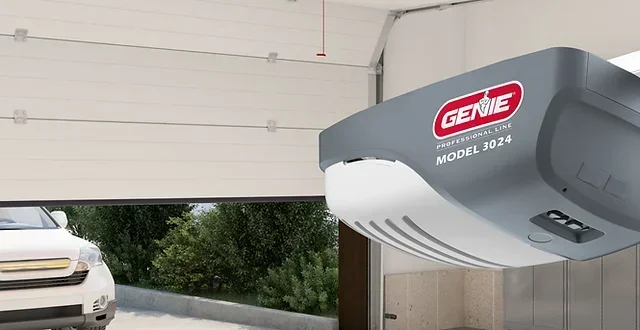
- Locate the “Learn” button on your Genie opener motor unit. This button is usually on the back or side of the motor.
- Press and release the “Learn” button. The indicator light on the opener will turn on.
- You usually have 30 seconds to complete the next step. Work quickly but carefully.
If you cannot find the Learn button, check your Genie manual. Some newer models use a smart button or a Wi-Fi-based setup process. The Genie garage door opener website also has model-specific instructions if you get stuck.
Step 4: Press and Hold the HomeLink Button
Go back to your Camry. Press and hold the HomeLink button you selected. Keep holding it for about 20 to 30 seconds. You should see the indicator light on the HomeLink button start to flash. This means the system is ready to receive the signal from your Genie opener.
While still holding the HomeLink button, go back to your Genie opener. Press and release the remote button or the wall control button. The HomeLink light should start flashing rapidly, which means it is picking up the signal.
Step 5: Test the Connection
Release both buttons. Press your newly programmed HomeLink button on your Camry. Your Genie garage door should respond and start to open or close. If it does, congratulations. You are done. If nothing happens, do not worry. We have troubleshooting steps below.
Pro Tip: Test the connection a few times to make sure it is reliable. Try opening and closing the door from different distances. This ensures the signal is strong and consistent.
Programming a New Genie Remote to Your Camry
If you are not programming the opener itself but rather a new Genie remote control, the process is slightly different. Here is what to do:
- Follow Steps 1 and 2 above to locate your HomeLink button and position your Camry.
- Press and hold the HomeLink button and the remote button at the same time.
- Release both buttons when the HomeLink indicator light flashes rapidly.
- Press the HomeLink button again to test the connection.
This method works for most Genie remotes, including the Genie Intellicode series. The rolling code feature in both your Camry and Genie remote ensures that each signal is unique, which keeps your garage secure.
Erasing Existing HomeLink Programming
Sometimes you need to start fresh. Maybe you bought a used Camry with a previous owner’s garage door still programmed. Or perhaps you are setting up a second garage door. Either way, erasing the existing programming is simple.
How to Erase a Single HomeLink Button
- Press and hold the HomeLink button you want to erase.
- Continue holding it for about 10 seconds until the indicator light turns off.
- Release the button.
- The button is now cleared and ready for new programming.
How to Erase All HomeLink Buttons
If you want to clear all three buttons at once, the process is slightly different. You may need to access the HomeLink system through your Camry’s settings or consult your owner’s manual. Some models require you to hold two buttons simultaneously for several seconds to initiate a full reset.
For more details on connecting garage door openers to vehicle systems, you can also check our guide on how to connect a garage door opener to Homelink. It covers additional HomeLink troubleshooting tips.
Troubleshooting Common Issues
Even when you follow the steps perfectly, things can sometimes go wrong. Here are the most common issues Camry owners face when programming a Genie garage door opener and how to fix them.
The HomeLink Light Does Not Flash
If you hold the HomeLink button and nothing happens, try this:
- Make sure your Camry ignition is in the ON or accessory position.
- Check that the HomeLink system has power. Some models have a fuse dedicated to the HomeLink system.
- Try holding the button for a longer period. Some systems need 30 seconds or more to activate.
The Garage Door Does Not Respond
If the HomeLink light flashes but the garage door does not move:
- Make sure your Genie opener is in programming mode. The Learn button light should still be on.
- Move your Camry closer to the garage door opener unit.
- Check the batteries in your Genie remote. Replace them with fresh ones.
- Make sure you are within the signal range of the Genie opener. About 10 feet is ideal during programming.
Programming Works Once Then Stops
If your HomeLink button works the first time but then stops responding:
- The rolling codes may have gotten out of sync. Erase the HomeLink button and reprogram from scratch.
- Check for interference from other nearby garage door openers or radio signals.
- Make sure your Genie opener firmware is up to date if it is a smart model.
For help with other Toyota-related remote features, such as remote starting your Toyota with the key fob, check out our other resources on Camry smart features.
Safety Tips for Using HomeLink With Your Genie Opener
Using HomeLink to control your garage door is incredibly convenient, but safety should always come first. Here are some important tips:
- Always confirm the garage door is fully closed before leaving your home.
- Teach all family members how to use the HomeLink system safely.
- Do not leave your Camry running in an attached garage, even with the garage door open.
- Test your garage door safety sensors regularly to ensure they are working properly.
- Keep your HomeLink buttons clean and free of debris so they respond reliably.
The HomeLink system in your Toyota Camry is designed with safety in mind. The rolling code technology prevents unauthorized access, and the three-button setup gives you flexibility to control multiple devices safely.
Benefits of Having HomeLink in Your Toyota Camry
Once you have your Genie garage door opener programmed, you will wonder how you ever lived without it. Here are some of the top benefits:
- Convenience: Open and close your garage door without ever leaving your car.
- No Extra Remote: One less thing to carry or worry about losing.
- Speed: Get into your garage faster, especially during bad weather.
- Security: Rolling code technology keeps your garage safe from signal cloning.
- Versatility: HomeLink works with more than just garage doors. You can control gates, lights, and other home automation devices.
The Toyota Camry is known for its blend of comfort, reliability, and smart features. The HomeLink system is one of those thoughtful touches that makes daily life a little easier. Once you set it up, it becomes second nature.
Can You Program a Genie Opener to Any Toyota Camry?
Most Toyota Camry models from 2003 onward come equipped with HomeLink. However, very early models or certain trim levels may not have this feature. If your Camry does not have HomeLink, you can purchase an aftermarket universal remote that mounts on the visor or dash.
Here is a quick reference:
- Camry models 2003 and newer: Almost all include HomeLink as standard or available as an option.
- Camry models before 2003: HomeLink may not be available. Check your owner’s manual or look for the HomeLink buttons on the overhead console.
- Hybrid Camry models: HomeLink works the same way on hybrid Camry models as it does on standard models.
If you are unsure whether your specific Camry has HomeLink, look for the three buttons near the rearview mirror. If they are there, you are good to go. You can also check your Camry’s owner’s manual for details on the HomeLink system.
Expert Tips for a Smooth Programming Experience
Here are some insider tips from experienced technicians and Camry owners who have done this many times:
- Work during the day. Natural light helps you see the indicator lights on both the HomeLink system and the Genie opener more clearly.
- Have a helper. One person can press the HomeLink button while the other stands near the Genie opener to confirm the signal is working.
- Be patient. If the first attempt does not work, erase and try again. Most issues resolve on the second attempt.
- Keep your Genie manual handy. Different Genie models have slightly different programming procedures. The manual will have the exact steps for your specific model.
- Replace batteries before starting. Fresh batteries in both your Genie remote and Camry ensure strong signal transmission during programming.
For additional information on Toyota remote features and key fob programming, you might also find our article on how much it costs to program a push-to-start key fob helpful for understanding Toyota’s broader remote technology ecosystem.
Frequently Asked Questions
Can I Program My Genie Garage Door Opener to a Toyota Camry Without HomeLink?
If your Camry does not have HomeLink, you can still control your garage door using a universal remote or an aftermarket visor-mounted remote. However, the built-in HomeLink system offers a cleaner, more integrated solution. Check your Camry’s manual to confirm whether HomeLink is available in your model year.
How Long Does It Take to Program a Genie Opener to a Camry?
The entire process typically takes about 5 to 10 minutes. Once you have the Genie opener in programming mode and the HomeLink button activated, the actual pairing takes only a few seconds. The most time-consuming part is usually locating the Learn button on the Genie motor unit.
What Should I Do If the HomeLink Button Flashes but the Garage Door Does Not Open?
This usually means the signal was not successfully paired. Try erasing the HomeLink button and repeating the programming process. Make sure your Camry is close to the Genie opener unit and that the Genie Learn button light is still blinking when you initiate the pairing.
Can I Program Multiple Genie Remotes to the Same HomeLink Button?
Yes. You can program more than one Genie remote to the same HomeLink button on your Camry. Simply repeat the programming process for each remote using the same HomeLink button. This is useful for families who share the same garage door access.
Does Programming a Genie Opener to My Camry Void the Warranty?
No. Using the HomeLink system in your Toyota Camry is a standard factory feature. Programming your Genie garage door opener to HomeLink does not affect your Toyota warranty in any way. Toyota designed HomeLink specifically for this purpose.
Can I Use HomeLink to Control Devices Other Than My Garage Door?
Absolutely. The HomeLink system in your Toyota Camry can control up to three different devices. These can include garage doors, gates, lighting systems, and even some home security features. Each of the three HomeLink buttons can be programmed to a different device, giving you versatile control from your vehicle.
Conclusion
Programming your Genie garage door opener to your Toyota Camry is one of the most useful things you can do for your daily routine. It takes just a few minutes, costs nothing, and makes your life noticeably easier. Whether you are heading home in the rain or carrying heavy bags of supplies, the ability to open your garage with the push of a button is a luxury you will never want to give up.
Remember to follow each step carefully, keep your Genie opener and Camry batteries fresh, and do not be afraid to erase and restart if something goes wrong. The HomeLink system is designed to be user-friendly, and with the tips and troubleshooting steps in this guide, you should have no problem getting everything connected.
Take a few minutes today to set this up. Once it is done, you will wonder how you ever managed without it. Your Toyota Camry and Genie garage door opener are a perfect match, and now you know exactly how to make them work together.