Learn How to Connect Garage Door Opener to HomeLink
Learning how to connect your garage door opener to HomeLink is one of the simplest upgrades you can make to your daily routine. This guide walks you through every step, from preparation to final testing, so you can control your garage door right from your car. Whether you drive a new SUV or an older truck, the process is straightforward and takes just a few minutes.
Have you ever pulled into your driveway on a rainy day and wished you could open the garage without digging through your pockets for the remote? That is exactly the kind of small convenience that changes your daily life. Connecting your garage door opener to HomeLink turns your vehicle into a remote control for your garage. It is faster, easier, and far more convenient than fumbling with a separate handheld device every single time.
HomeLink is a wireless control system built directly into many vehicles. It replaces the need for multiple remotes and keeps your garage door integrated with your car’s console. The good news is that the process to set it up is surprisingly simple. In this guide, we will walk you through every single step. You will learn what HomeLink is, what you need before starting, the exact programming steps for different opener types, and how to fix common issues. By the end, you will have your garage door opener fully connected and working from your vehicle.
Key Takeaways
- HomeLink is a built-in system: Most vehicles manufactured after 1997 come with a HomeLink console already installed in the visor or dashboard.
- Three methods work for most openers: You can use the standard pairing method, the rolling code method, or the smart button approach depending on your opener model.
- Preparation is key: Having your garage door remote, ladder, and owner’s manual ready saves time and prevents frustration during setup.
- Troubleshooting is simple: Most connection issues resolve with a quick reset or by checking the frequency and antenna connections.
- Safety first: Always test your HomeLink connection in a safe, open area before relying on it for daily use.
- HomeLink works with most brands: Chamberlain, LiftMaster, Genie, and many other major opener brands are fully compatible.
- MyQ integration adds smart features: Pairing HomeLink with a MyQ-compatible opener gives you remote monitoring and control from your phone.
📑 Table of Contents
- What Is HomeLink and Why Should You Use It?
- Before You Start: What You Need to Prepare
- Step-by-Step Guide to Connect Garage Door Opener to HomeLink
- Troubleshooting Common HomeLink Connection Issues
- HomeLink vs Other Garage Door Control Options
- Expert Tips for Getting the Most Out of HomeLink
- Common Mistakes to Avoid When Connecting HomeLink
- Frequently Asked Questions
- Conclusion
What Is HomeLink and Why Should You Use It?
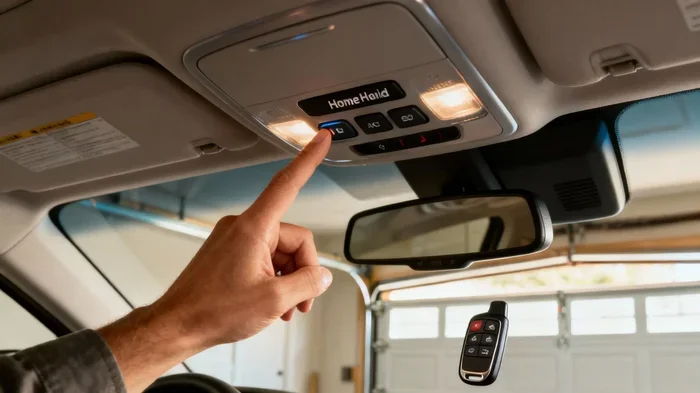
HomeLink is a factory-installed wireless system found in most cars, trucks, and SUVs sold in North America. It allows you to control your garage door, gate, or even your carport opener directly from your vehicle. The system uses a small console, usually mounted on the visor or overhead console, with up to three programmable buttons.
The idea behind HomeLink is simple but powerful. Instead of carrying a separate garage door remote, you just press a button inside your car. The signal travels to your garage door opener, which then opens or closes the door. This means no more stepping out into the rain or cold just to get into your garage.
How HomeLink Works
HomeLink communicates with your garage door opener using radio frequencies. Most modern openers use rolling code technology, which changes the access code every time you use the remote. This adds a layer of security because the code is never the same twice. HomeLink systems are designed to work with both fixed code and rolling code openers, though the programming method differs slightly between the two.
The HomeLink console typically has three buttons, labeled 1, 2, and 3. You can program each button to control a different device. For example, button one might control your garage door, button two your gate, and button three your carport opener. This makes HomeLink a versatile tool for managing multiple access points around your home.
Benefits of Using HomeLink
- Convenience: Open your garage door without leaving the driver’s seat.
- Speed: Access your garage in seconds, even with your hands full of groceries.
- Security: Rolling code technology keeps your garage protected from code theft.
- No extra remotes: Reduce clutter in your home and car by eliminating separate garage remotes.
- Compatibility: Works with most major garage door opener brands including Chamberlain, LiftMaster, Genie, and Craftsman.
Before You Start: What You Need to Prepare
Before you begin programming, gathering the right tools and information will make the process smooth and quick. Skipping this step is the most common mistake people make. Taking five minutes to prepare saves you from frustration later on.
Items You Will Need
- Your garage door opener remote: The handheld remote that currently controls your garage door. You need this to access the programming mode on the opener itself.
- Your vehicle’s HomeLink console: Locate the HomeLink buttons, which are typically found on the visor, overhead console, or near the rearview mirror.
- A stable ladder or step stool: You may need to access the garage door opener unit mounted on the ceiling or wall of your garage.
- Your garage door opener manual: The user manual contains specific instructions for your model. If you do not have the physical copy, you can usually find a PDF version online by searching for your model number.
- A flathead screwdriver or small tool: Some opener units require you to press a small recessed button or slide a switch to enter programming mode.
- Your vehicle owner’s manual: This contains specific HomeLink programming instructions for your car model.
Check Your Opener Compatibility
Not all garage door openers are created equal. Before you start, confirm that your opener is compatible with HomeLink. Most openers manufactured after 2000 are compatible with rolling code technology, which is what HomeLink uses. If you have an older fixed code opener, the process is slightly different and we will cover that below.
You can check the compatibility by looking at the back of your handheld remote. If it has a small button labeled “Learn” or “Smart,” your opener likely supports rolling code programming. If it has a set of dip switches on the back, you have a fixed code opener. Knowing which type you have determines which programming method to use.
Step-by-Step Guide to Connect Garage Door Opener to HomeLink
Now comes the main event. We will walk you through the three most common methods for connecting your garage door opener to HomeLink. Choose the method that matches your opener type and follow along carefully.
Method 1: Standard Rolling Code Programming
This is the most common method for modern garage door openers. It works with Chamberlain, LiftMaster, Genie, and most other brands made in the last 15 years.
Step 1: Park your vehicle in front of the garage door opener unit. Make sure the car is within range, usually about 10 to 15 feet from the opener motor.
Step 2: Press and hold the two outer HomeLink buttons on your console for about 20 seconds. The indicator light will turn on and then start flashing. Release the buttons once the light flashes.
Step 3: Go to your garage door opener unit. Locate the “Learn” button, which is usually a small red, purple, or yellow button on the back or side of the motor unit. Press it once. The indicator light on the opener will stay lit for about 30 seconds.
Step 4: Return to your vehicle. Press and hold the HomeLink button you want to program. Hold it for about 2 seconds, release, and then press and hold it again for another 2 seconds. Repeat this cycle until the HomeLink indicator light stays solid.
Step 5: Test the connection by pressing the programmed HomeLink button. Your garage door should respond immediately. If it does not, repeat the process from Step 3.
Method 2: Fixed Code Programming
Older garage door openers use fixed codes, which means the access code does not change between uses. If your opener has dip switches on the back of the handheld remote, you are working with a fixed code system.
Step 1: Count the number of dip switches on the back of your handheld remote. Write down the positions (on or off) for each switch.
Step 2: Set the HomeLink console to fixed code mode. To do this, press and hold the first and third HomeLink buttons simultaneously for about 10 seconds. The indicator light will blink rapidly.
Step 3: Enter the dip switch code by pressing the HomeLink button in a pattern that matches the switch positions. You may need to press the button multiple times to match each switch position.
Step 4: Release the button and test the connection. Press the HomeLink button to see if the garage door responds.
Method 3: Smart Button or MyQ Programming
Some newer garage door openers, especially those with Wi-Fi connectivity like Chamberlain MyQ models, use a different programming approach. These openers often have a “Smart” button that glows when ready for pairing.
Step 1: Press and hold the HomeLink button you want to use until the indicator light flashes rapidly. This usually takes about 20 seconds.
Step 2: Immediately go to your garage door opener and press the Smart button. The indicator light will start glowing, showing it is ready to pair.
Step 3: Return to your vehicle and press the HomeLink button three times quickly. The indicator light should stay solid, indicating a successful connection.
Step 4: Test the button by pressing it once. The garage door should open or close without any issues.
Quick Tips for Programming Success
- Work in a well-lit area: Finding the “Learn” button on the opener unit is much easier when you can see clearly.
- Keep your remote close: Hold the handheld remote near the HomeLink console during programming to strengthen the signal.
- Be patient with the timing: The 20-second windows are important. If you miss them, simply start that step over.
- Use a fresh battery: A weak battery in your handheld remote can cause programming failures. Replace it before you start.
- Clear old codes first: If a HomeLink button was previously programmed, clear it before setting up a new connection.
Troubleshooting Common HomeLink Connection Issues
Even when you follow the steps perfectly, things do not always work the first time. This is completely normal and easy to fix. Here are the most common issues and how to resolve them.
HomeLink Button Does Not Respond
If pressing the HomeLink button does nothing, the first thing to check is the antenna wire. The HomeLink system has a small antenna that runs along the inside of your vehicle’s roof. Make sure it is not folded down or pinched. The antenna should be hanging freely for the best signal reception.
Next, try resetting the HomeLink button. Press and hold the two outer HomeLink buttons for 10 seconds until the indicator light turns off. This clears any existing programming and gives you a fresh start. Then repeat the programming steps from the beginning.
Garage Door Opens but Does Not Close
This is a less common but still frustrating issue. It usually happens when the HomeLink signal is partially received by the opener. Try moving your vehicle closer to the opener unit and reprogramming. Also check if your garage door opener has a safety sensor that might be misaligned. A dirty sensor lens can cause intermittent behavior that looks like a HomeLink problem.
Rolling Code Fails to Pair
If the rolling code method does not work, try the “smart button” approach instead. Some openers respond better to the smart button method even if they support rolling codes. You can also try pressing the HomeLink button faster or slower during the programming cycle. Timing can vary slightly between vehicle models.
Interference from Other Devices
Other electronic devices near your garage door opener can sometimes cause interference. This includes baby monitors, wireless cameras, and even neighboring garage door openers operating on the same frequency. If you suspect interference, try reprogramming during a quieter time of day when fewer electronic devices are active.
When to Call a Professional
If you have tried all the troubleshooting steps and your HomeLink still does not work, it may be time to call a professional. A garage door technician can check the opener’s frequency settings, antenna connections, and HomeLink compatibility. Most issues are resolved with a simple fix, so do not hesitate to reach out for help.
HomeLink vs Other Garage Door Control Options
HomeLink is not the only way to control your garage door from your vehicle. Let us compare HomeLink with some other popular options so you can understand why it is often the best choice.
HomeLink vs Aftermarket Bluetooth Adapters
Bluetooth adapters like the Chamberlain MyQ Bluetooth module or the Genie Aladdin Connect plug into your garage door opener to add smartphone connectivity. These devices work well for controlling your door from your phone, but they do not replace the in-car convenience of HomeLink. HomeLink is built directly into your vehicle, which means no extra hardware, no battery charging, and no app required.
HomeLink vs Universal Remote Controls
Universal garage door remotes are small devices you can mount on your visor or keychain. They are affordable and work with most openers. However, they add another item to carry and another remote to lose. HomeLink eliminates the need for these extra remotes entirely, keeping your setup clean and simple.
HomeLink vs Smartphone Apps
Smartphone apps like the Chamberlain MyQ app or the Genie Aladdin app let you control your garage door from anywhere with internet access. This is great for checking if you left the door open while at work. However, apps require your phone to be charged, connected to Wi-Fi or cellular data, and unlocked. HomeLink works instantly with a single button press, no connectivity needed.
Comparison Table
| Feature | HomeLink | Bluetooth Adapter | Universal Remote | Smartphone App |
|---|---|---|---|---|
| Built into vehicle | Yes | No | No | No |
| Internet required | No | No | No | Yes |
| Extra hardware needed | No | Yes | Yes | No |
| Works without phone | Yes | Yes | Yes | No |
| Remote monitoring | No | Yes (with app) | No | Yes |
| Cost | Free (built-in) | $30-$50 | $15-$30 | Free (app only) |
Expert Tips for Getting the Most Out of HomeLink
Once your HomeLink is connected and working, there are a few things you can do to get the best experience from the system. These tips come from years of experience working with garage door openers and vehicle integration systems.
Program All Three Buttons
Most vehicles have three HomeLink buttons. Use them wisely. You can program one button for your garage door, another for your backyard gate, and a third for a carport or shed opener. This turns HomeLink into a whole-home access control system.
Clear and Reprogram Periodically
Every few months, it is a good idea to clear your HomeLink buttons and reprogram them. This ensures the rolling codes stay fresh and the connection remains strong. It only takes a few minutes and helps prevent unexpected connection issues down the road.
Keep Your Opener Firmware Updated
If your garage door opener has Wi-Fi connectivity, check for firmware updates periodically. Manufacturers often release updates that improve compatibility with HomeLink and fix minor bugs. Updating is usually done through the manufacturer’s app and takes just a few minutes.
Teach Family Members How to Use It
Once your HomeLink is set up, make sure everyone in your household knows how to use it. Show them where the buttons are and how the system works. This is especially helpful for teenagers, elderly family members, or anyone who may not be familiar with the system.
Consider MyQ Integration
If you want the best of both worlds, consider pairing HomeLink with a MyQ-compatible garage door opener. This gives you in-car control through HomeLink and remote monitoring through your smartphone. You can check your garage door status, receive alerts when the door opens or closes, and even let trusted people into your garage from anywhere in the world.
Common Mistakes to Avoid When Connecting HomeLink
Learning how to connect garage door opener to HomeLink is straightforward, but a few common mistakes can cause unnecessary delays. Here is what to watch out for.
- Skipping the preparation step: Not having your opener manual or remote ready leads to guesswork and frustration.
- Starting with a weak vehicle battery: A low car battery can weaken the HomeLink signal. Make sure your vehicle battery is fully charged before programming.
- Standing too far from the opener: During programming, your vehicle needs to be within 10 to 15 feet of the opener unit for the strongest signal.
- Pressing HomeLink buttons too slowly: During the rolling code programming, you need to press and release the HomeLink button in quick cycles. Slow presses can cause the system to time out.
- Not clearing old codes: If a HomeLink button has a previously programmed code, it can interfere with the new connection. Always clear it first.
- Ignoring the antenna wire: A damaged or folded antenna wire is the number one cause of HomeLink signal problems.
Frequently Asked Questions
How long does it take to connect a garage door opener to HomeLink?
For most people, the entire process takes between 5 and 15 minutes. If you have all your materials ready and follow the steps carefully, you can have it done in under 10 minutes. The most time-consuming part is usually locating the “Learn” button on your garage door opener unit.
What should I do if my HomeLink button keeps blinking and will not connect?
A blinking HomeLink light usually means the system has not received the signal from your garage door opener. Try clearing the button by holding the two outer HomeLink buttons for 10 seconds, then restart the programming process. Also check that your garage door opener is within range and that the “Learn” button was pressed correctly.
Can I use HomeLink with a Genie garage door opener?
Yes, HomeLink is compatible with Genie garage door openers. The programming process is the same as for Chamberlain and LiftMaster openers. Use the rolling code method and follow the steps outlined in this guide. Genie openers made after 2000 should work without any issues.
Do I need any special equipment to use HomeLink?
No special equipment is needed. HomeLink is built into your vehicle, so you only need your garage door opener remote and access to the opener unit in your garage. If your vehicle does not have HomeLink, you can purchase an aftermarket HomeLink-compatible visor module or a universal remote as an alternative.
Can HomeLink control more than one garage door?
Yes, HomeLink can control up to three different devices. Each of the three HomeLink buttons can be programmed to a different garage door, gate, or other access opener. This is great if you have multiple access points on your property, such as a front gate and a rear garage.
Is HomeLink safe and secure?
HomeLink uses rolling code technology in most modern systems, which means the access code changes every time you use it. This makes it very difficult for someone to intercept and duplicate your signal. For added security, you can also enable the MyQ app’s activity alerts to monitor every time your garage door is opened.
Conclusion
Connecting your garage door opener to HomeLink is one of the easiest and most rewarding upgrades you can make to your vehicle. It brings convenience, speed, and a touch of modern technology to something you use every single day. The process is straightforward, the cost is zero since HomeLink comes built into most vehicles, and the benefits are immediate and lasting.
Whether you use the standard rolling code method, the fixed code approach, or the smart button technique, the steps are simple and well within reach of anyone comfortable following a basic guide. If you run into issues, the troubleshooting tips in this article should help you get back on track quickly.
Take a few minutes today to connect your garage door opener to HomeLink. Once you experience the ease of pressing a single button in your car to open your garage, you will wonder how you ever lived without it. The next time you pull into your driveway, you will be ready. Your hands stay warm, your garage opens smoothly, and your day just got a little bit easier.