Can I Reset My Own TPMS Sensor Without Any Mechanic
Yes, you can reset your own TPMS sensor without visiting a mechanic or spending hundreds of dollars. Most modern vehicles allow you to perform a TPMS reset at home using simple tools and a few easy steps. Whether your tire pressure light is on after a rotation, a temperature drop, or a slow leak, this guide walks you through everything you need to know. You will learn the different reset methods, the tools required, and the common mistakes to avoid. By the end, you will feel confident handling your tire pressure monitoring system reset on your own.
Have you ever driven down the road and suddenly spotted that little horseshoe-shaped light with an exclamation point glowing on your dashboard? It is the TPMS warning light, and it can send anyone into a panic. The first thought that crosses most people’s minds is, “Do I need to take this to a mechanic and pay a fortune?” The good news is that you can reset your own TPMS sensor in many cases, and it does not require any special skills or expensive equipment.
A tire pressure monitoring system keeps an eye on the air pressure inside your tires. When the pressure drops too low, the system triggers a warning light to let you know. Sometimes this light stays on even after you have fixed the real problem. Other times, it comes on for no obvious reason at all. Either way, learning how to reset your TPMS sensor at home can save you time, money, and a trip to the repair shop.
This guide is written for everyday drivers who want to handle simple car maintenance on their own. We will walk you through exactly what a TPMS sensor does, how to tell when it needs a reset, what tools you need, and the step-by-step process for different vehicle types. By the time you finish reading, you will have the confidence to tackle this job yourself. Let us get started.
Key Takeaways
- You can absolutely reset your TPMS sensor yourself: Most vehicles support DIY resets using a button, an OBD-II scanner, or a handheld TPMS tool.
- You only need basic tools: A TPMS reset tool, an OBD-II scanner, or your vehicle’s steering wheel controls are often enough.
- Knowing the signs matters: Flashing lights, persistent warnings, and recent tire changes are clear signals your sensor needs resetting.
- Avoid common mistakes: Driving too fast during reset, ignoring the spare tire, and skipping the sensor battery check can cause problems.
- Some situations need a pro: If the sensor is damaged, the battery is dead, or the system still won’t cooperate, a mechanic may be the right call.
- Regular maintenance helps: Checking tire pressure monthly and replacing TPMS batteries on schedule prevents most warning light issues.
📑 Table of Contents
- What Is a TPMS Sensor and Why Does It Need Resetting?
- Signs That Your TPMS Sensor Needs a Reset
- Tools and Equipment You Will Need
- Step-by-Step Guide to Resetting Your TPMS Sensor
- Common TPMS Reset Mistakes to Avoid
- When to Call a Professional Instead
- Preventing Future TPMS Issues
- Key Takeaways
- Conclusion
What Is a TPMS Sensor and Why Does It Need Resetting?
Your tire pressure monitoring system is a safety feature built into your vehicle. It uses sensors to measure the air pressure inside each tire and sends that information to your car’s computer. When the pressure falls below the recommended level, the TPMS warning light illuminates on your dashboard.
How TPMS Sensors Work
There are two main types of TPMS technology used in vehicles today. Direct TPMS sensors are small devices mounted inside each tire, usually attached to the valve stem. They measure the actual air pressure and transmit the data wirelessly to your car’s onboard computer. Indirect TPMS systems do not use physical sensors inside the tires. Instead, they rely on your vehicle’s anti-lock brake system to detect differences in wheel rotation speed. A tire with low pressure has a smaller rolling radius, which causes it to spin faster than the others. The system picks up on this and triggers the warning light.
Over time, these sensors can lose calibration. Temperature changes, tire rotations, battery replacement, and even driving over potholes can throw off the readings. When that happens, the system needs a TPMS relearn procedure to recalibrate and clear the stored fault codes. This is where the reset comes in.
Why the Light Stays On After Fixing the Problem
Here is something many drivers do not realize. Even after you inflate your tires to the correct pressure, the TPMS light may not turn off right away. The system stores a fault code in its memory. Until you manually reset it, the light will keep glowing. Some vehicles automatically relearn the correct pressure readings after driving a certain distance at a steady speed. Others require you to trigger the reset yourself. Understanding this difference is the first step toward solving the problem without a mechanic.
Signs That Your TPMS Sensor Needs a Reset
Not every dashboard warning means the same thing. Learning to read the TPMS warning light correctly helps you decide whether a simple reset will do the trick or if there is a deeper issue at play.
The Steady Light vs. the Flashing Light
A steady yellow tire pressure warning light usually means one or more tires are underinflated. A flashing light, on the other hand, often signals a problem with the TPMS sensor itself. If the light flashes for about 60 to 90 seconds and then stays steady, the sensor or the system may have a malfunction that needs attention.
Other Warning Signs to Watch For
- The light comes on after a tire rotation or tire change: The system needs to relearn the new tire positions.
- The light appears after a big temperature drop: Cold weather can temporarily lower tire pressure and trigger the sensor.
- The light flickers intermittently: A loose sensor or a weak battery in the sensor can cause inconsistent readings.
- The light returns shortly after you reset it: This could indicate a slow leak or a failing sensor that needs replacement.
- The TPMS light comes on alongside the check engine light: This combination may point to an OBD-II diagnostic issue that needs professional attention.
If you notice any of these signs, it is worth checking your tire pressure first with a reliable gauge. Sometimes a simple top-off is all it takes. If the pressure is fine but the light stays on, a TPMS reset is likely the solution.
Tools and Equipment You Will Need
One of the best things about resetting your own TPMS sensor is that you do not need a garage full of expensive tools. The equipment you need depends on your vehicle model and the reset method available. Here is what you might need.
Basic Tools
- A tire pressure gauge: A digital or dial gauge lets you check each tire’s pressure accurately before you start.
- An air compressor or access to an air pump: You need a way to inflate your tires to the manufacturer’s recommended PSI.
- A TPMS reset tool or relearn tool: This is a handheld device that communicates with your vehicle’s TPMS system. Prices range from $20 to $150 depending on the brand and features.
- An OBD-II scanner: Many OBD-II scanners include TPMS reset functions. If you already own one, check if it supports TPMS relearn mode.
- A flathead screwdriver or pen: Some vehicles have a manual TPMS reset button that you can press with a simple pointed tool.
Optional but Helpful Tools
- A TPMS service kit: This includes new valve cores, seals, and caps. It is a good idea to replace these when you reset or rotate your tires.
- A TPMS battery tester: If your sensors are several years old, a dead battery might be causing the light. A battery tester helps you identify weak sensors before you attempt a reset.
- Your vehicle owner’s manual: This is your best friend. Every car is different, and the manual will tell you exactly where the reset button is and how the system works.
Before you start, make sure your tires are inflated to the correct pressure. You can find the recommended PSI on the sticker inside the driver’s door frame or in your owner’s manual. Inflating the tires first makes the entire process smoother and more effective.
Step-by-Step Guide to Resetting Your TPMS Sensor
Now for the part you have been waiting for. Here is how to reset your TPMS sensor yourself. The exact steps vary by vehicle, but these general methods cover most makes and models.
Method 1: Using the Manual Reset Button
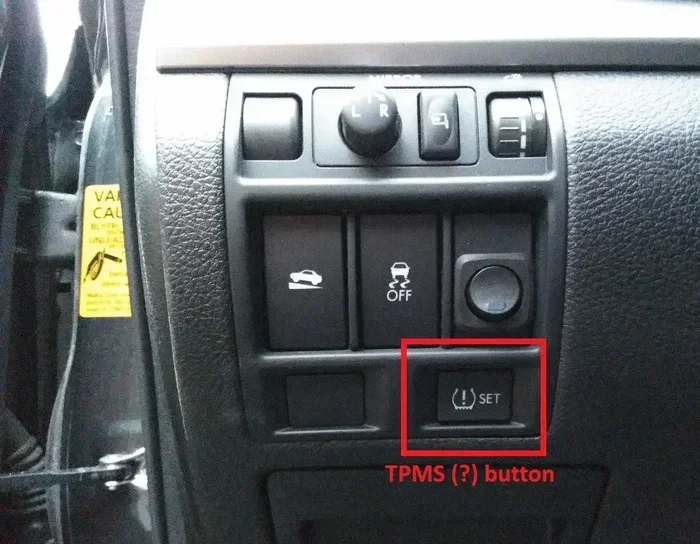
Many vehicles have a dedicated TPMS reset button located under the steering wheel, near the dashboard, or in the glove box. Here is how to use it.
- Make sure all tires are inflated to the correct pressure.
- Turn the ignition to the “on” position without starting the engine.
- Locate the TPMS reset button. Check your owner’s manual if you are not sure where it is.
- Press and hold the button until the TPMS warning light on the dashboard blinks three times.
- Release the button and start the engine.
- Drive the vehicle at or above 50 mph for about 10 to 20 minutes. The system will relearn the sensor readings.
- After driving, check if the light has turned off.
This method works on many Toyota, Honda, Ford, and Chevrolet models. It is the simplest and most common way to perform a tire pressure reset.
Method 2: Using the Steering Wheel Controls
Some newer vehicles, especially luxury brands like BMW, Mercedes-Benz, and Audi, do not have a physical reset button. Instead, you use the infotainment system to reset the TPMS sensor.
- Press the menu or settings button on your steering wheel.
- Navigate to the vehicle settings or tire pressure menu.
- Look for an option labeled “TPMS Reset” or “Relearn Tire Position.”
- Select the option and follow the on-screen prompts.
- Drive the vehicle at highway speed for 10 to 15 minutes to allow the system to recalibrate.
If you cannot find the TPMS option in your menu, consult the owner’s manual or search for your specific vehicle model online. The steps are almost always documented somewhere.
Method 3: Using an OBD-II Scanner
An OBD-II scanner is a versatile tool that plugs into your vehicle’s diagnostic port, usually located under the steering column. Many modern scanners include a TPMS reset function.
- Locate the OBD-II port and plug in your scanner.
- Turn the ignition to the “on” position.
- Follow the scanner’s menu to find the TPMS or tire pressure option.
- Select “Reset TPMS” or “Relearn Sensors.”
- Wait for the scanner to confirm the reset is complete.
- Drive the vehicle for 10 to 20 minutes at speeds above 50 mph.
- Check the dashboard to see if the warning light has turned off.
OBD-II scanners are especially useful when the TPMS light is flashing or when the manual reset button does not work. They can also read and clear fault codes, which gives you more insight into what is happening with your system.
Method 4: Using a Dedicated TPMS Reset Tool
A TPMS reset tool is a handheld device designed specifically for tire pressure monitoring systems. These tools communicate directly with the sensors and can trigger a relearn sequence. They are especially helpful for direct TPMS systems where each sensor has its own battery and ID.
- Make sure your tires are properly inflated.
- Turn the ignition to the “on” position.
- Activate the TPMS reset tool and follow the on-screen instructions.
- The tool will signal each sensor to enter relearn mode.
- Once all sensors are recognized, the tool will complete the reset process.
- Drive the vehicle for 10 to 20 minutes to finalize the calibration.
Dedicated TPMS tools range from basic models to advanced ones that can read sensor battery life and program new sensors. If you plan to reset your TPMS regularly or work on multiple vehicles, investing in a quality tool is worth it.
Common TPMS Reset Mistakes to Avoid
Resetting your TPMS sensor is straightforward, but small mistakes can cause frustration or even damage the system. Here are the most common errors drivers make.
Skipping the Tire Pressure Check
This is the number one mistake. Never attempt a TPMS reset without first checking and correcting your tire pressure. If a tire is actually low, the system will simply trigger the light again after the reset. Always use a reliable gauge and inflate to the recommended PSI before you start.
Driving Too Fast During the Relearn Process
While you do need to drive above 50 mph for the system to relearn, driving at excessive speeds during the initial reset phase can interfere with the process. Stick to safe highway speeds and avoid aggressive driving until the light turns off.
Forgetting the Spare Tire
Many people forget that their spare tire may also have a TPMS sensor. If your spare is low on pressure or its sensor has a dead battery, the system may keep the light on even after you reset everything else. Always check the spare when troubleshooting a persistent TPMS warning light.
Ignoring a Dead Sensor Battery
TPMS sensors run on small batteries that typically last 5 to 10 years. When the battery dies, the sensor cannot transmit accurate readings, and the light will stay on no matter how many times you reset it. If you have an older vehicle or sensors that have never been replaced, a dead battery could be the culprit. A TPMS battery replacement is a relatively simple fix that a mechanic or a handy DIYer can handle.
Using the Wrong Reset Method
Not every vehicle uses the same reset method. Some require the manual button, others need an OBD-II scanner, and a few need a dedicated TPMS tool. Using the wrong method can waste your time and potentially confuse the system. Always check your owner’s manual or a reliable online source for your specific vehicle before you begin.
When to Call a Professional Instead
There is no shame in admitting that some car jobs are best left to the pros. While resetting a TPMS sensor is a task most drivers can handle, there are situations where professional help is the right choice.
Sensor Damage or Physical Wear
If a TPMS sensor is physically damaged, corroded, or has been knocked off the valve stem, a reset will not fix it. The sensor needs to be replaced. A mechanic can remove the old sensor, install a new one, and program it to your vehicle’s system. This typically costs between $50 and $250 per sensor depending on your vehicle.
Persistent Malfunction After Multiple Resets
If you have tried resetting the system several times and the TPMS light keeps coming back, there may be a deeper electrical or software issue. A professional mechanic can run a full diagnostic scan and identify problems that a basic reset cannot fix.
After a Major Tire or Wheel Replacement
If you have installed new tires, new wheels, or replaced multiple sensors at once, the system may need a full TPMS programming session. This involves registering each sensor’s unique ID with the vehicle’s computer. Some advanced scan tools are required for this, and it is often best handled by a tire shop or dealership.
Knowing when to call a professional saves you from frustration and prevents you from accidentally causing more problems. A good rule of thumb is this: if you have tried the reset and the light returns within a day or two, it is time to seek expert help.
Preventing Future TPMS Issues
The best way to avoid frequent TPMS resets is to stay on top of your tire maintenance. Here are a few simple habits that keep your system running smoothly.
- Check your tire pressure monthly: A quick check with a gauge takes only a few minutes and catches slow leaks early.
- Replace TPMS sensor batteries on schedule: If your sensors are more than 8 years old, consider replacing the batteries proactively.
- Use a quality tire pressure gauge: Cheap gauges can give inaccurate readings, which leads to unnecessary resets.
- Keep your valve stems in good condition: Damaged valve stems can cause slow leaks that trigger the TPMS light.
- Reset after every tire rotation: Many drivers find that resetting the system after a rotation prevents the light from coming on unexpectedly.
- Store a TPMS reset tool in your garage: Having the right tool on hand makes future resets quick and easy.
These small habits add up over time. They keep your tires in great shape, improve your fuel economy, and reduce the chances of being surprised by a glowing warning light on your dashboard.
Key Takeaways
- Resetting your TPMS sensor is a DIY task: Most vehicles support manual reset buttons, steering wheel controls, OBD-II scanners, or dedicated TPMS tools for home use.
- Always check tire pressure first: A reset will not fix a genuinely underinflated tire. Correct the pressure before you reset the system.
- Know your vehicle’s method: Consult your owner’s manual to find the correct reset procedure for your specific make and model.
- Avoid common mistakes: Skipping tire pressure checks, driving too fast during relearn, and ignoring spare tire sensors are the most frequent errors.
- Call a professional when needed: Damaged sensors, persistent malfunctions, and major tire replacements are situations where expert help is the smart choice.
- Preventive maintenance is key: Monthly pressure checks, timely battery replacements, and regular resets after tire rotations keep your TPMS system healthy.
Conclusion
The answer to the question “Can I reset my own TPMS sensor?” is a clear yes. With the right tools, a little patience, and the steps outlined in this guide, you can handle a TPMS reset without ever stepping foot in a mechanic’s shop. Whether you use the manual reset button, your steering wheel controls, an OBD-II scanner, or a dedicated TPMS reset tool, the process is simpler than most people think.
Remember that the TPMS warning light is there to protect you. It alerts you when your tires need attention. A reset clears the warning, but it does not replace the habit of checking your tire pressure regularly. Make tire maintenance a part of your routine, and you will rarely have to deal with that annoying dashboard light again.
Take what you have learned here and give it a try the next time your TPMS sensor lights up. You might be surprised at how easy and satisfying it feels to solve the problem on your own. Your wallet will thank you, and you will walk away with a new skill that makes you a more confident driver. Happy driving, and keep those tires properly inflated.
Frequently Asked Questions
Can I reset my TPMS sensor without any special tools?
Yes, in many vehicles you can reset the TPMS using just the manual reset button or the steering wheel controls. Check your owner’s manual for the specific method for your car. No special tools are required for these methods.
How long does it take to reset a TPMS sensor at home?
A TPMS reset typically takes about 10 to 20 minutes, including the drive time needed for the system to relearn. The actual reset process itself is often under five minutes, but driving at highway speed is required for the system to fully recalibrate.
Why does my TPMS light keep coming back after I reset it?
If the light returns shortly after a reset, it usually means there is an underlying issue such as a slow leak, a dead sensor battery, or a damaged sensor. Check your tire pressure first, and if the pressure is fine, inspect the sensors for problems.
Is it safe to drive with the TPMS light on?
It is not recommended to drive for long periods with the TPMS light on. Low tire pressure can reduce fuel efficiency, cause uneven tire wear, and increase the risk of a blowout. Check your tire pressure as soon as possible and address the issue.
How much does it cost to replace a TPMS sensor?
TPMS sensor replacement typically costs between $50 and $250 per sensor, depending on your vehicle make and model. Labor costs may be additional if you have a mechanic install the sensor. DIY replacement can save you money on labor.
Can cold weather cause the TPMS light to come on?
Yes, cold weather can temporarily lower tire pressure, which triggers the TPMS light. As the temperature drops, the air inside your tires contracts and the pressure decreases. Inflating your tires to the correct PSI and resetting the system usually resolves this.
=== CONCLUSION ===
Resetting your own TPMS sensor is one of the easiest car maintenance tasks you can do at home. It saves money, builds your confidence, and keeps your vehicle running safely. Follow the steps in this guide, avoid the common mistakes, and make tire pressure checks a regular habit. Your TPMS system will reward you with fewer warning lights and better overall performance. Now go ahead and give it a try your self.