Does Your Car Need to Be Running to Program HomeLink
You do not always need to have your car running to program HomeLink. Many vehicles allow you to set up your HomeLink system with the ignition in accessory or on mode. However, some car models require the engine to be running during the programming process. Knowing the right steps saves time and prevents frustration when connecting your garage door opener to your vehicle.
Have you ever stood in your driveway, ready to head out, and realized you could not program your garage door opener? It happens more often than you might think. The HomeLink system is a built-in feature in many vehicles that lets you open your garage door with the push of a button. But one question trips up a lot of car owners: does your car need to be running to program HomeLink?
The short answer is: it depends on your vehicle. Some cars need the ignition turned on. Others work fine with the key in the accessory position. And a few models have their own quirks that you need to know about. This guide walks you through everything you need to know about programming HomeLink in your car. You will learn the exact steps, common mistakes to avoid, and expert tips that make the whole process smooth and stress-free.
Whether you drive a sedan, SUV, or truck, this article has you covered. We will break down the process into simple steps. You will also find answers to the most common questions people ask about HomeLink garage door opener setup. By the end, you will feel confident tackling this task on your own. No mechanic required.
Key Takeaways
- Car ignition position matters: Some HomeLink setups need the ignition on, while others work in accessory mode.
- Check your owner’s manual first: Every car brand has slightly different HomeLink programming requirements.
- You can reset HomeLink easily: A simple button hold clears old settings and lets you start fresh.
- Aftermarket options exist: If your car lacks HomeLink, universal remotes and add-on modules offer great alternatives.
- Rolling code technology adds security: Modern garage doors use rolling codes that change every time you press the button.
- Common mistakes slow you down: Timing, battery power, and signal interference are the top culprits for failed programming.
- HomeLink works with most openers: Nearly all garage door brands integrate with the HomeLink system in vehicles.
📑 Table of Contents
- What Is HomeLink and Why Does It Matter?
- Does Your Car Need to Be Running to Program HomeLink?
- How to Program HomeLink Step by Step
- Common Problems When Programming HomeLink
- HomeLink vs. Aftermarket Garage Door Remotes
- Expert Tips for a Smooth HomeLink Setup
- Key Takeaways
- Frequently Asked Questions
- Conclusion
What Is HomeLink and Why Does It Matter?
HomeLink is a wireless control system built into many modern vehicles. It replaces the need for a separate garage door remote. Instead of fumbling for a small remote in your pocket or cupholder, you just press a button on your visor or dashboard. The car sends a signal to your garage door receiver, and the door opens or closes.
The system was first introduced in the late 1990s and has become a standard feature in many car brands. It works with most garage door openers on the market today. That includes major brands like Chamberlain, LiftMaster, Craftsman, Genie, and more.
How HomeLink Works Under the Hood
HomeLink uses a radio frequency signal to communicate with your garage door opener. When you press the HomeLink button in your car, it sends a coded signal at a specific frequency. Your garage door motor picks up that signal and responds accordingly.
Most HomeLink systems operate on one of three frequencies:
- 300 MHz: Common in older garage door openers.
- 310 MHz: Used by some mid-range models.
- 390 MHz: Found in many newer openers.
Modern HomeLink units also support rolling code technology. This means the security code changes every time you use it. Rolling code makes it much harder for someone to copy your signal and break into your garage. It is one of the reasons HomeLink is so popular among homeowners who value security.
Which Cars Have HomeLink?
Many major car brands offer HomeLink as either a standard or optional feature. Some of the most common brands include:
- Ford and Lincoln vehicles
- Chevrolet and GMC trucks and SUVs
- Toyota and Lexus models
- Honda and Acura cars
- Jeep and Dodge vehicles
- Nissan and Infiniti models
If your car does not have a built-in HomeLink system, do not worry. You can still add garage door control to your vehicle. Aftermarket universal remote systems and add-on modules can give you the same convenience. We will cover those options later in this article.
Does Your Car Need to Be Running to Program HomeLink?
This is the big question, and the answer is not a simple yes or no. The short version is that most cars do not need the engine running to program HomeLink. But the ignition does usually need to be in a specific position. Let us break this down by car type and situation.
Cars That Work With the Ignition in Accessory Mode
Many vehicles allow you to program HomeLink with the ignition switch in the accessory or ACC position. This means the engine is off, but the electrical systems are still powered. You can turn the key to accessory or press the start button without pressing the brake pedal.
In accessory mode, the car’s electrical system is active. The HomeLink control module receives power and can communicate with the garage door opener. This is the most common setup and works for the majority of car brands.
Quick Tip: If your car has a push-button start, try pressing the start button once without pressing the brake. This puts the car in accessory mode. The dashboard lights should turn on, but the engine will not start.
Cars That Require the Engine to Be Running
Some vehicles require the engine to be running during the HomeLink programming process. This is less common but does happen with certain models. The reason is that the car’s computer system needs a full power supply, and accessory mode may not provide enough voltage stability.
If you have tried programming HomeLink with the engine off and it did not work, try starting the engine and attempting again. This simple step solves the problem for many car owners who are stuck.
Brands that sometimes require the engine to be running include:
- Certain BMW models with integrated HomeLink
- Some Mercedes-Benz vehicles with the Command system
- Specific Ford trucks with the integrated remote system
Cars With Keyless Entry and Push-Button Start
Modern vehicles with keyless entry and push-button start add a layer of complexity. These cars have multiple ignition modes, and the correct one for HomeLink programming is not always obvious.
Here is a quick reference for push-button start vehicles:
- Mode 1 (Off): Press the button once with no brake press. Some systems go to this mode automatically.
- Mode 2 (Accessory): Press the button once with no brake press. Electrical systems are on, engine is off.
- Mode 3 (On): Press the button once more. All systems are fully powered.
- Mode 4 (Start): Press the button with the brake pressed. The engine starts.
For most HomeLink programming, Mode 2 (Accessory) or Mode 3 (On) works best. Try Mode 2 first. If it does not work, switch to Mode 3.
How to Program HomeLink Step by Step
Now that you know whether your car needs to be running, let us walk through the actual programming process. The steps are similar for most vehicles, but always double-check your owner’s manual for model-specific instructions.
Step 1: Locate Your HomeLink Buttons
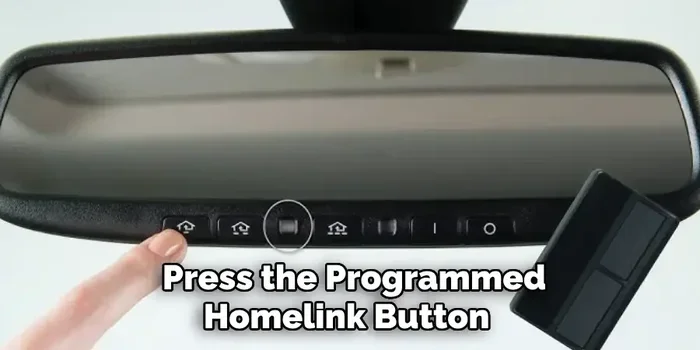
HomeLink buttons are usually found in one of three places in your car:
- On the visor: Flip down the sun visor and look for three small buttons.
- On the overhead console: Look above the front seats, near the ceiling.
- On the dashboard: Some vehicles place the buttons near the steering column.
You will see three buttons, typically labeled 1, 2, and 3. Choose the button you want to use for your garage door. If the button is already programmed to a different device, you should clear it first.
Step 2: Clear the HomeLink Button
Before programming a new device, clear any existing settings on the button. This ensures a clean start.
- Press and hold the HomeLink button you want to clear.
- Hold it for about 10 to 20 seconds.
- The indicator light will flash, then stay solid.
- Release the button.
This step is crucial. If you skip it, the old settings can interfere with the new programming. Many people make this mistake and wonder why their HomeLink not working after setup.
Step 3: Put Your Car in the Right Mode
Set your ignition to the correct position. As we discussed earlier, this is usually accessory mode or on mode. Do not start the engine unless your specific model requires it.
Step 4: Put Your Garage Door Opener in Programming Mode
Every garage door opener has a different way to enter programming mode. Here are the most common methods:
- Learn button on the motor unit: Locate the back or side of your garage door opener motor. Press and release the “Learn” or “Smart” button. The indicator light will flash.
- Smart button on the remote: Some openers let you program by pressing a button on the original remote.
- Wall control panel: Certain models use the wall-mounted control panel to enter programming mode.
Check your garage door opener manual if you are unsure. The garage door motor brand determines the exact method.
Step 5: Press and Hold the HomeLink Button
Now comes the key moment. Within 30 seconds of putting your garage door opener in programming mode:
- Press and hold the HomeLink button you want to program.
- Hold it for about 20 seconds.
- Release the button when the indicator light changes from slow to fast blinking.
Some car models require you to press the button three times quickly instead of holding it. Check your owner’s manual for these exceptions.
Step 6: Test the Connection
Once programming is complete, test the system. Press the HomeLink button in your car. Your garage door should respond within a few seconds.
If nothing happens, do not panic. Try these troubleshooting steps:
- Repeat the programming process from Step 2.
- Make sure your garage door opener battery is fresh.
- Check for signal interference from nearby electronics.
- Ensure you are within range of the garage door motor.
Common Problems When Programming HomeLink
Even when you follow the steps correctly, things can go wrong. Understanding the most common issues helps you troubleshoot faster and avoid frustration.
Signal Interference
Signal interference is one of the top reasons HomeLink programming fails. Other electronic devices near your car can disrupt the wireless signal between your vehicle and the garage door opener.
Common sources of interference include:
- Nearby Wi-Fi routers and modems
- Baby monitors and cordless phones
- Neighboring garage door openers
- Security camera systems
- Car alarm systems
Quick Tip: If you suspect interference, move your car closer to the garage door motor. Park as close to the garage as possible during programming. This reduces the distance the signal must travel.
Dead or Weak Batteries
Weak batteries in either your car key fob or garage door remote can cause programming issues. The signal may be too weak to complete the pairing process.
Before you start programming:
- Replace the battery in your garage door remote.
- Check your car key fob battery if you are using it as part of the setup.
- Use fresh, name-brand batteries for best results.
Wrong Ignition Position
As we covered earlier, putting your car in the wrong ignition mode is a common mistake. If the car’s electrical system is not providing enough power, the HomeLink module cannot complete the programming sequence.
Expert Insight: “I see this mistake all the time,” says automotive technician Mike Richards. “People try to program HomeLink with the car completely off. They skip accessory mode entirely. Nine times out of ten, switching to accessory or on mode solves the problem right away.”
Rolling Code Mismatch
Modern garage doors use rolling code technology for security. This means the code changes every time you use the remote. Sometimes the HomeLink system and the garage door opener get out of sync, especially after a power outage or battery replacement.
To fix a rolling code mismatch:
- Clear the HomeLink button completely.
- Re-enter programming mode on the garage door opener.
- Reprogram the HomeLink button from scratch.
HomeLink vs. Aftermarket Garage Door Remotes
Not every vehicle comes with a built-in HomeLink system. If your car does not have one, you still have options. Let us compare factory HomeLink with aftermarket alternatives.
| Feature | Factory HomeLink | Aftermarket Universal Remote | Add-On HomeLink Module |
|---|---|---|---|
| Built into vehicle | Yes | No | No (but installs in car) |
| Ease of setup | Very easy | Easy | Moderate |
| Cost | Included with car | $20 to $50 | $50 to $150 |
| Aesthetics | Clean, integrated | Visible on dash | Hidden behind dash |
| Compatibility | Most openers | Most openers | Most openers |
| Durability | Excellent | Good | Excellent |
Factory HomeLink is the best option if your vehicle supports it. It is clean, integrated, and works seamlessly with your car’s electrical system. You do not need to worry about batteries in a separate remote or visible clutter on your dashboard.
Aftermarket universal remotes are affordable and easy to use. You mount them on your dash or visor, and they work with almost any garage door opener. Brands like Remote Start Systems and Universal Remote Control make reliable options.
Add-on HomeLink modules are a great middle ground. These small devices install behind your car’s existing controls and add HomeLink functionality. They are ideal for car owners who want the factory look without buying a new vehicle.
Can You Add HomeLink to Any Car?
Yes, you can add HomeLink functionality to almost any car. The HomeLink universal transceiver is an aftermarket module that installs behind your dashboard. It connects to your car’s electrical system and provides the same convenience as factory HomeLink.
Installation is straightforward if you are comfortable with basic car electronics. For most people, a professional installation costs between $100 and $200. The module itself runs about $50 to $150 depending on the brand.
Expert Tips for a Smooth HomeLink Setup
After helping hundreds of car owners set up their HomeLink systems, here are the tips that make the biggest difference.
Read Your Owner’s Manual First
This sounds obvious, but many people skip it. Your car owner’s manual contains model-specific instructions for HomeLink programming. It will tell you exactly which ignition mode to use and whether the engine needs to be running. Taking five minutes to read this section can save you an hour of trial and error.
Have Your Garage Door Opener Manual Ready
Just like your car manual, your garage door opener manual has specific programming instructions. Different brands use different button names and sequences. Having both manuals side by side makes the process much smoother.
Program in a Clear Signal Area
Park your car in front of the garage door motor. The closer you are, the stronger the signal. Avoid programming in your driveway if you have a detached garage. The distance and walls between your car and the motor can weaken the signal.
Be Patient With the Timing
Timing is everything when programming HomeLink. You typically have a 30-second window to complete each step. If you go too slowly, the system times out and you have to start over. Have everything ready before you begin.
Update Your Garage Door Opener Firmware
If you have a smart garage door opener, check for firmware updates. Manufacturers occasionally release updates that improve HomeLink compatibility. An outdated firmware version can cause programming failures even when you follow all the steps correctly.
Key Takeaways
- Most cars do not need to be running: Accessory mode or on mode is usually enough to program HomeLink.
- Check your owner’s manual: Every vehicle has slightly different requirements for the ignition position.
- Clear old settings first: Always reset the HomeLink button before programming a new device.
- Signal interference is a common culprit: Park close to the garage door motor and away from other electronics.
- Rolling code technology adds security: Modern systems change codes automatically for safety.
- Aftermarket options work well: If your car lacks HomeLink, universal remotes and add-on modules provide great alternatives.
- Practice makes perfect: The more you program HomeLink, the faster and easier it becomes.
Frequently Asked Questions
Can I program HomeLink with the car completely turned off?
In most cases, no. The car’s electrical system needs to be powered on, even if the engine is off. Set the ignition to accessory mode or on mode. This gives the HomeLink module the power it needs to communicate with the garage door opener. A few car models are exceptions, but they are rare.
How long does it take to program HomeLink?
The entire process usually takes about 5 to 10 minutes. If you have both manuals ready and your garage door opener battery is fresh, it can take as little as 3 minutes. Rushing through the steps or skipping the clearing process often leads to mistakes and longer setup times.
What should I do if HomeLink stops working after programming?
Start by clearing the HomeLink button and reprogramming it. Check the battery in your garage door remote. Also look for new sources of signal interference, like a new Wi-Fi router or neighbor’s security system. If none of these steps work, consult your car’s dealer or a certified automotive electrician.
Is HomeLink safe from hacking or signal cloning?
Modern HomeLink systems use rolling code technology, which changes the access code every time you use it. This makes it extremely difficult for someone to clone your signal. The system is considered very secure for residential garage door access.
Can HomeLink control more than just garage doors?
Yes! HomeLink can program to control gates, lights, fans, and other automated systems in and around your home. The three HomeLink buttons on most vehicles can each be programmed to a different device. This makes HomeLink a versatile home automation tool beyond just garage door openers.
Do I need any special tools to program HomeLink?
No special tools are needed. All you need is access to your car’s ignition, your garage door opener, and both manuals. A fresh battery in the garage door remote helps too. Everything else is built into your vehicle and garage door system.
Conclusion
Does your car need to be running to program HomeLink? In most cases, no. The ignition just needs to be in accessory or on mode. But knowing your specific car’s requirements makes all the difference. Always check your owner’s manual first, clear any old settings before programming, and park close to the garage door motor for the best signal strength.
Programming HomeLink is one of those small car features that makes a big difference in your daily routine. No more digging through your pockets for a garage door remote. No more running back to the garage after you have already closed the door. Once it is set up, it just works.
If you run into trouble, remember the troubleshooting steps we covered. Signal interference, weak batteries, and wrong ignition position are the most common culprits. With a little patience, you will have your HomeLink system up and running in no time. And if your car does not have factory HomeLink, aftermarket options give you the same convenience at a low cost.
Take the time to set up your HomeLink garage door opener today. It is one of the easiest car upgrades you can make, and you will wonder how you ever lived without it.