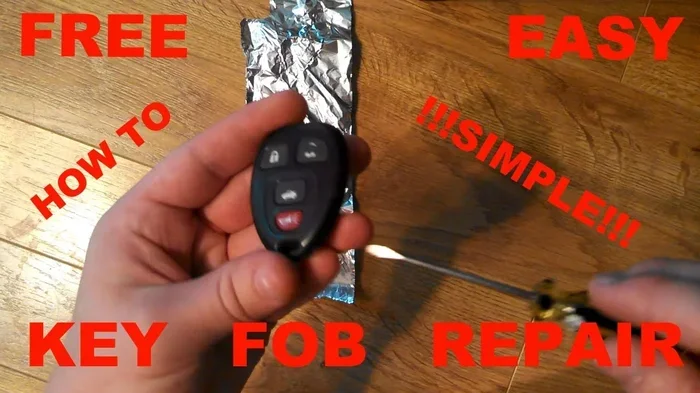
How Do You Fix an Unresponsive Key Fob With These Tips
An unresponsive key fob is frustrating but usually easy to fix. Most of the time, the problem comes down to a dead battery, a signal issue, or a simple reset. This guide walks you through every fix step by step, from key fob battery replacement to advanced troubleshooting, so you can get back on the road quickly.
You press the button on your key fob and nothing happens. No lights. No locks. No engine start. It is one of those small moments that can completely throw off your morning routine. Before you panic or call for expensive help, take a breath. The good news is that fixing an unresponsive key fob is usually simple, fast, and something you can do at home.
Whether your key fob not working started suddenly or crept up over time, this guide covers every fix you need. We will walk through battery swaps, resets, signal checks, and more. By the end, you will know exactly what to do and why it works. Let us get your remote back in action.
Key Takeaways
- A dead battery is the #1 cause: Replacing the CR2032 coin cell battery fixes most unresponsive key fob issues.
- A simple reset often works: Removing and reinserting the battery can restore your key fob signal instantly.
- Signal interference is common: Other electronics, metal objects, or extreme temperatures can block your key fob from working.
- You can DIY most repairs: You do not need special tools or dealership visits for most key fob fixes.
- Know when to seek help: If basic fixes fail, a dealership or locksmith can reprogram or replace your key fob.
- Regular maintenance prevents problems: Keeping your key fob clean and using the right battery extends its lifespan significantly.
- A bad key fob can drain your car battery: A malfunctioning fob may slowly drain your vehicle’s power overnight.
📑 Table of Contents
Why Does a Key Fob Become Unresponsive?
A key fob not responding can feel like a mystery. But there are only a handful of common causes. Understanding the root problem helps you choose the right fix quickly. Most issues fall into three broad categories: power, signal, and hardware.
Dead Battery
The most frequent reason for a key fob not working is a dead battery. Key fobs use small coin cell batteries, usually a CR2032. These batteries last one to three years depending on how often you use the fob. When the battery dies, your remote loses power and cannot send a signal to your car.
Signal Interference
Sometimes the battery is fine but the signal cannot reach your car. Other electronics, metal objects, or even thick clothing can block the weak radio signal your fob sends. Parking near tall buildings or power lines can also cause temporary key fob signal problems.
Water or Physical Damage
Dropping your fob in water or crushing it in your pocket can damage the internal circuitry. Water damage may not show up immediately. It can slowly corrode the connections inside the fob, leading to intermittent or permanent failure.
Worn-Out Buttons
Over time, the rubber buttons on your fob wear down. Dirt and oils from your hands build up on the contacts. This can make individual buttons unresponsive even when the battery is fresh.
How to Replace the Key Fob Battery
Replacing the battery is the first thing you should try for any unresponsive key fob. It costs just a few dollars and takes about two minutes. You can absolutely replace a car key fob battery yourself at home with no special tools.
What You Need
- A CR2032 coin cell battery (check your owner’s manual for the exact type)
- A small flathead screwdriver or a thin plastic pry tool
- A clean, dry workspace
Step-by-Step Battery Replacement
- Locate the small slot or seam on the back of your fob.
- Insert the flathead screwdriver gently into the seam.
- Twist slowly to pop the back cover off. Do not force it.
- Note which side the old battery faces up. Take a photo if you are unsure.
- Remove the old battery carefully with your fingers or a non-metal tool.
- Place the new CR2032 battery in the same orientation as the old one.
- Snap the back cover back on until it clicks into place.
- Test the fob by standing close to your car and pressing the unlock button.
If you are unsure about the battery type, check the label inside the fob or look up your vehicle model online. Using the wrong battery will not fix the problem. For more details on this process, you can read our guide on Can You Replace A Car Key Fob Battery Yourself.
Quick Tips for Battery Replacement
- Always wash and dry your hands before handling the new battery. Oils can affect performance.
- Do not mix old and new batteries. Replace all batteries if your fob uses more than one.
- Buy batteries from reputable brands. Cheap off-brand batteries may die faster.
- Dispose of old batteries properly. Do not throw them in regular household trash.
Reset Your Key Fob to Restore the Signal
Sometimes a simple reset is all it takes to bring your key fob back to life. A reset clears any minor electronic glitches that may be causing the fob to freeze or become unresponsive. The exact reset process varies by car brand and model, but the general idea is the same.
Basic Battery Reset Method
This method works for most key fobs. Start by opening the fob and removing the battery. Wait about 30 seconds. Then place the battery back in, close the fob, and stand near your car. Press the unlock button. If the fob was just experiencing a minor software hiccup, this will fix it.
Car-Based Reset Method
Some vehicles require you to perform a reset from inside the car. Sit in the driver’s seat and close all doors. Turn the ignition to the “On” position without starting the engine. Press the lock button on the fob. Wait for the lights to flash. Turn the ignition off. Repeat this cycle three times. This often re-establishes the connection between the fob and the car’s computer.
For Toyota owners dealing with fob issues, you may also want to check whether your fob can be reprogrammed for a different vehicle or if there are specific Toyota-related troubleshooting steps. You can learn more about Toyota-specific fob reprogramming in our article on Can You Reprogram A Used Toyota Key Fob To A Different Car.
When a Reset Does Not Work
If the basic reset fails, do not give up yet. Try the battery reset again but wait a full minute before reinserting the battery. Some fobs need a longer power drain to fully reset. You can also try holding the lock and unlock buttons simultaneously for 10 seconds, then release and test.
Check for Signal Interference and Range Issues
Your key fob communicates with your car using a low-power radio signal. This signal has a limited range, usually about 30 to 50 feet. Anything between you and the car can weaken or block that signal.
Common Sources of Interference
- Electronic devices: Laptops, phones, and Bluetooth speakers emit signals that can interfere with your fob.
- Metal objects: Keys, coins, or metal cases near your fob can block the signal.
- Other fobs: If you carry multiple key fobs in the same pocket, they can conflict with each other.
- Building materials: Concrete walls, metal garages, and underground parking lots weaken signals.
How to Test for Interference
Step outside your building or garage. Move at least 10 feet away from other electronics. Try pressing the fob button again. If the fob works outside but not inside, interference is likely the culprit. Move away from electronic devices and try again.
Another important thing to know: a bad key fob can actually drain your car battery over time. If your fob is malfunctioning and sending constant signals, it may slowly kill your car battery overnight. If you have noticed your car battery dying frequently, a faulty fob could be the hidden cause. Read more about this connection in our article Can A Bad Key Fob Drain Your Car Battery.
Clean and Inspect Your Key Fob
Dirt, grime, and moisture build up inside your key fob over time. This gunk can prevent buttons from making proper contact with the circuit board. Cleaning your fob regularly is one of the easiest ways to prevent key fob malfunction.
How to Clean Your Key Fob
- Open the fob carefully using a plastic pry tool. Avoid metal tools that can scratch the circuit board.
- Remove the battery and set it aside safely.
- Use a cotton swab dipped in isopropyl alcohol to gently clean the button contacts.
- Wipe down the inside of the fob with a dry cloth.
- Let everything air dry for at least 10 minutes.
- Reassemble the fob, insert the battery, and test.
Inspect for Physical Damage
While the fob is open, look for any visible damage. Cracked solder joints, corroded battery terminals, or broken plastic clips are all signs of physical wear. If you see corrosion on the battery contacts, gently clean them with a pencil eraser or a cotton swab dipped in vinegar.
If the internal damage is severe, cleaning alone will not fix it. You may need a replacement fob or professional repair. In that case, it is worth checking what your dealership can do. Our article on Do Dealerships Replace Key Fobs covers what to expect from a dealership visit for fob replacement.
When to Visit a Dealership or Locksmith
Most key fob problems respond to the DIY fixes above. But sometimes the issue is beyond a battery swap or a reset. Knowing when to seek professional help saves you time and frustration.
Signs You Need Professional Help
- The fob still does not work after replacing the battery and doing a full reset.
- The fob works intermittently, sometimes locking and sometimes not.
- Your car displays a “key not detected” or “smart key system error” message on the dashboard.
- The fob was dropped in water or crushed and shows visible internal damage.
- You need to reprogram or pair a new fob to your vehicle.
Dealership vs. Locksmith: Which Is Better?
| Factor | Dealership | Locksmith |
|---|---|---|
| Cost | Higher | Lower |
| Expertise | Brand-specific training | General automotive knowledge |
| Programming Tools | Full manufacturer access | Varies by provider |
| Wait Time | May require appointment | Often same-day service |
| Warranty | Often covered under service plan | Varies |
Both options can solve your unresponsive key fob problem. Dealerships have the advantage of brand-specific tools and trained technicians. Locksmiths often provide faster and more affordable service. Choose based on your budget, your vehicle’s complexity, and how quickly you need the fix.
Prevent Future Key Fob Problems
Once you fix your key fob, take a few simple steps to prevent future issues. Prevention is always easier and cheaper than repair.
Simple Habits That Help
- Replace the battery every two years: Do not wait until the fob stops working. Proactive replacement avoids being stranded.
- Keep your fob away from water: Store it in a dry place. A small waterproof pouch helps if you are near pools or beaches.
- Clean the contacts yearly: A quick cleaning with isopropyl alcohol keeps the connections strong.
- Store the fob properly: Do not leave it loose in a junk drawer with other metal objects. A dedicated spot prevents signal confusion and physical damage.
- Keep a spare fob: A backup fob saves you from a lockout situation. Store the spare in a different location, like your office or glovebox.
Know Your Fob’s Limitations
Every key fob has a limited range and a finite lifespan. Understanding these limits helps you set realistic expectations. Extreme cold can temporarily weaken the battery signal. If you live in a cold climate, keep your fob close to your body to use your body heat as insulation. Similarly, if you live in a hot climate, avoid leaving the fob on your car’s dashboard where direct sun can damage the electronics.
Also, remember that a malfunctioning fob can quietly drain your car battery. This is one of those problems that sneaks up on you. If your car does not start one morning and the battery is dead, the fob could be the hidden cause. Checking your fob regularly can save you from this frustrating situation.
Key Takeaways
- A dead battery is the #1 cause: Replacing the CR2032 coin cell battery fixes most unresponsive key fob issues.
- A simple reset often works: Removing and reinserting the battery can restore your key fob signal instantly.
- Signal interference is common: Other electronics, metal objects, or extreme temperatures can block your key fob from working.
- You can DIY most repairs: You do not need special tools or dealership visits for most key fob fixes.
- Know when to seek help: If basic fixes fail, a dealership or locksmith can reprogram or replace your key fob.
- Regular maintenance prevents problems: Keeping your key fob clean and using the right battery extends its lifespan significantly.
- A bad key fob can drain your car battery: A malfunctioning fob may slowly drain your vehicle’s power overnight.
Conclusion
Dealing with an unresponsive key fob does not have to be a stressful experience. In most cases, the fix is as simple as swapping out a dead battery or performing a quick reset. You now have the knowledge and the steps to handle this common problem on your own. From battery replacement and cleaning to signal troubleshooting and professional help, you are covered.
The next time your key fob not working situation strikes, stay calm and work through the list above. Start with the battery. Try a reset. Check for interference. Clean the contacts. If none of that works, a dealership or locksmith can take it from there.
Taking care of your key fob with regular maintenance keeps it working reliably for years. A little attention goes a long way. Keep your fob charged, keep it clean, and keep a spare battery on hand. You will never have to worry about being locked out again.
Frequently Asked Questions
Why is my key fob unresponsive even after replacing the battery?
The battery may be installed incorrectly or in the wrong orientation. Double-check that the positive side faces up as indicated inside the fob. If the orientation is correct, try resetting the fob by removing the battery for 60 seconds and reinserting it. Signal interference from nearby electronics can also cause temporary unresponsiveness.
Can a dead key fob drain my car battery?
Yes, a malfunctioning key fob can slowly drain your car battery. If the fob is sending constant signals or the internal circuitry is shorting, it draws power from the car battery even when the vehicle is off. If you notice your car battery dying frequently, inspect your key fob for issues.
How much does it cost to replace a key fob battery?
A CR2032 coin cell battery costs between $1 and $5 at most stores. The entire replacement process takes about two minutes and requires no special tools. You can easily replace a car key fob battery yourself at home and save the cost of a service visit.
How do I know if my key fob needs reprogramming?
If your fob works intermittently, displays a “key not detected” error on the dashboard, or stops working after a battery replacement, it may need reprogramming. A dealership or qualified locksmith can reprogram your fob using manufacturer-specific tools. Check our guide on Do Dealerships Replace Key Fobs for more details on what to expect.
Can I use a different brand of battery in my key fob?
Yes, you can use any reputable brand of CR2032 battery as long as it matches the voltage and size specified for your fob. Duracell, Energizer, and Panasonic are all reliable options. Avoid cheap generic brands that may have inconsistent voltage or shorter lifespans.
What should I do if my key fob gets wet?
Remove the battery immediately and open the fob if possible. Let all components air dry completely for at least 24 hours before reassembling. Do not use a hair dryer on high heat, as this can damage the circuit board. If the fob still does not work after drying, the internal circuitry may be damaged and you may need a replacement or professional repair.