How To Adjust The Steering Wheel On Tesla Model Y
Adjusting the steering wheel on a Tesla Model Y is simple and done through the touchscreen display. You can move it up, down, forward, or backward to find your ideal driving position. This guide walks you through every step, including troubleshooting common issues and tips for the perfect setup.
Driving a Tesla Model Y feels futuristic, but even the most advanced cars need simple adjustments. One of the first things you will want to do after getting behind the wheel is adjust the steering wheel to fit your body. A properly positioned steering wheel makes long drives more comfortable and keeps you safe on the road.
The Tesla Model Y steering wheel adjustment system is different from traditional cars. Instead of a lever under the column, you use the touchscreen. This guide will show you exactly how to make those adjustments. Whether you are a new Tesla owner or thinking about buying one, this article covers everything you need to know about Tesla Model Y steering wheel positioning.
We will walk through each step, share tips for finding your perfect position, and address common problems. By the end, you will feel confident making adjustments every time you get in your car. Let us dive right in.
Key Takeaways
- Easy Touchscreen Controls: Adjust your Tesla Model Y steering wheel using the steering wheel icon on the touchscreen.
- Two Adjustment Types: You can adjust both tilt (up and down) and telescopic (forward and back) positions.
- Safety First: Always adjust the steering wheel while the car is parked for safety.
- Common Issues Exist: Steering wheel problems can often be fixed with a simple restart or software update.
- Perfect Position Matters: Proper steering wheel positioning reduces fatigue and improves driving comfort.
📑 Table of Contents
Understanding The Tesla Model Y Steering Wheel
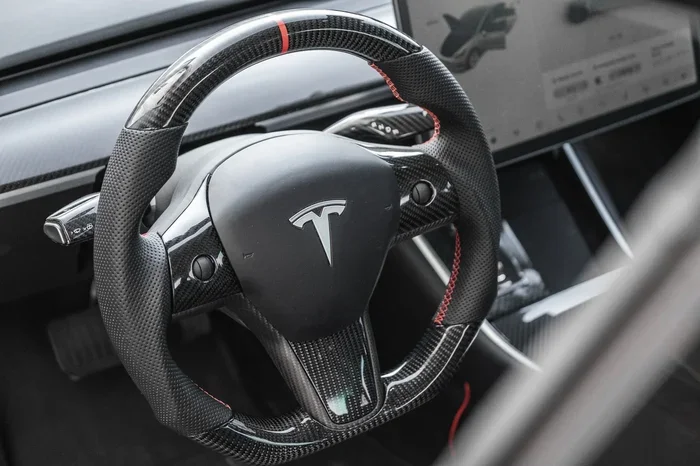
The Tesla Model Y steering wheel is sleek and minimalist, just like the rest of the car. It does not have the traditional tilt lever or telescopic lever found in most vehicles. Instead, Tesla uses a digital system that gives you full control through the touchscreen. This design keeps the cabin looking clean and modern.
The steering wheel on the Model Y is adjustable in two directions. You can move it up and down (tilt) and forward and back (telescopic). Both adjustments are easy to make and save to your driver profile. This means your preferred position is always ready when you sit in the car.
One thing that sets the Tesla apart is the touch controls built right into the steering wheel. These include buttons for horn, turn signals, and other functions. Understanding how the steering wheel works as a whole is the first step to adjusting it properly.
What Makes The Tesla Steering Wheel Unique
Unlike most cars that use mechanical levers, the Tesla Model Y uses electronic controls for steering wheel adjustment. The entire process happens through the central touchscreen. This is part of Tesla’s philosophy of keeping everything digital and user-friendly.
The steering wheel also features yoke-style or traditional round wheel options depending on your model year. Both styles offer the same adjustment capabilities. The key difference is purely in the shape and feel of the wheel itself.
How To Adjust The Steering Wheel On Tesla Model Y
Adjusting the steering wheel on a Tesla Model Y is a quick process. You can make changes in under a minute. Follow these steps carefully to get the perfect position every time.
Step-by-Step Telescopic Adjustment
The telescopic adjustment moves the steering wheel forward or backward. This is the most important adjustment for finding a comfortable driving position. Here is how to do it:
- Park your Tesla Model Y and put it in park.
- Tap the steering wheel icon on the touchscreen.
- You will see options for tilt and telescopic adjustment.
- Select the telescopic option.
- Use the slider to move the wheel forward or backward.
- Release when you find the right position.
The wheel moves smoothly and stops at several preset positions. You do not need to hold the slider in place. The steering wheel will stay exactly where you set it.
Step-by-Step Tilt Adjustment
The tilt adjustment moves the steering wheel up or down. This helps you find the right height for your arms and wrists. Here is how it works:
- From the steering wheel menu on the touchscreen, select tilt adjustment.
- Use the slider to move the wheel up or down.
- Find the position where your arms feel relaxed with a slight bend at the elbows.
- Release the slider to lock the position in place.
Some drivers prefer a higher steering wheel position for a more upright seating feel. Others like it lower for better aerodynamics and road visibility. Experiment to find what works best for you.
Quick Tips For Perfect Positioning
- Keep your wrists straight: Your wrists should rest comfortably on top of the steering wheel with a slight bend in your elbows.
- Avoid blocking the instrument cluster: Make sure the steering wheel does not block your view of the speedometer or touchscreen.
- Adjust after setting the seat: Always adjust your seat first, then fine-tune the steering wheel position.
- Save your profile: Tesla saves steering wheel positions to your driver profile, so your settings are always ready.
Steering Wheel Controls And Features
The Tesla Model Y steering wheel has several built-in controls. These allow you to interact with the car without taking your hands off the wheel. Knowing what each button does helps you get the most out of your driving experience.
The left side of the steering wheel typically has the left turn signal stalk and the steering wheel scroll wheel. The right side has the right turn signal stalk. The scroll wheel lets you scroll through menus, adjust volume, and control regenerative braking.
Some Tesla owners also wonder about steering assist features. These are electronic systems that help keep the car centered in its lane. While not the same as steering wheel adjustment, understanding these features helps you appreciate the full steering system on your Model Y.
You can customize many of the steering wheel controls through the Tesla settings menu. This includes changing scroll wheel sensitivity and enabling or disabling certain features. The steering wheel is more than just a positioning tool. It is a command center for your driving experience.
Common Steering Wheel Adjustment Problems
Most Tesla Model Y owners never have issues with steering wheel adjustments. But sometimes things go wrong. Here are the most common problems and how to fix them.
Why Your Steering Wheel Won’t Move
If your steering wheel will not adjust, do not panic. This is usually a simple fix. The most common cause is a software glitch. Tesla vehicles receive regular over-the-air updates, and sometimes these updates need a restart to fully apply.
Try restarting your Tesla by holding down both scroll wheels on the steering wheel until the screen goes black. Wait about 30 seconds and the screen will turn back on. After the reboot, try adjusting the steering wheel again. This fixes the issue in most cases.
Another reason could be that the steering wheel is already at its maximum adjustment limit. The telescopic and tilt systems have physical stops. If the wheel is already at the farthest forward or highest position, it will not move further. Try resetting to a middle position first, then adjust again.
Steering Wheel Lock Issues
Some owners report that the steering wheel locks and will not adjust after the car sits for a while. This is a security feature. When the car is locked, the steering wheel locks in place to prevent theft.
To unlock it, simply get in the car, put your foot on the brake, and tap the steering wheel icon on the screen. The wheel should unlock and become adjustable again. If it does not, try locking and unlocking the car using the key fob or Tesla app.
In rare cases, a persistent lock issue might indicate a steering column motor problem. If restarting the car does not help, you may want to contact Tesla service for assistance.
Tips For Finding Your Perfect Driving Position
Finding the right driving position goes beyond just the steering wheel. Your seat position, mirror angles, and pedal distance all work together. Here are some tips to help you find the sweet spot.
Start by adjusting your seat so your feet can comfortably reach the pedals with a slight bend in your knees. Once the seat is set, move to the steering wheel. The goal is to have your arms slightly bent when holding the wheel at the 9 and 3 o’clock positions. This gives you the best control and reduces fatigue on long drives.
Make sure you can see the full instrument cluster without leaning forward. If you have to hunch to see the screen, the steering wheel is too low or too far forward. Raise it or pull it back slightly. Your neck and shoulders will thank you on longer trips.
Tesla allows you to save your entire driving position to your driver profile. This includes seat position, steering wheel position, mirror angles, and even pedal sensitivity. Take a few minutes to set everything up perfectly. Once saved, every time you drive, your car will be ready to go in your ideal position.
Maintaining Your Tesla Model Y Steering System
The Tesla Model Y steering system requires very little maintenance. It is electronic and does not have the cables or fluids that traditional steering systems need. However, a few simple steps can keep everything working smoothly for years.
Keep the steering wheel clean with a gentle automotive cleaner. Avoid harsh chemicals that could damage the leather or yoke surface. Check the touch controls periodically to make sure all buttons respond properly.
Keep your Tesla software up to date. Tesla regularly releases updates that improve steering responsiveness and fix minor bugs. You can check for updates in the Software menu on the touchscreen. If you ever notice unusual behavior with the steering wheel, a simple software update often resolves it.
If you experience persistent steering wheel issues that a restart does not fix, it is worth visiting a Tesla service center. Tesla offers convenient service options, and you can even schedule mobile service in many areas. Taking care of small issues early prevents them from becoming bigger problems down the road.
Conclusion
Adjusting the steering wheel on a Tesla Model Y is straightforward and takes just a few minutes. The touchscreen-based system is intuitive and saves your preferences automatically. Whether you need to move the wheel up, down, forward, or backward, the process is the same simple steps every time.
Remember to always adjust while parked, find a position that keeps your arms relaxed, and save your settings to your driver profile. If you run into any issues, a quick restart usually solves the problem. The Tesla Model Y steering wheel is designed to be both functional and comfortable, and with the tips in this guide, you will get the most out of it every time you drive.
Take a moment now to fine-tune your steering wheel position. A small adjustment can make a big difference in how your drives feel. Enjoy the road in your Tesla Model Y.
Frequently Asked Questions
Can I adjust the Tesla Model Y steering wheel while driving?
Tesla does not recommend adjusting the steering wheel while driving. Always make adjustments when the car is parked and in park mode. This ensures your safety and prevents any accidental changes while you are on the road.
Why won’t my Tesla Model Y steering wheel adjust at all?
If the steering wheel will not move, try restarting your Tesla by holding both scroll wheels until the screen goes black. A software glitch is the most common cause. If the restart does not help, check that the wheel is not already at its maximum adjustment limit.
How do I save my steering wheel position on a Tesla Model Y?
Tesla automatically saves your steering wheel position to your driver profile. When you adjust the wheel and the car recognizes your profile, the position is stored. You can also adjust mirror and seat positions, and they all save together.
Can I adjust the steering wheel on a Tesla Model Y with the screen off?
No, the steering wheel adjustment requires the touchscreen to be on. If the screen is off, wake it up by tapping anywhere on the display or pressing a scroll wheel. Once the screen is active, you can access the steering wheel menu.
Is the Tesla Model Y steering wheel adjustment the same for the Performance version?
Yes, the steering wheel adjustment process is identical across all Tesla Model Y trims. Whether you have the Standard Range, Long Range, or Performance version, the touchscreen controls and adjustment options work the same way.
What should I do if the steering wheel adjustment feels stiff or grinding?
A stiff or grinding feeling could indicate a mechanical issue with the steering column motor. Try restarting the car first. If the problem persists, contact Tesla service for a professional inspection. Do not force the steering wheel to move if it feels stuck.