How to Change Time in a Subaru and Set the Clock Right
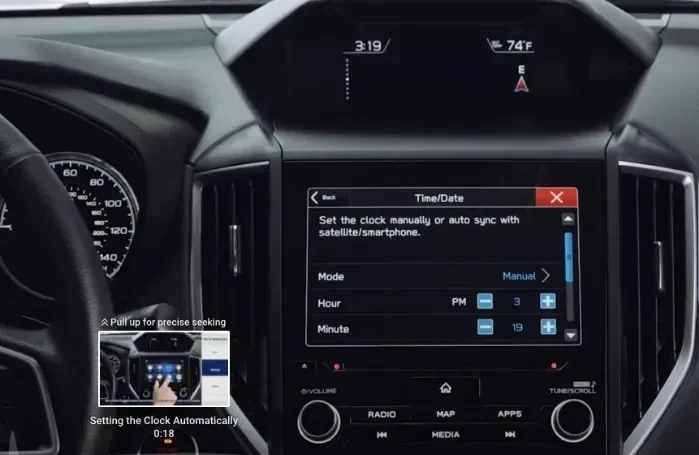
Changing the time in your Subaru is a quick, easy process that anyone can do. Whether you drive a Subaru Outback, Forester, Legacy, or Impreza, you can adjust the clock in just a few minutes. This guide walks you through the exact steps for your model, including how to switch to 24-hour format and fix common clock problems. You will also learn why the clock resets and how to keep it accurate year-round.
How to Change Time in a Subaru is a simple task that saves you from driving with a wrong clock all day. Your Subaru’s dashboard clock helps you keep track of time during commutes, road trips, and daily errands. When the clock shows the wrong time, it can throw off your schedule and make you late. This guide gives you clear, step-by-step instructions for every Subaru model. You will learn how to adjust the time manually, switch to 24-hour format, and fix common clock problems. Whether you own a Subaru Outback, Forester, Legacy, or Impreza, you will find the right method here. I will also share expert tips to keep your clock accurate for years.
Knowing how to set the clock right gives you confidence behind the wheel. A correct time display helps you manage appointments, catch trains, and avoid speeding tickets. The process takes only a few minutes, and you do not need any special tools. I have broken the guide into easy sections so you can jump straight to your model. You will also discover why your clock might reset after a battery change and how to prevent it. Let us dive in and get your Subaru clock showing the correct time.
## Why Your Subaru Clock Might Show the Wrong Time
Your Subaru clock can drift or reset for several simple reasons. Understanding the cause helps you fix it quickly and prevent it from happening again. Most clock issues are easy to solve at home.
### Common Reasons for Incorrect Time
– Battery disconnect: When you disconnect the battery for service, the clock loses its stored time and resets to 12:00.
– Dead battery: A weak car battery can cause the clock to lose power overnight, especially in older Subarus.
– Manual error: Someone might have accidentally changed the time or switched to 24-hour format without realizing it.
– Firmware glitch: In rare cases, a software bug in the infotainment system can freeze the clock display.
– Aftermarket stereo: If you installed an aftermarket radio, it may interfere with the factory clock settings.
### When the Clock Resets After a Battery Change
If you recently replaced your battery, the clock will likely reset to a default time. This is normal behavior. You simply need to adjust the clock again. In some models, the clock also resets after a jump start or a long period of inactivity. Always check the time after any electrical work on your vehicle. For detailed guidance on checking your battery, you can refer to our article on how to open an exterior bonnet to inspect the terminals safely.
## How to Change Time in a Subaru: Model-Specific Steps
The exact steps to adjust the clock vary by Subaru model and year. Below, I cover the most popular models with clear instructions. Follow the section that matches your car.
### Adjusting the Clock in a Subaru Outback
The Subaru Outback uses either a traditional knob or a touchscreen interface, depending on the year.
1. Press the Home button on the infotainment screen.
2. Select Settings from the main menu.
3. Choose System Settings and then Clock.
4. Use the up and down arrows to adjust the hour and minute.
5. Toggle 24-Hour Format if you prefer a military-style display.
6. Press OK to save the new time.
If your Outback has a traditional clock knob on the steering wheel, simply press the MODE button until the clock display appears. Then use the TUNE/SCROLL knob to change the time. Hold the knob for two seconds to exit.
### Setting the Time in a Subaru Forester
The Subaru Forester makes clock adjustment straightforward through the center display.
1. Tap the Settings icon on the home screen.
2. Scroll down to Vehicle Settings.
3. Select Clock or Time Zone.
4. Adjust the hour and minute values using the on-screen arrows.
5. Confirm the change by tapping Set.
For older Forester models without a touchscreen, look for a small button near the clock on the instrument cluster. Press and hold it for three seconds to enter the adjustment mode. Use the trip lever on the steering wheel to change the numbers.
### Clock Adjustments for Subaru Legacy and Impreza
The Subaru Legacy and Impreza share a similar clock-setting process.
– Press the Disp button on the steering wheel repeatedly until the clock appears on the instrument display.
– Hold the Reset stalk on the steering column for two seconds.
– Use the Up and Down arrows to set the hour.
– Press the Mode button to move to the minutes setting.
– Adjust with the arrows and press Reset again to save.
You can also find detailed instructions in your owner’s manual. If you need the manual, check our guide on how to download a product manual to get the PDF for your specific Subaru model.
## Understanding the 24-Hour Format and Time Zone Settings
Many drivers prefer the 24-hour clock format, especially for avoiding AM/PM confusion. Subaru allows you to switch between the two easily.
### Switching Between 12-Hour and 24-Hour Display
1. Enter the Settings menu on your infotainment screen.
2. Go to Clock Settings or Display Settings.
3. Look for the Time Format option.
4. Select 24-Hour to switch from the standard 12-hour display.
5. Confirm your choice. The clock will immediately update to show the time in 24-hour format (e.g., 14:30 instead of 2:30 PM).
### How to Set the Correct Time Zone
Modern Subarus with GPS or navigation systems can automatically detect your time zone. If your clock is off by an hour, the time zone setting might be wrong.
– Go to Settings > System > Time Zone.
– Select your current region or city from the list.
– The clock will update automatically to match the local time.
– If you travel frequently, you can enable Auto Time Zone to let the car adjust itself.
For vehicles without GPS, you must set the time zone manually. Simply choose the correct offset from UTC (Coordinated Universal Time) in the same menu.
## Troubleshooting Common Subaru Clock Problems
Even after following the steps, you might encounter issues with your Subaru clock. Here are the most common problems and how to fix them.
### Clock Won’t Change or Stuck on a Time
If the clock display freezes and you cannot adjust it, try a simple reset.
1. Turn off the ignition and wait for 30 seconds.
2. Restart the car and press the Home button.
3. Navigate back to Settings > Clock.
4. If the screen is unresponsive, perform a soft reset by holding the Power button for 10 seconds.
A frozen clock often results from a temporary software glitch. A soft reset clears the system cache and usually resolves the issue.
### Internal Link: Managing Your Infotainment System
While you are in the settings menu, you might also want to organize your media. For tips on handling photos and media on your Subaru’s screen, read our guide on how to add pictures to Uconnect from a phone. It covers file transfers and display settings that work similarly across Subaru models.
### When the Clock Resets Every Time You Turn Off the Car
This problem almost always points to a power loss to the clock’s memory. The most common cause is a weak or old battery. When the battery voltage drops below a certain level, the clock loses its stored time. To fix this:
– Check the battery voltage with a multimeter. A healthy battery should read 12.6 volts or higher when the engine is off.
– Inspect the battery terminals for corrosion. Clean them with a wire brush if you see a white, powdery buildup.
– If the battery is more than three years old, consider replacing it.
– Also check the ground wire connecting the battery to the chassis. A loose ground can cause intermittent power loss to the clock.
If you are unsure about opening the hood, refer to our how to open an exterior bonnet article for safe, step-by-step instructions.
### Quick Tips for Maintaining the Correct Time
– Set the clock after every battery service: Make it a habit to check the time whenever you disconnect the battery.
– Enable automatic time updates: If your Subaru has a navigation system, turn on the auto-update feature so it syncs with GPS time.
– Check daylight saving time: Most Subarus from 2015 onward adjust automatically. Older models require a manual toggle in the clock menu.
– Keep your infotainment system updated: Software updates often include clock synchronization fixes. Visit your Subaru dealer for the latest updates.
– Use the trip computer as a backup: If the main clock fails, the trip computer on the instrument cluster still displays the correct time in many models.
### Common Mistakes to Avoid
– Forgetting to save changes: Always press the Set or OK button after adjusting the time. If you simply turn the knob without confirming, the clock will not update.
– Confusing the hour and minute: Use the mode button to clearly separate the hour and minute settings before making changes.
– Ignoring the time zone: Setting the correct time zone prevents a one-hour error, especially when traveling across state lines.
– Assuming the clock is broken: In most cases, a wrong clock is just a setting issue, not a hardware failure. Try a soft reset before visiting a mechanic.
## Final Thoughts: Set Your Subaru Clock Right Today
How to Change Time in a Subaru is a simple skill that every Subaru owner should know. A correct clock keeps your daily routine on track and helps you stay punctual. Whether you drive a rugged Outback, a versatile Forester, a sleek Legacy, or a compact Impreza, the steps are quick and easy to follow. You now know how to adjust the clock manually, switch to 24-hour format, set the right time zone, and troubleshoot common problems. A little regular maintenance, like checking the battery and updating the software, keeps your Subaru clock running perfectly. Take a few minutes today to set your clock right, and you will enjoy a smoother, more organized driving experience every day.
Key Takeaways
- Easy adjustment: You can change the time in most Subarus using the steering wheel controls or the infotainment screen in under two minutes.
- Model-specific steps: The process differs slightly between the Outback, Forester, Legacy, and Impreza, and this guide covers them all.
- 24-hour format and time zone: You can switch between 12-hour and 24-hour display and set the correct time zone for your location.
- Common fixes: A clock that resets often usually points to a weak battery or a loose ground wire, which you can check yourself.
- Daylight saving time: Many newer Subarus update automatically, but older models need a manual toggle each spring and fall.
- No special tools needed: You only need the owner’s manual or a quick online search to find the right menu path.
Frequently Asked Questions
How do I change the time on a Subaru Outback?
Press the Home button on your infotainment screen, go to Settings, select System Settings, then Clock. Use the arrows to adjust the hour and minute, and press OK to save. For older models with a steering wheel knob, press the MODE button and use the TUNE/SCROLL knob.
Why does my Subaru clock keep resetting to 12:00?
This usually happens because of a weak or dead car battery. When the battery voltage drops, the clock loses its memory. Check your battery voltage and terminals, and replace the battery if it is more than three years old or shows signs of weakness.
Can I switch my Subaru clock to 24-hour format?
Yes. Go to Settings, then Clock Settings or Display Settings, and look for the Time Format option. Select 24-Hour to switch from the standard 12-hour display. The change takes effect immediately.
Does the Subaru clock adjust automatically for daylight saving time?
Subarus from 2015 onward with navigation or GPS systems usually adjust automatically. Older models without GPS require a manual toggle in the clock menu each spring and fall. Check your owner’s manual for specific details.
How do I fix a frozen Subaru clock display?
Perform a soft reset by turning off the ignition, waiting 30 seconds, and restarting the car. If the screen is still unresponsive, hold the Power button for 10 seconds to clear the system cache. This usually resolves temporary software glitches.
Where can I find the clock settings on a Subaru Forester?
On newer Foresters with a touchscreen, tap Settings, then Vehicle Settings, and select Clock. On older models without a touchscreen, press the Disp button on the steering wheel repeatedly until the clock appears, then use the Reset stalk to adjust the time.