How to Remote Start an Acura MDX Without Any Hassle
Remote starting your Acura MDX is simple once you know the right steps. This guide walks you through every method, from the key fob to the Acura app, so you can warm up or cool down your vehicle before you even step inside. We also cover common issues, model year differences, and expert tips to help you get the most out of your Acura MDX remote start system.
There is nothing quite like stepping into a warm Acura MDX on a freezing winter morning. Or climbing into a cooled-down cabin after a long day under the summer sun. The remote start Acura MDX feature makes both of these scenarios possible with just the press of a button. If you have been wondering how to use this feature or why it is not working for you, you are in the right place. This guide covers everything you need to know about remote starting your Acura MDX without any hassle.
The Acura MDX is a premium three-row SUV that comes loaded with technology. Among its standout features is the remote start system, which allows you to start the engine from a distance. Whether you drive a 2020 model or the latest 2024 Acura MDX, understanding how your remote start works can save you time and discomfort. In this article, we break down the setup process, the key fob controls, common problems, and pro tips to get the best results every time.
Key Takeaways
- Multiple Methods: You can remote start your Acura MDX using the key fob, the AcuraLink app, or the push-button start system.
- Model Year Matters: Newer Acura MDX models come with factory remote start, while older models may need a retrofit kit.
- Key Fob Range: Your key fob must be within a specific distance for the remote start to work properly.
- Common Issues Are Fixable: Most remote start problems stem from simple causes like a dead key fob battery or incorrect procedure.
- Safety First: Always follow Acura’s guidelines to avoid damaging your engine or voiding your warranty.
- Acura MDX Value Holds Well: The remote start feature adds resale value, especially when paired with other comfort features.
📑 Table of Contents
- Understanding Remote Start on the Acura MDX
- How to Set Up Remote Start on Your Acura MDX
- Using the Key Fob for Remote Start
- Acura MDX Remote Start: Model Year Differences
- Troubleshooting Common Remote Start Issues
- Tips for Getting the Most From Your Acura MDX Remote Start
- When to Seek Professional Help
- Conclusion
Understanding Remote Start on the Acura MDX
The remote start system on the Acura MDX lets you start the engine without being inside the vehicle. It is designed to preheat or precool the cabin before you get in. The system works through a signal sent from your key fob to the car’s computer. Once the signal is received, the engine turns on and the climate control activates based on your last settings.
Not all Acura MDX models come with factory remote start. Some trim levels include it as standard, while others offer it as part of a technology package. If you are unsure whether your specific model has this feature, you can check your owner’s manual or visit your local Acura dealership. You may also want to look into whether your Acura MDX has remote start for a quick reference guide.
How the Remote Start System Works
The remote start system relies on a few key components working together. Your key fob sends a coded signal to the car’s receiver module. The receiver then communicates with the engine control unit to start the vehicle. At the same time, the HVAC system kicks in to regulate the cabin temperature. All of this happens within seconds of you pressing the button.
Here is a simple breakdown of the process:
- You press the remote start button on the key fob.
- The key fob sends an encrypted signal to the car.
- The car’s computer verifies the signal is from an authorized fob.
- The engine starts and the climate system adjusts to your preferences.
- The vehicle remains running for a preset time, usually 10 to 20 minutes.
This entire process is designed to be secure. The engine will not start if the signal is not recognized. And once you insert the key and press the brake pedal, the car is ready to drive. It is a seamless experience that adds real convenience to daily life.
How to Set Up Remote Start on Your Acura MDX
Setting up the remote start on your Acura MDX is straightforward, but the exact steps depend on your model year and trim level. Most newer models with the push-button start system have a dedicated remote start button on the key fob. If your fob does not have this button, you may need to use the AcuraLink app on your smartphone instead.
Step-by-Step Setup Guide
Follow these steps to get your Acura MDX remote start up and running:
- Make sure your vehicle is parked and all doors are closed.
- Press the lock button on the key fob to secure the vehicle.
- Within a few seconds, press and hold the remote start button. On most Acura MDX fobs, this is the button with a circular arrow icon.
- Wait for the engine to start and the parking lights to flash. This confirms the system is active.
- Exit the vehicle and close all doors properly.
That is really all there is to it for most models. If your Acura MDX came with the technology package, you likely have full remote start capability right out of the box. For those who do not, aftermarket remote start kits are available and can be installed by a professional.
Setting Up the AcuraLink App
The AcuraLink app is a great alternative for vehicles equipped with the connected car technology. Through the app, you can start your Acura MDX remotely using your smartphone. This is especially useful if you forget to use the key fob or if your fob battery dies. To set it up, simply download the AcuraLink app, pair it with your vehicle, and follow the on-screen prompts to enable remote start.
The app also lets you monitor your vehicle’s status, lock and unlock doors, and even locate your car in a parking lot. It is a powerful tool that pairs well with the Acura MDX key fob remote start system for maximum convenience.
Using the Key Fob for Remote Start
The key fob is the primary way most Acura MDX owners use the remote start feature. It is fast, reliable, and does not require any additional technology. But knowing the right way to use it makes all the difference. Many people press the wrong button or do not follow the correct sequence, which leads to frustration.
Here are the key fob controls you need to know:
- Lock Button: Locks all doors and the liftgate.
- Unlock Button: Unlocks all doors and the liftgate.
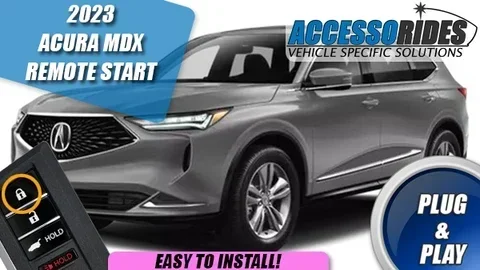
- Remote Start Button: Starts the engine remotely. Look for the circular arrow symbol.
- Panic Button: Activates the alarm and horn.
- Trunk Release: Opens the rear liftgate.
When using the remote start button, make sure you are within range. The effective range is typically around 300 to 600 feet, depending on obstacles and signal interference. Walls, large vehicles, and electronic interference can reduce this range significantly.
Key Fob Battery and Remote Start Performance
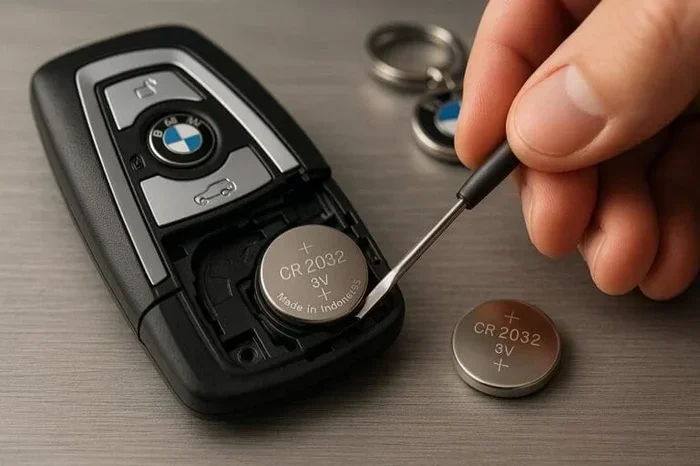
A weak key fob battery is one of the most common reasons remote start fails. If your Acura MDX remote start stops working, try replacing the battery in the fob first. Most Acura key fobs use a CR2032 battery, which is inexpensive and easy to swap. Keeping a spare battery in your glove box is a smart habit that prevents unexpected problems.
It is also worth noting that remote start systems across brands work similarly with key fobs, so the general principles apply whether you drive an Acura or a Toyota. The key fob must be within range and the vehicle must be properly locked for the system to engage.
Acura MDX Remote Start: Model Year Differences
The Acura MDX has gone through several generations, and the remote start features have evolved with each one. Understanding what your specific model year offers helps set the right expectations and avoid confusion.
2014-2020 Acura MDX
The 2014 through 2020 Acura MDX models offered remote start as part of the technology package or the advance package. These models use a traditional key fob with a dedicated remote start button. The system is reliable and straightforward, though it lacks the smartphone connectivity of newer models.
2021-2024 Acura MDX
The newer generations of the Acura MDX come with enhanced remote start capabilities. The 2021 and later models often include AcuraLink connectivity, which allows you to start the car from your phone. These models also feature improved signal range and faster engine response times. The user interface on the key fob has been refined for better ergonomics as well.
If you are in the market for an Acura MDX and remote start is a must-have feature, you should definitely check how well Acura MDX models hold their value, as this feature contributes to strong resale demand in the used market.
Troubleshooting Common Remote Start Issues
Even with a well-maintained Acura MDX, the remote start system can occasionally act up. Most problems are easy to fix and do not require a trip to the dealer. Knowing what to check first can save you time and frustration.
Remote Start Does Not Respond
If pressing the remote start button does nothing, the first thing to check is the key fob battery. A dead or low battery will prevent the signal from reaching the car. Replace the battery and try again. Also, make sure you are within the effective range and that there are no large obstructions between you and the vehicle.
Engine Starts but Shuts Off Immediately
This is a common issue that usually has a simple fix. The Acura MDX remote start system is designed to shut off automatically if the hood is not fully closed. Check all doors and the hood to make sure they are properly latched. The system also shuts off if it detects a fault in the engine or emissions system, so a check engine light could be related.
Remote Start Works Intermittently
Intermittent remote start failure can be caused by signal interference from nearby electronic devices. Try moving to a different location and attempting again. If the problem persists, the key fob itself may need to be reprogrammed or replaced. In some cases, a software update from the dealer can resolve connectivity issues.
Expert Insight
Many Acura owners do not realize that the remote start system has a built-in safety feature that prevents the engine from running indefinitely. The system automatically shuts off after a preset period, usually around 15 to 20 minutes. If you need more run time, you can press the remote start button again within that window. This protects your engine and prevents fuel waste.
Tips for Getting the Most From Your Acura MDX Remote Start
Once you have the remote start system working, a few smart habits can help you get the best results every time. These tips come from experienced Acura MDX owners and service professionals who know the system inside and out.
- Pre-Set Your Climate: Before you turn off the engine, set the temperature to your preferred level. The remote start system will use these settings when you start the car remotely.
- Keep the Fob Close: Always carry the key fob with you when using remote start. The system requires the fob to be within a certain distance to re-engage the vehicle after you get in.
- Use Remote Start Wisely: Do not leave the vehicle running unattended for longer than the allowed time. This is both a safety measure and a courtesy to those around you.
- Check the Weather: In extreme cold, remote start is especially valuable. In moderate weather, you may not need it every day, which helps preserve the key fob battery.
- Keep Software Updated: For models with AcuraLink, keep the app and vehicle software up to date. Updates often include improvements to the remote start experience.
Quick Tips for Daily Use
Here are a few quick tips that make a big difference in day-to-day use:
- Press the remote start button twice in cold weather for maximum cabin heating.
- Lock the doors manually after remote starting if the auto-lock feature does not engage.
- Keep the key fob away from other electronic devices to avoid signal confusion.
- Test the remote start system regularly to ensure it is working properly.
For more tips on maintaining your vehicle’s features and getting the best performance, consider exploring how to care for your auto tint and other vehicle upgrades that complement your Acura MDX ownership experience.
When to Seek Professional Help
Most remote start issues can be resolved with simple troubleshooting. But there are times when professional help is the right call. If you have tried replacing the key fob battery, checking all doors and the hood, and moving to a different location, and the system still does not work, it is time to see a specialist.
A certified Acura technician can run diagnostic tests on the remote start system and the vehicle’s computer. They have access to specialized tools that can identify problems not visible to the naked eye. If your Acura MDX is still under warranty, visiting an authorized dealer ensures that any repairs are covered and your warranty remains intact.
Some owners choose to install aftermarket remote start systems for added functionality. If you are considering this route, make sure the installer is experienced with Acura vehicles. A poorly installed system can interfere with your car’s electronics and potentially cause issues with the factory warranty. Always ask about compatibility before committing to any aftermarket installation.
Conclusion
The remote start Acura MDX feature is one of the most convenient technologies available in a modern SUV. It saves you time, keeps you comfortable, and adds real value to your daily driving experience. Whether you use the key fob or the AcuraLink app, the process is simple and reliable once you understand how it works.
By following the steps in this guide, you can set up, use, and troubleshoot your Acura MDX remote start system with confidence. Remember to keep your key fob battery fresh, stay within range, and follow Acura’s guidelines for the best results. With proper care, your remote start system will serve you well for years to come.
If you are shopping for an Acura MDX or considering an upgrade, the remote start feature is well worth prioritizing. It is a small detail that makes a big difference, especially during the harsh winter months or hot summer days. Take advantage of this technology, and you will wonder how you ever drove without it.
Frequently Asked Questions
Can I Remote Start My Acura MDX From Inside My House?
Yes, you can remote start your Acura MDX from inside your house as long as you are within the key fob’s effective range, which is typically around 300 to 600 feet. Walls and other obstacles may reduce the range, so standing near a window or outside can improve signal strength and reliability.
Does Remote Start Waste Gas or Harm the Engine?
No, the Acura MDX remote start system is designed to be fuel-efficient and engine-safe. The engine automatically shuts off after a preset time, usually 10 to 20 minutes, to prevent fuel waste and protect the engine from running unnecessarily long.
Can I Install an Aftermarket Remote Start on My Acura MDX?
Yes, aftermarket remote start kits are available for the Acura MDX. However, it is important to have the system installed by a professional who is familiar with Acura vehicles to avoid interference with your factory electronics and warranty coverage.
Why Does My Acura MDX Remote Start Keep Failing?
The most common reasons are a weak key fob battery, doors or the hood not being fully closed, or signal interference from nearby electronic devices. Try replacing the battery first, as this resolves the issue in most cases.
Is Remote Start Available on All Acura MDX Models?
Remote start is not standard on all Acura MDX models. It is typically included in the technology package or the advance package on newer models. Check your vehicle’s trim level and features list, or consult your owner’s manual to confirm availability.
Can I Use the AcuraLink App to Remote Start My MDX?
Yes, if your Acura MDX is equipped with AcuraLink connectivity, you can use the AcuraLink app on your smartphone to start the engine remotely. This is a convenient alternative to the key fob, especially if you forget to remote start before leaving the house.