How to Replace Toyota Key Fob Battery in 5 Minutes
Replacing your Toyota key fob battery is quick, easy, and costs just a few dollars. This guide walks you through the entire process in under 5 minutes, so you can get back on the road without visiting a dealer. You will learn which battery to use, the exact steps to open your fob, and tips to make the battery last longer.
There is nothing more frustrating than standing by your Toyota, pressing the key fob button, and getting nothing in return. Your remote just sits there, silent and useless. Before you call a dealer or spend big money on a locksmith, take a breath. The problem is almost always a simple dead battery, and you can fix it yourself in about 5 minutes.
This guide covers everything you need to know about Toyota key fob battery replacement. We will walk through which battery to buy, how to open your specific fob model, and how to put it all back together. By the end, you will feel confident handling this job on your own. Let us get started.
Key Takeaways
- Easy DIY Fix: You can replace a Toyota key fob battery at home with basic tools and no technical skills needed.
- Right Battery Matters: Most Toyota key fobs use a CR2032 battery, but always check your specific model first.
- Saves Money: Doing it yourself costs under $10, while a dealer or locksmith could charge $50 or more.
- Quick Process: The entire battery swap takes about 5 minutes from start to finish.
- Know the Signs: Recognizing early warning signs of a low battery helps you avoid being locked out.
- Reset May Be Needed: Some Toyota models require a simple reset after battery replacement to restore full function.
📑 Table of Contents
- Why Toyota Key Fob Batteries Die
- Which Battery Does Your Toyota Key Fob Need
- Tools You Will Need
- Step-by-Step Guide to Replace Toyota Key Fob Battery
- How to Know If Your Key Fob Battery Is Low
- Common Mistakes to Avoid When Replacing Toyota Key Fob Battery
- When to Seek Professional Help
- Tips to Make Your Toyota Key Fob Battery Last Longer
- Can You Drive Your Toyota Without a Key Fob
- Conclusion
Why Toyota Key Fob Batteries Die
Toyota key fobs are built to last, but the battery inside them does not. Most Toyota key fob batteries last between 2 and 4 years, depending on how often you use the remote. If you live in a cold climate, the battery may drain even faster. Understanding why batteries die helps you know when to replace them before you get stuck.
Common Reasons for Battery Drain
- Frequent use: Every time you press the button, the battery loses a small amount of power.
- Cold weather: Low temperatures reduce battery efficiency and shorten overall life.
- Proximity to other electronics: Placing your fob near phones or laptops can cause slow drain.
- Old age: Even if you rarely use it, the battery simply wears out over time.
- Moisture damage: Sweat or water exposure can corrode the battery contacts inside the fob.
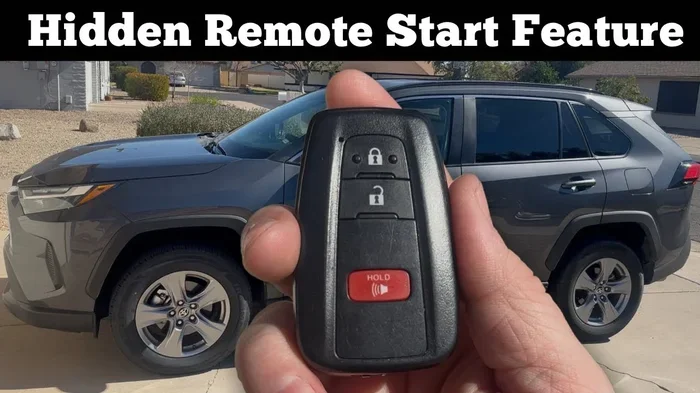
If you have noticed that your Toyota remote start is not working as far as it used to, or you need to press the button multiple times, those are clear signs your battery is getting weak. The good news is catching it early means you never have to deal with a completely dead fob at the worst possible moment.
Which Battery Does Your Toyota Key Fob Need
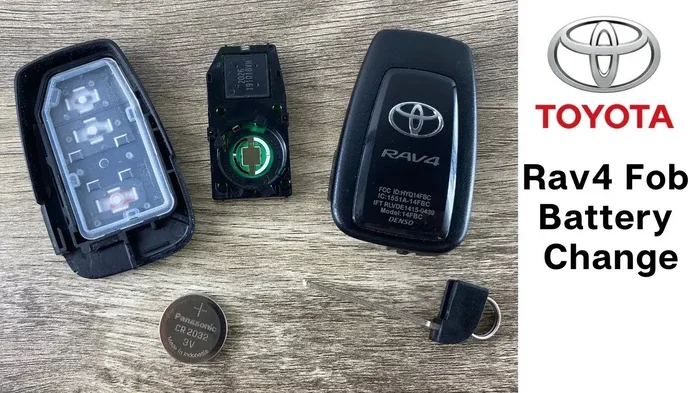
Most Toyota key fobs use a CR2032 battery. This is a standard 3-volt coin cell battery that you can find at almost any grocery store, pharmacy, or auto parts shop. However, some older Toyota models or special fob designs may use a different battery type. Always double-check before you buy.
Battery Types by Toyota Model
- Toyota Camry: Uses CR2032 battery in most years.
- Toyota RAV4: Uses CR2032 in most models.
- Toyota Corolla: Uses CR2032 in most generations.
- Toyota Highlander: Uses CR2032 in most models.
- Older Toyota models: Some may use CR2025 or SR44 batteries.
When you buy a replacement battery, look for trusted brands like Energizer, Duracell, or Panasonic. Cheap off-brand batteries may not last as long and could leak, which can damage your fob. Spending an extra dollar on a quality battery is always worth it.
Tools You Will Need
One of the best things about replacing a Toyota key fob battery is that you need almost no tools. Here is what you should have ready before you start.
- A CR2032 battery (or the correct type for your model)
- A small flathead screwdriver or a thin plastic pry tool
- A clean, soft cloth to wipe the fob interior
- A well-lit workspace
That is it. No special equipment. No trip to the dealer required. If you do not have a flathead screwdriver, you can also use a butter knife or even a coin in a pinch. The goal is to gently pry open the fob case without scratching or damaging it.
Step-by-Step Guide to Replace Toyota Key Fob Battery
Now for the part you have been waiting for. Here is exactly how to replace the battery in your Toyota key fob. Follow these steps carefully, and you will be done in under 5 minutes.
Step 1: Locate the Seam on Your Key Fob
Hold your Toyota key fob in your hand and look closely at the edges. You will notice a thin line or seam running around the middle of the fob. This is where the two halves of the case meet. Some Toyota fobs have the seam on the top, while others have it on the side. Take a moment to find it before you start prying.
Step 2: Gently Open the Fob Case
Insert your flathead screwdriver or plastic pry tool into the seam. Start at one corner and work your way around gently. Do not force it. The case should pop apart with light pressure. If it feels stuck, try a different spot along the seam. Some Toyota fobs have a small release button on the back that you need to press first.
Pro tip: If your fob has a physical key hidden inside, use the key to help pry open the case. Many Toyota key fobs have a small slot where you can insert the emergency key to release the cover.
Step 3: Remove the Old Battery
Once the fob is open, you will see the battery sitting in a small compartment. It is usually held in place by a small metal clip or just sits snugly in its slot. Carefully lift the old battery out. Pay attention to which side faces up, as you will need to place the new battery in the exact same orientation.
Take a moment to look at the inside of the fob. If you see any corrosion or buildup on the battery contacts, gently wipe it away with your soft cloth. A little buildup is normal and can prevent the new battery from making proper contact.
Step 4: Insert the New Battery
Take your fresh CR2032 battery and place it in the compartment with the positive side facing up (the side with the “+” sign and the smooth surface). Push it down gently until it sits flush in the slot. The metal clip should hold it in place naturally.
Make sure the battery is seated firmly. A loose battery will not make contact, and your fob will still not work even with a brand-new battery inside.
Step 5: Snap the Fob Back Together
Align the two halves of the fob case and press them together firmly. You should hear a click or feel the case snap into place. Make sure there are no gaps or loose spots. If the case does not sit flush, the battery may not be seated correctly, or something is misaligned inside.
Step 6: Test Your Fob
Stand near your Toyota and press the buttons on your fob. The doors should lock and unlock immediately. If you have Toyota remote start, try that too. If the fob works, congratulations, you just saved yourself a trip to the dealer. If it does not work, try opening the fob again and checking that the battery is seated properly.
Sometimes after a battery swap, you may need to reset the key fob. This is especially true for Toyota models with push-button start. If your fob is not working after the replacement, try holding the unlock button for 5 seconds or following the reset steps in your owner manual.
How to Know If Your Key Fob Battery Is Low
You do not always need to wait for your fob to stop working completely. There are several early warning signs that tell you the battery is getting weak. Catching these signs early means you can replace the battery before you are ever stuck.
- Reduced range: You need to be closer to your car for the fob to work. If you used to unlock from 30 feet away and now it only works at 5 feet, the battery is dying.
- Delayed response: There is a noticeable lag between pressing the button and the car responding.
- Intermittent working: The fob works sometimes but not others, especially in cold weather.
- Dashboard warning: Some newer Toyota models display a key fob battery low message on the dashboard.
- Multiple presses needed: You find yourself pressing the button two or three times to get a response.
If you notice any of these signs, grab a new battery and do the swap right away. It takes just a few minutes, and you will avoid the headache of a completely dead fob when you are rushing out the door.
Common Mistakes to Avoid When Replacing Toyota Key Fob Battery
Even though this is a simple job, there are a few mistakes that people make. Avoid these, and your battery replacement will go smoothly every time.
- Using the wrong battery type: Not all Toyota fobs use CR2032. Check your owner manual or the markings on the old battery before you buy a replacement.
- Forcing the fob open: If the case does not pop apart easily, you are probably pressing in the wrong spot. Go slowly and find the correct seam.
- Ignoring corrosion: If the battery contacts look green or white, clean them before inserting the new battery. Otherwise, you will have the same problem again.
- Forgetting to reset: Some Toyota models need a reset after a battery change. If the fob still does not work after the swap, check the manual for reset steps.
- Touching the battery with bare hands: Oils from your skin can affect battery performance. Handle the new battery with clean, dry hands or use gloves.
These small mistakes can turn a 5-minute job into a frustrating experience. Take your time, follow the steps, and you will be fine.
When to Seek Professional Help
Replacing a Toyota key fob battery is a DIY-friendly task for most people. However, there are situations where professional help makes sense. If you open your fob and the internal components look damaged or broken, do not try to fix it yourself. Water damage, cracked circuit boards, or worn-out buttons are issues that need a professional.
You should also consider professional help if your fob stops working even after a fresh battery. This could indicate a deeper issue with the Toyota smart key system or the fob’s internal electronics. A Toyota dealership or qualified locksmith can diagnose the problem and reprogram the fob if needed.
Additionally, if you have a push to start key fob system and the fob is not being recognized by your car, the issue may go beyond a simple battery swap. These advanced fob systems sometimes require professional programming after maintenance. Learn more about push-to-start key fob programming costs here to understand what you might expect to pay.
Tips to Make Your Toyota Key Fob Battery Last Longer
Once you have replaced your battery, you probably want to make it last as long as possible. Here are some simple habits that can extend the life of your Toyota key fob battery.
- Keep your fob away from other electronics: Storing it in the same pocket as your phone or laptop can cause interference and slow battery drain.
- Avoid extreme temperatures: Do not leave your fob in a hot car or in freezing conditions for long periods.
- Do not press buttons unnecessarily: Every press uses a small amount of battery power. Be intentional with your fob use.
- Store it properly at night: Keep your fob in a consistent, room-temperature location when not in use.
- Check the battery annually: Even if your fob seems fine, testing the battery once a year helps you catch weak batteries before they die completely.
These small habits add up over time. Many Toyota owners find that following these tips helps their key fob battery last 3 to 4 years instead of just 2.
Can You Drive Your Toyota Without a Key Fob
If your Toyota key fob battery dies and you are stuck without a replacement, you might wonder if you can still drive your car. The answer is yes, in most cases. Toyota vehicles with push-button start systems have a backup method to start the engine. You simply hold the dead fob directly against the start button, and the car can sense the fob through the button and allow you to start the engine.
However, this backup method is meant for emergencies only. It is not convenient for daily use, and you should replace the battery as soon as possible. Find out more about driving a Toyota without a key fob here. Also, if you have a Toyota with a physical key slot, you can use the hidden mechanical key to unlock the doors and start the car the traditional way.
It is worth noting that switching to sport mode or using other Toyota features while operating on a backup fob signal may behave differently than normal. Always get your fob battery replaced promptly to ensure full functionality across all your Toyota’s features.
Conclusion
Replacing your Toyota key fob battery is one of the easiest and most satisfying DIY jobs you can do. It takes about 5 minutes, costs less than $10, and requires no special skills or tools. Whether you have a Toyota Camry, RAV4, Corolla, or any other model, the process is essentially the same across the lineup.
Keep a spare CR2032 battery in your glove box or junk drawer so you are always prepared. Pay attention to the early warning signs of a weak battery, and swap it out before you are left stranded. Your Toyota key fob is a small but essential part of your daily driving experience, and keeping it in top shape takes almost no effort at all.
Now that you know exactly how to handle this job, you can tackle it the next time your fob starts acting up. You will save time, save money, and feel good about handling car maintenance on your own. Your Toyota will thank you for it.
Frequently Asked Questions
How do I know which battery my Toyota key fob uses?
Most Toyota key fobs use a CR2032 battery, but some older models may use a CR2025 or SR44. Check the markings on your old battery or look in your owner’s manual to confirm the correct type before purchasing a replacement.
Can I replace the Toyota key fob battery myself without any tools?
Yes, in most cases you do not need any tools at all. You can use your fingernails or a thin flathead screwdriver to gently pry open the fob case. A plastic pry tool works best to avoid scratching the fob.
How long does a Toyota key fob battery last?
A Toyota key fob battery typically lasts between 2 and 4 years, depending on how frequently you use the remote. Cold weather and heavy use can shorten battery life, so keep an eye on performance over time.
Do I need to reprogram my Toyota key fob after replacing the battery?
In most Toyota models, you do not need to reprogram the fob after a battery swap. However, some push-button start models may require a simple reset. If your fob does not work after replacing the battery, try holding the unlock button for several seconds or consult your owner’s manual.
Where can I buy a replacement CR2032 battery for my Toyota key fob?
CR2032 batteries are available at grocery stores, pharmacies, hardware stores, and auto parts shops. You can also purchase them online from major retailers. Look for trusted brands like Energizer or Duracell for the best results.
What should I do if my Toyota key fob still does not work after replacing the battery?
First, make sure the new battery is seated correctly with the positive side facing up. Check for corrosion on the battery contacts and clean them if needed. If the fob still does not work, the issue may be with the fob’s internal electronics, and you should visit a Toyota dealership or qualified locksmith for diagnosis.