Simple Steps to Reset Keyless Entry on Your Ford F150
Resetting keyless entry on your Ford F150 is easier than you think. This guide walks you through every step, from basic reprogramming to troubleshooting common issues. Whether your remote stopped working or you just replaced the battery, you will have your F150 keyless entry back up and running in no time.
Have you ever stood by your Ford F150, pressing the key fob over and over, and nothing happens? It is frustrating. Your keyless entry just stops working when you need it most. The good news is that fixing this problem is usually simple. You do not need a mechanic or a trip to the dealership. In this guide, we will show you exactly how to reset keyless entry on Ford F150 models. Whether you own a 2015 or a 2023, the steps are straightforward. Let us get your remote working again.
The Ford F150 is one of the best-selling trucks in America. It comes packed with features that make driving easier. Keyless entry is one of those features you do not think about until it breaks. A working remote lets you lock, unlock, and even start your truck from a distance. When it fails, it throws off your whole routine. This article covers everything you need to know. We will walk through the reset process, common problems, and simple fixes. By the end, you will feel confident handling this yourself.
Before we dive in, let us talk about what keyless entry actually means on a Ford F150. The system uses a small remote, often called a key fob, to send signals to your truck. When you press a button, the truck receives that signal and locks or unlocks the doors. Sometimes the system needs a reset. This can happen after a battery change, a power loss, or just from age. The reset clears old codes and refreshes the connection between your fob and the truck. It is quick, and it works.
Key Takeaways
- Simple Reset Process: Resetting your Ford F150 keyless entry takes just a few minutes using the dashboard controls.
- Battery Matters: A dead key fob battery is the most common cause of keyless entry failure.
- No Dealer Needed: You can reprogram your keyless entry at home without visiting a dealership.
- Multiple Methods Work: There are several ways to reset, including the dashboard method and battery disconnect method.
- Prevention Helps: Regular maintenance and timely battery replacements prevent most keyless entry problems.
- Reset Procedures Vary: Different Ford F150 model years may have slightly different reset steps.
📑 Table of Contents
- Understanding Your Ford F150 Keyless Entry System
- How to Reset Keyless Entry on Ford F150
- Troubleshooting Common Keyless Entry Problems
- When to Replace Your Key Fob Battery
- Preventing Keyless Entry Issues on Your Ford F150
- Expert Tips for Ford F150 Keyless Entry Maintenance
- Key Takeaways
- Frequently Asked Questions
- Conclusion
Understanding Your Ford F150 Keyless Entry System
The keyless entry system on a Ford F150 is more advanced than it looks. It involves the key fob, the truck’s computer, and the door locks. All of these parts work together. When one piece fails, the whole system can stop. Understanding how it works helps you fix problems faster.
How Keyless Entry Works on the F150
Your Ford F150 key fob sends a coded signal. The truck has a receiver that picks up that signal. When the codes match, the doors respond. This is why key fob programming matters. If the codes get out of sync, the truck will not recognize the fob. A reset puts the codes back in order. Think of it like retraining the truck to listen to your remote again.
Different model years use slightly different technology. Newer F150s have advanced smart key systems. These allow push-button start and proximity sensing. Older models use simpler remotes. No matter which type you have, the reset process is similar. The basic idea is the same. You are clearing the old pairing and setting up a fresh connection.
Common Reasons Keyless Entry Stops Working
Before you reset anything, it helps to know why the problem started. Here are the most common causes:
- Dead key fob battery: This is the number one reason. The battery wears out over time and loses power.
- Signal interference: Other electronics nearby can block the fob signal. This happens at gas stations or parking garages.
- Out-of-sync codes: The fob and truck lose their connection after a power outage or battery disconnect.
- Faulty door lock module: In rare cases, the problem is inside the truck itself.
- Water damage: If the fob got wet, internal parts can corrode and fail.
- Worn-out buttons: The buttons on the fob wear down after years of use.
If you have tried replacing the battery and the problem still exists, a reset is the next step. Now let us get into the actual process.
How to Reset Keyless Entry on Ford F150
Resetting your Ford F150 keyless entry is a straightforward process. You do not need special tools or technical skills. Just follow these steps carefully. The entire process takes about five to ten minutes.
Method One: Dashboard Reset
This is the most common method. It works on most Ford F150 model years. Here is what you need to do:
- Sit in the driver seat and close all doors.
- Turn the ignition to the “On” position. Do not start the engine. Just push the key to “On.”
- Press the “Unlock” button on the driver door panel. Hold it for about five seconds.
- Within ten seconds, turn the ignition from “On” to “Off.”
- Turn it back to “On” again.
- Release the door panel “Unlock” button.
- Now press and hold both the “Lock” and “Unlock” buttons on your key fob at the same time.
- Hold them for about fifteen seconds.
- The doors should lock and unlock to confirm the reset worked.
If the doors do not respond, wait a few seconds and try again. Sometimes the truck needs a moment to process the command. Be patient and repeat the steps.
Method Two: Battery Disconnect Reset
Another way to reset your keyless entry is by disconnecting the truck battery. This method clears all stored codes and gives you a fresh start. Here is how to do it:
- Turn off the engine and remove the key from the ignition.
- Open the hood and locate the battery.
- Use a wrench to loosen the negative terminal cable. Pull it off the battery post.
- Wait at least fifteen minutes. This lets the truck computer fully reset.
- Reconnect the negative terminal and tighten it securely.
- Start the truck and test your key fob.
This method works well when the keyless entry system has completely frozen or when you have replaced the truck battery. It is similar to how you would handle other reset procedures on your vehicle. If you have ever wondered does disconnecting battery reset codes, the answer is yes. Disconnecting the battery clears the truck’s memory, including any paired key fob codes.
Some owners also ask whether can you reset the check engine light without disconnecting the battery. The answer depends on the issue. But for keyless entry problems, a battery disconnect is one of the most reliable fixes. It gives the truck a completely clean slate.
Method Three: Key Fob Reset Button
Some Ford F150 key fobs have a small reset button on the back or inside the battery compartment. Check your fob model for this option. If it has one, here is what to do:
- Open the fob and remove the battery.
- Press and hold the reset button for five seconds.
- Put the battery back in.
- Press any button on the fob to test it.
This method is quick and easy. It works best for fobs that just need a fresh signal connection. Not all F150 fobs have this button, so check your model first.
Troubleshooting Common Keyless Entry Problems
Sometimes a reset does not fix the problem right away. That does not mean something is broken. It might just need a little extra attention. Here are the most common issues and how to solve them.
The Fob Works Sometimes But Not Always
If your Ford F150 remote start or keyless entry works intermittently, the battery is likely weak. The fob battery may still have some charge, but not enough to send a strong signal. Replace it with a fresh one and see if the problem goes away. Use a quality battery, like a CR2025 or CR2032, depending on your fob model.
No Response From Any Button
If pressing any button on the fob does nothing, the battery is probably dead. Open the fob and check the battery. If it looks corroded or leaking, replace it right away. Clean the battery contacts with a dry cloth before inserting the new battery.
The Truck Does Not Recognize the Fob After Reset
This can happen if the reset was not completed properly. Try repeating the dashboard reset method. Make sure you follow each step in order. Timing matters. If you move too fast between steps, the truck may not register the new code. Slow and steady wins this race.
Multiple Fobs Not Working
If you have more than one key fob and none of them work, the problem is likely with the truck receiver, not the fobs. In this case, a battery disconnect reset is your best bet. If that does not work, you may need a professional diagnosis.
When to Replace Your Key Fob Battery
Keeping your key fob battery fresh is one of the best ways to avoid keyless entry problems. Most fob batteries last about two to three years. But they can die faster if you use the remote a lot. Here are signs your battery needs replacing:
- The range of your remote gets shorter. You have to stand closer to the truck.
- Buttons feel less responsive or require more pressure.
- The fob works intermittently, especially in cold weather.
- The truck does not beep when you lock or unlock.
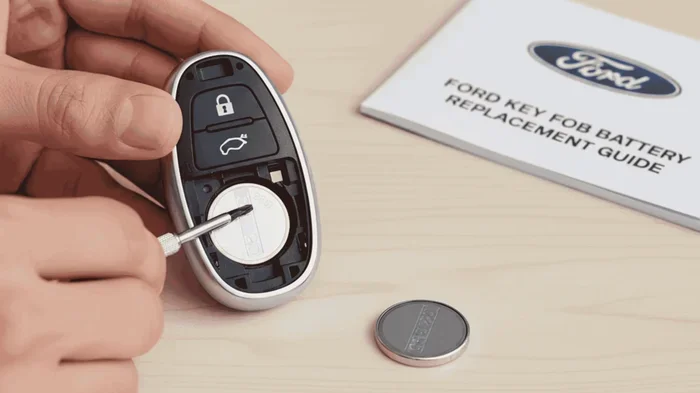
Replacing the battery is simple. Open the fob with a small flathead screwdriver. Remove the old battery. Insert a new CR2025 or CR2032 battery, matching the positive and negative sides. Snap the fob back together and test it. This small fix can save you a trip to the dealer.
While you are at it, it is worth checking if you need to do you have to reset the light after an oil change or handle other vehicle maintenance tasks at the same time. Staying on top of small maintenance jobs keeps your F150 running smoothly. The same goes for resetting any vehicle systems after maintenance. A little attention goes a long way.
Preventing Keyless Entry Issues on Your Ford F150
Prevention is always better than fixing a problem. Here are simple habits that keep your keyless entry system working well for years.
Keep Spare Fobs in Safe Places
Store spare key fobs away from water and extreme temperatures. A hot glove box or a damp garage can damage the electronics. Keep them in a cool, dry spot. You never know when you will need that backup fob.
Replace Batteries Before They Die
Do not wait for the fob to stop working completely. Replace the battery every two years as a routine habit. Set a reminder on your phone if you need to. It takes five minutes and saves you from being locked out.
Avoid Signal Interference
Keep your fob away from other electronic devices when trying to unlock the truck. Phones, tablets, and other remotes can sometimes interfere with the signal. If you are in a crowded parking lot, try standing closer to the truck before pressing the button.
Clean Your Fob Regularly
Dirt and grime can build up around the buttons and battery compartment. Wipe your fob down with a soft cloth every few weeks. This keeps the contacts clean and the buttons responsive.
Expert Tips for Ford F150 Keyless Entry Maintenance
Here are some extra tips from experienced Ford owners and technicians. These small habits make a big difference over time.
Tip One: Always use OEM or high-quality replacement fobs. Cheap aftermarket fobs may not pair correctly with your truck. They can cause more problems than they solve.
Tip Two: If you buy a used F150, reprogram all key fobs as soon as possible. You never know how many people had access to the previous fobs. Reprogramming keeps your truck secure.
Tip Three: If your Ford F150 has a push-button start, the key fob battery is extra important. A weak battery can prevent the truck from starting, even if the keyless entry still works.
Tip Four: Keep your owner’s manual handy. Different F150 model years may have slightly different reset procedures. The manual has the exact steps for your specific truck.
Tip Five: If you are planning a long road trip, test your keyless entry a few days before you leave. It is much easier to fix a problem at home than at a rest stop on the highway.
Key Takeaways
- Resetting keyless entry on a Ford F150 is simple: You can use the dashboard method, battery disconnect method, or fob reset button.
- Dead batteries cause most problems: Replacing the fob battery solves many issues without a reset at all.
- You do not need a dealership: All reset methods can be done at home with basic steps.
- Timing matters during resets: Follow each step in order and wait the right amount of time between steps.
- Prevention saves time: Regular battery replacements and careful fob storage prevent most keyless entry failures.
- Model year differences exist: Always check your owner’s manual for the exact procedure for your specific F150 year.
- When in doubt, disconnect the battery: This is the most thorough reset method and clears all stored codes.
Frequently Asked Questions
How long does it take to reset keyless entry on a Ford F150?
The reset process takes about five to ten minutes. The dashboard method is the fastest. The battery disconnect method takes a bit longer because you need to wait fifteen minutes for the computer to fully reset. Either way, it is a quick fix you can do at home.
Can I reset the keyless entry myself, or do I need a dealer?
You can absolutely reset the keyless entry yourself. No special tools or dealer visits are needed. The steps are simple and only require access to your truck’s interior and key fob. Most owners complete the reset in under ten minutes.
Why does my Ford F150 keyless entry keep failing after a reset?
If the problem keeps coming back, the key fob battery may be weak. Try replacing the battery first. If that does not help, there could be an issue with the truck’s door lock module or receiver. In that case, a professional inspection is a good next step.
Do I need to reprogram all my key fobs after a reset?
Yes, after a full reset, you should reprogram all key fobs. Each fob needs to be paired with the truck again. The dashboard reset method handles this automatically when you follow the steps correctly. Test each fob after the reset to confirm they all work.
Will resetting keyless entry erase any other settings on my Ford F150?
A battery disconnect reset may clear some minor settings like radio presets or clock adjustments. The dashboard method usually does not affect other settings. Either way, any lost settings are easy to reset. They are not permanent changes to your truck.
What type of battery does the Ford F150 key fob use?
Most Ford F150 key fobs use a CR2025 or CR2032 battery. Check your owner’s manual or look at the old battery to confirm the exact type. Replacement batteries are inexpensive and available at most stores. Keeping a spare battery in your glove box is a smart habit.
Conclusion
Resetting keyless entry on your Ford F150 is one of those simple fixes that saves time and money. You do not need to visit a dealer or pay for expensive repairs. With the steps in this guide, you can handle the reset yourself in just a few minutes. Whether you use the dashboard method, the battery disconnect approach, or the fob reset button, the process is manageable for any truck owner.
Remember to replace your fob battery regularly and keep your spare remotes in safe places. These small habits prevent most problems before they start. Your Ford F150 is built to last, and its keyless entry system should work just as well. If you ever run into issues, come back to this guide. You will have the answer right at your fingertips.
Now that you know how to reset your keyless entry, you are better prepared for whatever comes your way. Share this guide with other F150 owners. They will thank you for it. And the next time your remote stops working, you will just smile and fix it yourself.