How to Start Your Infiniti QX50 With a Key Right Now
Starting your Infiniti QX50 with a key is straightforward once you know the steps. The QX50 uses a smart key system that lets you start the engine with the push of a button, but you still need the physical key for certain situations. This guide walks you through the entire process, from finding the key slot to handling common problems, so you can get behind the wheel with confidence.
There are few things more frustrating than standing in front of your car, key in hand, and realizing you have no idea how to start it. If you own or just bought an Infiniti QX50, you are in the right place. This vehicle comes loaded with modern tech, and that includes a smart key system that can feel a bit confusing at first. But don’t worry. By the time you finish reading this guide, you will know exactly how to start your Infiniti QX50 with a key in any situation.
The QX50 is a popular compact luxury SUV. It blends comfort, style, and performance in a package that fits everyday driving perfectly. One thing that makes it stand out is its keyless entry and push-button start system. However, the physical key still plays an important role. Whether your key fob battery died, you are dealing with a lockout, or you just want to understand how the system works, this article has you covered. We will walk through every step in plain language, so you do not need to be a mechanic to follow along.
Many new QX50 owners feel unsure about using the key. The fob looks sleek and compact, but it hides a few secrets. There is a hidden mechanical key inside, a specific place to insert it, and a sequence you need to follow to turn the engine on. We will break all of that down. You will also learn how to troubleshoot common problems, maintain your key properly, and avoid mistakes that could leave you stuck. Let us dive right in.
Key Takeaways
- The Infiniti QX50 uses a smart key system that combines a physical key with a push-button start for convenience.
- You must press the brake pedal before pressing the engine start button to ignite the vehicle.
- A dead key fob battery is the most common reason the QX50 won’t start with the key.
- Hidden key slots are located inside the key fob and near the steering column for emergencies.
- Regular key maintenance and timely battery replacement prevent most starting issues.
- Always carry your spare key to avoid being stranded if the primary key fails.
📑 Table of Contents
Understanding the Infiniti QX50 Key System
The Infiniti QX50 uses what is called a smart key system. This system lets you start the car without inserting the key into a traditional ignition slot. Instead, you just press a button on the dashboard. But the smart key system still relies on the physical key fob to communicate with the car’s computer. The fob sends a signal that tells the car you are authorized to start it.
What Makes the QX50 Key Special
The QX50 key fob is more than just a remote. It contains a transponder chip that communicates wirelessly with the vehicle. When you are near the car, the system detects the fob and unlocks the doors automatically. Inside the fob, there is also a small mechanical key hidden inside the casing. This backup key comes in handy when the fob battery dies or the electronic system fails.
The QX50 also features keyless entry, which means you can unlock and start the car without ever taking the fob out of your pocket. As long as the fob is inside the vehicle, the system recognizes it. But there are times when you need the physical key. That is where knowing the proper steps becomes essential.
Where Is the Key Slot Located?
Many drivers wonder where to insert the key when the push-button start does not work. On the Infiniti QX50, the key slot is hidden inside the key fob itself. You can slide out the small metal mechanical key from the side of the fob. There is also a key slot on the steering column area, right below the dashboard. This slot is designed for emergency situations when the fob is completely unresponsive.
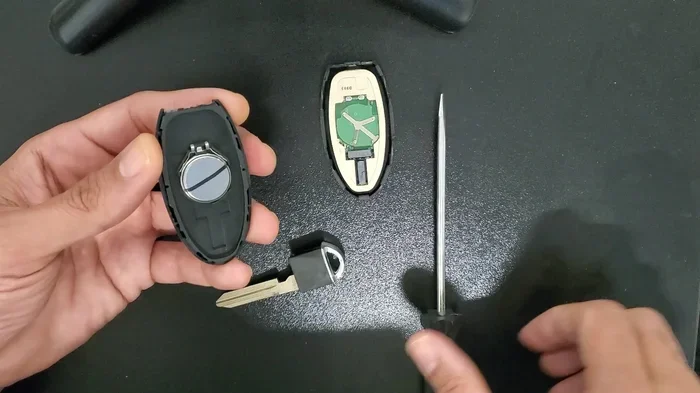
If you are new to the QX50, take a moment to explore your key fob. Open it carefully and look for the release latch on the side. Press it, and the small metal key will pop out. That key is your backup for starting the car when the electronic system is not working. Knowing where this key is and how to use it can save you a lot of stress.
Step-by-Step: How to Start Infiniti QX50 With a Key
Now that you understand the key system, let us walk through the exact steps to start your Infiniti QX50 with a key. Whether you are using the smart key fob or the hidden mechanical key, the process is simple once you know what to do.
Method 1: Starting With the Smart Key Fob
This is the most common way to start your QX50. Follow these steps carefully:
- Step 1: Sit in the driver’s seat. Make sure the door is closed and you are seated comfortably.
- Step 2: Press the brake pedal. You must press the brake pedal all the way down before the car will start. This is a safety feature built into the QX50.
- Step 3: Press the engine start button. The button is located on the dashboard, near the steering column. Press it once and hold it for a second. The engine should turn over.
- Step 4: Release the brake pedal. Once the engine starts, you can release the brake. The dashboard lights will change from red to green, showing the car is ready to drive.
That is it. The entire process takes just a few seconds. Make sure the gear shifter is in the Park position before you press the start button. If it is not, the car will not start. This is another safety measure that protects the transmission.
Method 2: Starting With the Hidden Mechanical Key
What happens if your key fob battery is dead and the push-button start does not respond? This is where the hidden mechanical key saves the day. Here is how to use it:
- Step 1: Remove the mechanical key from the fob. Slide the release latch and pull out the small metal key.
- Step 2: Find the key slot on the steering column. Look for a small cover on the right side of the steering column, just below the dashboard. Remove the cover by pressing or sliding it.
- Step 3: Insert the mechanical key. Put the key into the slot and turn it clockwise. This manually unlocks the ignition.
- Step 4: Press the brake pedal and start the car. Even with the mechanical key, you still need to press the brake pedal. The engine should start normally.
This method works reliably even when the fob is completely dead. It is a great backup to know about. If you ever find yourself stranded with a dead fob battery, this process will get you back on the road quickly.
Common Reasons Your QX50 Won’t Start With the Key
Sometimes, even when you follow the steps correctly, the QX50 still refuses to start. This can be annoying, but it usually points to a simple fix. Let us look at the most common reasons and what you can do about them.
Dead Key Fob Battery
The number one reason a QX50 will not start with the key is a dead key fob battery. The smart key system needs power to send its signal to the car. When the battery dies, the fob becomes useless. You will notice warning signs before it completely dies, such as a reduced range or needing to press the unlock button multiple times.
The good news is replacing the battery is easy and inexpensive. The QX50 uses a small CR2032 battery. You can swap it out in seconds with a flat screwdriver. Just open the fob, remove the old battery, drop in the new one, and snap the case back together. If you are unsure, check your QX50 owner manual for detailed instructions on the battery compartment.
Steering Wheel Lock
Another common issue is the steering wheel lock. When you turn off the car and remove the key, the steering wheel can lock in place. This is a security feature. But it can also prevent the key from turning in the ignition. If this happens, gently wiggle the steering wheel left and right while trying to turn the key. The lock should release, and you will be able to start the car normally.
Gear Shifter Not in Park
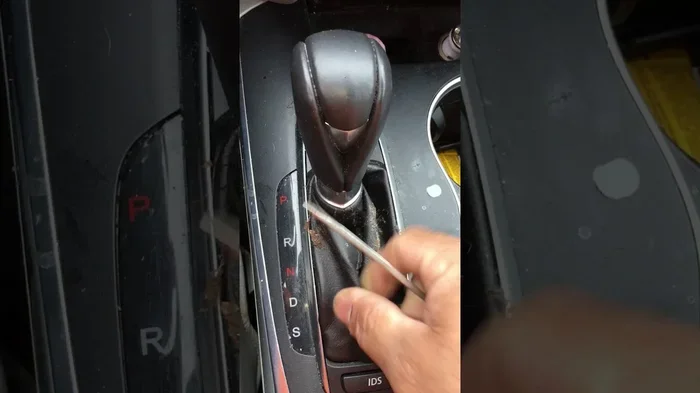
The QX50 will not start unless the gear shifter is in Park. This is a safety feature that prevents the car from lurching forward unexpectedly. If your shifter is in Neutral or any other position, the start button will not work. Simply move the shifter to Park and try again.
Faulty Brake Light Switch
The car requires you to press the brake pedal to start the engine. If the brake light switch is faulty, the car may not recognize that the pedal is being pressed. Check that the brake lights come on when you press the pedal. If they do not, the switch may need replacement. This is a quick and affordable fix at most repair shops.
Key Fob Not Detected
Sometimes the car simply does not detect the key fob. This can happen if the fob is too far from the reader, or if there is interference from other electronic devices. Try placing the fob directly on the start button. The QX50 has a backup reader built into the button itself. This allows you to start the car even if the fob battery is very low.
Key Maintenance Tips to Avoid Starting Problems
Taking care of your QX50 key can prevent most starting problems before they happen. A little maintenance goes a long way in keeping your car reliable and ready to go.
Replace the Fob Battery Regularly
Do not wait for the battery to die completely. Replace it every two years as a preventive measure. Keep a spare CR2032 battery in your glove box so you can swap it out quickly if needed. This simple habit saves you from the hassle of a dead fob at the worst possible moment.
Keep the Key Clean
Dirt and grime can build up inside the key fob over time. This can interfere with the buttons and the internal components. Wipe the fob down regularly with a soft, damp cloth. Avoid using harsh chemicals that could damage the casing or the electronic parts inside.
Store the Key Properly
Avoid placing the key fob near strong magnets or electronic devices that could interfere with its signal. Do not leave it in direct sunlight for long periods, as extreme heat can damage the internal battery and circuitry. A good rule of thumb is to keep it in a dedicated pocket or compartment away from other electronics.
Always Carry a Spare Key
It is easy to forget about your spare key until you need it. Make it a habit to keep a spare key in a safe place, such as your home or office. If you ever lose your primary key, having a spare means you are not stuck waiting for a replacement. Some owners also keep a spare hidden on the vehicle, but be careful about where you hide it. Thieves know all the common spots.
When to Seek Professional Help
Most starting issues with the QX50 are simple to fix. But there are times when you need a professional. If you have replaced the fob battery, checked the brake pedal, and confirmed the gear shifter is in Park, and the car still will not start, it is time to see a mechanic.
A professional can diagnose issues with the ignition switch, the steering column lock, or the car’s computer system. They have the tools and expertise to handle complex problems safely. If you suspect your vehicle has been tampered with or you want to check if a vehicle is stolen for free before driving, there are online services that can help you verify the vehicle’s status using the VIN number.
Also, if you are learning to drive the QX50 and want more guidance on basic car operations, resources on how to drive a car for beginners can give you extra confidence behind the wheel. A professional locksmith can also help if you need a new key programmed or if the existing key is damaged beyond repair.
Expert Tips for Infiniti QX50 Key Owners
Here are some insider tips that experienced QX50 owners swear by:
- Keep the fob close to the start button when the battery is low. The backup reader on the button can still pick up the signal.
- Do not press the start button repeatedly if the car does not respond immediately. This can drain what little power remains in the fob.
- Learn the location of your hidden key before you need it. Practice removing the mechanical key so you are not fumbling in an emergency.
- Update your QX50 software if you notice any electronic glitches. Infiniti occasionally releases updates that improve key system performance.
- Stay calm if the car will not start. Most issues are simple and have quick fixes. Panicking only makes it harder to think clearly.
These tips may seem small, but they can make a big difference in your daily driving experience. The more familiar you are with your QX50’s key system, the less stressful every drive becomes.
Final Thoughts
Starting your Infiniti QX50 with a key is a simple process once you understand how the system works. Whether you are using the smart key fob or the hidden mechanical backup key, the steps are clear and easy to follow. The key to a smooth experience is regular maintenance and knowing what to do when things go wrong.
Keep your fob battery fresh, store your spare key safely, and remember the basic steps we covered. These small habits will keep your QX50 running reliably day after day. If you ever run into a problem you cannot solve, do not hesitate to reach out to a professional. Your QX50 is a well-built vehicle, and with the right knowledge, you will always know how to get it started.
The Infiniti QX50 is designed to make your driving life easier and more enjoyable. Understanding its key system is just one part of that experience. With this guide in hand, you are fully equipped to start your QX50 with confidence, no matter the situation. Safe travels and happy driving.
Frequently Asked Questions
Can I start my Infiniti QX50 without the key fob?
No, you need either the key fob or the hidden mechanical key to start the QX50. The smart key system requires the fob to be inside the vehicle. If the fob battery is dead, use the mechanical key inserted into the steering column slot.
How do I know if my QX50 key fob battery is dying?
Signs include reduced range when unlocking the car, needing to press buttons multiple times, and the dashboard showing a key fob warning light. Replace the battery with a CR2032 as soon as you notice these signs.
Where is the hidden mechanical key stored in the QX50 fob?
The mechanical key is hidden inside the key fob itself. Look for a small release latch on the side of the fob. Press it, and the metal key will slide out. This key is your backup for emergencies.
Why does my QX50 not start even with the key inserted?
This could be caused by a dead fob battery, steering wheel lock, gear shifter not in Park, or a faulty brake light switch. Check each of these before seeking professional help.
How often should I replace my QX50 key fob battery?
Replace the battery every two years as a preventive measure. If you notice any starting issues, replace it immediately. The process is quick and requires only a small CR2032 battery.
Can a dead key fob battery damage my QX50’s electrical system?
No, a dead fob battery will not damage your vehicle’s electrical system. It simply prevents the smart key from communicating with the car. Use the mechanical key or replace the battery to restore normal function.
=== CONCLUSION ===
Knowing how to start your Infiniti QX50 with a key is an essential skill for every QX50 owner. The smart key system makes daily driving convenient, but understanding the backup mechanical key method ensures you are never left stranded. From replacing the fob battery to handling the steering wheel lock, this guide covers everything you need to keep your QX50 running smoothly.
Take a few minutes to practice the steps, keep spare batteries on hand, and maintain your key properly. These small efforts pay off in reliability and peace of mind. Your QX50 is a great vehicle, and with the knowledge you have gained from this guide, you are fully prepared to handle any key-related situation that comes your way. Drive safe and enjoy the ride.