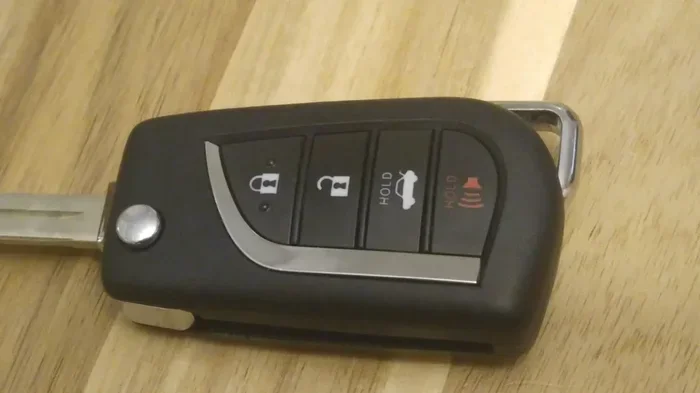
Everything You Need to Start Toyota Camry With Key Fob
Learning how to start Toyota Camry with key fob is easy once you understand the smart key system. This guide walks you through every step, from getting into your car to troubleshooting common problems. Whether you own a new Camry or a used model, you will find clear instructions, practical tips, and expert insights that make the process simple and stress-free.
There is something satisfying about pressing a button and hearing your Toyota Camry come to life. The how to start Toyota Camry with key fob process has changed the way we think about driving. No more fumbling with a traditional key. No more worrying about locking your keys inside the car. The smart key system on the Toyota Camry makes everything smoother and more convenient.
If you just bought a Camry or recently switched to a key fob setup, you might feel a little unsure at first. That is completely normal. This guide breaks down everything you need to know. We will walk through the starting process step by step. We will also cover troubleshooting, battery replacement, and maintenance tips that keep your key fob working reliably every single day.
The Toyota Camry is one of the most popular sedans on the road. Millions of drivers trust it for daily commutes, road trips, and everything in between. Part of what makes it so reliable is the Toyota Camry key fob system. Understanding how it works and how to use it properly makes your ownership experience even better. Let us dive right in.
Key Takeaways
- The Toyota Camry smart key system lets you start the car without inserting the key into the ignition.
- Press the push button start only when the key fob is inside the vehicle and the brake pedal is pressed.
- A weak key fob battery is the most common reason the system fails to recognize the fob.
- You can start a Toyota Camry with a dead key fob using the backup method near the start button.
- Regular maintenance of your key fob helps avoid unexpected starting problems.
- Knowing how to replace the key fob battery saves time and money at the dealer.
📑 Table of Contents
- How the Toyota Camry Key Fob System Works
- Step-by-Step Guide to Starting Your Toyota Camry With Key Fob
- Troubleshooting Common Key Fob Problems
- Key Fob Battery Replacement Made Easy
- Toyota Camry Key Fob Maintenance Tips
- Pro Tips for Getting the Most From Your Key Fob
- Common Mistakes to Avoid
- Can You Drive a Toyota Camry Without a Key Fob?
- Final Thoughts
How the Toyota Camry Key Fob System Works
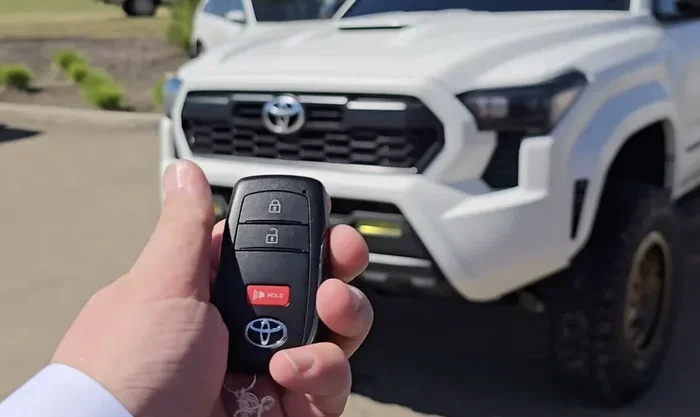
The Toyota Camry uses what Toyota calls a smart key system. This system lets you unlock, access, and start your car without ever taking the key fob out of your pocket or bag. The fob communicates wirelessly with the car using a low-frequency signal. When the car detects the fob is nearby, it wakes up and prepares to start.
What Makes the Smart Key System Special
The smart key system on the Toyota Camry is designed around convenience. Here is what makes it stand out:
- Keyless entry: You can unlock the doors just by touching the door handle. The car senses the fob and unlocks automatically.
- Push button start: Instead of turning a key, you press a button on the dashboard to start the engine.
- Smart detection: The car knows which fob belongs to it. It will not start with a random fob nearby.
- Anti-theft protection: The system uses rolling codes that change every time you use the fob. This makes it very hard to clone or steal.
All of these features work together to make your Toyota Camry push start experience seamless. You do not need to think about where your key is. As long as the fob is inside the car, you are good to go.
How the Push Button Start Feature Works
The push button start is the centerpiece of the how to start Toyota Camry with key fob process. Here is the basic idea. When you sit inside the car and press the brake pedal, the car checks whether the key fob is present. If it detects the fob, the engine start button becomes active. You press it, and the engine fires up. It is that simple.
But there are a few details that matter. The fob must be within a certain range. Usually, that means inside the cabin. If the fob is too far away, the car will not let you start the engine. This is a safety feature, not a glitch.
Step-by-Step Guide to Starting Your Toyota Camry With Key Fob
Now let us get into the actual process. Whether you are starting your Camry for the first time or you just want to make sure you are doing it right, this section has you covered. Follow these steps carefully.
Step 1: Get Into Your Toyota Camry
Walk up to your Camry with the key fob in your pocket or bag. Touch the door handle on the driver side. You should feel a slight click, and the doors will unlock. Some models also flash the turn signals briefly to confirm the car has been unlocked.
If the door does not unlock, the fob battery might be low. We will cover how to fix that later in this guide. For now, make sure you are standing close to the car. The smart key system has a limited detection range, usually about 3 to 6 feet.
Step 2: Sit Down and Press the Brake Pedal
Once inside, close the door and sit in the driver seat. Press the brake pedal all the way down. You need to hold it firmly. The car will not start unless the brake is pressed. This is a standard safety feature across all Toyota vehicles.
Some drivers forget this step, especially if they are used to older cars with manual ignition. But on a Toyota Camry with key fob, the brake pedal is mandatory. Always press it before touching the start button.
Step 3: Press the Engine Start Button
With the brake pedal pressed and the fob inside the car, look for the engine start button. It is usually located on the lower part of the dashboard, near the steering column. Press it once and hold it for a second. You should hear the engine turn over.
The dashboard lights will come on briefly, and then the engine will start. Once the engine is running, you can release the brake pedal. Your Toyota Camry is now ready to drive.
Step 4: Shut Down the Engine
When you are done driving, stopping the car is just as easy. Park the Camry and keep your foot on the brake. Press the engine start button again. The engine will turn off. Make sure the car is in Park before you do this.
Some drivers like to turn off the engine before taking their foot off the brake. That is fine. Just make sure the car is completely stopped before pressing the button.
Troubleshooting Common Key Fob Problems
Even the best key fob systems can run into issues sometimes. The good news is that most problems are easy to fix. Here are the most common issues drivers face with their Toyota Camry key fob and how to solve them.
Key Fob Not Responding
If your key fob does not work when you try to unlock or start the car, do not panic. The first thing to check is the distance. Move closer to the car and try again. The fob needs to be within range for the system to detect it.
Another common cause is interference. Other electronic devices or metal objects near the fob can block the signal. Try moving the fob to a different pocket or holding it directly against the start button. Some Toyota Camry models have a specific spot on the start button where you can place the fob as a backup. Check your owner manual for the exact location.
If none of that works, the fob battery might be dead. We will cover battery replacement in the next section.
Key Fob Battery Is Low
A low battery is the number one reason key fobs stop working properly. The good news is that replacing the battery is simple and inexpensive. Most Toyota Camry key fobs use a CR2025 or CR2032 coin cell battery. You can buy one at any drugstore or auto parts store.
Want to know if your fob battery is running low? Some Toyota Camry models show a warning message on the dashboard. If you see a message about the key fob battery, it is time for a replacement. You can also check by standing close to the car and trying to unlock it. If the range feels shorter than usual, the battery is probably weak.
Key Fob Battery Replacement Made Easy
Replacing the battery in your Toyota Camry key fob is one of the easiest maintenance tasks you can do. You do not need to visit a dealer or pay for expensive service. With a new battery and a few seconds of your time, your fob will work like new again.
When to Replace the Battery
Most key fob batteries last between one and two years. However, this depends on how often you use the fob. If you unlock and lock your car multiple times a day, the battery may drain faster. Cold weather can also shorten battery life significantly.
As a rule of thumb, replace the battery once a year. This keeps your fob working reliably and prevents the frustration of a dead fob at the worst possible moment. If you notice any of these signs, it is time to swap in a new battery:
- The fob needs to be very close to the car to work.
- The unlock or lock buttons feel weak or unresponsive.
- The dashboard shows a key fob battery warning.
- The push button start does not recognize the fob consistently.
How to Replace the Battery Yourself
Here is a quick walkthrough for replacing your Toyota Camry key fob battery:
- Flip the key fob over and locate the small notch on the seam.
- Use a flat tool, like a coin or a small screwdriver, to pry open the fob case.
- Carefully remove the old battery. Note which side faces up.
- Insert the new battery with the correct orientation. Make sure it sits flat and secure.
- Snap the fob case back together until it clicks.
- Test the fob by standing near your Camry and pressing the unlock button.
That is all it takes. If the fob still does not work after replacing the battery, try resetting it by holding the unlock and lock buttons together for a few seconds. This simple trick often solves the problem.
Toyota Camry Key Fob Maintenance Tips
Taking care of your key fob extends its life and keeps it working smoothly. You do not need any special tools or skills. Just a few simple habits make a big difference.
Keep Your Key Fob Clean
Dirt and grime can build up on the buttons and inside the fob case. Over time, this can cause buttons to stick or stop working. Wipe your fob regularly with a soft, damp cloth. Avoid using harsh chemicals or soaking the fob in water. A gentle wipe with a microfiber cloth is all you need.
Protect the Fob from Damage
Key fobs are small and portable, which means they get handled a lot. Dropping them on hard surfaces can damage the internal electronics. Try to keep your fob in a dedicated pocket or pouch. Avoid placing heavy objects on top of it. If you are active and tend to toss your keys around, consider using a protective fob cover.
Store Spare Fobs Properly
If you have a spare key fob for your Toyota Camry, store it in a safe place. Keep it away from strong magnetic fields and electronic devices that might interfere with the signal. A drawer or a dedicated key bowl works great. Having a working spare fob can save you a lot of trouble if your primary fob ever stops working.
Get the Fob Programmed After Battery Replacement
In most cases, replacing the battery does not require reprogramming. However, if you notice the fob is not working correctly after a battery swap, you may need to resync it with the car. Refer to your owner manual for the specific steps. Some models require you to press a sequence of buttons on the fob and the car within a certain time frame.
Pro Tips for Getting the Most From Your Key Fob
You already know how to start Toyota Camry with key fob, but there are some extra tips that can make your experience even better. These are small habits that experienced Camry owners swear by.
First, always keep your fob away from water. Water damage is one of the leading causes of key fob failure. If your fob gets wet, dry it off immediately and remove the battery if possible. Let it air dry completely before putting the battery back in.
Second, if you are buying a used Toyota Camry, make sure you get the correct key fob for your model year. Different years use different fob designs and frequencies. You can check with a Toyota dealer or look up your specific model online to confirm compatibility.
Third, consider the benefits of remote start on your Toyota Camry. Some models and trims support remote starting using the key fob. This lets you warm up or cool down your car before you get in. If you are interested in this feature, check whether your Camry supports it and how to set it up.
Finally, if you ever need a replacement fob or additional fobs, your Toyota dealer is the best place to go. They can program a new fob specifically for your car. While it may cost a bit more than buying one online, dealer programming ensures everything works correctly and safely.
Common Mistakes to Avoid
Even experienced drivers make mistakes with their key fobs. Here are a few common errors and how to avoid them:
- Forgetting to press the brake pedal: This is the most common mistake. The Camry will not start without the brake being pressed. Always make it a habit to press the brake first.
- Leaving the fob outside the car: If the fob is in the garage or on a table outside, the car will not detect it. Always bring the fob inside the cabin.
- Ignoring low battery warnings: If your dashboard shows a key fob battery warning, replace the battery right away. Waiting too long can leave you stranded.
- Using aftermarket batteries: Stick with name-brand batteries for your fob. Cheap batteries may not last as long and can leak, damaging the fob.
- Not reading the owner manual: Your Toyota Camry owner manual has specific instructions for your model year. It is worth reading through the key fob section to understand all the features.
Avoiding these mistakes keeps your Toyota Camry smart key system running smoothly for years. A little attention goes a long way.
Can You Drive a Toyota Camry Without a Key Fob?
Some drivers wonder what happens if they lose their key fob entirely. The short answer is that you cannot start a modern Toyota Camry without the fob. The smart key system requires the fob to be present inside the car. However, if you lose your fob, Toyota dealers can help you get a replacement and program it to your vehicle. It is always a good idea to keep a spare fob in a safe place at home.
If you are curious about this topic in more detail, check out our guide on Can I Drive My Toyota Without A Key Fob. It covers everything you need to know about driving your Toyota when the fob is not available.
Final Thoughts
The how to start Toyota Camry with key fob process is simple, intuitive, and designed to make your life easier. From the moment you press the door handle to the satisfying hum of the engine starting at the push of a button, the smart key system on the Toyota Camry is a genuinely great feature. Once you get used to it, you will not want to go back to a traditional key.
Remember to keep your fob battery fresh, store the fob properly, and follow the simple steps in this guide. With just a little care, your Toyota Camry key fob will serve you reliably for many years to come. Whether you are heading to work, running errands, or taking a long road trip, you can count on your Camry to start right up every time.
If you ever run into issues that this guide does not cover, your Toyota dealer or a trusted mechanic can help. And if you are interested in learning more about remote start features or other Toyota Camry capabilities, explore our other articles for more helpful tips and insights.
Frequently Asked Questions
Can I start my Toyota Camry with the key fob outside the car?
No, the Toyota Camry smart key system requires the fob to be inside the cabin. The car must detect the fob before it will allow the engine to start. This is a safety feature designed to prevent theft and accidental starting.
How do I know if my Toyota Camry key fob battery is low?
Signs of a low key fob battery include reduced range, weak button response, and a warning message on the dashboard. Some models also show a notification on the instrument cluster. If you notice any of these signs, replace the battery as soon as possible.
Can I use a regular key to start my Toyota Camry if the fob dies?
Some Toyota Camry models have a backup slot near the start button where you can place the fob to start the car even with a low battery. However, older models may include a physical key blade hidden inside the fob that you can use to manually unlock the door. Check your owner manual for your specific model.
How much does it cost to replace a Toyota Camry key fob battery?
A key fob battery typically costs between 5 and 10 dollars. The most common battery types used in Toyota Camry fobs are CR2025 and CR2032. You can find them at any pharmacy, grocery store, or auto parts shop.
How do I reprogram my Toyota Camry key fob after replacing the battery?
In most cases, you do not need to reprogram the fob after replacing the battery. The fob retains its programming. If the fob is not working after a battery change, try placing it near the start button and pressing the brake pedal and start button together. Refer to your owner manual for model-specific instructions.
Is it safe to drive my Toyota Camry with the key fob battery dead?
It is not recommended to drive with a dead key fob battery. The car may not recognize the fob, which means you could lose the ability to restart the engine if you turn it off. Replace the battery as soon as you notice weak performance. For more details, you can read our article on How Do I Know If My Key Battery Is Low.