How to Turn Off One Side of AC on a Tesla Model 3
You can turn off one side of the AC on a Tesla Model 3 by using the dual-zone climate controls on the touchscreen. Simply adjust the driver or passenger temperature independently to save energy and boost comfort. This guide covers every method, from basic touchscreen controls to advanced settings and common troubleshooting tips.
Have you ever gotten into your Tesla Model 3 on a hot summer day and thought, “Why does the passenger side blast freezing air when I’m the only one here?” You are not alone. Many Tesla owners want to know how to turn off one side of AC on a Tesla Model 3 and save energy while staying comfortable.
The good news is that the Tesla Model 3 comes with a smart dual-zone climate control system. This means you can control the temperature on the driver side and the passenger side separately. Whether you want to cool just one side or turn off the AC entirely on one side, the process is simple and quick. In this guide, we walk you through every method step by step.
Understanding how your Tesla’s air conditioning system works can make a big difference. It helps you stay cool in summer, warm in winter, and even extend your driving range. Let us dive into everything you need to know about managing the climate inside your Model 3.
Key Takeaways
- Dual-Zone Climate Control: The Tesla Model 3 lets you set different temperatures for the driver and passenger sides independently.
- Touchscreen Method: You can turn off one side of the AC by adjusting the temperature slider for that specific zone on the center screen.
- Mobile App Control: The Tesla app allows you to pre-adjust climate settings before you even get in the car.
- Energy Savings: Turning off one side of the AC can help extend your driving range and reduce battery usage.
- Common Issues: If one side of the AC is not working, it could be a sensor issue, a vent blockage, or a software glitch.
- Auto Mode vs. Manual Mode: Understanding the difference helps you take full control of your Tesla’s cooling system.
📑 Table of Contents
- Understanding the Tesla Model 3 Climate Control System
- How to Turn Off One Side of AC on a Tesla Model 3 Using the Touchscreen
- Using the Tesla Mobile App for Remote Climate Control
- Advanced Climate Settings and Features
- Energy Efficiency: How Turning Off One Side of AC Saves Battery
- Troubleshooting: When One Side of the AC Is Not Working
- Tips for Maximizing Comfort and Efficiency
- Comparison: Tesla Model 3 AC vs. Traditional Car AC
- Final Thoughts
Understanding the Tesla Model 3 Climate Control System
The Tesla Model 3 uses an advanced electric HVAC system that heats and cools the cabin efficiently. Unlike traditional cars that rely on engine heat, Tesla uses electric compressors and resistive heaters. This design gives you precise control over the cabin temperature.
The system divides the car into two zones. The driver zone covers the driver’s seat and the area near the driver’s vents. The passenger zone covers the front passenger seat and the area near the passenger vents. Each zone has its own temperature sensor and airflow controls.
Here is how the system works in simple terms:
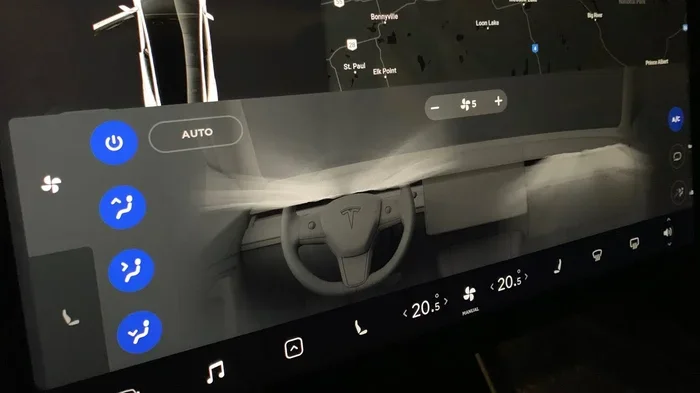
- The touchscreen displays two temperature sliders, one for each zone.
- You can set different temperatures for the driver and passenger sides.
- The system automatically adjusts fan speed and vent direction based on your settings.
- You can switch between auto mode and manual mode for more control.
This dual-zone design is one of the reasons why Tesla’s climate system feels so comfortable. It also means you have the flexibility to turn off one side of the AC whenever you want.
How to Turn Off One Side of AC on a Tesla Model 3 Using the Touchscreen
The most common way to manage your AC is through the center touchscreen. This method works for both the driver side and the passenger side. Here is exactly how to do it.
Step-by-Step Guide
- Tap the Climate Icon: On the bottom of the touchscreen, you will see a fan icon. Tap it to open the climate controls.
- Locate the Temperature Sliders: You will see two sliders, one labeled “Driver” and one labeled “Passenger.”
- Adjust the Temperature: To effectively turn off the AC on one side, set that side’s temperature to match the current cabin temperature. For example, if the car is at 72°F, set the passenger slider to 72°F.
- Reduce Fan Speed: Lower the fan speed for that zone to zero or the minimum setting.
- Close the Vents: If your Model 3 has vent controls, you can close the vents on the side you want to turn off.
By following these steps, the AC will stop blowing cold (or hot) air on the side you adjusted. The other side will continue to work normally. This is the simplest and most direct method.
Why This Method Works
When you set the temperature for one zone to match the cabin temperature, the system sees no need to cool or heat that area. It essentially turns off the AC for that zone. This is different from turning off the entire AC system. The other zone continues to operate as usual.
Using the Tesla Mobile App for Remote Climate Control
Did you know you can control your Tesla’s AC from your phone? The Tesla mobile app lets you adjust climate settings remotely. This is especially useful on hot days when you want to cool down the car before you get in.
Here is how to use the app to manage one side of the AC:
- Open the Tesla app on your phone.
- Tap the “Climate” option.
- You will see separate controls for the driver and passenger zones.
- Adjust the temperature for the side you want to turn off.
- You can also turn the AC on or off completely from the app.
This method is great if you want to pre-cool or pre-heat your Tesla before a drive. It also works if you are parked and only want one side of the car to remain cool. Just keep in mind that the car must be connected to Wi-Fi or cellular data for the app to work.
Many Tesla owners also use the app to check their driving range and battery status while managing climate settings. This helps you plan your trips more efficiently.
Advanced Climate Settings and Features
The Tesla Model 3 has several advanced climate features that give you even more control. Let us explore some of the most useful ones.
Auto Mode vs. Manual Mode
When you first open the climate controls, the system is usually in auto mode. In auto mode, the Tesla decides the best fan speed, temperature, and vent direction based on the cabin temperature and your settings.
To switch to manual mode:
- Tap the climate icon on the touchscreen.
- Look for the auto/manual toggle.
- Switch to manual mode.
In manual mode, you control the fan speed and temperature directly. This gives you more granular control over each zone. You can set one side to full blast and the other side to off, for example.
Seat Heaters and Ventilation
The Tesla Model 3 also has seat heaters and ventilated seats. These features work independently from the AC system. You can cool or heat your seat without affecting the cabin temperature. This is a great way to stay comfortable without running the AC on both sides.
Here are some tips for using seat features:
- Use seat ventilation on hot days to cool down quickly without lowering the AC.
- Use seat heaters in winter to feel warm while keeping the AC off on one side.
- Adjust seat settings from the climate screen or through the app.
Bioweapon Defense Mode
The Tesla Model 3 includes a feature called Bioweapon Defense Mode. This mode maximizes the cabin air filtration and creates positive pressure inside the car. It is not directly related to turning off one side of the AC, but it is worth knowing about. This mode uses the HVAC system at full capacity, so it will drain more battery.
To activate Bioweapon Defense Mode:
- Go to Settings on the touchscreen.
- Navigate to Vehicle.
- Select Bioweapon Defense Mode.
Keep in mind that this mode runs the AC and filtration system at maximum power. It is best used in areas with poor air quality, not for everyday driving.
Energy Efficiency: How Turning Off One Side of AC Saves Battery
One of the biggest benefits of turning off one side of the AC is energy savings. The Tesla Model 3 runs on a battery pack, and the AC system draws power from that battery. By turning off the AC on one side, you reduce the load on the system and extend your driving range.
Here is a simple comparison:
- AC on Both Sides: The system cools or heats the entire cabin. This uses more energy and can reduce your range by 10 to 20 percent on hot days.
- AC on One Side Only: The system only works on one zone. This uses less energy and helps preserve your battery.
- AC Off Completely: No energy is used for climate control, but comfort is reduced.
If you are driving alone, turning off the passenger side AC is an easy way to save energy. Over a long road trip, these small savings can add up. They can help you reach your destination without needing to charge as often.
For comparison, building a car takes significant time and energy, so it makes sense to conserve the energy your Tesla uses while driving. Similarly, idling with the AC on also drains battery, so managing your climate settings wisely is always a good practice.
Troubleshooting: When One Side of the AC Is Not Working
Sometimes, one side of the AC may not work as expected. This can be frustrating, but there are a few common causes and fixes you can try.
Common Issues and Solutions
- Issue 1: One Side Is Not Blowing Air. Check if the vent on that side is closed. Also, make sure the fan speed is not set to zero for that zone.
- Issue 2: One Side Is Too Warm. The temperature sensor on that side might be malfunctioning. Try restarting the touchscreen by holding the two scroll buttons on the steering wheel.
- Issue 3: AC Works on One Side But Not the Other. This could be a software glitch. Try updating your Tesla’s software to the latest version.
- Issue 4: Uneven Cooling. Make sure the cabin filters are clean. Dirty filters can restrict airflow and cause uneven cooling.
When to See a Service Technician
If you have tried all the troubleshooting steps and one side of the AC still does not work, it is time to visit a Tesla service center. The issue could be a faulty temperature sensor, a blocked vent, or a problem with the HVAC compressor. Tesla service technicians can diagnose and fix the problem quickly.
Unlike traditional dealerships, Tesla service centers specialize in electric vehicles. They have the tools and training needed to work on your Tesla climate system properly. You can also check if your car is still under warranty, as climate system repairs may be covered.
Tips for Maximizing Comfort and Efficiency
Here are some practical tips to help you get the most out of your Tesla Model 3’s climate system:
- Pre-Cool Your Car: Use the Tesla app to cool down the car before you start driving. This reduces the workload on the AC system once you are on the road.
- Use Seat Ventilation: On hot days, seat ventilation can keep you cool without running the AC on full blast.
- Set Temperatures Wisely: A temperature between 68°F and 72°F is comfortable for most people and uses less energy than extreme settings.
- Close Windows and Sunroof: Open windows let hot air in, making the AC work harder. Keep them closed for best efficiency.
- Use Shade Parking: Parking in the shade reduces the heat buildup inside the car, so the AC does not have to work as hard.
- Keep Cabin Filters Clean: Clean filters ensure proper airflow and help the AC system run efficiently.
These simple habits can make a big difference in your daily driving experience. They help you stay comfortable while also protecting your battery and extending your range.
Comparison: Tesla Model 3 AC vs. Traditional Car AC
To understand why the Tesla Model 3’s climate system is so flexible, it helps to compare it with a traditional car AC system.
| Feature | Tesla Model 3 | Traditional Car |
|---|---|---|
| Dual-Zone Control | Yes, independent sliders for driver and passenger | Often manual dial or basic dual-zone |
| Remote Control | Yes, via Tesla mobile app | Rare, only in luxury models |
| Energy Source | Electric battery | Engine-driven compressor |
| Energy Efficiency | High, with precise zone control | Lower, less granular control |
| Turning Off One Side | Easy, adjust slider to match cabin temp | Difficult, often requires turning off entire system |
| Seat Ventilation | Available on most trims | Rare, usually in luxury models |
As you can see, the Tesla Model 3 offers much more control over the cabin climate than most traditional cars. This makes it easy to turn off one side of the AC and save energy without sacrificing comfort on the other side.
Final Thoughts
Knowing how to turn off one side of AC on a Tesla Model 3 is a simple but powerful skill. It helps you stay comfortable, save energy, and extend your driving range. Whether you use the touchscreen, the mobile app, or manual vent controls, the process is quick and easy.
The Tesla Model 3’s dual-zone climate system is one of its best features. It gives you the flexibility to customize the cabin temperature to your exact needs. And with the tips and troubleshooting advice in this guide, you can handle any climate-related issue that comes your way.
Take a few minutes to explore your Tesla’s climate settings. Experiment with different modes and temperatures. You will find the setup that works best for you. And the next time you are driving alone on a hot day, you will know exactly how to keep cool without wasting energy.
Remember, small adjustments make a big difference. Whether you are driving across town or on a long road trip, managing your AC smartly helps you get the most out of your Tesla Model 3.
Frequently Asked Questions
Can I turn off the AC on just the passenger side of a Tesla Model 3?
Yes, you can. Open the climate controls on the touchscreen and set the passenger temperature slider to match the current cabin temperature. Then reduce the passenger fan speed to zero. This effectively turns off the AC on the passenger side while keeping the driver side running.
Does turning off one side of the AC save battery on a Tesla Model 3?
Yes, it does. The AC system draws power from the battery. By turning off one side, you reduce the workload on the system, which helps conserve battery energy and extend your driving range.
Can I control the Tesla AC from my phone?
Absolutely. The Tesla mobile app lets you adjust climate settings remotely. You can control both the driver and passenger zones separately, pre-cool the car, and even turn the AC on or off before you get in.
Why is one side of my Tesla AC not blowing cold air?
This could be caused by a closed vent, a fan speed set to zero, a dirty cabin filter, or a faulty temperature sensor. Try checking the vents and fan settings first. If the problem persists, a Tesla service technician can diagnose the issue.
Is it normal for the Tesla AC to make different noises on each side?
Some noise difference is normal, especially if one side is running at a higher fan speed. However, if you notice loud or unusual noises on one side, it could indicate a problem with the blower motor or duct. Have it checked by a professional if needed.
Can I use seat ventilation instead of AC to stay cool?
Yes, you can. The Tesla Model 3 has ventilated seats that blow cool air directly onto your body. This is a great way to stay comfortable without running the AC on full power. It saves energy and can be used alongside or instead of the cabin AC.