Heres How to Turn On Audi Traffic Light Information
Audi traffic light information helps drivers see when lights will change, making city driving smoother and safer. Turning it on takes just a few minutes through the Audi MMI system, and you need an active Audi connect data plan to use it. This guide walks you through every step, from checking compatibility to fixing common issues.
Driving through busy city streets can be stressful. You stop at red lights, wait for them to turn green, and try to time your speed just right. Audi understood this problem years ago and built a smart solution called traffic light information. This feature shows drivers a countdown on their display, telling them exactly how long until the light changes.
But here is the thing many Audi owners do not realize. The feature does not just turn on by itself. You need to go into your car settings and activate it. And if you do not have the right data plan or software version, it simply will not work. That is exactly why we put together this guide.
In this article, we will show you how to turn on Audi traffic light information in clear, simple steps. We will cover what the feature is, what you need to use it, and how to fix common problems. Whether you drive a new Audi A4 or a luxury Audi Q7, this guide will help you get the most out of your car’s smart features.
Key Takeaways
- Audi traffic light information works through the MMI infotainment system and requires a connected data service to function properly.
- You can turn it on by navigating through the vehicle settings menu on your Audi display screen in just a few simple steps.
- The feature is not available on all Audi models, so checking compatibility before setup is an important first step.
- An active Audi connect subscription is required for the traffic light data to reach your vehicle in real time.
- Restarting the MMI system can fix most common issues if the feature is not working as expected.
- The traffic light countdown display appears on the navigation screen and helps you plan your speed approaching intersections.
- Keeping your Audi software updated ensures the best performance from the traffic light information feature.
📑 Table of Contents
What Is Audi Traffic Light Information?
Audi traffic light information is a smart feature built into the Audi MMI infotainment system. It connects to city traffic management systems and receives real-time data about traffic light changes. The system then displays a countdown on your navigation screen, showing you how many seconds remain until the light turns green or red.
This is part of Audi’s broader connected car technology. The feature works alongside other smart systems like traffic sign recognition and the Audi navigation network. Together, these tools give drivers a clearer picture of what is happening on the road ahead.
How the Traffic Light Data Works
The system receives data from city infrastructure through wireless connections. Traffic signals in supported cities send out information about their timing cycles. Your Audi receives this data and displays it on the MMI screen. The countdown appears when you are approaching an intersection within range.
Not every city supports this feature yet. Audi has been expanding its list of compatible cities over the years. Major metropolitan areas in Europe and North America are the primary markets for this technology. You can check whether your city is supported through the Audi connect portal online.
What You See on Your Display
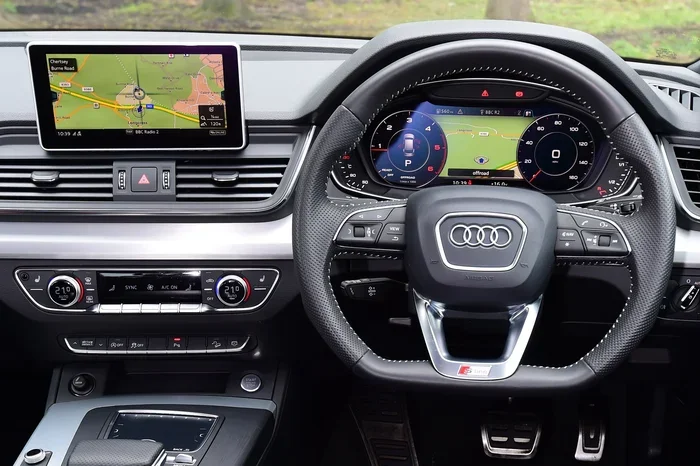
When the feature is active, you will see a small traffic light icon on your navigation display. Next to it, a countdown timer shows the seconds remaining. The display turns green when the light will turn green soon. It turns red when the light is red or will turn red before you reach the intersection.
This simple visual cue helps you make smarter driving decisions. Instead of rushing toward a yellow light, you can slow down and coast to a stop. Or you can ease off the accelerator when you see the countdown is short and the light is about to change.
How to Turn On Audi Traffic Light Information
Turning on this feature is straightforward once you know where to look. The steps are slightly different depending on your Audi model and MMI generation. But the general process is the same across most recent Audi vehicles. Follow these steps carefully to get the feature up and running.
Step 1: Start Your Vehicle and Access the MMI Menu
First, start your Audi and let the system fully boot up. Make sure your Audi infotainment system is ready and the display is active. Press the menu button on the MMI controller or touch the menu icon on the screen. This brings up the main settings panel.
Use the rotary dial or touchscreen to navigate to the vehicle settings section. On most models, this is represented by a car icon. Tap on it to open the vehicle configuration menu.
Step 2: Navigate to the Connectivity or Navigation Settings
Inside the vehicle settings, look for a section called connectivity, network, or navigation settings. The exact name depends on your MMI version. On newer Audi models with MMI touch response, you will find it under the vehicle management tab.
Tap on the connectivity or network settings option. Here you will see information about your Audi connect status, data connection, and online services. Make sure your vehicle is connected to the internet through your data plan.
Step 3: Enable Traffic Light Information
Within the connectivity menu, look for an option labeled traffic light information or TLI. This may be listed under online services or advanced settings depending on your model year. Toggle the switch to turn it on.
Some Audi models may require you to accept terms and conditions before the feature becomes active. Read through the information and confirm if prompted. The system will then begin searching for available traffic light data in your area.
Step 4: Test the Feature
After enabling the feature, drive toward a known intersection in your city. The traffic light countdown should appear on your navigation display as you approach. If you do not see the countdown, check that your GPS signal is strong and that you are in a supported area.
You can also go back to the settings menu to confirm the feature is still toggled on. Sometimes a system update or restart can change settings unexpectedly.
Requirements for Using Traffic Light Information
Not every Audi has traffic light information built in. Before you try to turn it on, make sure your vehicle meets the requirements. Skipping this step can save you a lot of frustration.
Compatible Audi Models
The traffic light information feature is available on most Audi models from the mid-2010s onward. This includes popular models like the Audi A3, A4, A6, and Q5. Newer models with the latest MMI systems tend to have full support. Older models may have limited functionality or no support at all.
You can check your specific model and year on the Audi website or by contacting your local Audi dealer. They can confirm whether your vehicle supports this connected car feature based on your build date and options.
Active Audi Connect Subscription
This is perhaps the most important requirement. The traffic light information feature relies on a live data connection. Your Audi needs an active Audi connect subscription to receive real-time traffic light data. Without this data plan, the feature simply will not work.
Audi offers different subscription tiers. Some come free for the first few years with a new vehicle purchase. After that, you may need to renew or purchase a data plan separately. Check your Audi account online or ask your dealer about your current subscription status.
Up-to-Date Software and Maps
Your Audi MMI system needs to run the latest software version for traffic light information to work properly. Audi regularly pushes updates that improve compatibility with city traffic systems. An outdated system may not recognize or display the countdown correctly.
You can check for software updates through the MMI menu or the myAudi app on your phone. If an update is available, install it and restart the system. This simple step can often fix issues with features not working as expected.
Benefits of Using Audi Traffic Light Information
Once you have the feature turned on, you will notice several real benefits during your daily commute and city driving. Here is why this feature is worth the setup time.
Smoother Driving and Better Fuel Economy
When you know how long you will wait at a red light, you can adjust your speed accordingly. Instead of accelerating hard toward a yellow light and then slamming on the brakes, you can ease off the gas and coast to a stop. This smoother driving style reduces wear on your brakes and can even improve fuel economy over time.
Reduced Stress in Heavy Traffic
City driving is stressful enough without the added anxiety of guessing when lights will change. The countdown removes that guesswork. You know exactly how many seconds you have, which helps you stay calm and focused on the road around you.
Improved Safety at Intersections
Rushing through yellow lights is one of the leading causes of intersection accidents. The traffic light countdown encourages you to slow down and prepare to stop rather than speed up. Over time, this can make you a safer and more predictable driver in urban environments.
Time Savings Over Long Commutes
If your daily commute takes you through several intersections, the feature can save you meaningful time over weeks and months. By adjusting your speed to catch green lights, you avoid unnecessary stops and the delay that comes with restarting your drive.
Troubleshooting Common Issues
Even after following all the steps, you might run into problems getting the traffic light information to work. Here are the most common issues and how to fix them.
The Feature Is Not Showing in the Menu
If you cannot find the traffic light information option in your settings, your vehicle may not support the feature. Older Audi models or base trim levels sometimes lack the hardware needed for this connected service. Contact your Audi dealer to confirm compatibility.
Another reason could be that your MMI software is outdated. Check for updates and install any available patches. After updating, restart the system and look for the option again.
The Countdown Is Not Displaying
If the feature is enabled but the countdown does not appear, check your data connection first. Make sure your Audi connect plan is active and your vehicle has a strong cellular signal. You can verify this in the connectivity status menu.
Also confirm that you are in a city that supports the traffic light information system. The feature only works in cities where the local traffic infrastructure communicates with connected vehicles. If you are traveling outside a supported area, the countdown will not appear.
The Display Shows Incorrect Information
Sometimes the countdown may show inaccurate timing. This can happen if the traffic signal data has not been updated recently. City traffic systems occasionally change light timing patterns, and your Audi needs fresh data to match.
Try refreshing your navigation system or updating the map data through the MMI menu. If the issue persists, a system restart often clears up temporary data glitches.
Resetting the MMI System
If none of the above fixes work, try resetting the MMI system. You can do this by holding down the power button on the infotainment unit for about 10 seconds. The system will restart and reload all settings. This is similar to restarting your phone and often resolves temporary software issues.
Note that resetting the MMI will not erase your saved settings or navigation history. It simply refreshes the system software. After the restart, check if the traffic light information feature is working correctly.
Expert Tips to Get the Most From Traffic Light Information
Once you have the feature working, these tips will help you use it more effectively and get the best experience from your Audi.
Keep Your Data Plan Active Year-Round
It can be tempting to pause your Audi connect subscription during winter months when you drive less. But the traffic light information feature needs an active data connection at all times. Even if you only use it occasionally, keeping the plan active ensures it works whenever you need it.
Update Your Maps Regularly
Traffic light data is tied to specific intersections and city maps. When Audi updates its navigation maps, it also updates the traffic light database. Regular map updates ensure you get the most accurate countdown information for your driving routes.
Use It Alongside Navigation for Best Results
The traffic light countdown works best when you are using the navigation system. The feature activates automatically when navigation is on and you are approaching a supported intersection. If you are driving without navigation, the countdown may not appear even if the feature is enabled.
Pair It with Adaptive Cruise Control
If your Audi has adaptive cruise control, the traffic light information feature pairs well with it. The system can use the countdown data to adjust your cruising speed, helping you arrive at the next light just as it turns green. This combination makes highway and city driving feel much more seamless.
Check for New City Support Periodically
Audi is constantly expanding the list of cities that support traffic light information. Check your myAudi account or the Audi app periodically to see if your city or frequent travel routes have been added. A simple update can activate the feature in areas where it was previously unavailable.
Understand the Limitations
The traffic light information feature is a helpful assistant, but it is not perfect. It depends on data from city traffic systems, which can sometimes be delayed or inaccurate. Always use your own judgment at intersections. The countdown is a guide, not a replacement for paying attention to the actual traffic light and surrounding traffic.
Conclusion
Audi traffic light information is a genuinely useful feature that makes city driving easier, safer, and less stressful. Once you know how to turn on Audi traffic light information, the setup process is quick and straightforward. The key is making sure your vehicle is compatible, your data plan is active, and your software is up to date.
From smoother commutes to better fuel economy, the benefits of this feature add up over time. The countdown display gives you the confidence to approach intersections calmly and make smarter driving decisions. It is one of those car technology features that you quickly wonder how you ever drove without.
If you run into any issues, the troubleshooting steps in this guide should help you get things working again. And remember, keeping your Audi software updated and your data plan active ensures the best experience. Take a few minutes today to check your settings and activate this feature. Your future commutes will thank you.
For more information about your Audi’s features and maintenance tips, explore our other articles on car care and vehicle technology. Stay connected and drive smarter with your Audi.
Frequently Asked Questions
Do all Audi models support traffic light information?
No, not all Audi models support this feature. It is available on most models from the mid-2010s onward, but older or base trim levels may not have the hardware needed. Check with your Audi dealer or visit the Audi website to confirm whether your specific model and year supports traffic light information.
Do I need a special subscription to use the traffic light countdown feature?
Yes, you need an active Audi connect data subscription for the feature to work. The traffic light data is transmitted to your vehicle through a cellular connection. Without an active plan, your Audi cannot receive real-time traffic light timing information. You can check your subscription status through the myAudi app or by contacting your dealer.
Can I use the traffic light information feature without navigation turned on?
The feature works best when the navigation system is active. The countdown display typically appears on the navigation screen when you are approaching a supported intersection. If navigation is turned off, the countdown may not show even if the feature is enabled in your settings.
Is the traffic light countdown always accurate?
The countdown is based on data received from city traffic systems, which is generally reliable. However, it is not perfect. Timing patterns can change, and data updates may lag behind actual signal changes. Always pay attention to the real traffic light and surrounding traffic. Use the countdown as a helpful guide, not as the sole source of information.
What should I do if the traffic light information stops working suddenly?
First, check that your Audi connect data plan is still active and your vehicle has a strong cellular signal. Next, verify that the feature is still enabled in your settings. If both are fine, try updating your MMI software and maps. A system restart often resolves temporary glitches. If the problem persists, contact your Audi dealer for further assistance.
Can I turn off the traffic light information if I find it distracting?
Yes, you can turn it off at any time by going back to the settings menu where you enabled it. Simply toggle the traffic light information switch to off. This will remove the countdown display from your navigation screen. You can always turn it back on later if you change your mind. Some drivers prefer to use it only on familiar routes and disable it on less predictable roads.