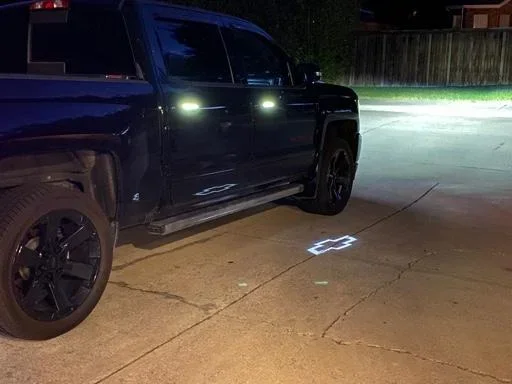
How to Turn On Puddle Lights on Your New GMC Sierra
Puddle lights on the GMC Sierra are a convenient and stylish feature that illuminates the ground when you open your door. Whether you own a GMC Sierra Denali, AT4, or base model, turning on puddle lights is simple once you know the right method. This guide covers every way to activate puddle lights, from the infotainment screen to the door switch module. We also share quick tips, common mistakes, and troubleshooting steps to help you get the most out of this popular truck lighting feature.
There is something genuinely satisfying about stepping out of your truck at night and having the ground light up right at your feet. Puddle lights on the GMC Sierra do exactly that. They project a soft glow onto the pavement, helping you see where you are stepping and giving your truck a sleek, welcoming look.
If you just bought a new GMC Sierra or recently upgraded your model, you might be wondering how to turn on puddle lights. The good news is that the process is simpler than most people think. Whether you have a GMC Sierra Denali with all the bells and whistles or a base model, this guide will walk you through every method step by step.
Puddle lights are more than just a cosmetic feature. They serve a real purpose. When you walk up to your truck in a dark parking lot or a dim garage, puddle lights give you immediate visibility. They also add a premium feel that makes your Sierra stand out from the crowd. Let us dive into everything you need to know about activating and getting the most from this great truck lighting feature.
Key Takeaways
- Multiple Activation Methods: You can turn on puddle lights through the infotainment screen, the door switch module, or the vehicle settings menu depending on your GMC Sierra model year.
- GMC Sierra Denali Models Include Them Standard: Higher trim levels often come with puddle lights as a factory-installed feature, making activation even easier.
- Troubleshooting Is Straightforward: Most puddle light issues are caused by a blown bulb, a faulty door switch, or a simple settings reset.
- Aftermarket Options Are Available: If your Sierra does not have factory puddle lights, you can install aftermarket kits that are affordable and easy to mount.
- Puddle Lights Enhance Safety and Convenience: They help you see the ground when entering or exiting your truck, especially in dark parking lots or garages.
- Customization Is Possible: Some GMC Sierra owners choose to change the color or add programmable lighting effects to their puddle lights.
📑 Table of Contents
- What Are Puddle Lights on the GMC Sierra?
- How to Turn On Puddle Lights on Your GMC Sierra
- Troubleshooting: Why Won’t My Puddle Lights Turn On?
- Adding Puddle Lights to a GMC Sierra That Does Not Have Them
- Customizing Your GMC Sierra Puddle Lights
- Common Mistakes to Avoid with GMC Sierra Puddle Lights
- Quick Tips for Getting the Most from Your Puddle Lights
- Final Thoughts
What Are Puddle Lights on the GMC Sierra?
Puddle lights are small LED lights mounted on the lower part of the door or beneath the side mirrors. When you unlock or open your door, they project a wide beam of light onto the ground beside the truck. The name comes from the way the light spreads out like a puddle on the pavement.
On the GMC Sierra, puddle lights are available on select trim levels. The GMC Sierra Denali, for example, often includes factory puddle lights as part of the premium package. Other trims like the AT4 and Elevation may also offer them depending on the model year and optional packages you chose.
These lights are different from the standard dome light inside the truck. Puddle lights serve an exterior purpose. They help you see uneven ground, puddles, curbs, or obstacles when you step out. They also give your Sierra a refined, high-end look that matches the brand’s premium positioning in the truck market.
Which GMC Sierra Models Have Puddle Lights?
Not every GMC Sierra comes with puddle lights from the factory. Here is a quick breakdown:
- GMC Sierra Denali: Almost always includes factory puddle lights as part of the premium lighting package.
- GMC Sierra AT4: May include puddle lights depending on the specific package and model year.
- GMC Sierra Elevation: Some years include puddle lights, but they are not standard across all configurations.
- GMC Sierra SLE and SLT: Puddle lights are less common on these trims and may require an aftermarket upgrade.
If you are not sure whether your Sierra has puddle lights, check the door area for small LED strips or lenses near the bottom of the mirror or door panel. You can also refer to your owner’s manual or look up your specific VIN to confirm.
How to Turn On Puddle Lights on Your GMC Sierra
Now for the main event. There are several ways to activate puddle lights on a GMC Sierra. The method you use depends on your model year, trim level, and whether the feature was factory-installed or added later. Below are the most common and reliable methods.
Method 1: Through the Infotainment Screen
Most modern GMC Sierra models let you control puddle lights through the touchscreen infotainment system. Here is how to do it:
- Start your GMC Sierra and make sure it is in park.
- Tap the “Settings” icon on the infotainment home screen.
- Look for “Vehicle” or “Vehicle Settings” in the menu.
- Find the “Lighting” or “Exterior Lighting” section.
- Toggle the “Puddle Lights” option to “On.”
Some Sierra models let you customize the puddle light behavior. You may see options like “Door Open Only,” “Unlock Only,” or “Always On.” Choose the setting that works best for your daily routine.
Once you have turned on puddle lights this way, they should activate every time you open the door or unlock the truck. If nothing happens, move on to the next method or check the troubleshooting section below.
Method 2: Using the Door Switch Module
On many GMC Sierra models, puddle lights are tied directly to the door switch module. This is the same mechanism that triggers your interior dome light when you open the door. When you open the driver or passenger door, the door switch sends a signal that can also activate the puddle lights.
To use this method:
- Simply unlock your Sierra using the key fob or the door lock button.
- Open the driver or passenger door.
- The puddle lights should turn on automatically if the feature is enabled.
This method works without any menu navigation. It is the most hands-free approach and is the default behavior on most factory-equipped GMC Sierra trucks.
Method 3: Using the Key Fob
Some GMC Sierra models allow you to activate puddle lights using the key fob. This is a handy feature when you are standing outside the truck and want to see the ground before stepping out.
To activate puddle lights with the key fob:
- Press the unlock button on your key fob once.
- Do not press it again or walk away from the truck.
- The puddle lights should illuminate for a few seconds.
Keep in mind that not all Sierra models support this feature. Check your owner’s manual to confirm whether your key fob has this capability. If your truck does not support fob-activated puddle lights, the infotainment method is your best bet.
Troubleshooting: Why Won’t My Puddle Lights Turn On?
So you have tried all the methods and your puddle lights still will not turn on. Do not worry. This is a common issue and it is usually easy to fix. Let us walk through the most likely causes and solutions.
Check If the Feature Is Enabled
The simplest explanation is that puddle lights are turned off in your settings. Go back to the infotainment screen and double-check that the puddle light toggle is set to “On.” Sometimes a settings reset or a software update can change your preferences without you noticing.
Inspect the Bulbs
Like any LED light, puddle light bulbs can burn out over time. If your Sierra is older or has high mileage, a blown bulb could be the culprit. To check:
- Open the door and look closely at the puddle light area near the bottom of the mirror or door panel.
- See if any bulb is visibly darkened or not glowing when you unlock the truck.
- If a bulb is burned out, you can replace it with a compatible LED bulb from an auto parts store.
Replacing a puddle light bulb is usually a simple job. Most bulbs twist out or clip out of their housing. Refer to your owner’s manual for the exact location and bulb type for your specific Sierra model.
Check the Door Switch
The door switch module controls several functions including the dome light and puddle lights. If the door switch is faulty or misaligned, the puddle lights may not activate when you open the door.
You can test this by opening the door and checking if the interior dome light comes on. If the dome light also does not work, the door switch is likely the problem. Replacing a door switch is an affordable repair and most mechanics can do it quickly.
Reset the Vehicle Electrical System
Sometimes the GMC Sierra’s electrical system needs a simple reset. To do this:
- Turn off the truck and remove the key from the ignition.
- Disconnect the negative battery terminal for about 30 seconds.
- Reconnect the terminal and start the truck.
- Go back to the settings and re-enable puddle lights.
This resets the vehicle’s electronic modules and often fixes minor software glitches that prevent puddle lights from working correctly.
Adding Puddle Lights to a GMC Sierra That Does Not Have Them
Not every GMC Sierra comes with factory puddle lights. If your truck does not have them, you are not out of luck. Aftermarket puddle light kits are widely available and relatively easy to install.
Types of Aftermarket Puddle Lights
Here are the most common options you will find:
- Door-Mounted LED Strips: These attach to the bottom of the door or mirror and project light downward. They are the most popular option and look very similar to factory puddle lights.
- Mirror-Mounted Puddle Lights: These replace or attach to the side mirror housing and provide a wider beam of light.
- Ground-Projector Puddle Lights: These are more advanced units that project a logo or pattern onto the ground. They give your Sierra a customized, premium look.
Most aftermarket kits come with detailed installation instructions. You typically need basic tools like a screwdriver, wire stripper, and electrical tape. The installation usually takes about 30 to 60 minutes per side. If you are not comfortable with DIY electrical work, a local auto shop can install the kit for you for a reasonable fee.
How Long Does Installation Take?
For most GMC Sierra owners, installing aftermarket puddle lights takes about one to two hours total. The process involves mounting the lights, running the wiring, and connecting them to a power source. Some kits tap into the existing door switch wiring so the lights activate automatically when you open the door. Others come with a separate switch that lets you turn them on and off manually.
Keep in mind that if you want to integrate the puddle lights with your existing truck systems, the installation may take a bit longer. Always follow the manufacturer’s instructions carefully and make sure all connections are secure and weatherproof.
Customizing Your GMC Sierra Puddle Lights
Once your puddle lights are working, you might want to get creative with them. Many GMC Sierra owners enjoy customizing their lighting to match their personal style or truck theme.
Color Options
Aftermarket puddle lights come in a variety of colors. White is the most popular because it provides the best visibility. However, you can also find amber, blue, red, and even RGB (color-changing) options. Just make sure any colored lights you install comply with local laws and regulations regarding vehicle lighting.
Programmable Effects
Some advanced aftermarket puddle light systems come with a remote control or a smartphone app. These let you adjust the brightness, change colors, set timers, and even create custom lighting patterns. It is a great way to make your Sierra truly unique and stand out in any parking lot.
Matching the Truck’s Theme
If you have a GMC Sierra Denali with a chrome grille and premium trim, consider white or chrome-finished puddle lights for a cohesive look. For a more rugged AT4 or off-road-themed Sierra, amber or warm white lights can complement the truck’s bold styling.
Common Mistakes to Avoid with GMC Sierra Puddle Lights
Even though puddle lights are a simple feature, there are a few common mistakes that owners make. Avoiding these can save you time, money, and frustration.
- Assuming All Models Have Puddle Lights: Not every GMC Sierra trim includes puddle lights. Always check your specific model and trim before assuming the feature is available.
- Using the Wrong Bulb Type: If you need to replace a puddle light bulb, make sure you use the correct size and type. Using the wrong bulb can cause flickering or no light at all.
- Ignoring Water Damage: Puddle lights are exposed to the elements. Over time, moisture can get into the housing and cause corrosion or short circuits. Check your lights periodically and replace any damaged housings.
- Overlooking the Settings Menu: Many owners search for a physical switch that does not exist. Puddle lights on the GMC Sierra are almost always controlled through the infotainment system or the door switch module.
- Skipping Weatherproofing on Aftermarket Installations: If you install aftermarket puddle lights, always use weatherproof connectors and seal any exposed wiring. This prevents damage from rain, snow, and road spray.
Quick Tips for Getting the Most from Your Puddle Lights
Here are some practical tips to help you enjoy your GMC Sierra puddle lights to the fullest:
- Clean the Lights Regularly: Dirt and grime can dim the output of your puddle lights. Wipe them down with a soft cloth every time you wash your truck.
- Use White Bulbs for Best Visibility: White light provides the clearest illumination and is the most legal for exterior use in most areas.
- Pair with LED Upgrades: If you are replacing bulbs, consider upgrading to LED bulbs. They last longer, draw less power, and produce a brighter, more focused beam.
- Check Your Owner’s Manual: Your GMC Sierra owner’s manual has the most accurate information about puddle light operation for your specific model year.
- Visit Your Local GMC Dealer: If you are unsure about any aspect of your puddle lights, your local GMC dealer can help. They can confirm whether your truck has the feature and assist with any needed repairs or upgrades.
Final Thoughts
Puddle lights are one of those small features that makes a big difference in your daily driving experience. They improve visibility, add convenience, and give your GMC Sierra a polished, premium look. Whether you turn them on through the infotainment screen, the door switch, or the key fob, the process is straightforward and takes only a few seconds.
If your Sierra does not have factory puddle lights, aftermarket kits offer an affordable and customizable solution. With the right kit and a little patience, you can have working puddle lights in under two hours. And if you run into any issues, the troubleshooting tips in this guide should help you get everything back up and running.
Take a few minutes to explore your GMC Sierra’s lighting settings today. You will be glad you did the next time you step out of your truck in the dark and the ground lights up right at your feet. It is one of those small upgrades that makes a real difference in how you experience your truck every single day.
Frequently Asked Questions
Can I turn off puddle lights on my GMC Sierra?
Yes, you can turn off puddle lights through the infotainment settings. Simply go to Settings, then Vehicle, then Lighting, and toggle the puddle lights option to “Off.” This stops them from activating when you open or unlock your door.
Do all GMC Sierra trims come with puddle lights?
No, not all trims include puddle lights from the factory. The GMC Sierra Denali and some AT4 models are most likely to have them. Base models like SLE and SLT may not include puddle lights unless they are part of an optional package. Check your owner’s manual or confirm with your trim level specifications.
How long do GMC Sierra puddle light bulbs last?
LED puddle light bulbs typically last between 30,000 and 50,000 hours. This means they can last the lifetime of your truck with normal use. If a bulb does burn out, replacement is inexpensive and usually takes just a few minutes.
Can I install puddle lights on a GMC Sierra that does not have them from the factory?
Absolutely. Aftermarket puddle light kits are widely available and designed to fit the GMC Sierra. Most kits include everything you need for installation and can be mounted in about one to two hours. Just make sure to follow the wiring instructions carefully and use weatherproof connections.
Why do my puddle lights only work sometimes?
Intermittent puddle light operation is usually caused by a loose connection, a faulty door switch, or a weak bulb. Check the door switch module first, as it controls the activation signal. If the door switch is working properly, inspect the bulbs and wiring for any loose or corroded connections.
Are colored puddle lights legal for GMC Sierra trucks?
Laws regarding colored exterior vehicle lights vary by state and locality. White and amber puddle lights are generally legal in most areas. Colors like blue, red, and green may be restricted because they are associated with emergency vehicles. Always check your local regulations before installing colored puddle lights on your truck.
=== CONCLUSION ===
Turning on puddle lights on your GMC Sierra is a quick and rewarding process that enhances both the functionality and the appearance of your truck. Whether you use the infotainment screen, the door switch, or the key fob, activating this feature takes just a few simple steps. If your Sierra does not come with factory puddle lights, an aftermarket kit is an easy and affordable upgrade that delivers immediate results.
Remember to keep your puddle lights clean, check the bulbs periodically, and refer to your owner’s manual for model-specific guidance. With the tips and troubleshooting advice in this guide, you will be able to enjoy your puddle lights for years to come. Your GMC Sierra is already an impressive truck, and puddle lights are the perfect finishing touch that makes every entry feel just a little more special.