What Does the HomeLink Button Look Like on Your Garage Door
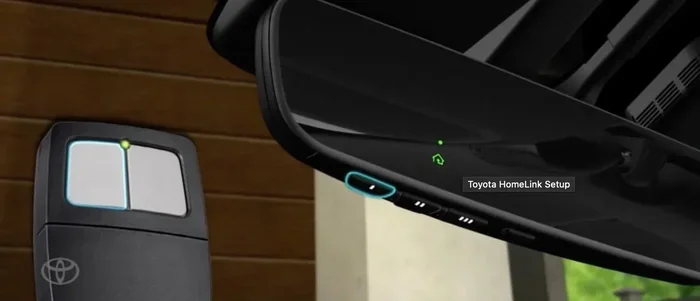
The HomeLink button is a small, square or rectangular control panel usually mounted inside your vehicle, near the rearview mirror or on the console. It typically features three buttons with small LED indicator lights and may include a HomeLink logo or a house icon. Understanding what the HomeLink button looks like helps you program your garage door opener quickly and safely from the comfort of your car.
Key Takeaways
- The HomeLink button is a small, square panel with three buttons and LED lights, usually found near the rearview mirror or on the center console.
- It looks different depending on your vehicle — some have a glossy black finish, while others blend into the mirror or visor.
- The HomeLink indicator light tells you if the system is programmed, learning, or needs a reset.
- Locating the HomeLink button is easy once you know where to look inside your car.
- HomeLink is compatible with most garage door openers and works as a convenient wireless garage door control.
- Resetting HomeLink is simple and takes just a few minutes if you run into issues.
📑 Table of Contents
What Does the HomeLink Button Look Like on Your Garage Door?
If you have ever wondered what the HomeLink button looks like, you are not alone. Many drivers see the term but never really look for it inside their vehicle. The HomeLink button is a small control panel built into your car. It lets you open and close your garage door without using a separate remote.
Most HomeLink systems feature three buttons arranged in a row. Each button has a tiny LED light above or beside it. The panel itself is usually black or matches the interior color of your vehicle. Some cars place it on the rearview mirror, while others mount it on the sun visor or center console.
The HomeLink button often has a small house icon or the word HomeLink printed on it. This makes it easy to spot once you know what you are looking for. The HomeLink indicator light will blink or stay solid depending on what the system is doing. A blinking light usually means the system is learning a new signal.
Quick Tip: If you cannot find your HomeLink button, check your vehicle owner’s manual. It will show you the exact HomeLink button location for your specific make and model.
Knowing what the HomeLink button looks like is the first step to using it. Once you spot it, you can program your garage door opener in minutes. It saves you from fumbling with multiple remotes every time you pull into the driveway.
Where Is the HomeLink Button Located?
The HomeLink button location varies from car to car. But no matter the vehicle, it is always placed somewhere easy to reach while driving. Let us look at the most common spots where you will find your HomeLink system.
Inside the Vehicle
Most vehicles place the HomeLink button inside the cabin. It is designed to be within arm’s reach of the driver. This way, you can open the garage door without taking your eyes off the road for long. The HomeLink car integration makes this process smooth and safe.
On the Sun Visor
Many cars have the HomeLink visor button mounted on the sun visor. You will find it clipped to the side that faces the window. It is a small, flat button panel that blends right into the visor design. Some visors have a flip-up cover to protect the buttons.
On the Rearview Mirror
In some vehicles, the HomeLink rearview mirror has the control panel built into its base. This is common in luxury cars and trucks. The HomeLink mirror button looks like a small rectangular strip at the bottom of the mirror. It may also include a compass or temperature display nearby.
On the Center Console
A few vehicles place the HomeLink control on the center console or dashboard. This location is common in trucks and larger SUVs. The HomeLink mounting location here is usually near the climate controls or the shift lever. It keeps the system within easy reach of the driver’s right hand.
Common Mistake: Many drivers confuse the HomeLink button with the garage door remote. They are not the same thing. The HomeLink system is wired into your vehicle, while the remote is a separate handheld device. If your garage door does not respond, check that you are using the HomeLink system correctly.
Quick Tips for Finding Your HomeLink Button
- Look near the rearview mirror first — this is the most common spot.
- Check the sun visor if nothing is near the mirror.
- Search the center console or dashboard in trucks and SUVs.
- Consult your vehicle owner’s manual for the exact HomeLink button location.
- Look for a small house icon or the word HomeLink printed nearby.
What Does the HomeLink Button Look Like in Different Vehicles?
The HomeLink button design changes depending on the vehicle brand and model. While the function stays the same, the appearance can differ quite a bit. Here is a closer look at how the HomeLink system appears in different types of vehicles.
Comparison Table: HomeLink Button by Vehicle Type
| Vehicle Type | Typical HomeLink Location | What It Looks Like | Indicator Light |
|---|---|---|---|
| Luxury Sedans | Rearview mirror base | Small rectangular panel, sleek finish | LED light on mirror housing |
| Trucks & SUVs | Center console or visor | Three-button panel, matte black | Blinking or solid LED above buttons |
| Compact Cars | Sun visor or overhead console | Flat button strip, compact size | Small light near buttons |
| Minivans | Overhead console or visor | Three buttons with HomeLink logo | Green or amber LED |
Luxury Vehicles
In luxury vehicles, the HomeLink system often blends seamlessly into the interior. The HomeLink car button may be hidden inside the mirror or integrated into the overhead console. These vehicles often have a more refined look, with the HomeLink system appearing as a subtle, elegant panel rather than a bulky control unit.
Trucks and SUVs
Trucks and SUVs tend to have the most visible HomeLink setup. The three-button panel is usually mounted on the overhead console or the sun visor. It is easy to spot because of its larger size compared to sedans. The HomeLink wireless control in these vehicles is built for convenience and heavy use.
Sedans and Compact Cars
Compact cars often have a smaller, more discreet HomeLink setup. The HomeLink button may be a single or dual button on the visor. It is designed to take up minimal space. Despite its size, the garage door control works just as well as in larger vehicles.
Expert Insight: The appearance of the HomeLink button does not affect its performance. Whether it is a sleek mirror-integrated design or a visible three-button panel, the HomeLink system works the same way across all vehicle types. Focus on the function, not the look.
How to Identify Your HomeLink Button
Identifying the HomeLink button is straightforward once you know the key features. The system has a few telltale signs that set it apart from other controls in your vehicle.
The Three-Button Panel
The most common HomeLink setup features three buttons in a row. Each button controls one garage door or gate. The buttons are usually square or rectangular with rounded edges. They are spaced evenly apart and sit flush with the panel surface. Above or beside each button, you will find a small HomeLink indicator light.
The Single Button Setup
Some vehicles, especially older models or compact cars, have a single HomeLink button. This button is larger and may be oval-shaped. It serves the same purpose as the three-button panel but controls only one garage door. The HomeLink indicator light is usually built into the button itself.
HomeLink Indicator Light
The HomeLink blinking light is one of the most important features of the system. Here is what different light patterns mean:
- Solid light: The HomeLink system is programmed and ready to use.
- Blinking light: The system is in learning mode and waiting for a signal.
- No light: The system may need a reset or the battery may need replacement.
Quick Tips for Identifying Your HomeLink Button
- Look for the house icon or HomeLink text near the buttons.
- Check for a small LED light above or beside the panel.
- Press any button gently — if the indicator light blinks, you have found the HomeLink system.
- Compare the look with images in your vehicle owner’s manual.
- Remember that the HomeLink button is always inside the vehicle, never outside.
Key Takeaway: The HomeLink button is a small, unobtrusive panel with three buttons and an LED light. It is designed to be functional and easy to use. Once you spot it, you will never struggle to find it again.
Common HomeLink Button Issues and Fixes
Even though the HomeLink system is reliable, you may run into issues from time to time. Understanding what the HomeLink button looks like helps you troubleshoot problems faster. Here are the most common issues drivers face.
HomeLink Button Not Working
If your HomeLink button does not respond, the first thing to check is the indicator light. A solid light means the system is programmed correctly. If there is no light, the system may need a reset. Try clearing all programmed buttons and starting the HomeLink programming process again.
Another common cause is a weak battery in your garage door transmitter. The HomeLink system needs a strong signal to work properly. Replace the battery in your garage door remote and try again.
HomeLink Blinking Light Problems
A HomeLink blinking light that does not stop can be frustrating. This usually means the system is stuck in learning mode. To fix this, hold down all three HomeLink buttons for 10 seconds. The lights should all turn off, resetting the system.
If the blinking continues, you may need to perform a full HomeLink reset. Consult your vehicle manual for the exact steps. In most cases, holding the two outside buttons for 20 seconds will clear all stored signals.
How to Reset HomeLink
Resetting the HomeLink system is simple and takes just a few minutes. Here is how to do it:
- Turn your vehicle ignition to the ON position.
- Hold down all three HomeLink buttons for 10 seconds.
- Release the buttons and wait for the indicator light to turn off.
- Press and hold the HomeLink button you want to program.
- Press and release the learn button on your garage door opener.
- Return to your vehicle and press the HomeLink button twice within 30 seconds.
Common Mistake: Many drivers try to program HomeLink with the vehicle engine off. Always set the ignition to ON before starting the programming process. This ensures the HomeLink system has power to receive the garage door signal.
Tips for Using Your HomeLink Button
The HomeLink system is one of the most convenient features in modern vehicles. Here are some tips to get the most out of your HomeLink vehicle integration.
Programming Your HomeLink
Programming your HomeLink button is easier than most people think. You do not need any special tools or technical knowledge. Just follow the steps in your vehicle manual or the steps listed above. Most HomeLink programming takes less than five minutes.
Make sure your garage door opener is nearby when you start programming. You will need to press the learn button on the opener unit, which is usually located on the back or side of the motor. Have your garage door remote handy as a backup during the setup process.
HomeLink Compatibility Tips
The HomeLink system is compatible with most garage door openers on the market. This includes major brands like Chamberlain, LiftMaster, Genie, and Craftsman. If your opener does not have a learn button, you may need a universal garage door opener adapter.
Here are some compatibility tips to keep in mind:
- Check your garage door opener model before programming HomeLink.
- Use the HomeLink universal system if your opener is older.
- Some gated communities and commercial doors may require a different HomeLink setup.
- Always test the HomeLink button after programming to confirm it works.
When to Replace Your HomeLink System
HomeLink systems are built to last the life of the vehicle. However, if the buttons stop responding or the indicator light stays off after a reset, it may be time for a replacement. HomeLink replacement units are affordable and easy to install.
You can also upgrade to a newer HomeLink model if your vehicle supports it. Newer HomeLink systems offer better range and faster response times. They also support more garage door frequencies, making them more versatile than older models.
Expert Insight: If you frequently rent or borrow vehicles, the HomeLink system is a great reason to learn what the HomeLink button looks like. It works across many different car brands, so you will always know how to use it no matter whose car you are driving.
Key Takeaways
- The HomeLink button is a small panel with three buttons and an LED indicator light, usually found near the rearview mirror or on the sun visor.
- It looks different in every vehicle but always serves the same purpose — controlling your garage door from inside the car.
- The HomeLink indicator light tells you if the system is programmed, learning, or needs attention.
- Locating the HomeLink button is easy once you know the common mounting spots inside the vehicle.
- HomeLink is compatible with most garage door openers and works as a reliable garage door control system.
- Resetting HomeLink is simple and can fix most common issues in just a few minutes.
- Understanding what the HomeLink button looks like empowers you to use this feature confidently every day.
Conclusion
So, what does the HomeLink button look like? It is a small, neat panel with three buttons and a tiny light. It sits inside your vehicle, usually near the mirror or on the visor. The HomeLink button may look different from car to car, but its purpose is always the same — to give you hands-free control over your garage door.
Learning to identify and use your HomeLink system is one of the best things you can do for daily convenience. It saves time, reduces clutter from multiple remotes, and makes your life easier every time you come home. Whether you drive a luxury sedan, a rugged truck, or a compact car, the HomeLink system works the same way.
Now that you know what the HomeLink button looks like, take a moment to find it in your own vehicle. Once you spot it, try programming your garage door opener. It only takes a few minutes, and you will wonder how you ever managed without it. The HomeLink system is a small feature that makes a big difference in your daily routine.
Keep your vehicle manual handy for reference. And remember, if you ever run into issues, a quick reset almost always solves the problem. The HomeLink wireless control is built to be dependable, and with the right knowledge, you will get the most out of it every single day.
Frequently Asked Questions
What Does the HomeLink Button Look Like on a Ford Vehicle?
On Ford vehicles, the HomeLink button is typically a small three-button panel located on the overhead console near the rearview mirror. It often has a black or charcoal finish with small LED lights above each button. Some Ford models place it on the sun visor instead.
Can I Replace the HomeLink Button Myself?
Yes, you can replace the HomeLink button yourself in most vehicles. The replacement unit is affordable and installs easily. Simply remove the old panel, connect the new one, and reprogram your garage door opener. Always refer to your vehicle manual for specific steps.
How Do I Know if My HomeLink Button Is Working?
Press any HomeLink button and check for the indicator light. A solid light means the system is programmed and ready. A blinking light means it is in learning mode. If nothing happens when you press the button, the system may need a reset or new battery.
Is HomeLink the Same as a Garage Door Remote?
No, HomeLink and a garage door remote are not the same. The HomeLink system is built into your vehicle and wired to the electrical system. A garage door remote is a separate handheld device. However, both control your garage door using the same radio frequency signals.
What Should I Do if My HomeLink Button Stops Working?
First, try resetting the HomeLink system by holding all three buttons for 10 seconds. If that does not work, check the battery in your garage door opener. You may also need to reprogram the HomeLink button from scratch. Consult your vehicle manual for detailed troubleshooting steps.
Does Every Vehicle Have a HomeLink Button?
Most modern vehicles come equipped with a HomeLink system. However, some older or base model vehicles may not have it. If your vehicle does not have HomeLink, you can install an aftermarket universal garage door opener that mounts inside the car.