Where to Get a QR Code Made Easy for Any Business Today
Finding the right place to create a QR code is easier than most business owners think. Whether you run a small shop or a large dealership, free and paid QR code generators can help you connect with customers instantly. This guide walks you through the top options, key features, and practical tips to get your QR code for business up and running today.
You have probably seen those square black-and-white patterns everywhere. They are on restaurant menus, parking tickets, product boxes, and even car dealership flyers. These are QR codes, and they have become one of the simplest ways to connect people with information. If you have been wondering where to get a QR code for your own business, you are in the right place.
Creating a QR code for business does not require any coding skills or expensive software. There are many free and paid tools available today that make the process fast and easy. In this guide, we will walk you through the best platforms, show you how to choose the right type of code, and share tips that actually work. Whether you are a small shop owner or managing a large automotive dealership, this article has you covered.
Key Takeaways
- Free QR code generators like QR Code Generator and Beaconstac offer great starting points for new businesses.
- Paid platforms provide advanced features like tracking, analytics, and dynamic QR codes for deeper insights.
- Custom QR codes with branded colors and logos boost trust and scan rates significantly.
- Automotive businesses can use QR codes for inventory lookup, service menus, and marketing campaigns.
- Dynamic QR codes let you update the destination URL without reprinting the code.
- Testing your QR code before printing or publishing is a simple step many people skip.
- Mobile-friendly landing pages are essential for a smooth user experience after a scan.
📑 Table of Contents
- What Is a QR Code and Why Does Your Business Need One?
- Where to Get a QR Code: Free Tools
- Where to Get a QR Code: Paid Platforms
- Comparison: Free vs. Paid QR Code Platforms
- How to Choose the Right QR Code for Your Business
- Step-by-Step: Creating Your First QR Code Today
- Final Thoughts on Getting Your QR Code
What Is a QR Code and Why Does Your Business Need One?
A QR code, which stands for Quick Response code, is a type of barcode that stores information. When someone scans it with their phone camera, it takes them to a website, a PDF, a video, or any online link you choose. Think of it as a digital bridge between the physical world and the internet.
Businesses use QR codes for many reasons. They make it easy for customers to find your website, view your menu, or learn about a product. In the automotive industry, a dealership might use a QR code for cars to link to a vehicle listing or a service booking page. The beauty of a QR code is that it removes friction. The customer does not need to type a long web address. They just point their phone and go.
Types of QR Codes You Should Know
Not all QR codes are the same. Understanding the difference helps you choose the right tool and the right plan.
- Static QR Codes: These are fixed. The data inside them cannot be changed once created. They are great for simple tasks like linking to your homepage.
- Dynamic QR Codes: These are flexible. You can change the destination URL anytime without creating a new code. This is perfect for campaigns that evolve.
- Custom QR Codes: These let you add your brand colors, logo, and unique design. They look more professional and build trust with customers.
Where to Get a QR Code: Free Tools
If you are just starting out, free QR code generators are a fantastic place to begin. You do not need to spend a single dollar to create a working code. Here are some of the best free options available today.
QR Code Generator (qr-code-generator.com)
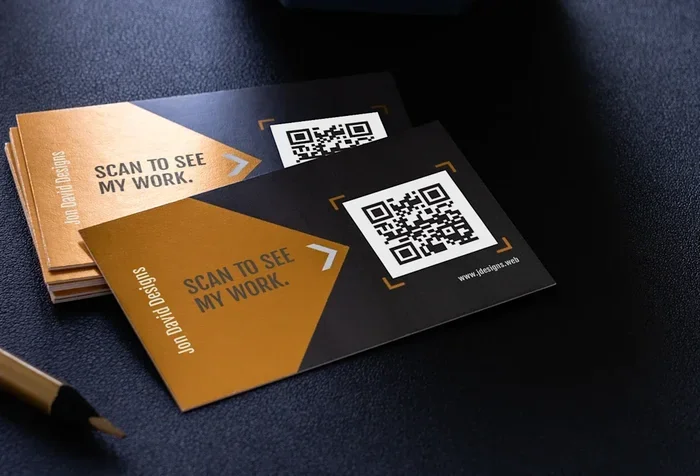
This platform is one of the most popular free QR code makers on the web. You simply type in your URL, pick a design, and download the code. It supports static codes for free, and the interface is very beginner-friendly. The site also offers a QR code for business cards template, which is a nice touch for small business owners.
Beaconstac
Beaconstac offers a free tier that lets you create basic QR codes for marketing purposes. It is widely used by QR code marketing professionals because it supports both static and dynamic options. The free plan has some limits, but it is a solid starting point for testing the waters.
QRCode Monkey
QRCode Monkey is a completely free tool with no watermarks. You can create custom QR codes with your own logo and brand colors. It supports a wide range of data types, including URLs, text, emails, and Wi-Fi logins. For a business that wants a polished look without spending money, this is a top choice.
Canva
Many people already use Canva for graphic design. What they may not know is that Canva also has a built-in QR code maker. You can design your code right inside a flyer or poster layout. This saves time and keeps your branding consistent across all materials.
Where to Get a QR Code: Paid Platforms
When your business grows, free tools may not be enough. Paid QR code platforms offer advanced features that free versions simply cannot match. Let us look at the best paid options.
QR Code Generator PRO
The paid version of QR Code Generator unlocks dynamic QR codes, scan tracking, and detailed analytics. You can see how many people scanned your code, where they were located, and what device they used. This data is incredibly valuable for measuring your QR code marketing efforts. Plans start at a reasonable price, making it accessible for small businesses.
Bitly
Bitly is best known for URL shortening, but it also offers a powerful QR code service. Its strength lies in the analytics and link management features. If your QR code for dealership needs to track customer engagement, Bitly is a strong contender. The platform integrates well with other marketing tools, which is a big plus.
Scanova
Scanova specializes in QR codes for automotive and retail businesses. It offers dynamic codes, bulk creation, and custom branding options. The platform is designed with businesses in mind, not just individual users. If you need to create many codes at once, Scanova’s bulk feature saves a ton of time.
Comparison: Free vs. Paid QR Code Platforms
Choosing between free and paid tools depends on your needs. Here is a simple comparison to help you decide.
| Feature | Free Tools | Paid Platforms |
|---|---|---|
| Cost | $0 | $5 to $200+ per month |
| Dynamic QR Codes | Rare or limited | Included in most plans |
| Scan Analytics | Not available | Full tracking and reports |
| Custom Branding | Basic or none | Logo, colors, and design options |
| Bulk Creation | Not supported | Available for large campaigns |
| Customer Support | Community or email only | Priority support and onboarding |
| Best For | Small businesses and testing | Growing businesses and campaigns |
The table above makes it clear that paid platforms shine when you need data and flexibility. However, free tools are perfect for getting started and testing the concept. Many businesses begin with free options and upgrade as they see results.
How to Choose the Right QR Code for Your Business
Not every QR code for business serves the same purpose. The right choice depends on what you want to achieve. Here are some practical guidelines to help you decide.
Step 1: Define Your Goal
Ask yourself what you want the code to do. Do you want people to visit your website? Download an app? Join a newsletter? Each goal may require a different type of code. For example, a QR code for cars at a dealership lot should link directly to a vehicle listing page.
Step 2: Choose Static or Dynamic
If the destination will never change, a static QR code works fine. But if you plan to update the link, run a time-sensitive promotion, or track scans, go with a dynamic QR code. The ability to edit without reprinting saves money and effort in the long run.
Step 3: Make It Branded
A plain black-and-white code works, but a custom QR code with your brand colors and logo looks much more professional. Customers are more likely to scan a code that looks trustworthy and on-brand. Use your QR code generator to add these visual elements.
Step 4: Test Before You Print
This is a step many businesses skip, and it causes problems. Always scan your code with multiple phones before printing thousands of copies. A code that does not work on certain devices or in certain lighting conditions can hurt your campaign. Testing takes only a minute but saves a lot of headaches.
Quick Tips for Better QR Codes
- Make the code large enough. A code that is too small is hard to scan, especially on printed materials.
- Add a call to action. Tell people what will happen when they scan. Say “Scan to view our latest vehicles” instead of just placing the code without context.
- Place codes in high-traffic areas. A QR code for marketing on a wall nobody looks at will not get scans. Put it where people naturally look.
- Use short URLs. Long URLs create busy, dense codes that are harder to scan. Shorten the link first for a cleaner result.
- Provide a fallback option. Not everyone knows how to scan a code. Include a short URL or text alternative for those who need it.
Common Mistakes to Avoid
Even experienced business owners make mistakes with QR codes. Here are the most common ones and how to avoid them.
- Using a code without a clear purpose: A QR code that just sits there without telling the user what to do will be ignored. Always pair it with a clear instruction.
- Choosing the wrong size: A tiny code on a billboard or a large poster will frustrate users. Make sure it is easy to scan from the expected distance.
- Ignoring analytics: If your QR code platform offers tracking data, use it. Without analytics, you have no idea if your campaign is working.
- Using a static code for a changing offer: If you run a weekly promotion, a static code means reprinting every time. A dynamic QR code solves this problem instantly.
- Forgetting mobile optimization: The page your code leads to must work perfectly on a phone. A slow or broken mobile page will drive customers away.
Expert Insights: How Automotive Businesses Use QR Codes
The automotive industry has embraced QR codes in creative ways. Dealerships use them to link to virtual tours of vehicles. Service centers place codes on windshield stickers that link to appointment booking pages. Parts departments use codes on shelves so technicians can quickly look up the right component.
One dealership in Ohio reported a 30% increase in service bookings after placing QR codes on service reminder postcards. The codes linked directly to their online scheduling system. Customers loved the convenience, and the dealership saved money on phone staff time.
Another example comes from a car parts retailer who uses QR codes for marketing on their product labels. When a customer scans the code, they see a video of the part in action, along with installation instructions and a link to purchase. This simple addition boosted their online sales by 18% in just three months.
These examples show that QR codes for automotive are not just a trend. They are a practical tool that drives real results. The key is to start simple, test what works, and scale up over time.
Step-by-Step: Creating Your First QR Code Today
Ready to create your own QR code? Follow these simple steps and you will have a working code in under five minutes.
- Choose a platform. Pick one from the free or paid options discussed earlier in this article. QRCode Monkey and QR Code Generator are excellent starting points.
- Enter your data. Type in the URL you want the code to point to. Make sure it is a mobile-friendly landing page that loads quickly.
- Select the code type. Choose static for a fixed link or dynamic if you want flexibility and tracking.
- Customize the design. Add your brand colors, upload your logo, and choose a style that matches your materials.
- Test the code. Scan it with at least two different phones to make sure it works perfectly.
- Download and use. Save the code in a high-resolution format like PNG or SVG. Print it, share it digitally, or add it to your website.
That is it. You now know where to get a QR code and how to create one that actually works for your business. The process is simple, fast, and costs nothing if you start with a free tool.
Final Thoughts on Getting Your QR Code
Creating a QR code for business is one of the easiest and most cost-effective marketing steps you can take. Whether you choose a free QR code generator or invest in a paid QR code platform, the key is to start. Do not overthink it. Pick a tool, create your first code, and test it with real customers.
The world has gone mobile, and QR codes are one of the simplest ways to meet your customers where they are. A well-designed QR code for dealership or QR code for cars can open new doors for your business. It bridges the gap between what people see in the physical world and the digital experience they expect today.
Remember the tips shared in this guide. Define your goal, choose the right type of code, make it branded, test before printing, and always track your results. These small steps add up to big improvements in how your business connects with customers. Start with a free QR code maker today and see how quickly this simple tool can make a difference for your business.
Frequently Asked Questions
Is it free to create a QR code?
Yes, many platforms like QRCode Monkey and Beaconstac offer free QR code generation. These free tools create static codes that work well for basic needs. If you want dynamic codes with analytics, you may need a paid plan.
What is the difference between a static and dynamic QR code?
A static QR code has fixed data that cannot be changed after creation. A dynamic QR code lets you update the destination URL without changing the code itself. Dynamic codes also provide scan tracking and analytics, which static codes do not offer.
Can I customize my QR code with my brand colors and logo?
Absolutely. Most QR code generators allow you to add brand colors, insert your logo, and choose unique designs. Custom QR codes look more professional and tend to get higher scan rates because they build trust with customers.
Are QR codes still relevant for automotive businesses?
Yes, QR codes for automotive are very relevant. Dealerships use them for vehicle listings, service bookings, and parts lookups. They provide a fast, contactless way for customers to access information from their phones. The automotive industry continues to find new and creative uses for this technology.
How do I know if my QR code is working?
The easiest way is to simply scan it with your phone. Use at least two different devices and check that it loads the correct page. If you use a paid QR code platform, you can also view scan analytics to see how many people are scanning and from where.
What should my QR code link to?
It depends on your goal. Common destinations include your website, a specific landing page, a booking form, a menu, or a social media profile. Always make sure the linked page is mobile-friendly and loads quickly for the best user experience.
=== CONCLUSION ===
Where to get a QR code is a question with a very simple answer. There are many excellent tools available, both free and paid, that make the process easy for any business. Whether you are a small local shop or a large automotive dealership, creating a QR code for business is one of the smartest moves you can make today. Start with a free QR code generator, test your code, and watch how this small square pattern opens up new ways to connect with your customers. The sooner you start, the sooner you will see the results.