How to Use AUX in a 2009 Volkswagen Jetta for Beginners
Using AUX in a 2009 Volkswagen Jetta is simple and affordable. This guide walks you through everything from finding the aux port to troubleshooting common issues. You will learn how to connect your phone, improve audio quality, and enjoy your favorite music on the road.
There is nothing better than cruising down the road in your 2009 Volkswagen Jetta with your favorite playlist pumping through the speakers. Whether you are commuting to work or taking a weekend road trip, having your own music at your fingertips makes every drive more enjoyable. The good news is that using AUX in a 2009 Volkswagen Jetta is one of the easiest upgrades you can make. You do not need to be a tech expert or a car mechanic to get it working.
This guide is designed for beginners who want to learn exactly how to set up and use an AUX connection in their Jetta. We will cover everything from finding the aux port to choosing the right cable and fixing common problems. By the end of this article, you will feel confident connecting your phone, MP3 player, or any other device to your car stereo. Let us get started.
Key Takeaways
- Easy Connection: The 2009 Jetta has a standard 3.5mm aux input on the stereo unit, making it simple to plug in any device.
- No Special Tools Needed: You only need a basic aux cable to get started. No expensive adapters or tools required.
- Better Sound Quality: Using AUX delivers cleaner audio compared to FM transmitters or Bluetooth adapters.
- Common Issues Are Fixable: Most AUX problems like static or no sound can be solved with simple troubleshooting steps.
- Works With Any Device: iPhones, Androids, MP3 players, and tablets all work with the Jetta aux port.
- Keep Your Cable Safe: Proper storage and care of your aux cable extends its life significantly.
📑 Table of Contents
- What Is AUX and Why Does It Matter?
- What You Need to Get Started
- Step-by-Step Guide to Using AUX in Your 2009 Jetta
- Troubleshooting Common AUX Problems
- AUX vs Other Audio Options for the 2009 Jetta
- Tips for Getting the Best AUX Audio Experience
- Can You Use AUX With Other Accessories in Your 2009 Jetta?
- Maintaining Your 2009 Jetta Audio System
- Conclusion
What Is AUX and Why Does It Matter?
AUX stands for auxiliary input. It is a standard audio connection that lets you play sound from an external device through your car speakers. The 2009 Volkswagen Jetta comes with a built-in aux port on the factory stereo system. This means you can skip FM transmitters and enjoy direct, high-quality audio from your phone or music player.
Before AUX ports became standard, drivers had limited options. FM transmitters were popular but often produced static and poor sound quality. CDs were the go-to choice for many. Today, an aux cable is the simplest and most reliable way to bring your personal music library into your car. The 3.5mm jack is universal, which means it works with almost every device you own.
How the AUX Port Works in the 2009 Jetta
The 2009 Jetta stereo system includes a dedicated aux input. This is typically a 3.5mm female jack located on the face of the radio unit. When you plug in a cable, the stereo switches to aux mode and plays audio from your device instead of the radio. The system uses your car’s existing speakers, so the sound quality depends on your stereo setup.
One great thing about the 2009 model is that it was built during a time when aux inputs were becoming standard across Volkswagen models. You do not need to upgrade your stereo to use AUX. The factory unit handles it perfectly. This makes the Jetta a great choice for drivers who want a simple and effective audio solution.
What You Need to Get Started
Setting up AUX in your 2009 Jetta requires very little. The simplicity of this connection is one of its biggest advantages. Here is everything you need before you begin.
The Right Aux Cable
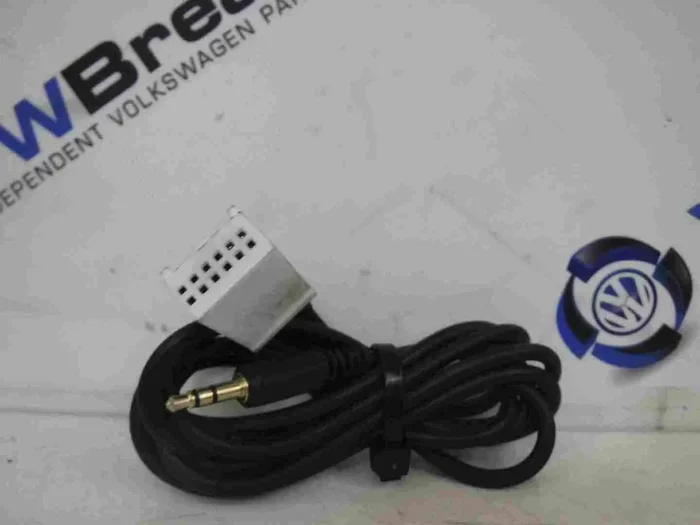
The most important item is a standard 3.5mm aux cable, also called an aux cord or audio cable. These cables have a 3.5mm plug on each end. One end plugs into your phone or device, and the other plugs into the Jetta’s aux port. You can find these cables at any electronics store, gas station, or online retailer. They are inexpensive and widely available.
When choosing a cable, look for one that is at least 3 to 6 feet long. This gives you enough slack to place your phone comfortably in the car. Braided cables tend to last longer than thin plastic ones. A quality cable will not break down after a few months of daily use.
Optional Accessories
While you do not need much, a few optional accessories can improve your experience. A cable management clip keeps your aux cord tidy and prevents it from sliding behind the stereo. A phone mount holds your device at eye level so you can skip tracks without taking your eyes off the road. Some drivers also like a cable extender if the built-in cable is too short for their setup.
You might also want to clean the aux port with a small brush or compressed air. Over time, dust and lint can build up inside the port. A clean connection ensures the best possible audio quality. This is a simple maintenance step that many people overlook.
Step-by-Step Guide to Using AUX in Your 2009 Jetta
Now that you have your cable ready, let us walk through the setup process. Follow these steps carefully and you will be listening to your music in just a few minutes.
Step 1: Locate the Aux Port
Open the center console of your 2009 Volkswagen Jetta. Look at the face of the factory stereo unit. The aux input is a small round hole labeled “AUX” or marked with a headphone icon. It is usually located on the lower left or right side of the stereo face. In some models, it may be behind a small flip cover or door.
If you are having trouble finding it, check your owner’s manual. The manual will show you the exact location of the aux port on your specific trim level. The 2009 Jetta S, SE, and GLI models all include this feature as standard equipment. You do not need any special trim to access the aux input.
Step 2: Plug in the Cable
Take one end of your 3.5mm aux cable and gently insert it into the aux port on the stereo. Push it in until you feel it click into place. Do not force it. The connection should feel snug but not tight. Next, plug the other end into your phone, MP3 player, or whatever audio device you are using.
Make sure both plugs are fully inserted. A loose connection is the most common cause of audio problems. If the cable feels wobbly, try a different aux port or replace the cable. Sometimes the issue is simply a dirty or damaged connector.
Step 3: Switch to Aux Mode
Press the “AUX” button on your Jetta’s stereo face or use the source selector knob to switch to the aux input. The display should show “AUX” or the name of the connected device. If you do not see this, press the button again or try unplugging and replugging the cable.
Once you are in aux mode, start playing music on your device. You should hear it coming through your car speakers immediately. If the volume is too low, increase the volume on both your phone and the car stereo. Most people find that keeping the phone volume at about 75% and adjusting the car stereo from there gives the best results.
Step 4: Adjust the Settings
Your 2009 Jetta stereo has several settings that can affect your aux experience. The bass and treble controls let you fine-tune the sound to your preference. If your stereo has a fader control, you can adjust the balance between front and rear speakers. These small adjustments can make a big difference in how your music sounds inside the cabin.
You can also explore the EQ (equalizer) settings if your stereo has them. Presets like “Rock,” “Pop,” or “Jazz” adjust the frequency balance for different music genres. Experiment with these settings to find what sounds best for your favorite type of music. The aux connection gives you full control over your audio output.
Troubleshooting Common AUX Problems
Even with a simple setup like AUX, you may run into issues from time to time. Most problems are easy to fix without any special tools or professional help. Here are the most common issues and how to solve them.
No Sound at All
If you plug in your cable but hear nothing, start by checking the basics. Make sure both ends of the cable are fully inserted. Check that your phone is actually playing music and not paused. Verify that you have selected the aux source on your stereo. These simple steps solve the problem most of the time.
If the basics check out, try a different cable. Aux cables wear out over time, especially if they are bent or coiled tightly. A faulty cable is the number one cause of no sound issues. Also check that the aux port on your stereo is not blocked by debris. A quick cleaning with a toothpick or compressed air can fix this.
Static or Interference Noise
Static in your aux connection usually comes from a few sources. A damaged cable is the most common culprit. Look for frayed wires or bent connectors. If the cable looks fine, try moving your phone away from other electronic devices. Some phones and chargers can cause interference when they are too close to the aux cable.
Another cause of static is a loose connection. If the cable does not fit snugly in the port, it may pick up interference. Try adjusting the angle of the plug or using a cable with a tighter-fitting connector. You can also try wrapping a small piece of tape around the plug to create a tighter fit.
Low Volume
If your music plays but the volume seems too quiet, there are a few things to check. First, make sure your phone volume is turned up all the way. Many devices have separate volume settings for different outputs. Next, check the car stereo volume. Some stereos have a “mute” function that can accidentally be activated.
The 2009 Jetta stereo also has a feature that lowers volume when the ignition is turned on. This is a safety feature to prevent sudden loud sounds. You can adjust this in your stereo settings if available. If none of these solutions work, your aux cable may be the problem. Try a new cable to see if the volume improves.
Intermittent Connection
If your audio cuts in and out, the cable connection is likely loose. This happens when the aux port or cable connector is worn out. Over time, the metal contacts inside the port can become dirty or bent. Gently cleaning the port with a toothpick can help restore a solid connection.
Another solution is to tape or tie the cable in place so it does not move while driving. Vibration from the road can cause a loose cable to lose contact. A simple cable clip or zip tie can keep everything secure. If the problem persists, replace the cable or consider having the aux port inspected by a professional.
AUX vs Other Audio Options for the 2009 Jetta
The 2009 Jetta gives you several ways to play music in the car. Each option has its pros and cons. Understanding these differences helps you choose the best method for your needs.
AUX vs FM Transmitter
An FM transmitter broadcasts your phone’s audio to an unused FM frequency on your car radio. While this works without a cable, the sound quality is noticeably worse. FM transmitters often produce static, interference, and limited frequency range. An aux cable provides direct connection with much cleaner audio.
FM transmitters also depend on your location. In crowded radio markets, finding a clear frequency can be challenging. An aux connection eliminates this problem entirely. For pure sound quality and reliability, AUX is the clear winner.
AUX vs Bluetooth Adapter
A Bluetooth adapter plugs into the aux port and lets you stream music wirelessly from your phone. This is a great option if you want to avoid cables. However, Bluetooth adapters can introduce slight audio delay and compression. The 2009 Jetta does not have built-in Bluetooth, so a Bluetooth adapter adds this capability.
The advantage of a Bluetooth adapter is convenience. You do not need to plug in a cable every time you get in the car. However, the adapter needs to be charged and paired each time. For the best sound quality and simplest setup, a direct aux cable is hard to beat. If you want wireless convenience, a Bluetooth adapter is a good secondary option.
AUX vs USB Connection
Some 2009 Jetta models include a USB port on the stereo. USB connections can charge your device while playing music and sometimes support playback controls through the stereo interface. However, not all USB ports support audio playback. The USB port may only work for charging.
An aux connection is more universally compatible. Any device with a headphone jack works with AUX. USB audio support varies by device and stereo model. If your USB port supports audio, it is a nice bonus. But for guaranteed compatibility, the aux input is the most reliable option.
Tips for Getting the Best AUX Audio Experience
Once your AUX setup is working, a few simple tips can help you get the most out of it. These small adjustments make a noticeable difference in sound quality and daily convenience.
Keep Your Cable Organized
A messy cable can be annoying and even damage your port over time. Use a cable organizer clip to keep the aux cord tidy. Route the cable along the center console so it does not interfere with the gear shift or cup holders. A well-organized cable setup also makes it easier to unplug and store your device when you leave the car.
Store Your Cable Properly
When you are not using the aux cable, store it loosely coiled in a dedicated compartment or bag. Avoid wrapping it tightly around your device or stuffing it in a glove box. Proper storage prevents tangling and reduces wear on the cable connectors. A cable that is stored well can last for years.
Clean Your Connectors Regularly
Dust and lint accumulate in aux ports and cable connectors. Every few weeks, inspect both ends of your cable and the aux port on your stereo. Use a soft brush or compressed air to remove any debris. Clean connectors ensure a strong signal and prevent static or sound dropouts.
Use a High-Quality Cable
Not all aux cables are created equal. A cheap, thin cable may produce poor sound or break quickly. Look for cables with gold-plated connectors, which resist corrosion and provide a better signal. Braided cables are more durable than standard plastic ones. Investing in a quality cable pays off in reliability and sound performance.
Keep Your Device Software Updated
While this may seem unrelated, keeping your phone or music app updated can improve your aux experience. Software updates sometimes fix audio glitches and improve playback performance. A smoothly running device means fewer interruptions when you are on the road.
Can You Use AUX With Other Accessories in Your 2009 Jetta?
The aux input in your 2009 Jetta is versatile. It works with more than just your phone. Here are some creative ways to use the aux port beyond basic music playback.
Using a GPS Device
If you use a standalone GPS navigator, you can plug it into the aux port to hear turn-by-turn directions through your car speakers. This is especially useful if your GPS does not have its own speaker. The aux connection gives you clear audio guidance without needing to mount a separate speaker.
Connecting a Portable Speaker
Some drivers like to bring a small portable speaker for outdoor use. The aux cable works the same way when you are away from the car. You can use the same cable and cable to connect your speaker to your phone. This versatility makes the aux connection even more valuable.
Playing Music from a Laptop or Tablet
Long road trips are more fun with a larger music library. You can connect a laptop or tablet to the Jetta aux port and play music from your hard drive or streaming app. Just make sure your device is charged or plugged into a power source to avoid battery drain during your drive.
Maintaining Your 2009 Jetta Audio System
Your car stereo and aux input are part of your vehicle’s overall electronics system. Taking care of them helps them last longer and perform better. Simple maintenance habits go a long way.
Keep the stereo face clean and free of dust. Wipe it down regularly with a soft microfiber cloth. Avoid using harsh chemicals that could damage the display or buttons. If you notice any issues with your stereo, such as flickering or unresponsive buttons, address them early before they become bigger problems.
It is also worth noting that regular car maintenance supports your audio system. A healthy electrical system ensures consistent power to your stereo. If you notice electrical issues elsewhere in your vehicle, such as dimming lights or slow cranking, have them checked promptly. A well-maintained car keeps all systems, including your audio, running at their best.
For more information on car maintenance and electrical troubleshooting, you might find it helpful to check whether a bad battery can cause the wrench light to come on. Understanding your vehicle’s warning lights helps you catch potential issues early and keep your Jetta running smoothly.
Conclusion
Using AUX in a 2009 Volkswagen Jetta is one of the simplest and most rewarding upgrades you can make. It gives you direct access to your personal music library with excellent sound quality and no complicated setup. Whether you are using a basic aux cable or exploring Bluetooth adapters, the 2009 Jetta makes it easy to enjoy your favorite audio on every drive.
Remember to choose a quality cable, keep your connections clean, and troubleshoot problems with patience. Most AUX issues are simple to fix and do not require professional help. With the right setup and a little care, your Jetta’s audio system will serve you well for years to come. Now that you know how to use AUX in your 2009 Volkswagen Jetta, you can hit the road with confidence and great sound.
If you are interested in learning more about your Jetta’s features, consider exploring how to use other functions in your car. Understanding your vehicle inside and out makes you a better driver and helps you get the most out of your ownership experience. Happy listening.
Frequently Asked Questions
Does the 2009 Volkswagen Jetta have an AUX input?
Yes, the 2009 Jetta includes a standard 3.5mm aux input on the factory stereo unit. This is available across most trim levels including the S, SE, and GLI models. The aux port is typically located on the face of the radio unit, near the lower left or right side.
What kind of aux cable do I need for my 2009 Jetta?
You need a standard 3.5mm aux cable with a 3.5mm plug on each end. These cables are universal and work with any device that has a headphone jack. Look for a cable that is 3 to 6 feet long for comfortable use in the car. Braided cables tend to be more durable than thin plastic ones.
Can I use Bluetooth if my 2009 Jetta does not have it built in?
Yes, you can add Bluetooth functionality to your 2009 Jetta by using a Bluetooth adapter that plugs into the aux port. The adapter connects wirelessly to your phone and sends audio to your car stereo through the aux connection. This is a great option if you want to avoid cables while still enjoying wireless audio.
Why is there static when I use the AUX port in my Jetta?
Static in the aux connection is usually caused by a damaged cable, a loose connection, or interference from nearby electronics. Try a different cable first, as worn-out cables are the most common source of static. Also check that the aux port is clean and that the cable plugs in fully. Moving your phone away from chargers or other devices can also reduce interference.
Can I charge my phone while using AUX in the 2009 Jetta?
Yes, you can charge your phone while using the aux connection. The aux cable only carries audio signals and does not interfere with your phone’s charging port. You can plug your phone into a USB charger or a car charger adapter while the aux cable is connected. This keeps your device powered during long drives.
Is AUX better than using an FM transmitter for music in my Jetta?
Yes, AUX is significantly better than an FM transmitter in terms of sound quality. An aux cable provides a direct, digital-quality audio connection with no static or interference. FM transmitters broadcast your audio over an FM frequency, which can pick up noise and lose clarity. For the best listening experience in your 2009 Jetta, AUX is the clear choice.