How to Reprogram Your Key Fob After Replacing the Battery
Reprogramming your key fob after a battery replacement is simpler than you think. Most vehicles require you to follow a few basic steps to resync the remote with your car’s computer system. This guide walks you through the exact process for popular brands and helps you avoid common mistakes that leave your key fob useless at the worst possible moment.
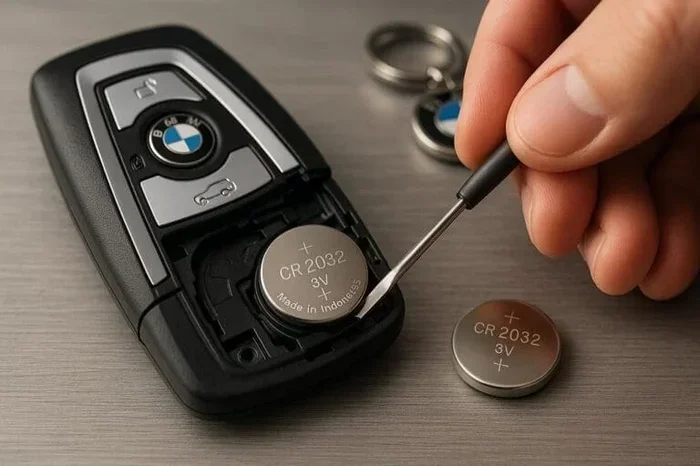
You just popped open your key fob, swapped out the tiny coin battery, and snapped it shut. But now the remote doesn’t work. The locks won’t respond. The panic button is dead. What went wrong? Here’s the thing most people don’t expect: replacing a key fob battery can sometimes break the connection between the remote and your car’s computer system. That means you need to reprogram the key fob after replacing the battery to restore full function. The good news? This is almost always a DIY job. You don’t need fancy tools, and you definitely don’t need to visit a dealership. In this guide, we’ll walk you through every step, brand by brand, so you can get back to using your remote in minutes.
Whether you drive a Toyota, Honda, Ford, or something else entirely, the basic idea behind reprogramming is the same. You’re telling the car’s computer to recognize the key fob again. Think of it like reconnecting a Bluetooth device. Once you know the steps, it becomes second nature. Let’s dive in and make sure your remote works perfectly again.
Key Takeaways
- Reprogramming is often necessary: Swapping the battery can reset your key fob’s connection to the vehicle.
- The process is quick: Most reprogramming steps take only 5 to 15 minutes.
- Brand-specific steps matter: Toyota, Honda, Ford, and other brands each have their own programming sequence.
- You can usually do it yourself: No dealership or mechanic is needed in most cases.
- Check your owner’s manual first: It contains the exact steps for your specific model.
- Replace with the right battery: Using the correct battery type prevents future reprogramming issues.
📑 Table of Contents
- Why Does a Key Fob Need Reprogramming After a Battery Swap?
- How to Reprogram a Key Fob for Popular Car Brands
- Tools and Materials You’ll Need
- Common Mistakes When Reprogramming a Key Fob
- How to Know If Reprogramming Was Successful
- When to Seek Professional Help
- Tips to Keep Your Key Fob Working Long-Term
- Final Thoughts
Why Does a Key Fob Need Reprogramming After a Battery Swap?
It can feel frustrating when a key fob stops working right after you change the battery. But there’s a logical reason behind it. Most modern key fobs store a small amount of encrypted data that links them to your specific vehicle. When you remove the battery, that data can temporarily reset. The car’s computer no longer sees the fob as a recognized device. This is a security feature. It prevents someone from using a stolen fob with a fresh battery to unlock your car.
The reprogramming process re-establishes that secure link. It’s not complicated, but it does require you to follow a specific sequence. Some cars need you to turn the ignition on and off a certain number of times. Others require you to press buttons on the fob in a particular order. Every brand has its own method, which is why we break it down by manufacturer below.
If you want to learn more about whether you even need to do anything after a battery swap, check out our guide on Do You Have To Do Anything After Replacing A Key Fob Battery. It covers the full picture of what happens when you change that tiny coin cell.
How to Reprogram a Key Fob for Popular Car Brands
The steps below cover the most common brands. Always double-check your owner’s manual for model-specific details. And if you’re wondering whether you can handle the battery replacement on your own, we have a full walkthrough at Can You Replace A Car Key Fob Battery Yourself that covers the entire process from start to finish.
How to Reprogram a Toyota Key Fob
Toyota makes the reprogramming process relatively straightforward. Here are the general steps that work for most Toyota models from 2005 and newer:
- Sit in the driver’s seat and close all doors.
- Turn the ignition from the OFF position to the ON position. Do this within 5 seconds.
- Repeat this ON-OFF cycle 3 times total. You should end on the ON position.
- The doors will lock and unlock automatically. This confirms you’ve entered programming mode.
- Within 40 seconds, press and hold the LOCK and UNLOCK buttons on the key fob simultaneously for 2 seconds.
- The doors will lock and unlock again to confirm the fob has been programmed.
- Repeat this step for any additional key fobs you want to add.
- Turn the ignition OFF to exit programming mode.
This process resyncs the Toyota key fob with the vehicle’s immobilizer system. If you have an older Toyota model, the steps might vary slightly. Always refer to the manual first.
How to Reprogram a Honda Key Fob
Honda uses a slightly different method. Here’s how to reprogram most Honda key fobs after a battery replacement:
- Turn the ignition to the ON position (do not start the engine).
- Press the SECURITY button on the dashboard. The security light should start blinking.
- Within 10 seconds, press the LOCK or UNLOCK button on the key fob.
- The security light should stop blinking and remain solid. This means the fob has been registered.
- Turn the ignition OFF and then back to ON to test the fob.
Honda vehicles also support a remote programming mode for adding new fobs. If you’re working with a used fob or replacing a lost one, the process is slightly longer but still manageable at home.
How to Reprogram a Ford Key Fob
Ford vehicles have their own unique programming sequence. Here’s what to do for most Ford models:
- Close all doors and windows.
- Turn the ignition from OFF to RUN 8 times within 10 seconds. The 8th time, leave it in the RUN position.
- The doors will lock and unlock to confirm you’ve entered programming mode.
- Within 20 seconds, press any button on the key fob.
- The doors will lock and unlock again to confirm the fob has been programmed.
- Repeat for additional fobs if needed.
- Turn the ignition OFF to exit programming mode.
Ford’s process is a bit more finicky with the timing. Make sure you count the ignition cycles carefully. If you mess up, just start over from step one.
How to Reprogram Key Fobs for Other Brands
Other brands like Chevrolet, Nissan, and Volkswagen follow similar patterns. The general approach involves entering a programming mode through the ignition, then pressing buttons on the fob to register it. If you’re unsure about your specific model, the owner’s manual is your best friend. You can also search online for your exact make, model, and year plus the word “key fob programming.” Most forums and YouTube channels have detailed video walkthroughs for nearly every vehicle on the road today.
If you’re concerned about whether a weak battery could cause issues with your key fob before you even replace it, read our article on Can A Bad Key Fob Drain Your Car Battery. It explains how a dying fob battery can cause strange electrical behaviors.
Tools and Materials You’ll Need
Reprogramming a key fob requires almost nothing in terms of tools. But having the right materials on hand makes the process smooth and frustration-free. Here’s what you should gather before you start:
- The correct replacement battery: Most key fobs use a CR2025 or CR2032 coin cell battery. Check your old battery or the owner’s manual to confirm.
- A clean, flat workspace: Key fobs are small and easy to lose. Work on a table with good lighting.
- A small flathead screwdriver or pry tool: Some fobs are tricky to open without scratching the casing.
- Your vehicle owner’s manual: This contains the exact programming steps for your specific model and year.
- A spare key fob (optional): Having a second fob makes the process easier because you can use it to test while programming the first one.
That’s it. No special diagnostic equipment. No expensive software. Just a fresh battery and a few minutes of your time.
Common Mistakes When Reprogramming a Key Fob
Even when you follow the steps carefully, mistakes happen. Here are the most common errors people make when reprogramming their key fob after a battery replacement:
Timing Mistakes
Most programming sequences have strict time windows. For Toyota, you have 40 seconds to register the fob after entering programming mode. For Ford, you need to cycle the ignition 8 times within 10 seconds. If you go too slow, the car exits programming mode, and you have to start over. Practice the steps a couple of times before you actually press any buttons on the fob.
Using the Wrong Battery
Not all key fob batteries are the same. Using a battery with the wrong voltage or size can cause the fob to malfunction even after reprogramming. Always match the battery type exactly. If you’re unsure, bring the old battery to an auto parts store and they’ll match it for you.
Not Closing All Doors
Many programming modes only activate when all doors and the trunk are fully closed. If a door is slightly ajar, the car might not recognize that you’ve entered programming mode. Double-check every door and window before you start.
Skipping the Owner’s Manual
Every vehicle is slightly different. The generic steps in this guide work for most models, but your specific year and trim might have unique requirements. The owner’s manual saves time and prevents frustration. If you’ve misplaced yours, search online for a free PDF version. Most manufacturers offer them on their websites.
How to Know If Reprogramming Was Successful
After you complete the programming steps, you need to verify that everything works correctly. Here’s what to check:
- Lock and unlock: Stand about 10 feet away from the car and press the LOCK and UNLOCK buttons. You should hear the doors engage and release.
- Panic button: Press the panic button. The horns should sound and the lights should flash.
- Remote start (if equipped): If your vehicle has remote start capability, test it now. Press the remote start button and confirm the engine turns on.
- Keyless entry: If your fob supports keyless entry, walk up to the car and press the door handle button. The doors should unlock without you pressing any button on the fob.
- Multiple fobs: If you programmed more than one fob, test each one individually to make sure they all work.
If any of these functions fail, repeat the programming process from the beginning. Sometimes it takes a second attempt for the car to fully register the fob. If the problem persists after multiple tries, there may be a deeper issue with the fob itself or the vehicle’s receiver module.
When to Seek Professional Help
Most reprogramming jobs are quick and easy. But there are situations where professional help makes sense:
- Multiple fobs won’t program: If you’ve tried several times and no fob will sync with the car, the issue might be with the vehicle’s receiver, not the fob.
- The fob is physically damaged: If the casing is cracked or the buttons are worn out, reprogramming won’t fix the problem. You need a replacement fob.
- You don’t have the owner’s manual: Some vehicles have complex programming procedures that are hard to find online. A locksmith or dealership can handle it quickly.
- Aftermarket fob compatibility issues: If you purchased a universal or aftermarket key fob, it might not be compatible with your vehicle’s system. A professional can help you find the right match.
For most people, though, reprogramming is a quick and satisfying DIY task. Once you’ve done it once, you’ll never forget the steps.
Tips to Keep Your Key Fob Working Long-Term
Prevention is always better than cure. Here are some simple habits that keep your key fob in great shape and reduce the need for frequent reprogramming:
- Replace the battery every 2 to 3 years: Don’t wait until the fob stops working. Proactive replacement prevents unexpected failures.
- Avoid exposing the fob to extreme temperatures: Heat and cold can damage the internal electronics and drain the battery faster.
- Handle the fob gently: Dropping a key fob can damage the internal circuit board. Use a protective case if you’re rough on your keys.
- Keep spare batteries on hand: A CR2025 or CR2032 battery costs just a few dollars. Stock up so you’re never caught off guard.
- Clean the contacts occasionally: A dirty battery terminal can cause intermittent fob problems. Use a dry cloth to clean the contacts inside the fob before inserting a new battery.
These small habits add up. They keep your key fob reliable and save you from the hassle of reprogramming more often than necessary.
Final Thoughts
Reprogramming your key fob after replacing the battery is one of those simple car maintenance tasks that anyone can do. It takes just a few minutes, requires no special tools, and follows a logical sequence that you can memorize after doing it once. Whether you drive a Toyota, Honda, Ford, or any other brand, the process follows a similar pattern: enter programming mode, register the fob, and confirm the connection.
The key is patience and attention to timing. Don’t rush through the steps, and make sure you’re using the correct battery type. If you run into trouble, your owner’s manual and online resources are full of model-specific guidance. And remember, if you ever feel stuck, a locksmith or dealership can always help you get it sorted.
Now that you know how to reprogram your key fob after a battery replacement, you can handle this situation with confidence the next time it comes up. No stress, no dealership visits, no wasted money. Just a quick fix that gets your remote working again in minutes.
Frequently Asked Questions
Do I need to reprogram my key fob after replacing the battery?
In most cases, yes. Replacing the battery can reset the encrypted connection between the fob and your car’s computer. Reprogramming re-establishes that link so the remote works again. However, some vehicles retain the programming even after a battery swap, so it depends on your specific make and model.
How long does it take to reprogram a key fob?
The entire process usually takes between 5 and 15 minutes. The exact time depends on your vehicle’s programming sequence and how many fobs you need to register. Most people complete it in under 10 minutes on their first attempt.
Can I reprogram a key fob myself, or do I need a professional?
You can almost always reprogram a key fob yourself at home. No special equipment is needed. The steps are built into your vehicle’s system and are detailed in the owner’s manual. Professional help is only necessary if multiple fobs fail to program or if the fob itself is physically damaged.
What battery should I use in my key fob?
Most key fobs use a CR2025 or CR2032 coin cell battery. Check your old battery or the owner’s manual to confirm the correct type. Using the wrong battery can cause the fob to malfunction and may require reprogramming again.
Why won’t my key fob work after I replaced the battery?
The most common reason is that the battery swap reset the fob’s pairing with the car. You need to reprogram the fob to restore the connection. If reprogramming doesn’t fix the issue, the new battery might be defective, or the fob’s internal electronics could be damaged.
Can a low key fob battery cause the car not to start?
Yes, in some vehicles a very low key fob battery can prevent the car from starting or recognizing the fob. This is especially common in push-button start systems. If your car won’t start and the fob battery is low, replacing the battery and reprogramming the fob usually resolves the issue. For more details on driving with a low key battery, check out our guide on Can I Drive My Car With A Low Key Battery.