How Do I Get Rid of the Service Light on My Dashboard
The service light on your dashboard is a maintenance reminder that tells you it is time for an oil change or routine checkup. You can usually reset it yourself using your trip meter, steering wheel buttons, or an OBD2 scanner. Knowing the right method for your vehicle saves time and money.
That little wrench or service symbol on your dashboard can be annoying. You know the one. It stays lit up and just won’t go away no matter what you do. If you have been Googling how to get rid of the service light on dashboard, you are not alone. Millions of drivers face this every year. The good news is that most of the time, it is a simple fix you can do at home.
Your car uses the service light to remind you about routine maintenance. It could be time for an oil change, a tire rotation, or a general inspection. Sometimes the light comes on because of a glitch or a dead battery. Either way, clearing it is usually straightforward. In this guide, we walk you through every method step by step.
We will cover what the light means, why it turns on, and exactly how to reset it. You will also learn when the light signals something more serious. By the end, you will feel confident handling this common car issue yourself.
Key Takeaways
- The service light is a maintenance reminder, not always a sign of a serious problem.
- Reset methods vary by vehicle brand, but most cars use the trip meter or steering wheel controls.
- An OBD2 scanner offers the most reliable reset for stubborn dashboard lights.
- Driving with the service light on is generally safe for short distances, but you should address it promptly.
- A bad battery or electrical issue can sometimes trigger the service light falsely.
- Regular maintenance prevents the light from coming back too soon.
📑 Table of Contents
- What Does the Service Light on Your Dashboard Mean?
- Why Does the Service Light Come On?
- How to Reset the Service Light on Your Dashboard
- Can You Still Drive With the Service Light On?
- Common Mistakes When Trying to Reset the Service Light
- When Should You See a Professional?
- Preventing the Service Light From Coming Back Too Soon
- Quick Tips for Resetting the Service Light
- Final Thoughts
What Does the Service Light on Your Dashboard Mean?
Understanding the Service Indicator
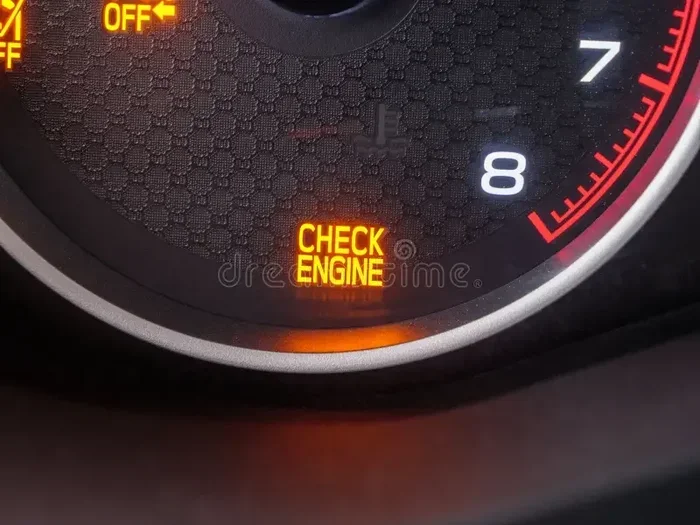
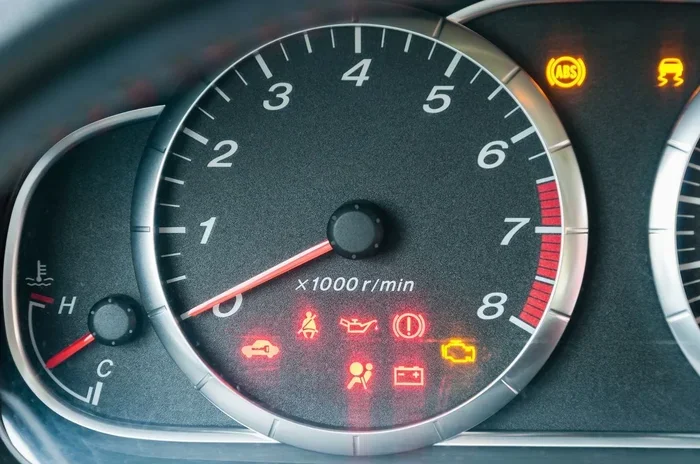
The service light on dashboard is a maintenance reminder. It is not the same as the check engine light. The service light typically looks like a wrench, a spanner, or the word “SERVICE.” It is part of your car’s oil life system or maintenance schedule tracker. When it comes on, your vehicle is telling you that a service interval has been reached.
Most modern cars use a mileage-based system. For example, your car might be programmed to remind you every 5,000 or 7,500 miles. Some vehicles use an oil life monitoring system that tracks driving habits instead of just mileage. Either way, the purpose is the same. Your car wants you to take it in for scheduled maintenance.
Common Symbols You Will See
Different car brands use different symbols for the service light. Here are the most common ones:
- Wrench icon: Used by Ford, Lincoln, and many other brands.
- Spanner icon: Common in European vehicles like BMW and Volkswagen.
- “SERVICE” text: Used by Toyota, Lexus, and some other brands.
- Oil can symbol: Often appears alongside the service light when an oil change is due.
If you are not sure what your symbol means, check your owner’s manual. It will have a full list of dashboard warning lights and what each one means. Understanding the symbol helps you respond correctly.
Why Does the Service Light Come On?
Scheduled Maintenance Reminders
The most common reason for the service light is a routine maintenance reminder. Your car’s computer tracks mileage and triggers the light when you reach the next service interval. This is normal and expected. It is your vehicle’s way of keeping you on track with car maintenance.
Typical service intervals include:
- Oil changes: Every 5,000 to 10,000 miles depending on the vehicle and oil type.
- Tire rotations: Every 5,000 to 7,500 miles.
- Brake inspections: Every 15,000 to 30,000 miles.
- Fluid checks: Every 30,000 miles or as specified by the manufacturer.
Once the service is completed, you need to reset the light manually in most cases. Some newer vehicles reset automatically after a dealership or service center completes the work.
Other Reasons the Light Activates
Sometimes the service light comes on for reasons other than routine maintenance. Here are a few less obvious causes:
- Dead or weak battery: A bad battery can cause the wrench light to come on because the electrical system resets unexpectedly.
- Electrical glitches: Voltage spikes or loose connections can trigger warning lights temporarily.
- Aftermarket accessories: Adding new electronics can sometimes interfere with the car’s computer system.
- Software updates: Some vehicles need a software update that resets maintenance data.
If the light comes on unexpectedly and you have not hit a service milestone, it is worth investigating further. A quick visit to a mechanic can rule out any underlying issues.
How to Reset the Service Light on Your Dashboard
Resetting the service light is different for every vehicle. However, there are three main methods that work for most cars. Let us walk through each one.
Method 1: Using the Trip Meter Reset Button
This is the most common method and works on many Toyota, Honda, Nissan, and Chevrolet models. Here is how to do it:
- Turn the ignition to the “ON” position without starting the engine.
- Locate the trip meter reset button. It is usually on the dashboard or steering column.
- Press and hold the button. Keep holding it while you complete the next step.
- Turn the ignition off and then back on. Continue holding the button.
- Wait for the light to blink or reset. This usually takes about 10 seconds.
- Release the button. The service light should now be off.
This method works well for vehicles with analog or basic digital displays. If the light does not reset, try the next method.
Method 2: Using the Steering Wheel Controls
Many newer vehicles use steering wheel buttons to navigate the dashboard menu. Here is the general process:
- Press the menu or settings button on the steering wheel.
- Navigate to the vehicle maintenance or settings menu. Use the arrow buttons to scroll.
- Find the service reminder or maintenance light option.
- Select “Reset” or “Yes” to clear the light.
- Confirm the reset and exit the menu.
For specific instructions, check your owner’s manual or search online for your vehicle’s make and model. The exact menu path varies widely between brands.
Method 3: Using an OBD2 Scanner
An OBD2 scanner is the most reliable tool for resetting the service light and checking for hidden codes. Here is how it works:
- Plug the OBD2 scanner into the diagnostic port. This port is usually under the steering wheel.
- Turn the ignition to the “ON” position.
- Follow the scanner’s on-screen instructions to read and clear codes.
- Select the maintenance light reset option if the scanner offers it.
- Remove the scanner and start the engine to confirm the light is off.
OBD2 scanners range from basic code readers to advanced diagnostic tools. You can buy a simple one for under $30 at most auto parts stores. If you prefer not to buy one, many auto parts stores like AutoZone will reset the light for free.
Can You Still Drive With the Service Light On?
Yes, you can generally drive with the service light on for short distances. The light is a reminder, not an emergency warning. Unlike the check engine light, the service light usually does not indicate a mechanical problem that could damage your car.
However, you should not ignore it for too long. If the light is on because you are due for an oil change, driving too long without one can hurt your engine. Clean oil keeps your engine running smoothly and prevents wear. Over time, old oil breaks down and loses its effectiveness.
If you are planning a long road trip, it is best to reset the light only after you have completed the service. If you want to know more about driving with the oil change light on, check out this guide on Can I Still Drive With The Oil Change Light On. It covers the risks and safe driving limits in detail.
One thing to watch for is if the service light starts flashing instead of staying solid. A flashing light is more urgent and could indicate a more serious issue. In that case, pull over safely and have your vehicle inspected.
Common Mistakes When Trying to Reset the Service Light
Resetting the service light seems simple, but people make mistakes that cause frustration. Here are the most common ones to avoid:
- Turning the ignition off too quickly: You need to hold the reset button long enough for the system to register the command. Rushing this step is the number one reason resets fail.
- Using the wrong reset method for your vehicle: Not all cars use the trip meter method. Some require the steering wheel controls or a scanner. Using the wrong method will not work.
- Ignoring the underlying maintenance need: Resetting the light without actually performing the service defeats the purpose. Your car still needs that oil change or inspection.
- Disconnecting the battery as a shortcut: Some people think removing the battery will clear the light. This can erase other important settings and codes. It is not a recommended method.
If you have tried resetting the light and it keeps coming back, there may be an underlying issue. A loose gas cap, a failing sensor, or an incomplete service can all cause the light to return. In these cases, it is best to consult a professional.
When Should You See a Professional?
Most of the time, resetting the service light is a DIY task. But there are situations where you should seek professional help:
- The light keeps coming back after you reset it: This could signal an unresolved maintenance issue or a deeper electrical problem.
- Multiple warning lights are on at the same time: If the service light appears alongside the check engine light or oil pressure light, get your car inspected right away.
- You are not comfortable working with your car’s electronics: There is no shame in visiting a mechanic or dealership. They can reset the light in minutes.
- Your vehicle is still under warranty: Some warranties require maintenance to be performed by a certified dealer. Check if you can take your Toyota to any dealer for service or if you need to stick with a specific location.
A professional can also run a full diagnostic to make sure the light came on for a legitimate reason. This gives you peace of mind and keeps your vehicle in good shape.
Preventing the Service Light From Coming Back Too Soon
Once you have successfully reset the service light, you probably want to keep it off. Here are a few tips to help:
- Keep track of your mileage: Use a phone app or notebook to log your miles between services. This helps you stay ahead of the next reminder.
- Follow the manufacturer’s maintenance schedule: Every vehicle has a recommended service schedule. Following it keeps your car running well and prevents unexpected lights.
- Address electrical issues promptly: If you notice flickering lights or a weak battery, get it checked. Electrical problems can trigger the service light unexpectedly.
- Keep your battery terminals clean: Corrosion on battery terminals can cause voltage drops that trigger dashboard lights.
Regular maintenance is the best way to prevent the service light from becoming a recurring nuisance. When you stay on top of oil changes and inspections, your car stays healthy and the light stays off.
Quick Tips for Resetting the Service Light
- Have your owner’s manual handy. It contains the exact reset procedure for your specific vehicle.
- Make sure the car is in park before starting the reset process.
- Try the reset method twice if it does not work the first time. Sometimes the system needs a second attempt.
- Use an OBD2 scanner for stubborn lights. It is the most foolproof method across all vehicle brands.
- Do not ignore the light for more than a week. Even if you just need an oil change, getting it done promptly keeps your engine protected.
Resetting the service light on dashboard is one of the simplest car maintenance tasks you can do. With the right method and a little patience, you will have that light off in no time.
Final Thoughts
The service light on your dashboard is there to help you, not to scare you. It is a friendly reminder that your car is due for routine maintenance. Whether you reset it using the trip meter, steering wheel controls, or an OBD2 scanner, the process is usually quick and easy.
Remember that the light is a signal to take care of your vehicle. Do not just reset it and forget about the maintenance it represents. Your car will thank you with better performance and a longer lifespan. If the light keeps coming back or you are unsure about what it means, a quick visit to a trusted mechanic can set your mind at ease.
Stay on top of your vehicle’s maintenance schedule and you will rarely have to deal with a stubborn service light. Drive safely and keep that car running strong.
Frequently Asked Questions
What is the service light on my dashboard?
The service light on dashboard is a maintenance reminder that tells you your vehicle is due for routine service like an oil change or inspection. It usually looks like a wrench or spanner icon. It is not an emergency warning but a scheduled maintenance notification.
How do I reset the service light after an oil change?
Most vehicles let you reset the light using the trip meter button or steering wheel controls. The exact steps vary by brand and model. You can also use an OBD2 scanner for a reliable reset. If you are unsure, consult your owner’s manual or visit a service center.
Can a bad battery cause the service light to come on?
Yes, a weak or dead battery can trigger the service light because it causes electrical fluctuations in the car’s system. If the light appeared after a battery issue, resetting the light after replacing or recharging the battery should resolve it. Check your battery health if the light keeps returning.
Is it safe to drive with the service light on?
It is generally safe to drive short distances with the service light on. The light is a maintenance reminder, not a critical warning. However, you should not delay service for too long. If the light is flashing or accompanied by other warnings, have your car inspected immediately.
Can I reset the service light myself or do I need a mechanic?
You can reset the service light yourself in most cases. The process usually involves the trip meter, steering wheel buttons, or an OBD2 scanner. Mechanics can also reset it quickly if you prefer not to DIY. The method depends on your vehicle’s make and model.
Why does my service light keep coming back after I reset it?
If the light keeps returning, it usually means the underlying maintenance has not been completed or there is an electrical issue. A loose gas cap, failing sensor, or weak battery can also cause the light to reappear. If resetting does not solve the problem, visit a mechanic for a diagnostic check.