How Do I Reset My Car Without Disconnecting the Battery
Resetting your car without disconnecting the battery is easier than most people think. You can use an OBD-II scanner, remove a fuse, perform a drive cycle, or use built-in reset options to clear error codes and warning lights. This guide walks you through each method step by step so you can handle common car resets safely and confidently.
Have you ever stared at a blinking warning light on your dashboard and thought, “I just need a fresh start”? You’re not alone. Many car owners face this moment and assume they need to pop the hood, disconnect the battery, and wait for everything to reset. But here’s the good news — resetting your car without disconnecting the battery is not only possible, it’s often the better approach.
Disconnecting your battery can erase important settings like your radio presets, clock, and even power window configurations. It can also trigger new error codes in some vehicles. So why go through all that hassle when simpler methods exist? This guide shows you exactly how to reset your car the smart way, without losing a single setting.
Whether you’re dealing with a stubborn check engine light, an oil change reminder, or a TPMS warning, there’s a method that works for you. Let’s dive into the details and get your car back to running smoothly.
Key Takeaways
- You don’t need to disconnect your battery to reset most car systems anymore.
- An OBD-II scanner is the fastest and most reliable way to clear error codes.
- Removing and reinserting a fuse can reset specific systems like the oil change light.
- A drive cycle naturally clears minor fault codes after a series of driving conditions.
- Never ignore persistent warning lights even after a reset — they may signal a real problem.
- Resetting the wrong system can cause issues, so always follow the correct method.
- Keep your owner’s manual handy for model-specific reset instructions.
📑 Table of Contents
- Why Would You Need to Reset Your Car Without Disconnecting the Battery?
- Method 1: Use an OBD-II Scanner to Reset Your Car
- Method 2: Remove and Reinsert the Fuse
- Method 3: Perform a Drive Cycle
- Method 4: Use the Car’s Built-In Reset Option
- What Happens After You Reset Your Car?
- Common Mistakes to Avoid When Resetting Your Car
- Final Thoughts on Resetting Your Car Without Disconnecting the Battery
Why Would You Need to Reset Your Car Without Disconnecting the Battery?
Cars today are packed with computers and sensors. These systems monitor everything from engine performance to tire pressure. Sometimes they need a reset to clear old data or error codes. Here are the most common reasons you might want to reset your car without pulling the battery:
- Clearing a check engine light after fixing the underlying issue.
- Resetting the oil change reminder after an oil change.
- Clearing a TPMS warning after inflating your tires.
- Resetting a wrench light on your dashboard.
- Clearing fault codes stored in the car’s computer.
- Restarting the car’s adaptive learning after a repair.
When you disconnect the battery to reset these systems, you risk losing all your personalized settings. You also may not fully clear the codes in newer vehicles. That’s why learning alternative reset methods is so valuable.
It’s also worth noting that does disconnecting battery reset codes in some older cars? Yes, it does. But modern vehicles with advanced computer systems often need more targeted approaches. The methods below work across most makes and models.
Method 1: Use an OBD-II Scanner to Reset Your Car
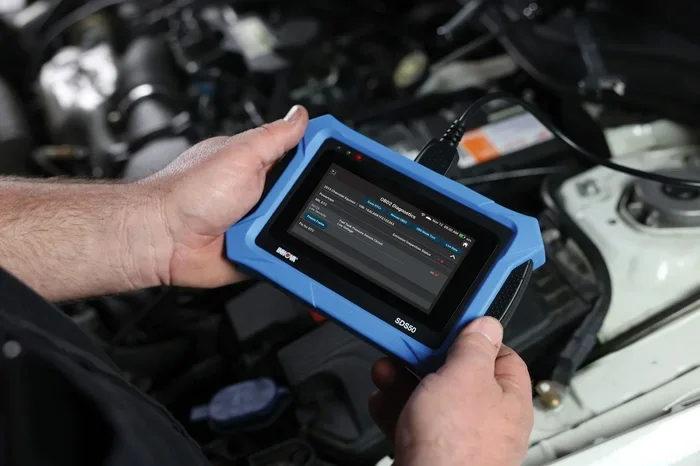
The most reliable way to reset your car without disconnecting the battery is by using an OBD-II scanner. This small device plugs into a port under your steering column and talks directly to your car’s computer. It reads and clears error codes with just a few clicks.
What Is an OBD-II Scanner?
OBD stands for On-Board Diagnostics. Every car sold in the United States since 1996 has an OBD-II port. This port gives you access to your car’s diagnostic system. A scanner reads the codes stored in the computer and can also clear them.
You can buy a basic OBD-II scanner for under $30 at most auto parts stores. Some models connect to your smartphone via Bluetooth, which makes them even easier to use.
How to Use an OBD-II Scanner
Follow these simple steps to clear your car’s error codes:
- Locate the OBD-II port under your steering column.
- Plug the scanner into the port.
- Turn the ignition to the “On” position (do not start the engine).
- Follow the on-screen prompts to read the codes.
- Note down any codes displayed for your records.
- Select the option to clear or erase the codes.
- Turn off the ignition and restart your car.
After you clear the codes, take your car for a short drive. If the issue is truly fixed, the check engine light should stay off. If it comes back, the problem may not be fully resolved. You can also check whether can you reset the check engine light without disconnecting the battery — and the answer is yes, with an OBD-II scanner.
Quick Tips for Using a Scanner
- Always write down the codes before clearing them. You’ll need them for future reference.
- Don’t clear codes just to pass an inspection. Fix the underlying problem first.
- Buy a scanner that supports your vehicle’s make and model for full compatibility.
- If you’re unsure about a code, search it online or ask a mechanic.
Method 2: Remove and Reinsert the Fuse
Another effective way to reset your car without disconnecting the battery is by removing a specific fuse. This method targets individual systems rather than the entire car. It’s great for resetting things like the oil change light or the service reminder.
Which Fuse Should You Remove?
Every car has a different fuse layout. Check your owner’s manual to find the right fuse. Common fuses used for resets include:
- The fuse for the instrument cluster (dashboard lights).
- The fuse for the ECU (Engine Control Unit).
- The fuse for the body control module.
Removing the wrong fuse won’t cause damage, but it also won’t reset the system you’re targeting. So always double-check before you pull anything.
Step-by-Step Fuse Removal Reset
- Turn off your car and remove the key from the ignition.
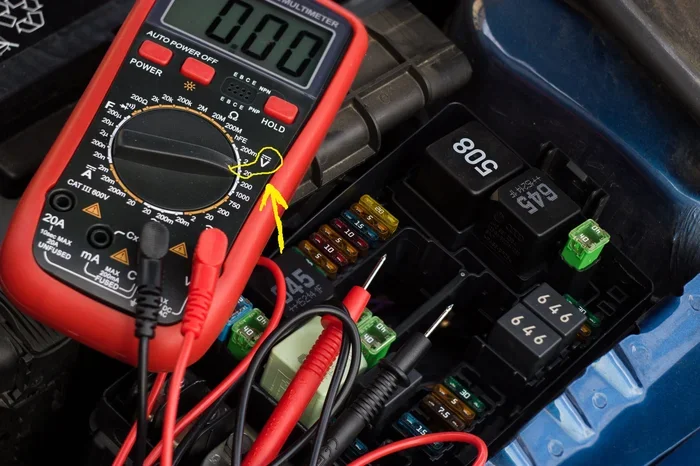
- Open the fuse box cover (usually located under the dashboard or in the engine bay).
- Use the fuse diagram in your owner’s manual to identify the correct fuse.
- Use a fuse puller or a pair of needle-nose pliers to remove the fuse.
- Wait 10 to 15 minutes.
- Reinsert the fuse firmly.
- Start your car and check if the warning light has reset.
This method works well for resetting the oil change light. Many people ask, “do you reset the oil change light?” and the answer is yes — removing the fuse is one of the easiest ways to do it. You can also check whether do you have to reset the light after an oil change, and in most cases, you do need to manually reset it.
Important Warnings
- Never remove fuses while the engine is running.
- Make sure you replace the exact same fuse you removed.
- Don’t pull multiple fuses at once — it can cause unexpected issues.
- If you’re uncomfortable with this method, try the OBD-II scanner instead.
Method 3: Perform a Drive Cycle
A drive cycle is a specific series of driving conditions that tells your car’s computer to relearn and clear minor fault codes. This method is completely passive — you don’t need any special tools. It works by running the car through a set of driving patterns that allow the computer to test various systems.
Why Does a Drive Cycle Work?
Your car’s computer stores fault codes when it detects a problem. Once the problem is fixed, the computer needs to confirm that the fix is working. A drive cycle gives the computer the chance to run its self-tests and clear old codes on its own.
This is especially useful after you’ve replaced a sensor or fixed a minor issue. The computer will recognize the repair and remove the warning from its memory.
How to Perform a Drive Cycle
While drive cycles vary by vehicle, here’s a general approach that works for most cars:
- Start with a cold engine (the car should have sat for at least 30 minutes).
- Idle the car for 2 to 3 minutes.
- Drive at moderate speed (30 to 40 mph) for 5 minutes.
- Accelerate gently to 55 mph and maintain that speed for 5 minutes.
- Decelerate gradually without braking hard.
- Stop and let the car idle for 2 minutes.
- Repeat the cycle two to three times.
After completing the drive cycle, check your dashboard. The check engine light should be off if the issue is resolved. You can also use an OBD-II scanner to confirm the codes are gone.
Quick Tips for a Successful Drive Cycle
- Don’t rush the process. Let the car reach operating temperature naturally.
- Avoid hard braking or aggressive driving during the cycle.
- Make sure your gas tank is at least half full.
- Some cars need a specific drive cycle — check your owner’s manual for details.
Method 4: Use the Car’s Built-In Reset Option
Many modern cars come with built-in reset features that let you clear certain lights and reminders without any tools. These options are usually hidden in the dashboard menu system or controlled by a combination of buttons on the steering wheel or dashboard.
Common Built-In Reset Options
Here are some systems you can often reset using your car’s built-in menu:
- Oil change reminder — usually found in the dashboard info menu.
- TPMS reset — some cars let you reset the tire pressure light from the settings menu.
- Service interval indicator — resets after a completed service.
- Maintenance light — common in older Toyota and Honda models.
How to Access the Reset Menu
The exact steps vary by car, but here’s a general process:
- Turn the ignition to the “On” position without starting the engine.
- Use the steering wheel buttons or the dashboard knob to navigate to the settings menu.
- Look for a “Maintenance” or “Vehicle Info” section.
- Select the system you want to reset.
- Hold the reset button for 3 to 5 seconds until the light flashes.
- Release the button and turn the ignition off and back on.
For Toyota owners, you can also check whether can I reset my own tpms sensor using the built-in menu. Many Toyota models allow you to reset the TPMS light directly from the dashboard without any external tools.
Which Systems Can You Reset This Way?
Not all systems respond to built-in resets. Here’s a quick comparison of what typically works:
| System | Built-In Reset Available? | Alternative Method |
|---|---|---|
| Oil change reminder | Yes (most models) | Fuse removal or OBD-II scanner |
| Check engine light | No | OBD-II scanner required |
| TPMS warning | Yes (many models) | OBD-II scanner or built-in menu |
| Wrench light | Yes (some models) | OBD-II scanner or dealer tool |
| ABS warning | No | OBD-II scanner required |
| Airbag warning | No | OBD-II scanner or dealer visit |
As you can see, the OBD-II scanner remains the most versatile tool for resetting your car without disconnecting the battery. It handles systems that built-in menus can’t reach.
What Happens After You Reset Your Car?
After you reset any system, your car needs time to relearn and recalibrate. Here’s what to expect and what to watch for:
The Computer Needs Time to Relearn
Your car’s computer adapts to your driving habits over time. This is called adaptive learning. When you reset the system, the computer goes back to its baseline settings. It may take a few days of normal driving for it to fully recalibrate.
You might notice some minor changes during this period. Your idle speed might fluctuate slightly, or the transmission might shift a bit differently. These are normal and temporary.
Warning Lights That Come Back
If a warning light returns after you reset it, that’s a clear sign something still needs attention. Don’t just reset the light again and ignore it. Here’s what to do:
- Use the OBD-II scanner to read the code again.
- Look up the code to understand what it means.
- Check the relevant system or component.
- Fix the problem before resetting again.
Remember, warning lights exist for a reason. They protect you and your car from serious damage. Ignoring them can lead to expensive repairs down the road.
When to See a Professional
Sometimes a reset isn’t enough. If you’ve cleared the codes and the light comes back immediately, or if you see multiple warning lights at once, it’s time to visit a mechanic. A professional has access to advanced diagnostic tools that can pinpoint the exact issue.
You should also see a professional if you notice any of these signs:
- The check engine light is flashing (not just steady).
- Your car is running rough or stalling.
- You notice a drop in fuel efficiency.
- Strange noises or vibrations accompany the warning light.
- Multiple systems show warnings at the same time.
These symptoms could indicate a serious problem that a simple reset won’t fix. Always prioritize safety and get expert help when needed.
Common Mistakes to Avoid When Resetting Your Car
Resetting your car seems straightforward, but a few common mistakes can cause problems. Here’s what to watch out for:
- Resetting without fixing the problem. Clearing a code without repairing the issue is like hiding a warning sign. The light will come right back.
- Using the wrong fuse. Removing the wrong fuse can disable important systems like your brakes or steering controls.
- Disconnecting the battery as a first resort. It erases settings and may not fully clear codes in modern cars.
- Ignoring the owner’s manual. Every car is different. Your manual has model-specific reset instructions that can save you time and frustration.
- Resetting too many times. Repeatedly clearing codes without fixing the root cause can damage the catalytic converter and other expensive components.
One thing many people wonder about is whether a bad key fob can drain your car battery. While this is a separate issue, it’s worth noting that electrical drain from a faulty key fob can trigger warning lights. If you’re dealing with mysterious battery and warning light issues, check your key fob battery too.
Final Thoughts on Resetting Your Car Without Disconnecting the Battery
Resetting your car without disconnecting the battery is not only possible — it’s the smarter choice for modern vehicles. Whether you use an OBD-II scanner, remove a fuse, perform a drive cycle, or use the built-in reset menu, each method has its place. The OBD-II scanner stands out as the most versatile and reliable option for clearing error codes across all systems.
Remember to always address the root cause before resetting any warning light. A reset is a tool, not a fix. Use it wisely, and your car will reward you with reliable performance and fewer trips to the mechanic.
Keep your owner’s manual in the glove box, invest in a good OBD-II scanner, and don’t be afraid to tackle those dashboard warnings head-on. With the right knowledge, you can handle most car resets yourself and save time and money in the process.
Frequently Asked Questions
Can I reset my check engine light without disconnecting the battery?
Yes, you can. The easiest way is to use an OBD-II scanner, which plugs into your car’s diagnostic port and clears the error codes electronically. You can also try removing the appropriate fuse or performing a drive cycle. Just make sure you fix the underlying issue first, or the light will come back.
How long does it take for a car computer to reset after a scan?
It usually takes one to three drive cycles for the car’s computer to fully relearn and confirm that everything is working correctly. During this time, the computer runs its self-tests on various systems. If no new problems are detected, the warning lights stay off permanently.
Will resetting my car erase any important data?
It depends on the method you use. An OBD-II scanner only clears error codes and won’t touch your personal settings. Disconnecting the battery, on the other hand, can erase radio presets, clock settings, and power window calibration. That’s why the methods in this guide are safer and more convenient.
Can I use a free OBD-II scanner app on my phone?
Yes, many free and low-cost apps connect to a Bluetooth OBD-II adapter. These apps can read and clear most diagnostic codes. However, they may not support all vehicle models or advanced features. For the most reliable results, consider a dedicated OBD-II scanner from a reputable brand.
Why does my check engine light keep coming back after I reset it?
If the light returns after a reset, it means the underlying problem hasn’t been fully resolved. The car’s computer detects the same issue again during its next self-test. Use the scanner to read the code, diagnose the problem, and fix it before resetting once more.
Is it safe to drive with the check engine light on?
It depends on the situation. If the light is steady and your car seems to be running normally, you can usually drive a short distance to a safe location or mechanic. If the light is flashing, reduce your speed and stop driving immediately. A flashing check engine light often indicates a serious engine misfire that can damage the catalytic converter.