How Do I Sync My Garage Door Opener to My Toyota
Syncing your garage door opener to your Toyota is a straightforward process that takes just minutes. Whether you have a Toyota with HomeLink or need a universal remote solution, this guide walks you through every step. You will learn how to program your garage door, troubleshoot common issues, and keep your system working smoothly for years to come.
There is something incredibly satisfying about pulling into your driveway and opening your garage door without ever leaving the driver’s seat. If you own a Toyota, you might already have the technology to do this built right into your vehicle. The system is called HomeLink, and it is one of the most convenient features Toyota offers.
But what if your Toyota does not have HomeLink? Or what if you already tried to sync your garage door opener and it just is not working? Do not worry. This guide covers everything you need to know. We will walk you through the HomeLink programming process, explain how universal remotes fit in, and help you fix the most common problems. By the end, you will know exactly how to sync your garage door opener to your Toyota, no matter what model you drive.
Let us get started. Whether you are a first-time Toyota owner or have been driving one for years, this guide will give you the confidence to take control of your garage door right from your vehicle.
Key Takeaways
- HomeLink is Toyota’s built-in system: Most newer Toyota models come with a factory-installed HomeLink system that lets you control your garage door directly from your vehicle.
- Programming takes only a few minutes: The sync process is simple and requires just a few steps, whether you are using the HomeLink buttons on your visor or mirror.
- Rolling code technology keeps you safe: Modern garage door openers use rolling codes, which change every time you use them, adding an extra layer of security.
- Universal remotes work as a backup: If your Toyota does not have HomeLink, a universal garage door remote is an easy and affordable alternative.
- Troubleshooting is usually simple: Most sync issues can be fixed by resetting the system, checking the frequency, or replacing the battery in your remote.
📑 Table of Contents
- What Is Toyota HomeLink and How Does It Work?
- How to Sync Your Garage Door Opener to Your Toyota
- What If Your Toyota Does Not Have HomeLink?
- Common Problems When Syncing a Garage Door Opener to Toyota
- How to Keep Your Toyota Garage Door System Working
- Is It Safe to Use HomeLink With My Garage Door?
- Quick Tips for a Smooth Sync Experience
- Frequently Asked Questions
- Conclusion
What Is Toyota HomeLink and How Does It Work?
HomeLink is Toyota’s built-in wireless control system. It allows you to operate your garage door, gate, or even your carport door directly from your vehicle. The system uses a small radio transmitter inside your car to communicate with your garage door opener. When you press a HomeLink button, it sends a signal that tells your door to open or close.
Most Toyota models from the past 15 years or so come with HomeLink as standard or optional equipment. You can usually find the HomeLink buttons mounted on the visor or on the overhead console. Some newer Toyota vehicles also support the Toyota app, which lets you control your garage door from your smartphone. If you are curious about what else your Toyota app can do, check out our guide on Can I Unlock My Car With The Toyota App to learn more about remote features.
HomeLink works with almost all garage door openers on the market today. It supports both rolling code and fixed code systems. Rolling code systems change the access code every time you use them, which makes them more secure. Fixed code systems use the same code every time, which is older but still widely used in many homes.
Which Toyota Models Support HomeLink?
The good news is that HomeLink is available on a wide range of Toyota vehicles. Here are some of the most popular models that include this feature:
- Toyota Camry – Available on most trim levels, especially higher-end models.
- Toyota RAV4 – Standard on many trims, making it very popular for families.
- Toyota Highlander – Comes with HomeLink on most versions.
- Toyota Tacoma – Available as an option on access cab and double cab models.
- Toyota Tundra – Often included in higher trim levels.
- Toyota Corolla – Available on newer models with the upgraded audio system.
- Toyota Sienna – Standard on most minivan trims.
If you are not sure whether your Toyota has HomeLink, look for the three small buttons on your visor or overhead console. They are usually labeled with small house icons. If you do not see them, your Toyota may still be able to control your garage door using a universal remote or an aftermarket solution.
How to Sync Your Garage Door Opener to Your Toyota
Now for the part you have been waiting for. Syncing your garage door opener to your Toyota is a simple process. You do not need any special tools, and you do not need to be a mechanic. Just follow these steps carefully, and you will be up and running in no time.
Step 1: Prepare Your Garage Door Opener
Before you start programming, you need to put your garage door opener into learning mode. This tells the opener to accept a new signal from your Toyota. The exact steps vary depending on the brand of your opener, but here is what to do for most models:
- Locate the learn button on your garage door opener motor. It is usually on the back of the unit or on the side panel.
- Press and release the learn button. You will usually see a small LED light turn on or blink.
- You typically have 30 seconds to complete the next step, so work quickly.
If you are not sure where the learn button is, check your garage door opener manual. You can also look up your specific model online for detailed instructions. For more general information about garage door systems and how they connect to vehicles, you may want to read our article on How To Connect Garage Door Opener To Homelink for additional guidance.
Step 2: Put Your Toyota in Programming Mode
Next, you need to put your Toyota’s HomeLink system into programming mode. Here is how:
- Get in your Toyota and make sure the engine is running or the vehicle is in accessory mode.
- Find the HomeLink buttons on your visor or overhead console.
- Press and hold the button you want to use for your garage door.
- After about 20 seconds, the HomeLink indicator light will start blinking rapidly. This means the system is ready to learn.
Some older Toyota models require you to hold the HomeLink button and simultaneously press the garage door opener’s handheld remote. Newer models may have a different sequence. Always refer to your Toyota owner’s manual for the exact method for your specific year and model.
Step 3: Send the Signal
Now you need to send the signal from your garage door remote to the Toyota HomeLink system:
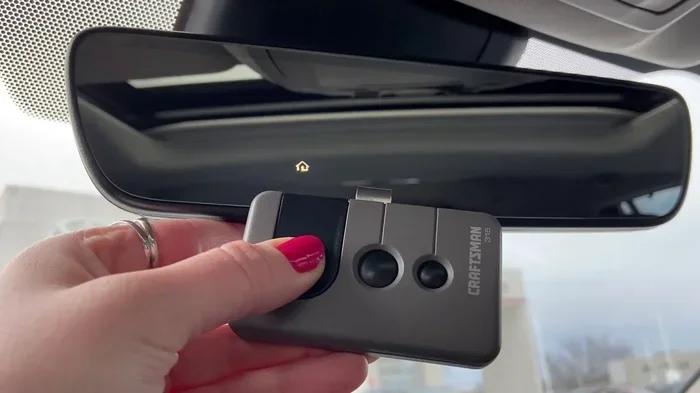
- Hold your handheld garage door remote close to the HomeLink button on your Toyota visor.
- Press and hold the button on your handheld remote.
- Watch the HomeLink indicator light on your Toyota. When it stays solid (not blinking), the signal has been received.
- Release both buttons.
That is it. Your Toyota has now learned the signal from your garage door opener. Press the HomeLink button in your Toyota, and your garage door should open or close.
Step 4: Test the System
Always test your new sync before you trust it completely. Park your car in the driveway, press the HomeLink button, and watch your garage door respond. If it opens or closes smoothly, you are all set. If nothing happens, do not panic. Move on to the troubleshooting section below.
What If Your Toyota Does Not Have HomeLink?
Not every Toyota comes with HomeLink. Older models and some base trim levels may not include this feature. But that does not mean you are out of luck. You have several options for controlling your garage door from your Toyota.
The most popular solution is a universal garage door remote. These small devices plug into your Toyota’s OBD-II port or replace your existing key fob. They are compatible with almost all garage door opener brands and are very affordable. You can find a universal remote for under $30 at most auto parts stores.
Another option is an aftermarket integration module. These devices connect to your Toyota’s electrical system and add garage door control functionality. Brands like GarageMate and DroneMobile offer solutions that work with most Toyota models. Some of these even let you control your garage door from your phone, which is a nice bonus.
If you are also interested in other key fob features for your Toyota, you might want to check out our article on Can I Remote Start My Toyota With The Key Fob. It covers some great features that work alongside garage door control.
Choosing the Right Universal Remote
When shopping for a universal garage door remote, keep these things in mind:
- Compatibility: Make sure the remote works with your specific garage door opener brand (Chamberlain, LiftMaster, Craftsman, Genie, etc.).
- Frequency: Most modern openers use 315 MHz or 390 MHz. Check which frequency your opener uses before buying.
- Vehicle compatibility: Some universals are designed specifically for certain vehicle brands. Look for ones that list Toyota as a compatible vehicle.
- Number of channels: If you have multiple garage doors or gates, choose a remote that supports multiple channels.
Common Problems When Syncing a Garage Door Opener to Toyota
Even when you follow the steps correctly, things can sometimes go wrong. Here are the most common issues people run into when syncing a garage door opener to their Toyota, along with simple fixes.
The HomeLink Light Blinks but Does Not Stay Solid
This usually means the HomeLink system did not pick up the signal from your handheld remote. Try these fixes:
- Move your handheld remote closer to the HomeLink button.
- Make sure the battery in your handheld remote is fresh. A weak battery is the number one cause of sync failures.
- Try the sync process again from the beginning.
- If you have a rolling code opener, you may need to use the “smart” or “learn” button method instead of the handheld remote method.
The Garage Door Opens But Then Immediately Closes
This is a safety feature called “reversing.” Your garage door opener senses an obstruction and immediately reverses. Check the following:
- Make sure nothing is blocking the garage door sensors.
- Clean the sensor lenses with a soft cloth.
- Adjust the sensor alignment if needed.
- Check the force settings on your garage door opener. The door may be set to reverse too easily.
HomeLink Works Once but Then Stops Working
If your HomeLink system worked at first but now does not respond, the most likely cause is a signal conflict. Some garage door openers use the same radio frequency as other nearby openers. This is called “code collision.” The fix is to reprogram your HomeLink system with a new code. You can also try resetting the HomeLink system completely by pressing and holding the two outer HomeLink buttons for 10 seconds. This clears all stored signals and lets you start fresh.
Battery Issues
Do not overlook the simple stuff. A dead or weak battery in your handheld remote or in your Toyota’s HomeLink system can cause all kinds of problems. Replace the battery in your handheld remote at least once a year. If your Toyota’s HomeLink system has a battery (some models do), replace it as needed too.
How to Keep Your Toyota Garage Door System Working
Once you have successfully synced your garage door opener to your Toyota, a little maintenance goes a long way. Here are some tips to keep everything working smoothly:
- Check your batteries regularly: Replace the batteries in your handheld remote and your Toyota’s HomeLink system at least once a year.
- Keep your HomeLink buttons clean: Dust and dirt can build up on the HomeLink buttons and cause intermittent issues. Wipe them down with a dry cloth every few months.
- Update your opener firmware: Some modern garage door openers have software updates that improve compatibility. Check with your opener manufacturer for updates.
- Test your system monthly: Press your HomeLink button once a month to make sure everything still works. This also gives you a chance to catch any issues early.
- Reprogram after a battery change: Some garage door openers reset their code when you change the battery. If this happens, you will need to re-sync your Toyota HomeLink system.
Taking care of your garage door opener system also means taking care of the door itself. A well-maintained garage door opens and closes more smoothly, which puts less strain on the opener motor. Lubricate the moving parts of your garage door every six months, and check the cables and springs for wear.
Is It Safe to Use HomeLink With My Garage Door?
Yes, HomeLink is very safe. Toyota designed the system with multiple layers of security. The rolling code technology we mentioned earlier is one of the biggest safety features. Because the code changes every time you use it, it is nearly impossible for someone to intercept and copy your signal.
HomeLink also uses encrypted signals on most newer Toyota models. This adds another layer of protection that makes it even harder for unauthorized users to access your garage. If you are concerned about security, make sure your garage door opener is set to rolling code mode and that you keep your handheld remote in a safe place.
For additional Toyota safety and convenience features, you might be interested in reading about whether you can drive your Toyota without a key fob. Check out our article on Can I Drive My Toyota Without A Key Fob for more information about keyless features in Toyota vehicles.
Quick Tips for a Smooth Sync Experience
Here are some extra tips that will make the syncing process easier and help you avoid frustration:
- Work in a clear area: Park your Toyota in the driveway with a clear line of sight to the garage door opener motor.
- Have your manual handy: Keep your garage door opener manual nearby. It will have the exact learn button location and programming steps for your specific model.
- Be patient: The 30-second window for programming can feel rushed. Stay calm and follow each step carefully.
- Use a helper: If possible, have someone press the handheld remote while you watch the HomeLink light on your Toyota. This makes it much easier to see when the signal is received.
- Try all three HomeLink buttons: If one button does not work, try a different one. Sometimes the first button has a stored code that needs to be cleared first.
Frequently Asked Questions
Can I sync more than one garage door to my Toyota HomeLink system?
Yes, you can. Most Toyota HomeLink systems have three buttons, and each button can be programmed to control a different garage door, gate, or other device. Simply repeat the programming process for each button using a different garage door opener signal. This is especially useful if you have a garage door and a gate or carport door that you want to control from your Toyota.
How long does it take to sync a garage door opener to a Toyota?
The entire process usually takes about 5 to 10 minutes. The actual programming is very quick, but you may need extra time if you need to locate the learn button on your opener or clear an existing code first. Having your garage door opener manual nearby can save you time.
Why does my Toyota HomeLink say “programming failed”?
A programming failure usually means the HomeLink system did not receive the signal from your handheld remote. This can happen if the battery in your remote is weak, if you are too far from the opener motor, or if there is interference from other nearby radio signals. Try replacing the battery in your remote, moving closer to the opener, and attempting the sync again. If the problem persists, try clearing the HomeLink system and starting over.
Do I need any special equipment to sync my garage door to my Toyota?
No special equipment is needed if your Toyota has HomeLink. You only need your handheld garage door remote and access to the learn button on your garage door opener motor. If your Toyota does not have HomeLink, you will need a universal garage door remote or an aftermarket integration module. These are widely available and easy to install.
Can I use HomeLink with a newer smart garage door opener?
Yes, HomeLink works with most modern smart garage door openers, including Chamberlain, LiftMaster, Craftsman, and Genie models. Some newer smart openers may require you to put them in a specific mode before syncing with HomeLink. Check your opener’s manual for instructions on how to enable HomeLink compatibility. If your opener supports Wi-Fi or Bluetooth, it should work with HomeLink as well.
What should I do if my garage door opens but does not close when I use HomeLink?
This is usually a sensor issue. Your garage door opener has safety sensors near the floor that detect objects in the door’s path. If the sensors are misaligned, dirty, or obstructed, the door will open but refuse to close. Clean the sensor lenses, check that nothing is blocking the sensor beam, and make sure the sensors are properly aligned. If the problem continues, check the force adjustment settings on your opener.
Conclusion
Syncing your garage door opener to your Toyota is one of the most rewarding small projects you can do. It adds real convenience to your daily routine and makes your vehicle feel even more integrated into your smart home setup. The process is straightforward, the technology is reliable, and the results are something you will appreciate every single time you pull into your driveway.
Whether you use the factory HomeLink system or a universal remote, the key is to follow the steps carefully and troubleshoot patiently when needed. Now that you know how to sync your garage door opener to your Toyota, you can enjoy the ease of keyless garage access every time you come home.
Take a few minutes today to set up your system. You will wonder how you ever lived without it. And if you run into any issues along the way, come back to this guide for help. Happy driving, and happy garage door controlling.