How to Reset the Maintenance Required Light on a Toyota CHR
The maintenance required light on a Toyota CHR is a friendly reminder that your car is due for routine service. Resetting it takes just a few minutes using the steering wheel buttons or instrument cluster. This guide shows you exactly how to reset the maintenance required light on a Toyota CHR so you can clear the warning and stay on schedule.
The maintenance required light on your Toyota CHR can feel like a nagging reminder. It usually shows up as a small wrench symbol on the dashboard. This light is part of the onboard maintenance system. It tells you that your vehicle is due for routine service based on mileage or time. Many owners worry when they see it, but the fix is simple. You can reset the maintenance required light on a Toyota CHR in just a few minutes. This guide walks you through the exact steps. You will learn two different methods that work for most model years. We also cover common mistakes and when to seek help. By the end, you will feel confident handling this yourself.
Knowing how to manage your Toyota CHR’s service indicators saves time and money. You do not need to visit a dealer just to clear a light. The process is the same whether you own a 2017 Toyota CHR or a 2023 model. The onboard computer tracks your driving habits and mileage. When it reaches a set interval, it triggers the maintenance reminder. Resetting the light simply tells the system that service has been completed. It is a quick reset that keeps your dashboard clean and your mind at ease. Let us dive into what this light really means before we reset it.
Key Takeaways
- Quick Reset: You can clear the maintenance required light in under five minutes with the steering wheel controls.
- No Tools Needed: The process uses your car’s onboard system—no special equipment required.
- Two Methods: Both the steering wheel buttons and the instrument cluster can be used to reset the light.
- Prevent Future Warnings: Creating a maintenance schedule helps you stay ahead of the service light.
- Check Oil Level: Always check your oil level when the light appears.
- Similar to Oil Life Reset: If you need to reset your oil life indicator, the steps are closely related.
📑 Table of Contents
What Is the Maintenance Required Light on a Toyota CHR?
The Wrench Symbol Explained
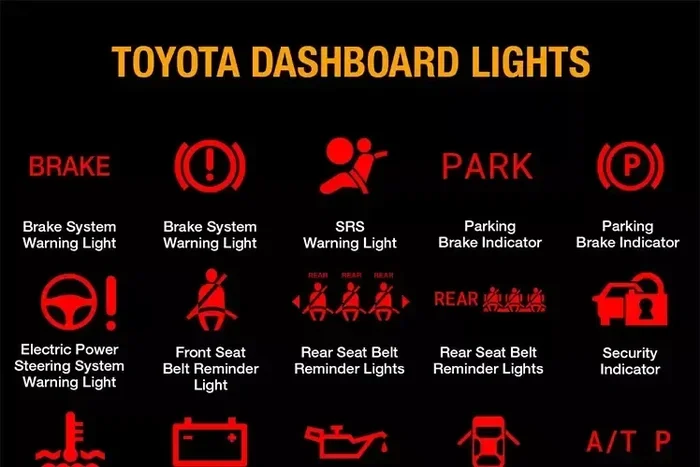
On the Toyota CHR, the maintenance required light looks like a small wrench. It appears in the instrument cluster behind the steering wheel. The symbol is designed to catch your eye without being alarming. It is different from the check engine light. The check engine light signals a problem with the engine or emissions system. The wrench light is purely a service reminder. It does not mean something is broken. It means it is time for an oil change or other routine maintenance. Understanding this difference helps you stay calm when the light comes on.
Why Does It Appear?
The maintenance system in the Toyota CHR uses a mileage counter. Most Toyotas are set to remind you every 5,000 miles or six months. The interval can vary based on driving conditions. If you drive in stop-and-go traffic or dusty areas, the system may shorten the interval. The light will also come on after a certain amount of time has passed, even if you have not hit the mileage target. This ensures your vehicle gets regular attention. The light will not turn off by itself. You must manually reset it after completing the service. That is where our step-by-step guide comes in.
How to Reset the Maintenance Required Light on a Toyota CHR
Before You Begin: Preparation Steps
Before you start the reset process, make sure you have everything ready. You do not need any special tools. Just your Toyota CHR key or push-start button. Here is what to do first.
- Park the car on a flat surface and turn off the engine.
- Make sure the headlights and all accessories are off.
- Locate the steering wheel controls or the instrument cluster buttons.
- Have the owner’s manual nearby if you need reference.
It is also a good idea to check your oil level before resetting the light. This ensures your oil is at the proper mark. If the oil is low, you should top it off first. A reset is only meaningful if the actual service has been done.
Method 1: Using the Steering Wheel Controls (Most Common)
This is the easiest way to reset the maintenance required light on a Toyota CHR. The steering wheel has a trip meter reset stalk on the left side. Follow these steps carefully.
- Turn the ignition to the ON position. Do not start the engine. Just press the push-start button once or turn the key to ON.
- Look at the instrument cluster. Press the trip meter reset stalk until the odometer or trip meter screen appears.
- Turn the ignition to the OFF position.
- Now, press and hold the trip meter reset stalk.
- While holding the stalk, turn the ignition back to the ON position.
- Keep holding the stalk for about 10 to 15 seconds.
- The maintenance light will start to flash.
- Release the stalk. The light should now be off.
If the light does not turn off, repeat the process. Make sure you hold the stalk firmly. Some models require a longer hold. This method works for most Toyota CHR years from 2017 to 2023. It is the same basic procedure used to reset your oil life indicator on many Toyota models.
Method 2: Using the Instrument Cluster Buttons
Some Toyota CHR trims or model years use buttons on the instrument cluster instead of a stalk. This method is just as effective. Here is how to do it.
- Turn the ignition to the ON position without starting the engine.
- Locate the menu or set buttons on the instrument cluster. These are usually small arrows or a select button.
- Press the menu button repeatedly until you see the maintenance service screen.
- Press and hold the set or OK button for several seconds.
- The maintenance required light should blink and then turn off.
- Turn the ignition off and then back on to confirm the reset.
This method relies on the onboard computer menu. If you are unsure which buttons to press, consult your owner’s manual. The manual provides exact button locations for your specific year. You can also find video guides online that match your trim level.
Common Mistakes That Prevent a Successful Reset
Leaving the Ignition in the Wrong Position
The most common mistake is not moving the ignition to the correct position at the right time. You must go from ON to OFF and back to ON during the reset sequence. If you leave the key in the START position or accidentally start the engine, the sequence breaks. You will need to start over. Take your time and follow each step precisely. Rushing through the process often leads to frustration.
Not Holding the Buttons Long Enough
Another frequent issue is releasing the reset stalk or button too early. The system needs a sustained hold to enter the reset mode. Ten to fifteen seconds is typical. If you let go after three seconds, nothing will happen. Wait until you see the maintenance light flash. That is your signal that the process is working. Patience is the key to a successful reset.
Resetting Without Completing the Service
Never reset the light just to make it disappear. If you have not changed the oil or performed the required service, the light will come back. The onboard computer tracks actual driving data. It will remind you again once the interval is reached. Always complete the maintenance first. Then reset the light. This keeps your Toyota CHR running reliably and prevents unexpected breakdowns.
When to Seek Professional Help
The Light Keeps Coming Back
If you reset the maintenance required light on your Toyota CHR and it returns within a few days, something may be off. The system might not be registering the service correctly. In rare cases, a faulty sensor or module causes the light to stay on. If you have tried both reset methods and the light persists, visit a Toyota service center. They have diagnostic tools that can read the maintenance system status. A quick scan can reveal if there is an underlying issue.
Other Warning Lights Appear
The maintenance required light is isolated to service reminders. If you see additional lights like the check engine light, oil pressure light, or battery light, do not ignore them. These indicate real problems that need immediate attention. Resetting the maintenance light will not fix those issues. Pull over safely and contact a mechanic. Always address warning lights in order of severity.
Staying Ahead of Maintenance on Your Toyota CHR
Creating a Maintenance Schedule
Prevention is the best way to deal with the maintenance required light. By keeping a regular schedule, you will rarely be caught off guard. You can create a maintenance schedule that matches your driving habits. Mark your calendar every 5,000 miles or six months. Set a phone reminder. This simple habit keeps your Toyota CHR in top shape and reduces surprise visits to the shop.
A good schedule includes oil changes, tire rotations, brake inspections, and fluid checks. The Toyota CHR is a reliable crossover, but it still needs consistent care. Following the factory-recommended intervals ensures longevity. It also helps maintain resale value. When you keep up with service, the maintenance light becomes a helpful tool rather than a nuisance.
The Link Between Oil Changes and the Maintenance Light
The maintenance required light is most commonly triggered by oil change intervals. Fresh oil keeps the engine lubricated and cool. Over time, oil breaks down and loses its effectiveness. The Toyota CHR’s engine performs best with clean oil. Resetting the light after an oil change signals that this vital task is complete. If you want to learn more about the relationship between oil life and the maintenance system, you can read about how to reset your oil life indicator for additional context.
Always use the recommended oil weight for your Toyota CHR. Check the owner’s manual or the oil cap under the hood. Using the wrong oil can trigger the light prematurely. It can also affect engine performance over time. Small details like this make a big difference in the long run.
Final Thoughts
Resetting the maintenance required light on a Toyota CHR is a straightforward task. You do not need a mechanic or expensive tools. Whether you use the steering wheel stalk or the instrument cluster buttons, the process takes just a few minutes. Remember to complete your service first, then follow the reset steps carefully. Avoid the common mistakes of rushing or skipping the service. If the light behaves strangely, a professional check is always a smart move. Keeping up with your Toyota CHR’s maintenance schedule ensures many miles of trouble-free driving. You now have the knowledge to handle this common situation with confidence.
Frequently Asked Questions
Can I drive my Toyota CHR with the maintenance required light on?
Yes, you can still drive the car. The light is a reminder, not a warning of immediate danger. However, you should schedule service soon to avoid missing an oil change or other routine maintenance.
Why does the maintenance required light come back after I reset it?
This usually happens if you have not actually completed the service. The onboard computer tracks mileage and time. Once the interval is reached again, the light will return. Always perform the maintenance first, then reset.
Is the maintenance required light the same as the check engine light?
No, they are different. The check engine light indicates an emissions or engine problem. The maintenance required light is simply a service reminder. The wrench symbol represents the maintenance light, while an engine icon represents the check engine light.
What year Toyota CHR models does this reset procedure work for?
The steering wheel stalk method works for most Toyota CHR models from 2017 through 2023. The instrument cluster button method is also common across these years. Always refer to your specific owner’s manual for exact instructions.
Do I need to reset the maintenance light after every oil change?
Yes, if the light was triggered by the oil change interval. Resetting it tells the system that the service is done. This prevents the light from staying on and reminding you unnecessarily.
What should I do if the reset procedure does not work?
Try both methods again, making sure to hold the buttons or stalk for the full duration. If the light still will not turn off, visit a Toyota dealership or qualified mechanic. They can run a diagnostic and check for any system faults.