How Do You Turn Off The BSM On A Toyota Camry Fast
Turning off the BSM (Blind Spot Monitor) on a Toyota Camry is simple once you know where to look. Whether you are dealing with a faulty sensor or just want a quieter ride, this guide walks you through the exact steps for every Camry model year. You will learn how to locate the BSM button, understand what happens when you disable it, and discover important safety considerations before you make any changes.
Driving a Toyota Camry is a smooth and comfortable experience. But sometimes, the safety alerts can feel a bit too talkative. The Blind Spot Monitor, or BSM, is one of those features that beeps and flashes when a car is in your blind spot. For many Camry owners, the question comes up: how do you turn off the BSM on a Toyota Camry?
The good news is that disabling the BSM on a Camry is straightforward. You do not need a mechanic or a trip to the dealer. In most cases, you can do it yourself in under a minute. Whether you have a 2018 Camry, a 2020 Camry, or the latest 2024 model, this guide will walk you through the exact steps. We will also cover what happens when BSM is off, whether you should turn it off, and how to turn it back on when you are ready.
Before we dive in, let us talk about what BSM actually does. The Blind Spot Monitor uses sensors mounted on the rear bumper to detect vehicles in your blind spots. When a car is detected, the system alerts you with a warning light on the side mirror and an audible beep. This feature is especially helpful when merging onto highways or changing lanes in heavy traffic. But there are times when you might want to turn off BSM on your Toyota Camry. Maybe the sensors are giving false alerts. Maybe you are towing a trailer and the sensors are too sensitive. Or maybe you just prefer a quieter driving experience.
Whatever your reason, understanding how to manage your BSM settings puts you in control of your vehicle. Let us get into the details.
Key Takeaways
- The BSM button is usually located near the steering column or on the dashboard: Finding it is the first step to turning the system off.
- Every Toyota Camry model year has a slightly different process: We cover the differences from 2018 through 2024.
- Disabling BSM does not turn off your rear cross traffic alert: These are two separate systems that need individual attention.
- You can re-enable BSM at any time: The process to turn it back on is just as simple as turning it off.
- Always consider safety before disabling any driver assistance feature: BSM exists to keep you safe on the road.
- Visit your local Toyota dealership for help: If you cannot find the button or the system is not responding, a Toyota dealership can assist you quickly.
📑 Table of Contents
What Is BSM on a Toyota Camry?
BSM stands for Blind Spot Monitor. It is a driver assistance feature that has been standard on most Toyota Camry trims for several years now. The system uses radar sensors to monitor the areas beside and slightly behind your vehicle. When another vehicle enters those areas, the system warns you through visual and audio alerts.
Here is how BSM works on the Camry:
- Sensors detect vehicles: Radar sensors on the rear bumper scan the blind spot zones on both sides of the car.
- Warning lights activate: A light on the corresponding side mirror illuminates when a vehicle is detected.
- Audible alerts sound: A beep or chime warns you when you signal a lane change with a vehicle nearby.
- Active assist (on some models): Some Camry models apply a subtle corrective force to help keep you in your lane.
The BSM system is part of Toyota’s broader safety suite, which also includes Lane Departure Alert and Rear Cross Traffic Alert. These features work together to give you a 360-degree awareness of your surroundings. But they are separate systems, and each can be toggled on or off individually.
Which Camry Models Have BSM?
Most Toyota Camry models from 2018 onward come equipped with BSM as standard or available. Here is a quick breakdown:
- 2018-2019 Camry: BSM is available on XSE and XLE trims. It comes standard on the TRD and hybrid trims.
- 2020-2021 Camry: BSM is standard on most trims, including the base LE on some packages.
- 2022-2024 Camry: BSM is standard across nearly all trims, including the hybrid versions.
If you are unsure whether your specific Camry has BSM, check your owner’s manual or look for the blind spot icon on your instrument cluster. The icon looks like a car with curved lines on either side. If you see it on your dashboard, your Camry has the feature.
How to Turn Off BSM on a Toyota Camry
Now for the main event. The process to turn off the BSM on a Toyota Camry depends slightly on your model year. But the general steps are similar across most generations. Let us walk through them.
Step-by-Step for Most Camry Models
Follow these steps to disable the Blind Spot Monitor on your Toyota Camry:
- Start the engine: Press the Start button or turn the key to power on the vehicle.
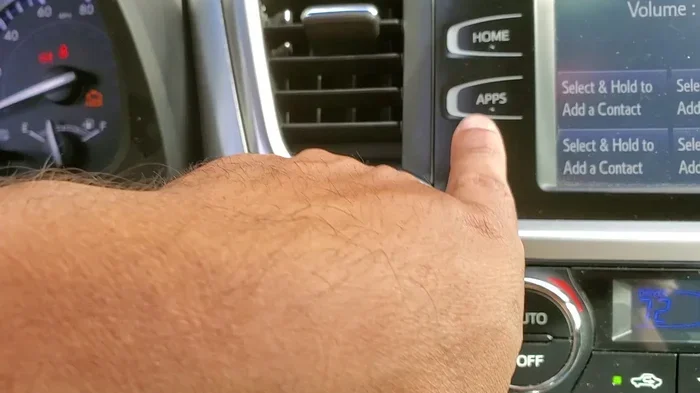
- Look for the BSM button: This button is typically located near the steering column, on the left side of the dashboard, or on the instrument panel cluster.
- Press and hold the BSM button: Hold it for about three seconds until you hear a beep or see the BSM indicator light on the dashboard change.
- Check the dashboard display: A message should appear confirming that the Blind Spot Monitor has been turned off.
- Verify the setting: Drive a short distance and check that the BSM warning lights no longer activate when you signal a lane change.
That is it. In most cases, you are done. The BSM is now disabled. But what if you cannot find the button? Let us troubleshoot that next.
Where Is the BSM Button Located?
The location of the BSM button varies by model year and trim level. Here are the most common locations:
- Near the steering column: On the left side of the steering wheel, below the turn signal lever. This is the most common spot.
- On the instrument panel: To the left of the speedometer cluster, often near the traction control or lane departure alert buttons.
- On the center console: Less common, but some models have it near the climate controls or the shift lever.
- Through the touchscreen: On newer Camry models (2022 and up), you may need to navigate to Settings, then Vehicle Settings, and look for Blind Spot Monitor.
If you are having trouble finding the button, consult your owner’s manual. The manual will have a diagram showing the exact location for your specific Camry model. You can also download a digital version of the manual from the Toyota website.
Turning Off BSM on Specific Camry Model Years
Let us get more specific. Here is how to handle the BSM on different Camry generations:
For the 2018-2019 Toyota Camry: The BSM button is located on the left side of the instrument panel. Look for a button labeled “BSM” or with the blind spot icon. Press and hold it for three seconds. The indicator on the dashboard will turn off, confirming the system is disabled.
For the 2020-2021 Toyota Camry: These models follow the same process. The button may be slightly different in placement depending on whether you have the LE, SE, or XLE trim. On the SE trim, the button is often integrated into the steering wheel controls area.
For the 2022-2024 Toyota Camry: Newer models may require you to go through the infotainment screen. Navigate to Settings, then select Vehicle Settings, and toggle the Blind Spot Monitor off. Some 2022+ models also let you adjust the sensitivity of the system rather than turning it off completely.
For the Toyota Camry Hybrid: The hybrid Camry follows the same process as the gas-powered version. The BSM button location is the same. Whether you have the LE Hybrid, SE Hybrid, or XLE Hybrid, the steps remain consistent.
What Happens When You Turn Off BSM?
It is important to understand exactly what happens when you disable the Blind Spot Monitor on your Toyota Camry. Here is a clear breakdown:
- The warning lights stop working: The side mirror indicators will no longer illuminate when a vehicle is in your blind spot.
- The audible alerts stop: You will no longer hear beeps when signaling a lane change with a vehicle nearby.
- Rear Cross Traffic Alert may still work: RCTA is a separate system. It will continue to function unless you also turn it off individually.
- Lane Departure Alert is unaffected: This is another independent system and stays active unless you disable it separately.
- The system can be re-enabled anytime: Simply press and hold the BSM button again to turn it back on.
One thing to keep in mind is that turning off BSM does not affect your other safety systems. Toyota designed these features to work independently so that you can customize your driving experience without compromising all safety at once.
Should You Turn Off BSM?
This is a question every Camry owner should ask themselves. Here are some valid reasons to turn off BSM:
- False alerts: Sometimes the sensors become overly sensitive, especially when towing a trailer or carrying a heavy load on the roof rack.
- Frequent lane changes: If you drive in areas with heavy traffic and change lanes often, the constant beeping can become distracting.
- Sensor malfunction: A damaged or dirty sensor can cause the BSM to malfunction. Turning it off temporarily while you fix the issue is a smart move.
- Custom driving preference: Some experienced drivers simply prefer to rely on their own mirrors and awareness rather than electronic alerts.
However, there are also good reasons to keep BSM enabled. The system genuinely helps prevent accidents. According to the Insurance Institute for Highway Safety, blind spot detection systems reduce lane-change crashes by a meaningful percentage. So before you turn it off, consider whether you really need to disable it or if adjusting your driving habits would be a better solution.
Common Issues with BSM on the Toyota Camry
Like any electronic system, the BSM on a Toyota Camry can experience issues. Here are the most common problems and what to do about them:
BSM Button Not Working
If you press the BSM button and nothing happens, try these troubleshooting steps:
- Make sure the vehicle is fully started and in park.
- Check if the button is stuck or damaged. Clean around it gently with compressed air.
- Try restarting the vehicle and pressing the button again.
- If the button still does not respond, visit a Toyota dealership for diagnosis.
BSM Warning Light Stays On
A BSM warning light that stays on even after you turn the system off could indicate a sensor issue. Common causes include:
- Dirty or obstructed sensors on the rear bumper.
- A damaged sensor from a minor collision or curb impact.
- An electrical issue in the BSM wiring harness.
In many cases, a simple cleaning of the sensors resolves the problem. Use a soft cloth and warm water to gently clean the sensor areas on both rear bumpers. If the light persists, a professional inspection is recommended.
False BSM Alerts
False alerts happen when the system detects a vehicle that is not actually in your blind spot. This is often caused by:
- Aftermarket accessories: Bike racks, trailer hitches, or large spoilers can interfere with the sensors.
- Weather conditions: Heavy rain, snow, or ice on the sensors can cause erratic behavior.
- Sensor calibration issues: After a bumper repair or replacement, the sensors may need recalibration.
If false alerts are driving you crazy, turning off BSM temporarily is a reasonable solution. Just remember to turn it back on when the issue is resolved.
How to Turn BSM Back On
Re-enabling the Blind Spot Monitor is just as easy as turning it off. Simply follow these steps:
- Start your Toyota Camry: Ensure the engine is running.
- Locate the BSM button: Find the same button you used to turn the system off.
- Press and hold the button: Hold it for about three seconds.
- Listen for the confirmation beep: You should hear a beep indicating the system is back on.
- Check the dashboard: The BSM indicator light should now be active on your instrument cluster.
Once BSM is re-enabled, test the system by checking your blind spots in a safe area. The side mirror lights should activate when a vehicle passes by. If they do not, you may need to repeat the process or have the system inspected.
BSM vs Other Toyota Safety Features
The Toyota Camry comes with several safety features that work alongside BSM. Understanding the differences helps you manage each system effectively:
- BSM (Blind Spot Monitor): Detects vehicles in your blind spots during lane changes.
- RCTA (Rear Cross Traffic Alert): Alerts you to approaching traffic when backing out of a parking spot.
- LDA (Lane Departure Alert): Warns you when you drift out of your lane without signaling.
- LTA (Lane Tracing Assist): Helps keep the car centered in your lane on highways.
- PCS (Pre-Collision System): Detects potential frontal collisions and can apply the brakes automatically.
Each of these systems can be toggled on or off separately. This gives you fine-grained control over your Camry’s safety features. If you are interested in learning more about managing other Toyota safety systems, check out how to turn traction control back on for a similar process with a different system.
Maintaining Your BSM System
Keeping your Blind Spot Monitor in good working order is easy with regular maintenance. Here are some tips to ensure your BSM stays reliable:
- Keep the sensors clean: Wipe down the rear bumper sensors regularly, especially after driving in dirty or snowy conditions.
- Remove obstructions: If you use a bike rack or trailer, remove it when you no longer need it to prevent sensor interference.
- Get regular inspections: During routine maintenance checkups, ask your technician to inspect the BSM sensors and wiring.
- Update your software: Toyota occasionally releases software updates that improve BSM performance. Ask your dealer about available updates for your Camry.
- Replace sensors promptly: If a sensor is damaged, replace it as soon as possible. Driving without a functioning BSM sensor reduces your overall safety.
Taking care of your BSM system not only keeps you safe but also preserves the resale value of your Toyota Camry. A well-maintained safety system is a selling point for any used car buyer.
Expert Insights on BSM and Driver Safety
Many automotive safety experts recommend keeping BSM enabled whenever possible. The system provides an extra layer of awareness that complements your mirrors and peripheral vision. However, experts also acknowledge that there are legitimate reasons to turn it off temporarily.
According to the National Highway Traffic Safety Administration (NHTSA), blind spot monitoring systems have contributed to a significant reduction in lane-change-related crashes. But the systems are only effective when they are working properly and when drivers understand how to use them correctly.
If you find yourself constantly disabling BSM because of false alerts or annoyance, it may be worth investigating the root cause rather than simply leaving the system off. A quick trip to a service center can often resolve sensor issues and restore your confidence in the system.
Key Takeaways
- The BSM button is usually located near the steering column or on the dashboard: Finding it is the first step to turning the system off.
- Every Toyota Camry model year has a slightly different process: We covered the differences from 2018 through 2024.
- Disabling BSM does not turn off your rear cross traffic alert: These are two separate systems that need individual attention.
- You can re-enable BSM at any time: The process to turn it back on is just as simple as turning it off.
- Always consider safety before disabling any driver assistance feature: BSM exists to keep you safe on the road.
- Regular maintenance keeps your BSM working reliably: Clean sensors and timely inspections go a long way.
Frequently Asked Questions
Can I turn off BSM on a Toyota Camry while driving?
Yes, you can turn off BSM while driving a Toyota Camry. The system allows you to toggle it on or at any time without needing to stop the vehicle. However, it is always safest to make adjustments when the car is stationary or at least when traffic conditions allow you to do so without distraction.
Will turning off BSM affect my Toyota Camry warranty?
No, turning off the Blind Spot Monitor does not void your Toyota warranty. BSM is a convenience and safety feature, not a core component of the vehicle. However, if you turn it off and get into an accident, your insurance company may consider the disabled safety feature during the claims process.
How do I know if my Toyota Camry has BSM?
Check for the blind spot icon on your instrument cluster or look for the BSM button near the steering column. You can also consult your owner’s manual, which will list all the safety features included with your specific Camry trim and model year.
Can I adjust the sensitivity of the BSM instead of turning it off completely?
On some newer Camry models (2022 and up), you can adjust BSM sensitivity through the infotainment settings menu. This lets you reduce false alerts while keeping the system active. Check your vehicle settings to see if this option is available for your specific model.
What should I do if the BSM light stays on after turning the system off?
A persistent BSM warning light usually indicates a sensor problem or a wiring issue. Start by cleaning the rear bumper sensors thoroughly. If the light remains on, schedule a service appointment at a Toyota dealership or qualified repair shop for a professional diagnosis.
Is it safe to drive without BSM enabled?
Driving without BSM is safe as long as you remain vigilant about checking your mirrors and blind spots manually. The BSM is an additional safety layer, not a replacement for attentive driving. Many drivers disable BSM temporarily and re-enable it when conditions are better, so it is a flexible feature designed to suit your needs.
=== CONCLUSION ===
Knowing how to turn off the BSM on a Toyota Camry gives you control over your driving experience. Whether you need to silence the alerts temporarily or disable the system for maintenance, the process is quick and easy. We covered the exact steps for every Camry model year, from the 2018 version to the latest 2024 models. You also learned what happens when BSM is off, how to turn it back on, and how to keep the system in good working condition.
Remember that BSM is an important safety feature designed to protect you and your passengers. Use the ability to turn it on and off wisely, and always prioritize safety on the road. If you run into issues that you cannot resolve on your own, do not hesitate to reach out to a Toyota dealership or a trusted mechanic. They can help you get your Blind Spot Monitor working perfectly again in no time.