How to Connect Aux to Bluetooth Wireless in Your Car
Discover how to connect aux to Bluetooth wireless in your car and upgrade your driving experience. This guide covers everything from choosing the right adapter to troubleshooting common issues. You will learn simple methods that work with almost any car stereo system.
Have you ever wished you could play music from your phone through your car speakers without wires? The good news is that going wireless with your aux to bluetooth car setup is easier than you think. Whether you drive an old sedan or a modern SUV, there is a solution that fits your needs and budget.
In this guide, we will walk you through everything you need to know about connecting aux to Bluetooth wireless in your vehicle. You will learn what tools you need, how to set them up, and how to get the best sound quality. By the end, you will wonder why you ever dealt with tangled cords in the first place.
The idea of wireless car audio might sound complicated, but it really is not. Most bluetooth car kits work right out of the box. You just plug in the device, pair it with your phone, and start streaming. It is one of the simplest and most affordable car audio upgrades you can make today.
Key Takeaways
- Aux to Bluetooth car adapters let you stream music wirelessly from your phone to your car stereo.
- There are several types of adapters, including FM transmitters, AUX Bluetooth receivers, and built-in car systems.
- Setting up a wireless car audio connection takes just a few minutes with the right device.
- Choosing the right adapter depends on your car model, budget, and sound quality needs.
- Common issues like pairing failures and static noise are easy to fix with simple steps.
- Regular maintenance and proper placement of your bluetooth adapter for car ensures the best performance.
📑 Table of Contents
- What Is an Aux to Bluetooth Car Adapter?
- Why Go Wireless with Your Car Audio?
- Types of Aux to Bluetooth Car Adapters
- Step-by-Step: How to Connect Aux to Bluetooth Wireless in Your Car
- Choosing the Right Adapter for Your Car
- Troubleshooting Common Issues with Aux to Bluetooth Car Setups
- Expert Tips for the Best Wireless Experience
- Conclusion
What Is an Aux to Bluetooth Car Adapter?
A bluetooth adapter for car is a small device that bridges the gap between your phone and your car stereo. Your phone sends music wirelessly using Bluetooth technology. The adapter then receives that signal and sends it to your car speakers through an aux cable or another connection method.
Think of it as a translator. Your phone speaks Bluetooth, and your car stereo speaks aux. The adapter makes them understand each other. This means you can enjoy wireless music streaming even if your car does not have built-in Bluetooth.
How Does It Work?
Here is a simple breakdown of how aux to Bluetooth wireless technology works in your car:
- Your phone connects to the adapter using Bluetooth pairing.
- The adapter receives the audio signal from your phone.
- The signal travels through a cable from the adapter to your car stereo.
- Your car speakers play the music clearly and without delay.
Most modern adapters use Bluetooth version 5.0 or higher. This means a stronger connection, longer range, and better sound quality. Some devices also support hands-free calling, so you can answer calls through your car speakers safely.
Why Go Wireless with Your Car Audio?
You might be wondering why you should bother switching from a wired aux connection to a wireless car connection. There are several great reasons that make this upgrade worth your time.
Freedom From Wires
First, you get rid of tangled cords. No more fishing around your center console to find the right aux cable. No more cords that fray or stop working after a few months. A bluetooth receiver for car gives you a clean, clutter-free setup.
Better Sound Quality
Many people think wires sound better than Bluetooth. But that is not always true anymore. Modern car bluetooth setup devices offer excellent sound quality. You get clear highs, rich mids, and deep bass that fill your car cabin.
Convenience and Safety
With hands-free calling, you can answer calls without taking your hands off the wheel. This makes driving safer. You can also use voice assistants like Siri or Google Assistant to control your music. Just speak a command and your favorite song starts playing.
Works with Almost Any Car
One of the best things about aux to bluetooth car adapters is that they work with almost any vehicle. You do not need a fancy new car. Whether you drive a 2005 Honda Civic or a 2023 Toyota Camry, there is an adapter that will work for you.
Types of Aux to Bluetooth Car Adapters
Not all bluetooth car kits are the same. There are several types to choose from, and each has its own strengths. Let us look at the most popular options for wireless audio streaming in cars.
FM Transmitter Bluetooth Adapters
An FM transmitter bluetooth adapter is one of the most affordable options. It plugs into your car’s cigarette lighter or USB port. The adapter broadcasts your phone’s audio to an empty FM radio frequency. You then tune your car radio to that frequency and listen.
Pros:
- Very affordable, usually under $20.
- Easy to set up and use.
- Works with any car that has an FM radio.
- Often includes a USB charging port.
Cons:
- Sound quality can be affected by radio interference.
- You need to find an empty FM frequency in your area.
- Not as reliable as wired connections in crowded cities.
AUX Bluetooth Receivers
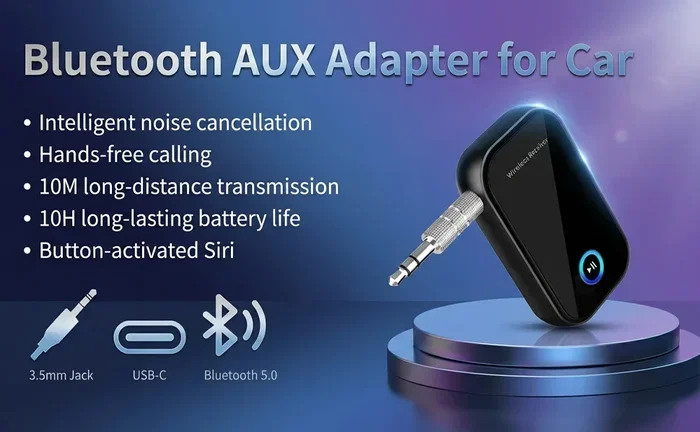
An aux bluetooth receiver is a small box that plugs directly into your car’s aux input. It receives the Bluetooth signal from your phone and sends the audio to your car stereo. This is one of the most popular choices for aux to bluetooth car setups.
Pros:
- Better sound quality than FM transmitters.
- Simple plug-and-play setup.
- No interference from radio signals.
- Works well with most car stereos.
Cons:
- Requires an aux input on your car stereo.
- Needs a power source, usually USB or cigarette lighter.
- The cable from the receiver to the stereo can be visible.
Bluetooth Car Stereos (Built-In)
If you are willing to replace your entire car stereo, a bluetooth car stereo is the best long-term solution. These units come with Bluetooth built right in. You pair your phone directly to the stereo and enjoy wireless audio without any extra adapters.
Pros:
- Cleanest look with no extra devices.
- Best sound quality.
- Often includes advanced features like Apple CarPlay and Android Auto.
- Professional installation ensures everything works perfectly.
Cons:
- More expensive than adapters.
- Requires professional installation.
- Takes more time to set up.
Bluetooth Car Kits with AUX Output
A bluetooth car kit with AUX output is a versatile option. These kits usually include a transmitter and receiver combo. You can use them with any car, regardless of whether it has an aux input or not. They offer great flexibility for car audio upgrade projects.
Step-by-Step: How to Connect Aux to Bluetooth Wireless in Your Car
Now let us get to the fun part. Here is a detailed walkthrough on how to set up your aux to bluetooth car connection. We will cover the most common method using an AUX Bluetooth receiver.
Step 1: Choose Your Adapter
Before you start, make sure you have the right bluetooth adapter for car. Check if your car has an aux input. If it does, an AUX Bluetooth receiver is your best bet. If not, consider an FM transmitter or a Bluetooth car kit.
Step 2: Plug in the Adapter
Plug the adapter into your car’s aux port. If your adapter needs power, plug the USB cable into a charging port or use the included car charger. Make sure the adapter is securely connected and powered on.
Step 3: Pair Your Phone
Open the Bluetooth settings on your phone. Turn on Bluetooth and search for available devices. Your adapter should appear in the list. Tap on it to pair. Some adapters have a specific pairing button you need to press first.
Step 4: Test the Connection
Once paired, play some music on your phone. It should come through your car speakers. Adjust the volume on both your phone and your car stereo for the best balance. If you hear any issues, move to the next step.
Step 5: Fine-Tune for Best Sound
Place the adapter somewhere near your car stereo for the strongest signal. Avoid hiding it deep in the glove box. Keep it away from other electronic devices that might cause interference. Test different locations if you notice any dropouts.
Quick Tips for a Smooth Setup
- Make sure your phone’s Bluetooth is updated to the latest version.
- Restart both your phone and the adapter if pairing fails.
- Keep your phone within 30 feet of the adapter for the best connection.
- Charge your phone before a long drive if you use hands-free calling frequently.
- Name your adapter something easy to recognize in the Bluetooth list.
Choosing the Right Adapter for Your Car
Not every aux to bluetooth car adapter is the right fit for every driver. Your choice should depend on your car model, your budget, and what features matter most to you.
Consider Your Car’s Inputs
First, check what inputs your car stereo has. Does it have an aux port? A USB port? An AUX input is the most common and easiest to work with. If your car only has a USB port, look for an adapter that connects via USB.
Set a Budget
Bluetooth adapter for car prices range from about $10 to $150. Basic FM transmitters cost less than $20. Mid-range AUX Bluetooth receivers run between $20 and $50. Premium Bluetooth car stereos can cost $100 or more. Set a budget before you shop so you do not overspend.
Look for Key Features
When shopping for your car bluetooth setup, look for these important features:
- Bluetooth version 5.0 or higher for a stable connection.
- Multipoint pairing so two phones can connect at once.
- Built-in microphone for hands-free calling.
- USB charging port to charge your phone while driving.
- Noise cancellation for clearer call quality.
- Compact design that fits well in your car.
Read Reviews Before You Buy
Always check reviews from other car owners. Look for feedback on sound quality, ease of use, and durability. Real-world reviews help you avoid buying a device that looks good on paper but performs poorly in your car.
Troubleshooting Common Issues with Aux to Bluetooth Car Setups
Even the best bluetooth car kit can have occasional issues. Here are the most common problems and how to fix them quickly.
Pairing Failures
If your phone will not connect to the adapter, try these steps. First, turn off Bluetooth on your phone and turn it back on. Then, restart the adapter by unplugging it and plugging it back in. Finally, delete the adapter from your phone’s Bluetooth list and pair it again from scratch.
Static or Poor Sound Quality
Static noise is a common complaint with wireless car audio. If you use an FM transmitter, try a different frequency. Move the adapter closer to your car stereo. For AUX Bluetooth receivers, check the cable connections and make sure they are secure.
Connection Drops
If your connection keeps dropping, the adapter may be too far from your phone. Move your phone closer to the adapter. Also, make sure no other Bluetooth devices are interfering. Some bluetooth receiver for car devices work better when there is a clear line of sight between the phone and the adapter.
No Sound at All
If you get no sound, check a few things first. Make sure the car stereo volume is turned up. Check that the aux input is selected on your car stereo. Ensure the adapter is powered on and properly connected. Sometimes a simple restart of both devices solves the problem.
Expert Tips for the Best Wireless Experience
Want to get the most out of your aux to bluetooth car setup? Here are some expert-backed tips that make a big difference.
Keep Your Adapter Firmware Updated
Many bluetooth adapter for car devices receive firmware updates from the manufacturer. These updates improve performance, fix bugs, and sometimes add new features. Check the manufacturer’s website or app for updates and install them regularly.
Position Matters
Where you place your adapter affects sound quality and connection strength. The best spot is usually near the center console or close to the car stereo. Avoid placing it near metal surfaces or other electronics that might interfere with the signal.
Use High-Quality Cables
If your setup uses cables from the adapter to your car stereo, invest in good ones. Cheap cables can cause signal loss and poor sound quality. Look for shielded cables that reduce interference and last longer.
Charge Your Phone Before Long Trips
Wireless music streaming uses battery power on your phone. If you plan a long road trip, charge your phone fully before you leave. Using a bluetooth car kit with a built-in USB charger helps keep your phone powered up during the drive.
Clean Your Connections Regularly
Dust and dirt can build up on your aux port and adapter connections over time. Use a soft, dry cloth to clean them occasionally. This keeps the connection strong and prevents sound problems caused by dirty contacts.
Know When to Upgrade
If you have an older bluetooth car kit that keeps giving you trouble, it might be time for an upgrade. Newer devices offer better range, faster pairing, and improved sound quality. A car audio upgrade can transform your daily commute into a much more enjoyable experience.
Conclusion
Connecting aux to Bluetooth wireless in your car is one of the best upgrades you can make. It is simple, affordable, and makes a huge difference in how you enjoy music on the road. Whether you choose an FM transmitter, an AUX Bluetooth receiver, or a full Bluetooth car stereo, the result is the same: wireless car audio that sounds great and works without wires.
Follow the steps in this guide, pick the right bluetooth adapter for car, and enjoy a cleaner, safer, and more convenient driving experience. With the right car bluetooth setup, every trip becomes more enjoyable. So go ahead, make the switch to wireless, and leave those tangled cords behind for good.
Your car audio journey starts now. Pick your favorite adapter, follow the setup steps, and start streaming music wirelessly today. You will wonder how you ever drove without it.
Frequently Asked Questions
Can I connect aux to Bluetooth wireless in any car?
Yes, almost any car can be upgraded with a bluetooth adapter for car. If your car has an aux input, an AUX Bluetooth receiver works perfectly. If not, an FM transmitter or a full Bluetooth car stereo will get the job done.
Is Bluetooth sound quality good enough for car audio?
Modern Bluetooth technology, especially version 5.0 and above, delivers excellent sound quality for wireless music streaming. Most drivers will not notice a big difference compared to a wired aux connection. The sound is clear, rich, and enjoyable for everyday driving.
How do I pair my phone with a car Bluetooth adapter?
Turn on Bluetooth on your phone and search for available devices. Make sure your bluetooth car kit is powered on and in pairing mode. Tap on the adapter name when it appears on your phone screen. Enter the PIN if prompted, and you are connected.
Can I make hands-free calls with an aux to Bluetooth car adapter?
Yes, most bluetooth receiver for car devices include a built-in microphone. This allows you to make and receive hands-free calling through your car speakers. Just pair your phone, and you can answer calls safely while driving.
What is the best position to place a Bluetooth adapter in my car?
The best spot is near your car stereo or center console. Keep it close to your phone for a strong connection. Avoid hiding it deep in the glove box or near metal surfaces. A clear line of sight between your phone and the adapter gives the best wireless car connection.
How much does an aux to Bluetooth car adapter cost?
Prices vary widely. Basic FM transmitters start around $10. Mid-range AUX Bluetooth receivers cost between $20 and $50. Premium Bluetooth car stereos can run $100 or more. The best choice depends on your budget and how much sound quality matters to you.