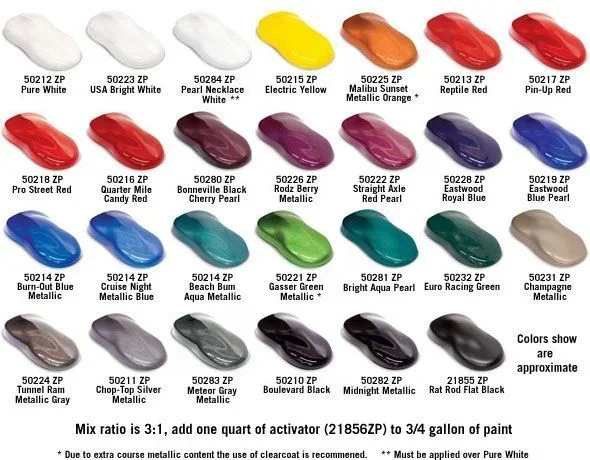
How Do I Find the Exact Color of My Car Step by Step
Finding the exact color of your car is simpler than you think. You can locate your paint code, use online lookup tools, or visit a dealership to get an accurate match. This guide walks you through every method so you can identify your car color with confidence.
Have you ever looked at your car and wondered, how do I find the exact color of my car? Maybe you need touch-up paint. Perhaps you’re selling the vehicle and want to list the correct color name. Or maybe you just want to know the official name of that shade sitting in your driveway every day.
Whatever the reason, finding your car’s exact color is easier than most people think. You don’t need to be a mechanic or a paint expert. With a few simple steps, you can identify your vehicle’s color down to the precise code and name. This guide covers every method available so you can get an accurate result fast.
Let’s walk through the process together. By the end of this article, you’ll know exactly where to look, what tools to use, and how to confirm your car’s color with confidence.
Key Takeaways
- Paint code location: Your car’s paint code is usually found on the door jamb, under the hood, or in the owner’s manual.
- Online lookup tools: Free websites and apps let you enter your VIN or paint code to find the exact color name.
- Dealership method: Your local dealer can pull up your color info using the VIN in seconds.
- Visual matching: Color charts and paint swatches help when you don’t have a code available.
- Touch-up paint: Once you know the code, ordering touch-up paint becomes easy and affordable.
- Multiple methods exist: Always cross-check at least two methods for the most accurate result.
📑 Table of Contents
- Why Finding Your Exact Car Color Matters
- How Do I Find the Exact Color of My Car Using the Paint Code
- How Do I Find the Exact Color of My Car Using the VIN
- Using Online Color Lookup Tools and Databases
- How Do I Find the Exact Color of My Car at the Dealership
- Visual Color Matching When You Don’t Have a Code
- Common Mistakes People Make When Identifying Car Color
- What to Do Once You Find Your Exact Color
- Frequently Asked Questions About Car Color Identification
- Final Thoughts
Why Finding Your Exact Car Color Matters
You might think car color is just cosmetic. But it matters more than you’d expect. Here’s why knowing your exact car color is important.
- Touch-up paint: Ordering the right shade requires the correct paint code. A wrong match leaves visible patches.
- Resale value: Accurate color listings in ads attract serious buyers and build trust.
- Insurance claims: After an accident, you need the correct color for repair estimates.
- Custom projects: Planning a wrap or custom finish starts with knowing the base color precisely.
- Parts matching: Trim pieces, mirrors, and badges often need to match the body color exactly.
Getting it right saves time, money, and frustration. Now let’s dive into the methods.
How Do I Find the Exact Color of My Car Using the Paint Code
The most reliable way to find your car color is through the paint code. Every vehicle manufacturer assigns a unique code to each color. This code tells paint shops and parts departments exactly which formula to use.
Where to Find the Paint Code on Your Car
The paint code sticker or plate is usually in one of a few standard locations. Here’s where to look:
- Driver’s side door jamb: Open the driver’s door and look along the frame. A sticker or metal plate is often attached there.
- Under the hood: Check the inner fender, the firewall, or near the battery. Many manufacturers place a label in this area.
- Trunk or hatch area: Some cars have the code sticker inside the trunk lid or near the spare tire.
- On the VIN plate: The vehicle identification number plate sometimes includes the paint code alongside other specs.
- Owner’s manual: Flip through your manual. The paint code is often listed in the specifications section.
Once you find the sticker, look for labels like “Paint Code,” “Color Code,” or “Exterior Color.” The code is usually a combination of letters and numbers. Write it down or take a clear photo with your phone.
What the Paint Code Looks Like
Paint codes vary by manufacturer. Here are some examples to help you recognize yours:
- Toyota: Usually three or four characters, like C1C or 1D4.
- Honda: Often a two-letter code, like NH-532 or WA-777.
- Ford: Typically a letter followed by numbers, like WA or PY2.
- Chevrolet: Uses alphanumeric codes like WA3 or 9043.
- BMW: Often starts with a letter followed by numbers, like 475 or Alpinwei.
Don’t worry if yours looks different. Every brand has its own system. The key is to use the code with the right lookup tool.
How Do I Find the Exact Color of My Car Using the VIN
Your vehicle identification number holds a wealth of information. It can reveal your car’s exact color without you ever leaving home. Let’s explore how this works.
What Is a VIN?
The VIN is a unique 17-character code assigned to every vehicle. You can find it on the dashboard near the windshield, on the driver’s door jamb, or on your registration and insurance documents.
Using the VIN to Look Up Color
Several free and paid services let you enter your VIN and pull up your car’s details, including the color. Here’s how:
- Write down your full 17-character VIN.
- Visit a reliable VIN lookup site.
- Enter the VIN in the search field.
- Review the results for the exterior color name and paint code.
Popular VIN lookup tools include the National Insurance Crime Bureau (NICB), the National Motor Vehicle Title Information System (NMVTIS), and various manufacturer-specific portals. Many of these are free to use.
Pro Tip: Always cross-check the VIN result with your physical paint code. Sometimes databases have outdated or incomplete information. Using two sources gives you the most reliable answer.
Using Online Color Lookup Tools and Databases
The internet makes finding your car color incredibly convenient. Several websites specialize in automotive color lookup services. These tools are free and take just a few minutes.
Top Websites for Car Color Lookup
Here are some trusted sites you can use right now:
- Codetore.com: Offers a simple paint code search by make and model.
- PaintCodeFinder.com: Lets you browse by manufacturer and view color charts.
- Car-Part.com: Provides color codes and touch-up paint options.
- Manufacturer websites: Brands like Ford, Toyota, and BMW offer official color lookup tools on their sites.
- AutoZone and O’Reilly: Their online catalogs include paint code search features.
Simply select your car’s make, model, and year. The site will display a list of available colors with their codes. Match the code on your vehicle to the one on the site.
Mobile Apps That Help
Don’t want to use a computer? Several mobile apps do the same job from your phone:
- AutoDetective: Lets you search by VIN or manual input.
- Paint Code Lookup: A simple app with a large database of manufacturer codes.
- Car Scanner: Reads VIN data and displays full vehicle specs including color.
These apps are especially handy when you’re at a parts store or dealership and need quick access to your color information.
How Do I Find the Exact Color of My Car at the Dealership
If you prefer a hands-off approach, your local dealership can help. They have direct access to manufacturer databases that contain every detail about your vehicle.
What to Bring
Before you visit, gather these items:
- Your VIN: You can find this on your dashboard or registration.
- Your registration: This confirms ownership and provides the VIN.
- Your owner’s manual: Helpful if the staff needs to cross-reference details.
What to Expect
Call the service department first. Ask if they can look up your color code using the VIN. Most dealerships will do this for free. Some even email or text you the result.
When you arrive, the service advisor will enter your VIN into their system. Within minutes, you’ll have the exact color name, code, and sometimes even the paint code revision number. This revision number matters because manufacturers sometimes update their color formulas over time.
Expert Insight: Dealerships are especially helpful if your car is still under warranty. They can also order official touch-up paint directly from the manufacturer, ensuring a perfect match.
Visual Color Matching When You Don’t Have a Code
What if you can’t find your paint code or VIN? You can still identify your car color through visual matching. This method isn’t as precise as using a code, but it works well in most situations.
Using a Car Color Chart
Most auto parts stores and dealerships keep physical color charts. These charts display swatches of every color a manufacturer offers. Here’s how to use one:
- Find the chart for your car’s make and year.
- Compare your car’s color to the swatches under good lighting.
- Note the closest match and its associated code.
- Double-check the code against your door jamb sticker if possible.
Taking a Photo for Digital Matching
You can also use your phone to help with color matching:
- Photograph your car in natural daylight.
- Avoid shadows and direct sunlight, which can distort the color.
- Use a plain white background behind the car.
- Upload the photo to a color-matching app or share it with a paint specialist.
Quick Tip: Always clean the area you’re photographing first. Dirt and oxidation can make the color look different from the original shade.
Common Mistakes People Make When Identifying Car Color
Even with the right tools, mistakes happen. Here are the most common errors to avoid:
Relying Only on the Color Name
Manufacturers often use creative names for their colors. “Ocean Blue Metallic” from one brand might look completely different from “Ocean Blue” from another brand. Always use the paint code, not just the name.
Ignoring the Revision Number
Car manufacturers update paint formulas over time. A revision number tells you which version of the formula was used. Ordering paint without the revision can result in a slight but noticeable mismatch.
Using Outdated Databases
Some online tools haven’t updated their databases in years. If you get a result that doesn’t match your sticker, try a different source or contact the manufacturer directly.
Forgetting About Two-Tone Cars
If your car has a dual-tone paint scheme, you’ll have two different paint codes. Check both areas of the car and record both codes separately.
Not Checking Under the Clear Coat
Over time, UV rays and weather can fade or change the appearance of your car’s surface color. The paint code represents the original factory color, not the current weathered shade. Keep this in mind when matching.
What to Do Once You Find Your Exact Color
Now that you know your color code, what’s next? Here are the best things to do with that information:
- Order touch-up paint: Use the code to buy a small touch-up bottle from the dealer or an online retailer.
- Schedule a professional repaint: Share the code with your body shop for an accurate estimate and match.
- List your car for sale: Use the exact color name and code in your listing for transparency.
- Plan a wrap or vinyl application: Knowing the base color helps the wrap shop choose the right material and finish.
- Keep the code for records: Save the paint code in your phone and glove box for future reference.
Having your color code on hand is a small effort that pays off in many ways. It’s one of those pieces of information you’ll be glad you took the time to find.
Frequently Asked Questions About Car Color Identification
Can I find my car color using just the make and model?
Yes and no. Searching by make and model will show you all available colors for that vehicle. But it won’t tell you which specific color your car was painted. You need the VIN or paint code to get the exact match for your individual vehicle.
Is the paint code the same as the color name?
No. The paint code is a unique identifier assigned by the manufacturer. The color name is a marketing label. Two different codes can sometimes share similar names, and the same code might be called something different across regions. Always use the code for accuracy.
How much does it cost to get a paint code lookup?
Most VIN lookup tools and dealership lookups are completely free. You only pay if you decide to purchase touch-up paint or schedule a professional repaint service through the dealer.
Can a color-matching app identify my car color from a photo?
Some apps can give you a close estimate, but they aren’t always precise. Lighting conditions, camera quality, and weathering on the car’s surface can affect the result. Use photo matching as a starting point, but confirm with the official paint code whenever possible.
What if my car was repainted and the original code doesn’t match?
If your car has been repainted, the original factory code is still the correct one to use for touch-ups and records. The current paint may not match the original perfectly, but the factory code ensures you order the right shade for future repairs.
Do electric and hybrid cars use different color codes?
No. Electric and hybrid vehicles use the same paint code system as traditional gasoline cars. The color identification process is identical regardless of the powertrain type.
Final Thoughts
So, how do I find the exact color of my car? The answer is simpler than you probably expected. Whether you check the door jamb sticker, use a VIN lookup tool, visit your dealership, or match visually with a color chart, you have multiple reliable paths to the right answer.
The paint code is your golden ticket. It connects you to the exact formula your car left the factory with. Once you have it, you can order touch-up paint, get accurate quotes for repairs, and list your car with confidence.
Take a few minutes today to locate your paint code. Write it down, save it in your phone, and snap a photo of the sticker. This small habit will save you time and money whenever you need to match or repair your car’s color in the future.
Your car’s color is part of its identity. Now you know exactly what that identity is. Use that knowledge wisely, and you’ll always have the perfect match when you need it most.