How Do I Reset My Car Security System Without Stress
Resetting your car security system doesn’t have to be stressful. Whether your car alarm won’t stop, the security light is flashing, or your vehicle won’t start, this guide walks you through every method step by step. You’ll learn simple tricks using your key fob, fuse box, and ignition to reset car security system issues in minutes.
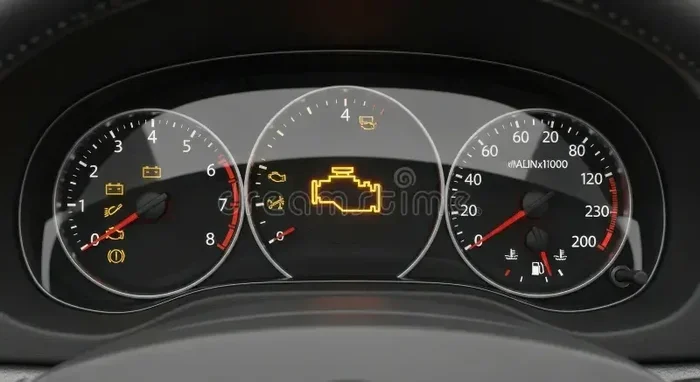
Ever walked out to your car only to find the alarm blaring for no reason? Or maybe your vehicle won’t start because the security light is flashing on the dashboard? These moments are frustrating, but here’s the good news — you can usually fix them yourself.
Knowing how to reset your car security system saves you time, money, and a lot of headaches. You don’t need to be a mechanic or visit a dealership. With a few simple steps, you can get your vehicle’s security system back to normal in under 15 minutes.
This guide covers every method you need, from basic key fob resets to fuse box tricks. We’ll also look at why your security system might be acting up in the first place. By the end, you’ll feel confident handling this common car problem on your own.
Key Takeaways
- Multiple reset methods exist: You can reset your car security system using the key fob, ignition cycle, fuse removal, or a manual reset procedure depending on your vehicle.
- Identifying the problem first saves time: Understanding why your security system triggered helps you choose the right reset method and prevents future issues.
- Common causes include low key battery, door latch issues, and sensor malfunctions: Addressing these root causes ensures your reset actually works.
- Professional help is rarely needed: Most resets can be done at home with basic tools and about 10-15 minutes of your time.
- Prevention is simple: Regular maintenance of your key fob battery and door sensors keeps your car security system working reliably.
📑 Table of Contents
Why Does Your Car Security System Need a Reset?
Your car’s security system is designed to protect against theft. It includes alarms, immobilizers, door lock sensors, and key fob recognition. When something goes wrong, the system can lock you out or trigger false alarms.
Several things cause the system to malfunction:
- Dead or weak key fob battery: The car can’t recognize your key, so it stays in security mode.
- Door or hood latch sensor issues: A loose or dirty sensor tricks the system into thinking a door is open.
- Recent battery death: If your car battery died or was disconnected, the security system often needs a fresh reset.
- Electrical glitches: Power surges or blown fuses can confuse the system.
- Aftermarket alarm installation: Poorly installed alarms frequently cause reset problems.
Understanding the cause helps you pick the right fix. Most of the time, the problem is simple and easy to solve.
Method 1: Reset Using the Key Fob
The easiest way to reset your car security system is through the key fob. Almost all modern vehicles support this method. Here’s how to do it:
Step-by-Step Key Fob Reset
- Get inside your car and close all doors firmly.
- Sit in the driver’s seat and make sure the ignition is off.
- Press the lock button on your key fob to lock all doors.
- Turn the ignition to the ON position (just before starting the engine).
- Press the unlock button on the key fob.
- Turn the ignition back to OFF.
- Repeat this cycle 2-3 times. The doors should lock and unlock with each cycle.
After the final cycle, try starting the engine. The security light should turn off, and your vehicle should start normally. This method works for most Toyota, Honda, Ford, and Chevrolet models.
Quick Tip: If your key fob battery is low, replace it before trying the reset. A weak battery often causes the security system to malfunction in the first place.
Method 2: The Ignition Cycle Reset
When the key fob method doesn’t work, try the ignition cycle reset. This method forces the car’s computer to reboot the security module. It works on most vehicles and takes about 5 minutes.
How to Perform the Ignition Cycle Reset
- Insert your key into the ignition.
- Turn the key to the ACC position (accessory mode). Wait 10 seconds.
- Turn the key to the ON position. Wait another 10 seconds.
- Turn the key back to OFF.
- Wait 30 seconds.
- Repeat this cycle 3 times in a row.
- Try starting the engine on the fourth attempt.
This method is especially helpful when your car alarm won’t stop or the security light stays on after a dead battery. The repeated cycle clears the error codes stored in the car’s computer.
Some vehicles require you to cycle the key faster than others. A steady pace of about 3 seconds per position works well for most cars.
Method 3: Fuse Box Reset
If the first two methods don’t work, the fuse box reset is your next option. This method physically cuts power to the security system, forcing it to restart. It’s slightly more involved but very effective.
How to Reset Through the Fuse Box
First, locate your fuse box. Most cars have two fuse boxes — one under the hood and one inside the cabin. Check your owner’s manual to find the exact location.
- Open the fuse box cover and look for the fuse labeled “security,” “alarm,” or “BCM” (body control module).
- Use a fuse puller to remove the security fuse carefully.
- Wait 2-3 minutes. This lets the system fully discharge.
- Reinsert the fuse firmly into its slot.
- Close the fuse box cover and get in the car.
- Turn the ignition to ON. The security light should flash once and then turn off.
- Start the engine to confirm the reset worked.
This method also works well if you’re dealing with a security system malfunction after installing new accessories or aftermarket parts.
Common Mistakes: Don’t pull the wrong fuse. Pulling the wrong one can disable other important systems. Always double-check the label before removing any fuse.
Method 4: Door Lock Manual Reset
Some vehicles allow you to reset the security system manually through the door lock mechanism. This method is less common but useful for older models.
Manual Door Lock Reset Steps
- Close all doors, windows, and the sunroof.
- Insert your key into the driver’s door lock.
- Turn the key to the lock position and hold it for 5 seconds.
- Turn the key to the unlock position and hold it for 5 seconds.
- Repeat this 3 times.
- Turn the ignition to ON within 10 seconds of the final unlock.
- The security light should go off.
This method works because the door lock mechanism is directly tied to the security system in many vehicles. The rapid lock-unlock cycle tells the system to re-sync.
If you’ve ever dealt with a situation where your oil change light won’t reset, you’ll notice the door lock reset method feels similar. Both rely on a specific sequence of actions to tell the car’s computer to clear a flagged condition.
What to Do If Nothing Works
Sometimes the security system won’t reset no matter which method you try. Don’t panic. Here’s what to do next:
Check for Underlying Issues
Before trying anything else, look for these common culprits:
- Open doors or trunk: Make sure every door, the hood, and the trunk are completely closed. Even a slightly ajar door can keep the security system active.
- Dirty door lock sensors: Wipe the door lock mechanisms with a clean cloth. Dirt and grime can prevent the sensors from reading properly.
- Corroded battery terminals: Check your car battery terminals for white or green buildup. Clean them with a wire brush if needed.
- Low car battery voltage: If your battery is weak, the security system may not have enough power to fully reset. Consider a battery charger.
When to Call a Professional
Most resets work at home. But if you’ve tried everything and the security light keeps flashing, it’s time to see a pro. A certified mechanic can run diagnostic tools that read the specific error codes in your car’s computer.
Also, if your key fob or phone-based starting system isn’t working alongside the security issue, there may be a deeper electrical problem that needs professional attention.
Expert Insight: Dealerships and independent mechanics both can handle security system resets. You don’t always need to go to the dealer for your specific brand. Many independent shops have the same diagnostic equipment.
How to Prevent Future Security System Issues
Once you’ve successfully reset your car security system, you want to keep it from happening again. Prevention is simple with a few good habits.
Regular Maintenance Tips
- Replace your key fob battery every 1-2 years. A fresh battery keeps the signal strong and prevents the car from losing recognition.
- Keep your doors and trunk closed tightly. Loose seals can let in moisture that damages door lock sensors.
- Avoid disconnecting your car battery without a memory saver. A memory saver keeps the security system powered during battery replacement.
- Clean door lock mechanisms regularly. A little WD-40 once a year keeps sensors working smoothly.
- Don’t ignore warning lights. If the security light comes on, address it quickly before it becomes a bigger problem.
Taking these small steps goes a long way. You’ll spend less time dealing with false alarms and more time enjoying your vehicle.
Quick Reference Comparison Table
| Reset Method | Difficulty | Time Required | Works For |
|---|---|---|---|
| Key Fob Reset | Easy | 5 minutes | Most modern vehicles |
| Ignition Cycle Reset | Easy | 5 minutes | Most vehicles with key ignition |
| Fuse Box Reset | Medium | 10 minutes | Vehicles with persistent issues |
| Door Lock Manual Reset | Medium | 5 minutes | Older vehicle models |
| Professional Diagnostic | Hard | 30+ minutes | Complex electrical problems |
Each method addresses different levels of severity. Start with the easiest and work your way down the list only if needed.
Key Takeaways
- Multiple reset methods exist: You can reset your car security system using the key fob, ignition cycle, fuse removal, or a manual reset procedure depending on your vehicle.
- Identifying the problem first saves time: Understanding why your security system triggered helps you choose the right reset method and prevents future issues.
- Common causes include low key battery, door latch issues, and sensor malfunctions: Addressing these root causes ensures your reset actually works.
- Professional help is rarely needed: Most resets can be done at home with basic tools and about 10-15 minutes of your time.
- Prevention is simple: Regular maintenance of your key fob battery and door sensors keeps your car security system working reliably.
Frequently Asked Questions
How long does it take to reset a car security system?
Most resets take between 5 and 15 minutes. The key fob method is the fastest, while the fuse box reset takes a bit longer due to the waiting periods. If you need to visit a mechanic, expect about 30 minutes for a professional diagnostic and reset.
Why is my car security light flashing after a battery change?
This happens because disconnecting the battery resets the car’s computer, but the security system doesn’t automatically re-sync with your key. You need to manually reset the system using one of the methods above. Simply reconnecting the battery usually isn’t enough.
Can a dead key fob battery trigger the car security system?
Yes, absolutely. A dead or weak key fob battery means your car can’t recognize your key. When the car doesn’t recognize the key, it activates the security mode. Replacing the key fob battery often solves this problem immediately.
Will resetting my car security system erase any settings?
No. Resetting the security system only clears the alarm and immobilizer status. It does not erase your radio presets, Bluetooth connections, or any other personal settings. Your car’s memory stays intact.
What should I do if the security light stays on after a reset?
If the light stays on, try the next method in our guide. Start with the ignition cycle reset if the key fob method didn’t work. If all methods fail, there may be a faulty sensor or wiring issue that needs professional diagnosis.
Is it safe to drive with the security light on?
In most cases, yes. The security light being on usually means the system is in a heightened state, but it doesn’t prevent the car from running. However, it’s best to address it quickly because a fully triggered alarm can drain your battery and drain your patience.
Resetting your car security system is one of those skills every car owner should have. It’s simple, fast, and saves you from unnecessary trips to the mechanic. The next time your alarm goes off for no reason or that little security light starts flashing, you’ll know exactly what to do.
Start with the key fob method — it works for most vehicles and takes just a few minutes. Move to the ignition cycle reset if that doesn’t do the trick. The fuse box and door lock methods handle more stubborn cases. And remember, prevention through regular maintenance keeps your security system running smoothly for years to come.
Your car works hard to protect you and your belongings. A quick reset now and then keeps everything running the way it should. You’ve got this.