How Do I Reset My Volkswagen Computer Step by Step
Resetting your Volkswagen computer is easier than you think and can save you a trip to the dealer. Whether you need to clear fault codes, reset the oil change light, or reboot the infotainment system, this step-by-step guide walks you through every method. We cover battery disconnect, OBD-II scanner, and dashboard button techniques for all VW models.
If your Volkswagen has been throwing warning lights or acting a little off lately, you might be wondering how to reset the onboard computer. The good news is that resetting my Volkswagen computer is something you can do at home without visiting a dealership. Whether you own a Jetta, Passat, Tiguan, or Golf, the process is straightforward once you know what you are doing.
Your VW computer, also known as the Engine Control Unit or ECU, manages everything from fuel injection to emission controls. Over time, it stores fault codes and warnings that sometimes need a fresh start. A reset can clear these codes, turn off stubborn dashboard lights, and even improve how your car feels on the road.
In this guide, we will walk you through every method step by step. You will learn how to disconnect the battery safely, use an OBD-II scanner, and reset specific systems like the oil change light. By the end, you will feel confident tackling this job yourself.
Key Takeaways
- Multiple Methods Available: You can reset your VW computer using a battery disconnect, an OBD-II scanner, or dashboard button combinations depending on what you need to reset.
- No Special Tools Required: Most resets can be done at home with basic tools like a wrench or a cheap code reader.
- Know What to Reset: Different systems require different approaches, from the ECU to the oil change reminder.
- Safety First: Always follow proper steps to avoid damaging your Volkswagen’s electronics or losing saved data.
- Quick and Rewarding: Most resets take less than 30 minutes and can fix annoying dashboard warnings.
📑 Table of Contents
- Why You Might Need to Reset Your Volkswagen Computer
- Tools and Things You Will Need
- Method 1: Reset by Disconnecting the Battery
- Method 2: Use an OBD-II Scanner to Reset Codes
- Method 3: Dashboard Button Combinations
- Resetting Specific Volkswagen Systems
- Common Mistakes to Avoid When Resetting Your VW Computer
- Expert Insights on Volkswagen Computer Resets
- How Often Should You Reset Your Volkswagen Computer?
- Final Thoughts
Why You Might Need to Reset Your Volkswagen Computer
There are several reasons why a Volkswagen computer reset becomes necessary. Understanding these reasons helps you decide which method to use and whether the reset will actually solve your problem.
Clearing Fault Codes After Repairs
When you fix a problem on your VW, the computer often keeps the old fault code stored in its memory. Even after the repair, the check engine light might stay on. A reset wipes these codes clean and lets you see if the fix actually worked. If the light comes back, there is still an underlying issue to address.
After Battery Replacement
Swapping out your car battery can cause the VW computer to lose its settings. The idle speed might feel rough, or the power windows might need reprogramming. A reset helps the computer relearn your driving patterns and recalibrate properly.
Stubborn Dashboard Warnings
Sometimes a warning light stays on even after the problem is resolved. The oil change light is a common culprit. A simple reset can turn these annoying reminders off and give you a clean dashboard.
Before Selling or Trading In
If you are selling your Volkswagen, clearing stored codes and warnings makes the car look better to buyers. A fresh computer reading shows that the vehicle has been well maintained.
Tools and Things You Will Need
Before you start, gather the right tools. Having everything ready makes the process smooth and stress-free.
- Basic wrench set: Usually a 10mm or 8mm wrench for battery terminals
- OBD-II scanner: A basic code reader works great and costs under $30
- Memory saver (optional): Keeps your radio presets and settings alive during a battery disconnect
- Clean cloth: For cleaning battery terminals before reconnecting
- Owner’s manual: Your specific VW model might have unique reset procedures
You do not need expensive equipment for most resets. A basic OBD-II scanner from any auto parts store handles the job. If you are only clearing a service light, you might not need any tools at all.
Method 1: Reset by Disconnecting the Battery
The battery disconnect method is the most popular way to reset my Volkswagen computer. It works on almost every VW model and requires no special equipment. This method clears all stored codes and resets the ECU to factory defaults.
Step-by-Step Instructions
- Park your Volkswagen on a flat surface and turn off the engine. Remove the key from the ignition.
- Open the hood and locate the battery. On most VW models, it sits in the front left corner of the engine bay.
- Identify the negative terminal (marked with a minus sign). This is the black cable clamp.
- Loosen the nut on the negative terminal clamp using your wrench. Once loose, carefully pull the clamp off the battery post.
- Move the cable away so it cannot touch the battery terminal. Tuck it to the side.
- Wait at least 15 minutes. This gives the computer time to fully discharge and clear all stored memory.
- Reconnect the negative cable by placing the clamp back on the battery post. Tighten the nut securely.
- Start the engine and let it idle for a few minutes. The computer will begin relearning your driving patterns.
Important Tips for Battery Disconnect
Always disconnect the negative terminal first. This prevents short circuits. If your VW has a radio with a security code, you will need the code to unlock it again after the reset. Write it down before you start. Also, your power windows may need recalibration after the disconnect. Simply roll them up and down fully a couple of times to reset.
For more details on what happens when you disconnect your battery, check out Does Disconnecting Battery Reset Codes. This article explains exactly what gets cleared and what does not.
Method 2: Use an OBD-II Scanner to Reset Codes
An OBD-II scanner gives you more control over what gets reset. This method is ideal when you want to clear specific codes without wiping everything from memory. It is also the best approach if you want to keep your radio settings and window positions intact.
How the OBD-II Scanner Method Works
The OBD-II port on your Volkswagen connects directly to the onboard computer. A scanner reads the fault codes and lets you erase them one by one or all at once. This method is cleaner than a battery disconnect because it does not reset all your car’s adaptations.
Step-by-Step Instructions
- Locate the OBD-II port in your Volkswagen. On most VW models, it is under the dashboard on the driver’s side, near the steering column.
- Plug the scanner into the port. You should feel it click into place.
- Turn the ignition to the “ON” position without starting the engine. The scanner screen should light up.
- Wait for the scanner to connect to the VW computer. This usually takes a few seconds.
- Read the stored codes. Write them down so you can look up what they mean later.
- Select “Clear Codes” or “Erase Fault Codes” on the scanner menu. Confirm the action.
- Turn the ignition off and back on. The check engine light should now be off.
- Take a short test drive. Drive for 20-30 minutes to let the computer recheck all systems.
If you want to learn more about clearing warning lights without disconnecting anything, read Can You Reset The Check Engine Light Without Disconnecting The Battery. It covers scanner-based resets in detail.
Choosing the Right Scanner
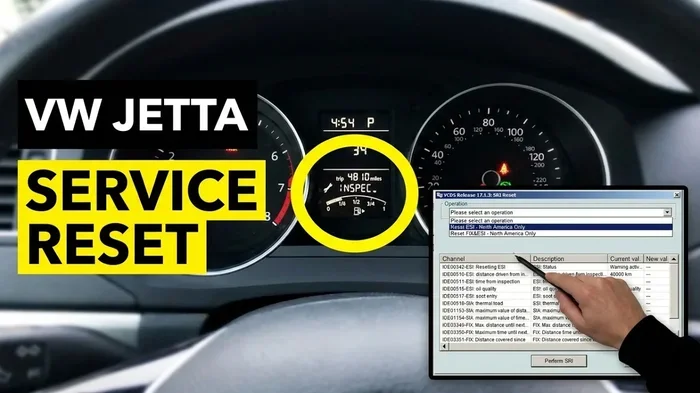
A basic OBD-II reader costs around $20 and handles most resets. For Volkswagen-specific features like ABS resets or transmission adaptations, you may want a more advanced scanner like the VCDS (VAG-COM) tool. These are designed specifically for VW and Audi vehicles and offer deeper access to the computer system.
Method 3: Dashboard Button Combinations
Some Volkswagen models allow you to reset the computer using button combinations on the dashboard or steering wheel. This method works best for resetting service lights and oil change reminders without any tools.
Common Button Reset Sequences
Here are the most common sequences for popular VW models. Always check your owner’s manual first because button layouts vary between model years.
- VW Golf (2010-2017): Turn the ignition to ON. Press and hold the trip reset button on the instrument cluster. Wait for the service menu to appear. Scroll to “Service Reset” and confirm.
- VW Jetta (2011-2019): Press the trip button repeatedly until the service screen appears. Hold the button for 10 seconds. The reset confirmation should appear.
- VW Passat (2012-2020): Use the steering wheel controls to navigate to Settings. Find Vehicle Maintenance and select Service Interval Reset.
- VW Tiguan (2016-2023): With the ignition on, press and hold the reset stalk on the right side of the steering column for 5 seconds.
These button methods only reset service and maintenance lights. They do not clear fault codes or ECU memory. For deeper resets, use the battery disconnect or OBD-II scanner methods described above.
Resetting Specific Volkswagen Systems
A full computer reset affects many systems in your VW. Here is what you need to know about resetting specific components.
Resetting the Oil Change Light
The oil change reminder is one of the most common reasons people reset their VW computer. After you get an oil change, you can turn off this light using the dashboard button method. For detailed steps, see our guide on Do You Reset The Oil Change Light. It covers the exact procedures for every VW model year.
Resetting After an Oil Change
Some VW models require a full computer reset after an oil change to update the service interval. This ensures the next oil change reminder comes on at the right time. If you are unsure whether you need to reset after your oil change, check out Do You Have To Reset The Light After An Oil Change for model-specific guidance.
Resetting the Tire Pressure Monitoring System
After rotating tires or adding air, you may need to reset the TPMS. On most VW models, this is done through the steering wheel controls. Go to Settings, then Vehicle, then Tire Pressure Monitoring, and select “Reset.” The system will recalibrate after you drive a few miles.
Resetting the Service Interval
The service interval tracks maintenance milestones like oil changes, brake inspections, and fluid flushes. A reset updates this tracker after each service. Use the dashboard menu or button combination method to adjust the service interval to your current mileage.
Common Mistakes to Avoid When Resetting Your VW Computer
Even though resetting a Volkswagen computer is not complicated, mistakes can cause problems. Here is what to watch out for.
- Disconnecting the wrong battery terminal: Always remove the negative terminal first. Removing the positive terminal can cause sparks and damage electrical components.
- Not waiting long enough: Fifteen minutes is the minimum wait time. Some VW models need 30 minutes or more for a full reset. Be patient.
- Forgetting to reset adaptations: After a battery disconnect, the ECU needs time to relearn your driving habits. Avoid aggressive driving for the first 50 miles after a reset.
- Ignoring the root cause: A reset clears codes but does not fix the problem. If your check engine light comes back, you have an unresolved issue that needs attention.
- Using the wrong scanner: Cheap scanners may not support all VW-specific functions. Invest in a VCDS tool if you own a newer Volkswagen.
Expert Insights on Volkswagen Computer Resets
Professional mechanics and VW specialists share a few insights that can make your reset experience smoother.
Timing matters. The best time to reset your Volkswagen computer is after completing a repair or maintenance task. Resetting too early means the computer has no chance to verify the fix. Wait until the repair is done, then drive for a few miles before performing the reset.
Keep a log. Write down the fault codes you cleared and the date. This creates a maintenance history that helps you track recurring issues. If a code comes back, you will know exactly when it first appeared and what you tried.
Do not reset before an inspection. If your vehicle is due for a state inspection, clearing codes right before the test can mask real problems. Inspectors can often detect recent resets, and it may cause you to fail the inspection.
Know when to seek professional help. If your check engine light keeps coming back after multiple resets, there is a deeper issue. A professional mechanic with VW-specific diagnostic tools can pinpoint the problem faster than a basic code reader.
How Often Should You Reset Your Volkswagen Computer?
You do not need to reset your VW computer regularly. Most Volkswagen owners only need to reset after a repair, a battery replacement, or a scheduled service. Over-resetting can actually cause problems by clearing learned adaptations that help your engine run smoothly.
A good rule of thumb is to only reset when you have a specific reason. If your dashboard is showing a warning light that should not be there, go ahead and clear it. If everything looks normal, leave the computer alone. The VW ECU is designed to manage itself, and unnecessary resets can disrupt that process.
Final Thoughts
Resetting your Volkswagen computer is a simple DIY task that anyone can do with basic tools and a little patience. Whether you choose the battery disconnect method, an OBD-II scanner, or dashboard button combinations, each approach has its place depending on what you need to reset.
Start with the method that matches your goal. For a full ECU reset, disconnect the battery. For clearing specific codes, use a scanner. For service light resets, try the button combination method. Always address the root cause of any warning before resetting, and do not be afraid to seek professional help if problems persist.
With the steps in this guide, you can tackle a Volkswagen computer reset confidently and save both time and money. Your VW will run better, your dashboard will stay clean, and you will gain valuable knowledge about how your car works.
Frequently Asked Questions
How long does it take to reset a Volkswagen computer?
A battery disconnect reset takes about 20 to 30 minutes including the wait time. An OBD-II scanner reset takes only 5 to 10 minutes. Dashboard button resets are the fastest and usually take less than 2 minutes. The total time depends on which method you use and what systems you are resetting.
Will resetting my Volkswagen computer erase my saved settings?
A battery disconnect will erase radio presets, power window calibrations, and some climate control settings. An OBD-II scanner reset preserves these settings. Dashboard button resets only affect service lights and do not touch other settings at all.
Can I drive my Volkswagen immediately after a reset?
Yes, you can drive right away after most resets. However, after a battery disconnect, it is best to drive gently for the first 20 to 30 miles. This gives the ECU time to relearn your driving patterns and recalibrate the idle speed and fuel mixture.
Why does my check engine light come back after I reset it?
The check engine light returns when the computer detects the same problem again. A reset only clears the code; it does not fix the underlying issue. If the light comes back within a few days, you have an unresolved problem that needs professional diagnosis.
Do I need a special scanner to reset a Volkswagen computer?
A basic OBD-II scanner works for most resets and costs under $30. For advanced resets like ABS bleeding or transmission adaptations, you may need a VCDS (VAG-COM) scanner. Your VW owner’s manual will tell you exactly what your model requires.
Is it safe to reset the Volkswagen computer myself?
Yes, it is completely safe if you follow the steps correctly. The biggest risks are disconnecting the wrong battery terminal or not waiting long enough. As long as you work carefully and follow our guide, you will not harm your Volkswagen’s electronics or void any warranty.