How Do I Turn On Forward Collision Avoidance Assist
Forward collision avoidance assist is a life-saving driver assistance feature that helps prevent crashes. This guide shows you exactly how to turn on forward collision avoidance assist in any vehicle. You will learn step-by-step instructions for popular car brands, troubleshooting tips, and expert advice to get the most from your collision avoidance system.
How Do I Turn On Forward Collision Avoidance Assist? If you have ever wondered about this question, you are not alone. Many drivers own vehicles with this amazing safety feature but never activate it. The truth is, turning on forward collision avoidance assist is simpler than most people think. In this guide, we will walk you through every step. You will learn what this system does, how to activate it in popular car brands, and what to do when it does not work. By the end, you will feel confident using your collision avoidance system every time you get behind the wheel.
Modern cars come packed with active safety technology designed to protect you and your passengers. Forward collision avoidance assist is one of the most important features available today. It uses radar-based detection and camera-based detection to monitor the road ahead. When it senses a potential crash, it warns you and can even apply the brakes automatically. This driver safety feature has saved countless lives on the road. Let us dive into everything you need to know about how to turn on forward collision avoidance assist and make the most of it.
Key Takeaways
- Easy Activation: Most vehicles let you turn on forward collision avoidance assist through the steering wheel controls or the infotainment screen in just a few taps.
- Brand-Specific Steps: Different car makers like Hyundai, Kia, Honda, Toyota, and Ford have unique menus and button combinations for activating the system.
- Safety First: This feature uses radar sensors and cameras to detect upcoming collisions and can automatically apply the brakes when needed.
- Common Issues Exist: Dirty sensors, software glitches, or incorrect settings can prevent the system from turning on properly.
- Regular Maintenance Matters: Keeping your sensors and cameras clean ensures the collision avoidance technology works reliably every time you drive.
- Customization Is Key: You can adjust sensitivity levels and notification preferences to match your driving style and comfort level.
📑 Table of Contents
- What Is Forward Collision Avoidance Assist?
- How Do I Turn On Forward Collision Avoidance Assist?
- Step-by-Step Instructions for Popular Car Brands
- Why Forward Collision Avoidance Assist Is a Game Changer
- Troubleshooting: What to Do When the System Won’t Activate
- Maximizing the Benefits of Your Collision Avoidance System
- Conclusion
What Is Forward Collision Avoidance Assist?
Forward collision avoidance assist is an advanced safety assist system built into modern vehicles. It works by constantly scanning the road ahead for other vehicles, pedestrians, and obstacles. The system relies on a forward sensing camera and a radar sensor mounted near the front windshield. These components work together to measure your distance from the car in front of you.
When the system detects a potential collision mitigation situation, it alerts you through visual warnings, audible beeps, or steering wheel vibrations. If you do not respond quickly enough, the braking assist system can step in and apply the brakes automatically. This entire process happens in milliseconds, far faster than a human reaction time.
Many people confuse forward collision avoidance assist with forward collision warning. While they are related, they are not the same. A forward collision warning only alerts you to danger. The full collision avoidance system goes further by taking action to prevent or reduce the severity of a crash. Think of it as having an extra set of eyes on the road that never get tired.
How the Technology Works
The collision avoidance technology depends on two main components. The first is the radar sensor, which sends out radio waves that bounce off objects ahead. The second is the forward sensing camera, which uses image recognition to identify vehicles, lane markings, and obstacles. Together, these sensors create a real-time picture of what is happening on the road.
The pre-collision system processes all this data instantly. It calculates your closing speed, the distance to the obstacle, and the likelihood of a crash. If the risk crosses a certain threshold, the safety system activation kicks in. First, it gives you a warning. Then, if needed, it applies partial braking to build up brake support system pressure. Finally, in the most dangerous situations, it can apply full emergency braking.
How Do I Turn On Forward Collision Avoidance Assist?
How Do I Turn On Forward Collision Avoidance Assist? The answer depends on your vehicle make and model. Most modern cars make this process straightforward, but the exact steps vary. Below, we cover the general methods and brand-specific instructions to help you find the right path.
In most vehicles, you can access the collision avoidance system settings through one of three methods. The first is through the steering wheel controls. Look for a button labeled “Safety,” “ADAS,” or “Driver Assist.” The second method is through the infotainment screen. Navigate to Settings, then Vehicle, and look for Driver Assistance or Safety Options. The third method is through a dedicated physical button, often located near the gear shifter or on the dashboard.
General Steps to Activate the System
- Start your vehicle and let the engine run for a few seconds.
- Press the driver assistance button on the steering wheel if your car has one.
- Check the instrument cluster for a safety system activation icon or message.
- Navigate to the infotainment screen and go to Settings.
- Select “Driver Assistance” or “Safety Features.”
- Find “Forward Collision Avoidance Assist” and toggle it on.
- Adjust your preferred sensitivity level if available.
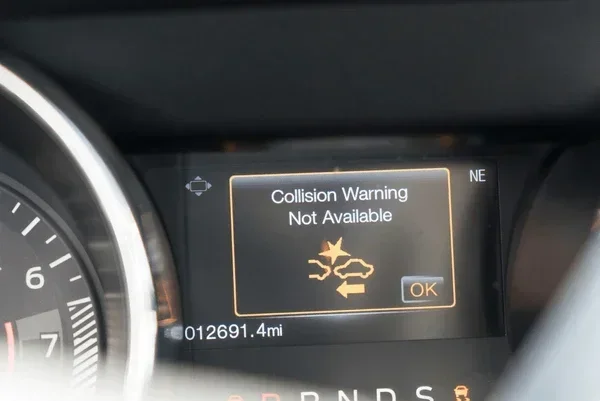
Once activated, you should see a green icon on your dashboard. This confirms the system is active and monitoring the road ahead. If you see a yellow or red icon, it usually means the system has a problem or the sensors need attention.
Quick Tips for First-Time Users
- Read your owner’s manual. Every car is different, and the manual has the exact steps for your specific model.
- Take a test drive in a safe area. Practice activating and deactivating the system in a parking lot before using it on busy roads.
- Check your sensor icons. Make sure the radar sensor and camera indicators show no warnings before driving.
- Keep the system on by default. Leaving forward collision avoidance assist enabled at all times gives you the best protection.
Step-by-Step Instructions for Popular Car Brands
Different car manufacturers use different names and menus for their collision avoidance system. Here is a detailed look at how to turn on forward collision avoidance assist in some of the most popular brands.
Hyundai and Kia Vehicles
Hyundai and Kia vehicles use a system called Forward Collision Avoidance Assist (FCA). To turn it on, start by pressing the Driver Assist button on the left side of the steering wheel. Then, on the infotainment screen, go to Settings > Driver Assistance > Forward Collision Avoidance Assist. Toggle the switch to “On.” You can also adjust the sensitivity between “Normal,” “High,” and “Low” modes. On newer models from 2022 and up, the system may activate automatically when you start the car.
Common mistake: Many Hyundai and Kia owners think the system is always on because it activates automatically in some models. Always check your dashboard icon to confirm the status.
Honda and Acura Vehicles
Honda calls its system Collision Mitigation Braking System (CMBS). To activate it, press the Road Safety Assist button on the steering wheel. On the display, you will see a confirmation that the system is active. For Acura models, the process is similar but accessed through the AcuraWatch menu. Go to Settings > AcuraWatch > Collision Mitigation Braking System and turn it on.
Expert Insight: Honda’s system works best when the forward sensing camera is clean. After washing your car, drive a short distance to let the system recalibrate. This ensures accurate radar-based detection from the very first mile.
Toyota and Lexus Vehicles
Toyota uses the name Pre-Collision System (PCS) with Automatic Emergency Braking. To turn it on, press the Safety Connect or Driver Assistance button. Then navigate to Settings > Safety > Pre-Collision System. Toggle it on and choose your alert preferences. Lexus vehicles follow a similar path under the Lexus Safety System+ menu.
Quick Tip: Toyota vehicles allow you to adjust the braking assist intensity. If you find the automatic braking too aggressive, you can lower the sensitivity in the settings menu.
Ford and Lincoln Vehicles
Ford calls its system Pre-Collision Assist with Automatic Emergency Braking. To activate it, go to the touchscreen and select Settings > Driver Assistance > Pre-Collision Assist. Toggle the switch to “On.” Ford also lets you adjust the system sensitivity and choose between different alert types, including visual, audible, and haptic feedback through the steering wheel.
Common Mistake: Some Ford owners accidentally turn off the system while adjusting other driver assistance features. Always double-check that the icon shows green after making changes.
Comparison Table: How Different Brands Handle Forward Collision Avoidance Assist
| Brand | System Name | Activation Method | Sensitivity Options |
|---|---|---|---|
| Hyundai / Kia | Forward Collision Avoidance Assist | Steering wheel button + Infotainment menu | Normal, High, Low |
| Honda / Acura | Collision Mitigation Braking System | Steering wheel button + Display menu | Normal, Sensitive |
| Toyota / Lexus | Pre-Collision System | Safety button + Settings menu | Low, Medium, High |
| Ford / Lincoln | Pre-Collision Assist | Infotainment touchscreen | Low, Medium, High |
| Tesla | Automatic Emergency Braking | Autopilot settings on touchscreen | On/Off (auto-calibrated) |
Why Forward Collision Avoidance Assist Is a Game Changer
The collision avoidance system is more than just a convenience feature. It is a road safety tool that can mean the difference between a near-miss and a serious accident. Studies show that vehicles equipped with automatic emergency braking and forward collision warning systems have significantly fewer rear-end collisions.
Here are the key reasons why this active safety technology deserves your attention:
- Faster Reaction Time: The system responds in milliseconds, which is much faster than any human can react. This speed matters most in sudden stop situations.
- Reduces Crash Severity: Even when a collision cannot be fully prevented, the braking assist system reduces the impact speed, which dramatically lowers injury risk.
- Works in Low Visibility: The radar sensor and camera-based detection systems work even in rain, fog, and low-light conditions when your visibility is reduced.
- Reduces Driver Fatigue: Long drives can be exhausting. The safety assist system acts as a backup, keeping you alert and protected when your attention wanders.
- Insurance Benefits: Many insurance companies offer discounts for vehicles equipped with collision avoidance technology. Check with your provider to see if you qualify.
Real-World Impact
The Insurance Institute for Highway Safety (IIHS) reports that cars with automatic emergency braking have 50% fewer rear-end crashes than those without. The pre-collision system is especially effective in urban driving, where stop-and-go traffic creates frequent collision risks. Whether you are commuting to work or driving on the highway, having forward collision avoidance assist active gives you peace of mind.
Expert Insight: “The best safety system is the one you actually use,” says automotive safety researcher Dr. Sarah Chen. “Many drivers deactivate their collision avoidance system after a few weeks because they do not understand how it works. Education is the key to making driver safety features truly effective.”
Troubleshooting: What to Do When the System Won’t Activate
Sometimes forward collision avoidance assist refuses to turn on, even when you follow all the steps. This can be frustrating, but there are usually simple explanations. Here are the most common reasons and what you can do about them.
Dirty or Obstructed Sensors
The most common reason for safety system activation failure is dirty sensors. The radar sensor and forward sensing camera are usually located behind the front windshield, near the rearview mirror. If they are covered in dirt, snow, ice, or even a thick layer of dust, the system cannot function properly.
Quick Fix: Clean the windshield area around the sensor carefully. Use a soft cloth and avoid abrasive cleaners. After cleaning, drive a few miles and let the system recalibrate. Most vehicles will display a message when the sensors are clear and the system is ready.
Software Glitches
Like any computer system, your vehicle’s collision avoidance technology can experience software glitches. A simple reset often fixes this. Turn off the engine, wait 30 seconds, and restart the vehicle. This clears temporary errors and refreshes the safety system activation process.
If a reset does not work, check for available software updates. Many manufacturers now offer over-the-air updates that improve driver assistance features and fix known bugs. Visit your dealer or check your brand’s mobile app for the latest updates.
Incorrect Settings or Disabled Features
Sometimes the system is turned off in the settings menu without the driver realizing it. Go through the driver assistance menu and confirm that forward collision avoidance assist is toggled on. Also check that no temporary “off” commands were accidentally triggered by a steering wheel button press.
System Malfunction or Hardware Issues
If none of the above solutions work, there may be a hardware problem. The radar sensor or camera could be damaged from a minor accident or a high-pressure car wash. In this case, you should visit a certified service center. They have the diagnostic tools needed to identify and fix the issue.
Common Mistake: Do not ignore warning lights on your dashboard. A yellow or red collision mitigation warning means the system needs attention. Driving without a functioning collision avoidance system leaves you without one of the most important vehicle safety features available today.
Maximizing the Benefits of Your Collision Avoidance System
Turning on forward collision avoidance assist is just the first step. To get the most out of this active safety technology, you need to understand how to use it effectively. Here are some practical tips to help you maximize the benefits.
Keep Your Sensors Clean
Regular maintenance is essential for reliable radar-based detection and camera-based detection. Make it a habit to clean the front windshield area around the sensors whenever you wash your car. In winter, clear snow and ice from this area before driving. A clean sensor is an accurate sensor.
Adjust Sensitivity to Your Driving Style
Most vehicles let you adjust the sensitivity of the collision avoidance system. If you drive in heavy traffic, consider using a higher sensitivity setting. If you find the warnings too frequent on open highways, you can lower it slightly. The goal is to find a balance that keeps you safe without causing alert fatigue.
Understand the System’s Limitations
Forward collision avoidance assist is a powerful tool, but it is not perfect. The system may not detect every obstacle, especially in extreme weather or if the sensors are blocked. It is designed to assist you, not replace your attention. Always stay focused on the road and keep both hands on the wheel.
Combine with Other Safety Features
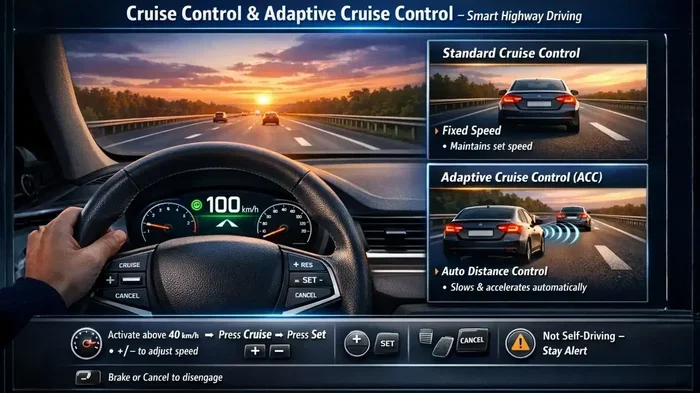
For maximum road safety, use forward collision avoidance assist alongside other driver assistance features. Lane keeping assist, adaptive cruise control, and blind spot monitoring all work together to create a comprehensive safety net. When these systems work in harmony, they significantly reduce your risk of an accident.
Get Regular System Checkups
Just like your brakes or tires, your safety system needs regular checkups. During routine service visits, ask your mechanic to inspect the radar sensor and forward sensing camera. Many dealerships offer a free safety feature settings check as part of an oil change or scheduled maintenance.
Conclusion
How Do I Turn On Forward Collision Avoidance Assist? Now you know the answer. Whether you drive a Hyundai, Honda, Toyota, Ford, or any other modern vehicle, activating your collision avoidance system is a straightforward process. The key is to find the right menu or button in your car, follow the steps, and confirm the system is active through your dashboard icon.
This forward collision avoidance assist feature is one of the most valuable active safety technology tools in your vehicle. It uses advanced radar sensor and camera-based detection to keep you safe on every drive. By keeping your sensors clean, adjusting your sensitivity preferences, and staying alert, you get the full benefit of this life-saving collision avoidance technology.
Take a few minutes today to turn on forward collision avoidance assist if you have not already done so. Your future self will thank you when this system helps you avoid a dangerous situation on the road. Drive safely, stay protected, and enjoy the confidence that comes with knowing your vehicle has your back.
Frequently Asked Questions
Can I turn off forward collision avoidance assist while driving?
Yes, most vehicles allow you to temporarily turn off the system using a steering wheel button or the infotainment menu. However, it is strongly recommended to keep the system on at all times. The collision avoidance system provides critical protection that works best when it is always active. If you turn it off, remember to turn it back on before your next drive.
Why does my forward collision avoidance assist keep turning off by itself?
This usually happens due to a dirty or obstructed radar sensor or forward sensing camera. Snow, ice, dirt, or even a bulky phone mount can block the sensors. Other causes include software glitches or low voltage from a weak car battery. Clean the sensors, restart the vehicle, and check your battery if the problem persists.
Does forward collision avoidance assist work at all speeds?
Most collision avoidance technology systems work at low speeds, typically starting from around 3 to 5 mph. Higher-speed automatic emergency braking usually activates above 10 mph. Check your owner’s manual for the specific speed range of your vehicle’s collision avoidance system. The system is designed to help in both city driving and highway situations.
Can I adjust how sensitive the forward collision avoidance assist is?
Yes, many vehicles offer sensitivity adjustments for the collision avoidance system. You can typically find this option in the infotainment menu under Settings > Driver Assistance. Sensitivity levels may include Low, Normal, and High. Choose a setting that matches your driving environment and personal comfort level for the best driver safety experience.
Will forward collision avoidance assist increase my car insurance rates?
No, the opposite is usually true. Vehicles equipped with forward collision avoidance assist and other active safety technology often qualify for insurance discounts. Many insurance companies offer lower rates for cars with automatic emergency braking and collision mitigation features because they reduce the likelihood of accidents and claims.
What should I do if the forward collision avoidance assist warning light stays on?
A persistent warning light usually indicates a sensor problem or system malfunction. Start by cleaning the radar sensor and forward sensing camera area on your windshield. If the light remains, restart the vehicle and check for software updates. If the issue continues, visit a certified service center for a professional safety system activation diagnostic and repair.