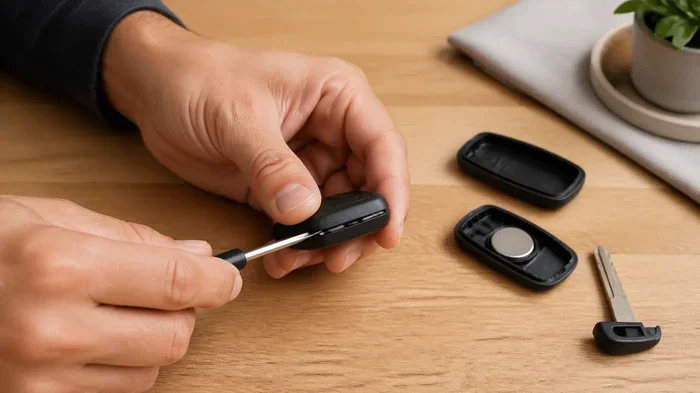
How Do You Open a New Key Fob With These Simple Steps
How Do You Open a New Key Fob? It’s easier than most car owners think. This guide breaks down every step you need to replace, reprogram, or maintain your remote key fob. You’ll learn the right tools, the proper technique, and common mistakes to avoid. Whether you have a basic car key fob or a smart key system, we’ve got you covered. Keep reading to master your key fob replacement and save money on dealer visits.
Have you ever wondered how do you open a new key fob? It’s a question that comes up when your car remote stops working or when you need a replacement. The good news is that opening a new key fob is a straightforward process anyone can learn. You don’t need to be a mechanic or a tech expert. With the right tools and a little patience, you can handle this task in just a few minutes.
A key fob is your car’s electronic remote control. It lets you lock doors, unlock them, and in many cases start the engine without inserting a physical key. When a key fob stops working, the problem is often a dead battery or a cracked casing. Either way, you need to open it up to fix the issue. This guide will show you exactly how to do it step by step.
Whether you have a standard remote key fob or a modern smart key for push button start, the basics are similar. You’ll learn about the different types, the tools you need, and the best techniques for opening yours safely. We’ll also cover programming, common mistakes, and maintenance tips. By the end, you’ll feel confident handling your car key fob on your own.
Knowing how to open and maintain your key fob saves you time and money. Instead of visiting a dealer or locksmith, you can do it yourself at home. Let’s dive into everything you need to know.
Key Takeaways
- Opening a key fob is simple: Most fobs use a small screw or clip that you can release with basic tools.
- Know your fob type first: Standard remotes, smart keys, and flip-out fobs each have a different opening method.
- Use the right tools: A flathead screwdriver, plastic pry tool, and the correct battery are all you need.
- Programming matters: After opening, you may need to reprogram your fob to sync with your vehicle.
- Avoid common mistakes: Using metal tools, forcing the casing, or skipping the battery check can cause damage.
- Maintenance extends life: Regular battery replacement and careful handling keep your fob working for years.
- Save money DIY: Handling your own fob saves hundreds compared to dealer or locksmith fees.
📑 Table of Contents
What Is a Key Fob and Why Does It Need Opening?
A key fob is a small electronic device that communicates with your car using radio frequency signals. It acts as a wireless remote for locking, unlocking, and sometimes starting your vehicle. Over time, these devices can wear out, lose signal strength, or simply stop working. When that happens, opening the fob becomes necessary.
There are several reasons you might need to open your key fob:
- Battery replacement: The most common reason. A dead car key battery means your fob won’t send signals.
- Cracked or damaged casing: Drops and wear can break the plastic shell, exposing internal parts.
- Button replacement: Worn-out buttons may need to be swapped out inside the fob.
- Reprogramming: Sometimes opening the fob helps with key fob programming or syncing issues.
- Water damage repair: If your fob gets wet, opening it allows you to dry and inspect the components.
Understanding the Different Types of Key Fobs
Not all key fobs are the same. Different vehicles use different types of electronic keys, and each has its own opening method. Here are the most common types you’ll encounter:
- Standard Remote Fob: The classic rectangular remote with buttons on the front. Found on older vehicles and still common today.
- Smart Key Fob: Used with push button start systems. These are often sleeker and more compact.
- Flip-Out Key Fob: Has a retractable metal key blade that slides out when needed. Popular with many manufacturers.
- Keyless Entry Remote: A simple remote with no key blade, just buttons for locking and unlocking.
Each type requires a slightly different approach when opening. Knowing which one you have is the first step to success.
Why Opening a Key Fob Matters for Your Vehicle Security
Your vehicle security system relies on the key fob to communicate with the car’s computer. When the fob malfunctions, it can leave you locked out or unable to start your engine. Opening the fob and replacing the battery or fixing the internal components restores that connection. It’s a small task that keeps your car door lock remote working reliably every day.
Many people don’t realize that a weak key fob signal range often means the battery is dying. Opening the fob early to replace the battery can prevent being stranded. Regular maintenance of your key fob troubleshooting needs goes a long way in keeping your car secure and accessible.
How Do You Open a New Key Fob: A Complete Walkthrough
How Do You Open a New Key Fob is a question with a surprisingly simple answer once you know the steps. The process varies slightly depending on your fob type, but the general approach is the same across most models. Let’s walk through it together.
Step 1: Identify Your Key Fob Type
Before you do anything, take a close look at your car key fob. Is it a standard rectangular remote? A sleek smart key? A flip-out model? Identifying the type tells you what to expect when opening it. Look for any visible seams, screws, or release tabs on the casing.
Here’s a quick comparison of common fob types and their opening methods:
| Key Fob Type | Opening Method | Battery Type | Difficulty Level |
|---|---|---|---|
| Standard Remote Fob | Pry open with flat tool or screwdriver | CR2025 or CR2032 | Easy |
| Smart Key Fob | Press release button or slide panel | CR2025 or CR2032 | Medium |
| Flip-Out Key Fob | Unclip metal key, then pry open | CR2025 | Easy |
| Keyless Entry Remote | Snap-open or screw-back design | CR2032 | Easy |
This table gives you a quick reference. Once you know your fob type, move on to the next step.
Step 2: Gather the Right Tools
You don’t need a lot of tools to open a key fob. A few basic items will get the job done. Having everything ready before you start makes the process smooth and frustration-free.
- Flathead screwdriver: A small one works best for prying open snap-fit casings.
- Plastic pry tool: This prevents scratching or damaging the fob’s exterior.
- Tweezers: Helpful for handling small internal components and the battery.
- Replacement battery: Make sure you have the correct key fob battery type before you start.
- Soft cloth or mat: Keeps small parts from rolling away or getting scratched.
Having these tools ready means you won’t have to stop mid-process. It keeps your workflow smooth and efficient.
Step 3: Locate the Release Mechanism
Most key fobs have a hidden seam where the two halves of the casing meet. Run your finger along the edges to find it. On some fobs, you’ll see a small hole or slot where you can insert a flathead screwdriver. On others, there’s a tiny release button near the key blade slot.
Here are some tips for finding the release mechanism:
- Look closely at the edges of the fob. The seam is often very thin and hard to see.
- Check the back of the fob. Some models open from the rear rather than the front.
- For flip-out fobs, remove the metal key blade first. This usually reveals the hidden seam.
- Use a flashlight if you’re having trouble seeing the seam or release point.
Take your time with this step. Forcing the wrong spot can crack the casing and make things harder.
Step 4: Open the Key Fob Casing
Once you’ve found the release mechanism, gently insert your tool and pry the casing apart. Work slowly and evenly around the seam. Don’t rush this. Most fobs snap together with plastic clips that can break if forced.
Quick Tips for opening the casing safely:
- Start at one corner and work your way around.
- Use gentle, steady pressure. Don’t use a hammer or excessive force.
- If the fob feels stuck, check for a hidden screw you might have missed.
- Place a cloth underneath to catch any small parts that fall out.
Once both halves separate, you’ll see the internal circuit board, battery, and buttons. Handle these components carefully. The circuit board is sensitive, and rough handling can damage the electronics inside your electronic key.
Step 5: Access and Replace Internal Components
Now that the fob is open, you can access the battery and other parts. The battery is usually held in place by a small clip or sits in a battery compartment. Use your tweezers to remove it carefully.
Check the battery orientation before removing the old one. Note which side faces up. This makes installing the new battery much easier. When inserting the new battery, make sure it matches the key fob battery type listed for your fob model.
If you’re replacing buttons or cleaning the circuit board, now is the time. Use a dry cloth or a small amount of rubbing alcohol to clean the contacts gently. Let everything dry completely before reassembling.
Programming Your New Key Fob After Opening
Opening the fob is only half the job. In many cases, you’ll also need to reprogram key fob it so it syncs with your vehicle’s computer system. Without proper programming, your fob won’t communicate with the car, and all that work goes to waste.
Self-Programming Methods for Common Vehicles
Many modern vehicles allow you to reprogram key fob yourself without visiting a dealer. The process varies by make and model, but here are some general steps that work for many cars:
- Sit in your car with all doors closed.
- Insert the key into the ignition and turn it to the “On” position (but don’t start the engine).
- Press and hold the lock button on the fob for several seconds.
- Turn the key back to “Off,” then back to “On.”
- Release the lock button. You should hear a confirmation sound or see the lights flash.
- Test the fob by locking and unlocking the doors.
Always check your vehicle’s owner manual for the exact programming steps. Some manufacturers have specific sequences that differ from the general method above.
When to Seek Professional Help for Key Fob Programming
Sometimes, self-programming just doesn’t work. If your key fob not working persists after you’ve replaced the battery and tried reprogramming, it’s time to call in a professional. A locksmith or dealership can perform advanced key fob programming that requires specialized equipment.
This is especially true for luxury vehicles and newer models with advanced vehicle security system features. These fobs often use encrypted signals that need dealer-level tools to program. Don’t force it. Paying a professional for programming is much cheaper than replacing a damaged fob.
Common Mistakes to Avoid When Opening a Key Fob
Even simple tasks like opening a key fob come with pitfalls. Avoiding these common mistakes saves you time, money, and frustration.
Rushing the Process
The biggest mistake people make is rushing. They force the casing open without finding the release mechanism first. This leads to cracked plastic, broken clips, and a fob that no longer closes properly. Take your time. Patience pays off when working with small electronic devices.
Using the Wrong Tools
Metal tools like butter knives or sharp screwdrivers can scratch and damage the fob’s exterior. They can also pierce the circuit board inside. Always use a plastic pry tool or a soft flathead screwdriver wrapped in cloth. Protecting the exterior of your remote key fob keeps it looking good and functioning well.
Forgetting to Check the Battery First
Sometimes the problem isn’t a broken fob at all. It’s a dead battery. Before you open the fob, try replacing the battery first. You might save yourself the entire opening process. Keep spare car key battery units in your glove box so you’re always prepared.
Not Knowing Your Fob Type
Every fob is different. Using the wrong opening technique for your specific model can cause damage. Always identify your fob type first and look up the specific opening method. A quick online search with your vehicle make, model, and year will give you the right instructions.
Skipping the Reassembly Check
After you’ve replaced the battery or fixed the internal parts, make sure the fob reassembles properly. All clips should snap back into place. Test the buttons before closing the casing completely. This ensures everything works and nothing gets pinched.
Maintaining Your Key Fob After Opening
Once you’ve successfully opened, repaired, or replaced your key fob, proper maintenance keeps it working for years. A little care goes a long way in preventing future issues.
Battery Replacement Tips
Most key fob battery replacement tasks are straightforward. Here are some tips to make the process even easier:
- Keep spare batteries on hand: Stock up on CR2025 or CR2032 batteries depending on your fob model.
- Replace batteries every 1-2 years: Don’t wait until the fob stops working entirely.
- Buy quality batteries: Name-brand batteries last longer and provide more consistent signal strength.
- Note the replacement date: Write the date on the new battery with a marker so you remember when to replace it next.
Keeping Your Key Fob in Top Shape
Beyond battery replacement, there are simple habits that extend your fob’s lifespan. Avoid dropping it on hard surfaces. Keep it away from extreme heat and moisture. Store it in a protective case or pouch when it’s in your bag or pocket.
Regular key fob troubleshooting also helps. If you notice the signal getting weaker or buttons feeling less responsive, open the fob and check for debris around the buttons. A quick cleaning can prevent bigger problems down the road.
When to Replace the Entire Key Fob
Sometimes opening and repairing isn’t enough. If the circuit board is damaged beyond repair or the fob is physically broken, a full key fob replacement is the best option. Look for a compatible replacement fob online or at an auto parts store. Make sure it matches your vehicle’s make, model, and year for proper compatibility.
After purchasing a new fob, follow the programming steps we covered earlier. A new fob won’t work until it’s properly synced with your car’s computer system. Taking the time to program it correctly ensures your car remote lock and key fob sync work perfectly from day one.
Expert Insights on Key Fob Care
Automotive experts agree that regular maintenance of your key fob prevents most common issues. According to industry professionals, the key is proactive care. Don’t wait for problems to arise. Replace batteries on a schedule, keep the fob clean, and handle it with care. These small habits add up to years of reliable performance from your key fob reset and key fob troubleshooting needs.
Experts also recommend keeping a spare fob in a safe place. If your primary fob fails unexpectedly, having a backup means you’re never stranded. It’s a small investment that provides big peace of mind.
Conclusion
How Do You Open a New Key Fob is a skill every car owner should have. It saves money, builds confidence, and keeps you prepared for unexpected fob failures. From identifying your fob type to gathering the right tools, opening the casing, replacing components, and programming the fob back to your vehicle, every step is manageable with a little care and patience.
Remember to avoid common mistakes like using the wrong tools or rushing the process. Maintain your fob regularly with timely battery replacements and gentle handling. Whether you have a standard remote, a smart key, or a flip-out model, the principles remain the same. Take your time, follow the steps, and you’ll have your key fob working perfectly again in no time.
The next time your car key fob gives you trouble, don’t panic. You now have the knowledge and confidence to handle it yourself. Open that fob, fix the issue, and get back on the road with ease. Your wallet will thank you too.
Frequently Asked Questions
Can I open a key fob without any special tools?
Yes, in most cases you can open a standard key fob with just a flathead screwdriver and a plastic pry tool. A coin can also work in a pinch for snap-fit casings. The key is to go slowly and find the release seam first. Avoid using sharp metal objects that could scratch or damage the fob’s exterior or internal circuit board.
How often should I replace my key fob battery?
Most experts recommend replacing your car key battery every 1 to 2 years, even if the fob still seems to work. Waiting until the fob stops working means you could get stranded. Keeping a spare battery in your glove box and replacing it on a schedule ensures your remote key fob stays reliable and ready to use whenever you need it.
Do I need to reprogram my key fob after opening it?
Not always. If you only replaced the battery, reprogramming is usually not necessary. However, if you replaced internal components or the fob stopped communicating with your car after opening, you may need to reprogram key fob it. Check your vehicle’s owner manual for the specific programming steps for your make and model.
What should I do if my key fob still won’t work after opening it?
If the fob still doesn’t work after a battery replacement and careful reassembly, the issue may be with the circuit board or internal electronics. Try cleaning the contacts with rubbing alcohol and a cotton swab. If that doesn’t help, the fob may need a full key fob replacement or professional repair. In some cases, a locksmith can diagnose and fix internal issues that aren’t visible to the naked eye.
Is it safe to open a key fob myself or should I go to a dealer?
Opening a key fob yourself is generally safe and straightforward for most standard models. It saves significant money compared to dealer fees. However, if you have a luxury vehicle or a complex smart key system with advanced vehicle security system features, a dealer or locksmith may be the better choice. They have the specialized tools and expertise to handle encrypted fobs without causing damage.
What type of battery does my key fob need?
The most common key fob battery type is the CR2025 or CR2032 lithium coin battery. However, some fobs use different sizes or types. Check your vehicle’s owner manual, look at the old battery inside the fob, or check the fob model number online to confirm the correct battery. Using the wrong battery type can damage the fob or cause it to malfunction.