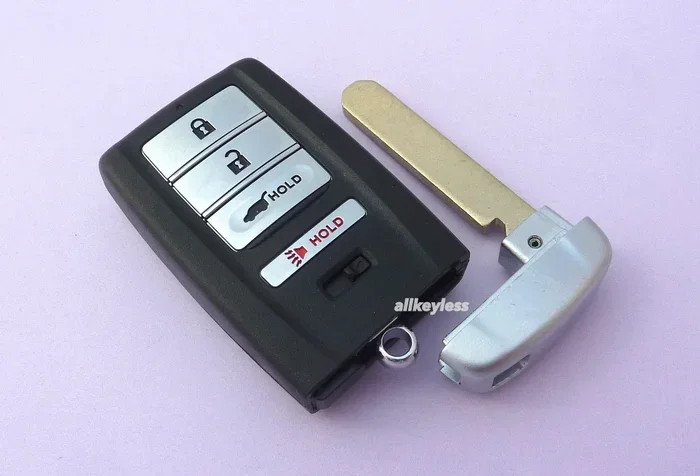
How to Change the Acura RDX Key Battery Step by Step
Changing the Acura RDX key battery is a simple DIY task that anyone can do in minutes. This guide walks you through every step, from gathering the right tools to testing your remote after replacement. You will learn the exact battery type, common mistakes to avoid, and tips to make your key fob last longer.
Changing the battery in your Acura RDX key fob is one of those small maintenance tasks that can save you a lot of hassle. Most Acura RDX owners face the same problem at some point. The remote stops working, the range gets shorter, or the buttons become unresponsive. Before you rush to a dealer or spend money on a replacement, you should know that a simple battery swap can fix the issue.
The process is straightforward, and you do not need any special skills. In this guide, we walk you through every step of the way. You will learn what battery type your Acura RDX key fob uses, what tools you need, and how to avoid common mistakes. Whether you are a complete beginner or someone who has done this before, you will find useful tips here.
We also cover how to extend your key fob battery life and when it is time to seek professional help. By the end of this article, you will feel confident handling the replacement yourself. Let us get started.
Key Takeaways
- CR2032 Battery: The Acura RDX key fob uses a standard CR2032 coin cell battery that is easy to find and affordable.
- Quick Process: You can replace the battery in under five minutes with just a small flathead screwdriver.
- Common Signs: A weak or dead key fob battery shows up as reduced range or unresponsive buttons.
- Care Tips: Proper storage and avoiding moisture can extend your key fob battery life significantly.
- Professional Help: If you are unsure, you can always take your Acura to a Honda dealership for assistance.
- Reset May Be Needed: After replacing the battery, you may need to reset the key fob to restore full function.
📑 Table of Contents
Understanding the Acura RDX Key Battery
The Acura RDX key fob is also known as the RDX smart key or the Acura RDX remote. It lets you lock, unlock, and even start your vehicle without taking the key out of your pocket. Like all remote key fobs, it runs on a small battery that needs to be replaced from time to time.
The good news is that the Acura RDX key battery is a standard type. Most models use a CR2032 coin cell battery. This is one of the most common batteries in the world. You can find it at almost any grocery store, pharmacy, or auto parts shop. The cost is usually very low, often under five dollars.
If you are not sure which battery your specific model uses, you can always download the product manual for your Acura RDX. The manual will list the exact battery type and provide additional details about the key fob. This is a great resource for any Acura RDX owner who wants to handle maintenance on their own.
Signs Your Acura RDX Key Battery Is Dying
Knowing when to replace the battery can save you from getting locked out of your car. Here are the most common signs that your key fob battery is running low:
- Reduced range: You have to stand closer to the car for the remote to work.
- Unresponsive buttons: Some buttons work, but others do not respond at all.
- Intermittent function: The remote works sometimes but not every time you press a button.
- Warning light: Some Acura RDX models display a warning on the dashboard about the key fob battery.
- Slow response: There is a noticeable delay between pressing the button and the car responding.
If you notice any of these signs, it is a good idea to replace the battery right away. Waiting too long can leave you stranded, especially if the battery dies completely while you are away from home. The key fob battery replacement process is so simple that there is no reason to wait.
Tools and Materials You Will Need
One of the best things about replacing the Acura RDX key battery is that you need very few tools. Here is a simple list of what you will need:
- CR2032 coin cell battery: This is the replacement battery. Make sure to buy a quality brand.
- Small flathead screwdriver: You will use this to pry open the key fob case.
- Soft cloth or towel: This protects the key fob from scratches while you work.
- Good lighting: Make sure you can see clearly inside the key fob.
- A clean, flat workspace: A table or desk works perfectly.
You do not need any special tools or technical knowledge. Everything you need is something you probably already have at home. The entire process should take less than five minutes once you have your materials ready.
It is also worth noting that key fob battery replacement is one of the cheapest maintenance tasks you can do yourself. A new CR2032 battery costs just a few dollars, and you will not need to pay for labor or diagnostics. This is a great way to save money on basic car maintenance. For more ways to save on car care, check out our guide on how to save money on auto tint for additional budget-friendly tips.
Step-by-Step Guide to Changing the Acura RDX Key Battery
Now that you have your tools ready, let us walk through the process step by step. Follow these instructions carefully, and you will have your key fob working like new in no time.
Step 1: Prepare Your Workspace
Find a clean, well-lit area to work. Lay down a soft cloth to protect the key fob from scratches. Make sure your hands are clean and dry. Oil and moisture from your fingers can damage the internal components of the key fob over time.
Place the key fob on the cloth with the buttons facing up. Take a moment to look at the key fob carefully. Notice the seam where the two halves of the case meet. This is where you will open the fob. Good lighting makes a big difference, so try to work near a window or under a bright lamp.
Step 2: Open the Key Fob Case
Insert the small flathead screwdriver into the seam of the key fob. Gently twist the screwdriver to pop the case open. Be careful not to use too much force. The case is made of plastic and can crack if you are too rough.
If the screwdriver does not fit well, you can also use a small butter knife or a guitar pick. The goal is to gently separate the two halves of the case without damaging them. Removing stuck or tight components from car parts requires patience and gentle force, and the same principle applies here.
Once the case is open, you will see the battery sitting in a small compartment. Take note of how the battery is positioned. Pay attention to which side is facing up. This will help you when you insert the new battery.
Step 3: Remove the Old Battery
The old battery should be easy to remove. In most cases, it simply lifts out of its compartment. You can use the tip of the screwdriver or your fingernail to gently pry it out.
Be careful not to damage the battery compartment or the contacts inside. If the old battery is stuck, try wiggling it gently from side to side. Do not use excessive force, as this could bend the contacts or crack the compartment.
Once the old battery is out, take a look at it. If it is leaking or corroded, you should clean the compartment before inserting the new battery. A quick wipe with a dry cloth or a cotton swab is usually enough to remove any residue.
Step 4: Insert the New Battery
Take your new CR2032 battery and check the orientation. The positive side (usually marked with a + sign) should face up, matching the position of the old battery. If you are not sure, check the markings inside the battery compartment for guidance.
Gently place the new battery into the compartment. Make sure it sits flat and secure. The battery should not wiggle or feel loose. If it does not fit easily, double-check the orientation and try again.
This is a key moment in the key fob battery replacement process. Taking a few extra seconds to ensure the battery is properly seated can save you from having to repeat the process. A well-placed battery ensures a strong connection and reliable performance.
Step 5: Close the Key Fob Case
Align the two halves of the key fob case carefully. Press them together gently until you hear a click. The case should snap shut securely. If it does not click into place, open it back up and check that the battery is seated correctly.
Make sure there are no gaps or misalignments. A properly closed case protects the internal components from dust and moisture. It also ensures that the buttons feel firm and responsive when you press them. A loose case can let dirt and debris inside, which can cause problems over time.
Step 6: Test the Key Fob
Now it is time to test your work. Stand near your Acura RDX and press the lock and unlock buttons. The car should respond immediately. Test all the buttons, including the trunk release and the panic button if your model has one.
If the key fob does not work right away, do not panic. Sometimes the key fob needs a moment to reconnect with the vehicle. Try walking closer to the car and pressing the buttons again. If it still does not work, you may need to reset the key fob or check that the battery is properly seated.
In some cases, you might also need to reprogram the key fob after a battery change. Refer to your owner manual for specific reprogramming steps for your Acura RDX model year. A quick online search for your specific year and model can also provide helpful guidance.
Common Problems After Replacing the Key Battery
Most of the time, replacing the battery solves the problem completely. However, there are a few issues that can come up after a battery change. Here are the most common ones and how to fix them.
The Key Fob Still Does Not Work
If the key fob still does not work after a fresh battery, the first thing to check is the battery orientation. It is easy to put the battery in upside down, and this will prevent the fob from working. Remove the battery, flip it over, and try again.
Another common issue is dirty battery contacts. Over time, the metal contacts inside the key fob can accumulate dust or corrosion. A quick wipe with a dry cloth or a cotton swab can clean them up and restore proper connection. If the contacts look heavily corroded, you may need to replace the entire key fob.
The Key Fob Works But Has a Short Range
If the key fob works but the range is still short, the new battery might be low or defective. Try a different CR2032 battery from a different brand. Sometimes even new batteries are not at full charge. This is more common than you might think.
Cold weather can also reduce the range of your key fob temporarily. If you live in a cold climate, this is something to keep in mind. The range should return to normal once the temperature rises. If the short range persists in warm weather, the battery may be defective or the key fob may have a deeper issue.
The Key Fob Needs to Be Reprogrammed
In rare cases, replacing the battery can cause the key fob to lose its pairing with the vehicle. If this happens, you will need to reprogram the key fob. The steps for this vary by model year, so it is best to consult your Acura RDX owner manual or contact a Honda dealership for guidance.
If you are not comfortable doing this yourself, remember that you can always take your Acura to a Honda dealership for professional assistance. They have the tools and expertise to reprogram your key fob quickly and correctly. This is especially helpful for newer models with advanced smart key systems.
How to Extend Your Acura RDX Key Battery Life
Replacing the battery is easy, but it is even better if you can make it last longer. Here are some practical tips to help you get the most out of every new battery.
Store the Key Fob Properly
When you are not using the key fob, store it in a cool, dry place. Avoid leaving it in direct sunlight or in a hot car. Extreme heat and cold can drain the battery faster and damage the internal electronics. A drawer or a dedicated key bowl inside your home is an ideal storage spot.
Also, try to keep the key fob away from other electronic devices. Things like phones, tablets, and laptops can sometimes interfere with the key fob signal. Storing them separately can help maintain strong signal strength and prevent unnecessary battery drain.
Avoid Getting the Key Fob Wet
Moisture is one of the biggest enemies of electronic devices. Try to keep your key fob dry at all times. If it gets wet, dry it off immediately and let it air dry before using it again. Water damage can short out the internal circuits and ruin the key fob entirely.
Consider using a protective case for your key fob if you are often outdoors or near water. A simple silicone cover can provide an extra layer of protection against moisture and accidental drops.
Do Not Press Buttons Unnecessarily
Every time you press a button, the key fob uses a small amount of battery power. While this is minimal, pressing buttons repeatedly when you do not need to can slowly drain the battery. Only press the buttons when you actually need to lock or unlock the car.
This is especially important for the panic button. It uses significantly more power than the lock and unlock buttons. Use it only in genuine emergencies to preserve battery life.
Be Aware of Overall Battery Health
It is worth noting that certain habits with your vehicle can also affect battery health overall. For example, leaving a car door open can drain the vehicle battery and cause electrical issues. While this is different from the key fob battery, maintaining good battery habits for both your car and your key fob will keep everything running smoothly.
Regular maintenance of your vehicle’s electrical system also helps. A healthy car battery supports all electronic systems, including the key fob receiver. If you notice multiple electronic issues at once, it could be a sign of a broader electrical problem that needs attention.
When to Seek Professional Help
For most people, changing the Acura RDX key battery is a simple and satisfying DIY task. However, there are times when it makes sense to seek professional help. If you have tried replacing the battery and the key fob still does not work, it could be a more serious issue with the key fob itself or the vehicle’s receiver.
Additionally, if you are uncomfortable opening the key fob or if the case is damaged, a professional can help. They have the right tools and experience to handle the job without risking further damage. A Honda dealership or an Acura specialist can also help with key fob programming and other advanced tasks.
Remember, taking care of your Acura RDX key battery is just one part of overall vehicle maintenance. Regular care and attention to small details like this can keep your car running smoothly for years to come. Do not hesitate to reach out to a professional if you are unsure about any step in the process.
Conclusion
Changing the Acura RDX key battery is a quick, easy, and affordable task that every RDX owner should know how to do. With just a CR2032 battery and a small screwdriver, you can have your key fob working perfectly again in under five minutes. The steps are simple, and the process is the same for most model years.
We hope this guide has given you the confidence to handle the replacement yourself. Remember to watch for the signs of a dying battery, store your key fob properly, and seek professional help when needed. Taking care of small maintenance tasks like this can save you time and money in the long run.
Your Acura RDX key fob is an essential part of your daily driving experience. Keep it in good working order, and it will serve you well for years to come. Now that you know how to change the battery, you are fully equipped to handle this common maintenance task whenever it comes up.
Stay proactive about your key fob maintenance. Replace the battery at the first sign of weakness, and you will never have to deal with the frustration of a dead remote. With the knowledge you have gained from this guide, you are ready to tackle the job with confidence.
Frequently Asked Questions
What type of battery does the Acura RDX key fob use?
The Acura RDX key fob uses a CR2032 coin cell battery. This is a standard 3-volt battery that is widely available at grocery stores, pharmacies, and auto parts shops. It is one of the most common battery types used in key fobs and small electronic devices.
How do I know when the Acura RDX key battery needs to be replaced?
The most common signs are reduced range, unresponsive buttons, intermittent function, and a dashboard warning light on some models. If you notice any of these symptoms, it is time to replace the battery. Do not wait until the key fob stops working completely, as this can leave you locked out of your car.
Can I change the Acura RDX key battery myself?
Yes, changing the Acura RDX key battery is a simple DIY task that requires only a small flathead screwdriver and a new CR2032 battery. The entire process takes less than five minutes and does not require any special tools or technical knowledge. Most Acura RDX owners can handle it easily.
How long does an Acura RDX key battery last?
A typical CR2032 battery in an Acura RDX key fob lasts between two and four years, depending on usage. Factors like frequency of button presses, exposure to extreme temperatures, and moisture can affect battery life. Storing the key fob properly can help extend the battery lifespan.
Do I need to reprogram the key fob after changing the battery?
In most cases, no. The key fob should work immediately after a battery change. However, in rare cases, the fob may lose its pairing with the vehicle. If this happens, you may need to reprogram it. Refer to your owner manual or contact a Honda dealership for reprogramming instructions specific to your model year.
Where can I buy a replacement CR2032 battery for my Acura RDX?
CR2032 batteries are available at most grocery stores, pharmacies, hardware stores, and auto parts shops. You can also purchase them online from major retailers. Look for reputable brands like Energizer, Duracell, or Panasonic for the best performance and reliability.