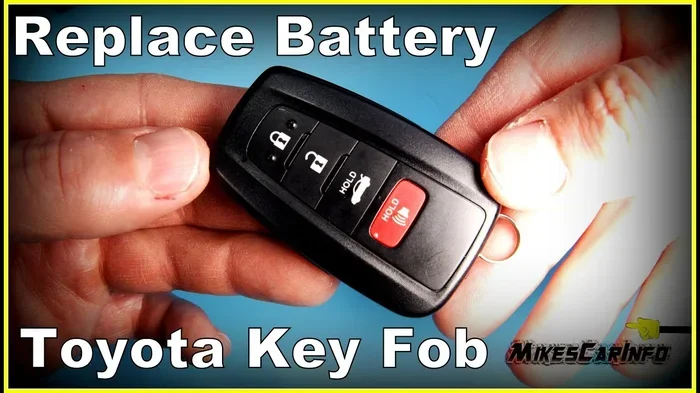
How to Change the Toyota Key Battery in Simple Steps
Changing your Toyota key battery is easy and takes just minutes. This guide shows you exactly how to replace the battery in your Toyota key fob using simple tools you already have at home. You will learn how to open the key, swap the old battery, and test the remote to make sure everything works perfectly again.
There is nothing worse than reaching for your Toyota key fob and finding it does not work. Maybe the buttons feel sluggish. Maybe the remote range has dropped to almost nothing. Or maybe the key fob just stopped responding altogether. Whatever the sign, one thing is clear: your Toyota key battery is probably dead. The good news is that you do not need to visit a dealership or pay a technician to fix this. In this guide, we walk you through how to change the Toyota key battery in simple, easy-to-follow steps. Whether you drive a Toyota Camry, RAV4, Highlander, or any other Toyota model, this process is nearly the same.
We will cover everything from the tools you need to how to open the key fob safely. You will also learn how to recognize the signs of a weak key fob battery before it dies completely. And if you are wondering about how to know if your key battery is low, we have you covered with clear warning signs to watch for. By the end of this article, you will feel confident replacing the battery on your own and saving time and money.
Key Takeaways
- Toyota key fobs use a common CR2032 battery that is easy to find at any store.
- You can replace the battery yourself in under five minutes without visiting a dealership.
- Knowing the signs of a low battery helps you replace it before you get locked out.
- Proper handling prevents damage to the key fob and extends its lifespan.
- Testing the key after replacement ensures the new battery is working correctly.
📑 Table of Contents
- Why Does Your Toyota Key Battery Die?
- What You Need Before You Start
- Step-by-Step Guide to Changing the Toyota Key Battery
- How to Know When Your Toyota Key Battery Is Low
- Common Problems After Battery Replacement
- Tips to Make Your Toyota Key Battery Last Longer
- When to Seek Professional Help
- Frequently Asked Questions
- Final Thoughts
Why Does Your Toyota Key Battery Die?
Toyota key fobs rely on a small coin cell battery to power the remote functions. Over time, this battery loses its charge and needs to be replaced. Most Toyota key fobs use the CR2032 battery, which is one of the most common battery types in the world. You can find it at grocery stores, auto parts shops, and even gas stations.
Several factors affect how long your key battery lasts. Daily use is the biggest one. If you press the buttons multiple times a day, the battery drains faster. Cold weather also plays a role. In winter months, batteries tend to lose power more quickly. And sometimes, a low-quality battery simply does not last as long as a name-brand one. On average, a Toyota key fob battery lasts between two and four years. But if you use the remote frequently, it may need replacement sooner.
Common Reasons the Battery Drains Fast
- Heavy daily use of the remote lock, unlock, and trunk release buttons.
- Extreme temperatures, both hot and cold, reduce battery life.
- A faulty key fob circuit that draws power even when not in use.
- Using a cheap or expired battery from an unknown brand.
- Leaving the key fob near other electronics that cause interference.
Understanding why the battery dies helps you take steps to make it last longer. We will share some of those tips later in this article.
What You Need Before You Start
Before you begin the replacement process, gather a few simple items. You do not need any special tools or technical skills. Everything you need is likely already in your home.
Tools and Materials Checklist
- One CR2032 battery — this is the standard battery for most Toyota key fobs.
- A small flathead screwdriver — used to pry open the key fob shell.
- A clean, soft cloth — to wipe the inside of the key fob.
- A well-lit workspace — so you can see the small components clearly.
- A bowl or tray — to keep tiny screws from rolling away.
Once you have everything ready, find a flat surface to work on. A kitchen table or desk works perfectly. Lay down a soft cloth to protect the key fob from scratches. Now you are ready to move on to the actual replacement steps.
Step-by-Step Guide to Changing the Toyota Key Battery
This is the core of the process. Follow each step carefully, and you will have a working key fob in just a few minutes. The process is straightforward, but patience is key. Do not rush, especially when prying open the key fob shell.
Step 1: Remove the Key Blade (If Applicable)
Some Toyota key fobs have a removable key blade hidden inside the fob shell. To access it, look for a small button or latch on the side of the key. Press it and slide the key blade out. Set the key blade aside in a safe place. Not all Toyota keys have this feature, so if your fob is a solid single piece, you can skip this step.
Step 2: Open the Key Fob Shell
Now it is time to open the fob. Look for a seam line around the edges of the key fob. This is where the two halves of the shell meet. Insert the flathead screwdriver gently into the seam. Work your way around the edge, popping the clips one by one. Be careful not to use too much force. You want to separate the halves, not break the plastic clips.
If the fob feels stuck, try twisting the screwdriver slightly as you push. This helps release the clips more easily. Some people also use a coin to pop the shell open, but a screwdriver gives you more control.
Step 3: Remove the Old Battery
Once the shell is open, you will see the circuit board and the battery sitting in a small compartment. The battery is usually held in place by a tiny metal clip or simply rests in a slot. If there is a clip, gently press it down or to the side to release the battery. Then carefully lift the old battery out using your fingernail or the screwdriver.
Take note of which side of the battery faces up. The positive side (marked with a +) should face upward in most Toyota key fobs. This matters when you insert the new battery. If you put it in upside down, the key fob will not work.
Step 4: Insert the New Battery
Take your fresh CR2032 battery and place it into the compartment with the positive side facing up. Press it down gently until it sits flat and the metal clip (if present) locks it into place. Make sure the battery is snug and does not wobble. A loose battery can cause intermittent key fob problems.
Step 5: Reassemble the Key Fob
Align the two halves of the key fob shell carefully. Press them together firmly, working around the edges until all the clips snap back into place. You should hear or feel a click as each clip locks. Do not force the shell shut if it resists. Double-check that no wires or components are pinched between the two halves.
Step 6: Test the Key Fob
Now for the moment of truth. Stand near your Toyota and press the lock, unlock, and trunk buttons. If the key fob works, you are done. If nothing happens, open the shell again and check the battery orientation. Make sure the battery is seated properly and the contacts are clean.
If you have ever wondered whether you can remote start your Toyota with the key fob, a fresh battery is the first step to making that work reliably. A dead or weak battery is the most common reason remote start fails.
How to Know When Your Toyota Key Battery Is Low
Replacing the battery before it dies completely saves you from getting locked out of your car. There are several clear warning signs that your Toyota key fob battery is dying. Recognizing these signs early gives you time to grab a replacement battery before you are stuck.
One of the first signs is reduced range. If you used to unlock your car from 30 feet away and now you need to stand right next to it, the battery is weakening. Another sign is sluggish button response. The buttons feel mushy or require extra pressure to register. Some Toyota models also display a warning message on the dashboard if the key fob battery is low.
If you want a more detailed guide on this topic, check out our article on how do I know if my key battery is low. It covers additional signs and troubleshooting tips for when your key fob starts acting up.
Warning Signs to Watch For
- Shortened remote range — you must stand closer to the car for the signal to reach.
- Delayed button response — there is a lag between pressing the button and the car reacting.
- Intermittent operation — the key fob works sometimes but not others.
- Dashboard warning light — some Toyota models show a key fob battery alert.
- Need to press buttons multiple times — the fob requires repeated presses to work.
If you notice any of these signs, it is a good idea to replace the battery right away. Waiting too long could leave you with a completely dead fob and no way to unlock or start your car.
Common Problems After Battery Replacement
Sometimes, even after replacing the battery, the key fob does not work as expected. This can be frustrating, but the fix is usually simple. Let us look at the most common issues and how to solve them.
The Key Fob Still Does Not Work
If the key fob remains unresponsive after a battery swap, the first thing to check is the battery orientation. Make sure the positive side faces up. Next, check that the battery is making proper contact with the terminals. Sometimes the battery sits slightly off-center and does not connect. Remove it, reposition it, and try again.
Another possibility is that the contacts on the circuit board are dirty. Use a clean, dry cloth to gently wipe the contact points. A small amount of corrosion can block the electrical connection. If you clean the contacts and the fob still does not work, the battery may be defective. Try a different CR2032 battery from a different brand.
The Key Fob Works But the Car Does Not Respond
In some cases, the key fob itself is fine but the car does not recognize it. This can happen if the key fob needs to be re-synced with the vehicle. To do this, sit in the driver seat with all doors closed. Insert the key into the ignition and turn it to the ON position without starting the engine. Press and hold the lock button on the fob for five seconds. Release it and wait for the doors to lock. This re-syncs the fob with the car.
If you are dealing with a situation where you cannot use the fob at all, you might want to explore whether you can drive your Toyota without a key fob. Most modern Toyota vehicles have a backup method for starting the car using the physical key blade.
Tips to Make Your Toyota Key Battery Last Longer
Nobody wants to replace their key fob battery every year. The good news is that a few simple habits can extend the life of each battery significantly. These tips are easy to follow and require no special skills.
1. Avoid Extreme Temperatures
Do not leave your key fob in a hot car or in direct sunlight for long periods. Heat is one of the biggest enemies of coin cell batteries. In winter, keep the fob close to your body inside a coat pocket. Your body heat helps maintain the battery charge. Extreme cold drains batteries faster than almost anything else.
2. Use Quality Batteries
Not all CR2032 batteries are created equal. Name-brand batteries like Energizer, Duracell, and Panasonic tend to last longer and perform more reliably. Cheap off-brand batteries may save a few cents but often die within months. Invest in a quality battery and you will save time and hassle in the long run.
3. Press Buttons Gently
It is tempting to mash the buttons on your key fob, especially when you are in a hurry. But pressing too hard can damage the internal contacts over time. A gentle press is all it takes to send the signal. This small habit can prevent premature wear on the fob and keep the battery drain to a minimum.
4. Remove the Battery for Long Storage
If you have a spare key fob or a Toyota you do not drive often, remove the battery from the fob. This prevents slow battery drain over time. When you are ready to use the fob again, simply insert a fresh battery and you are good to go.
5. Keep the Fob Dry
Moisture can damage the circuit board and corrode the battery contacts. Do not leave your key fob in the bathroom or near a pool where it could get wet. If it does get wet, dry it thoroughly before inserting a new battery. Water damage is one of the most common causes of key fob failure.
For additional information about related costs, you might find it helpful to read about how much it costs to program a push to start key fob if your Toyota has that feature. Understanding the full cost picture helps you budget for any key-related maintenance.
When to Seek Professional Help
Most Toyota key battery replacements are simple DIY jobs. But there are times when professional help makes sense. If you have replaced the battery and the key fob still does not work, there may be a deeper issue. The circuit board could be damaged, or the key fob itself may need to be reprogrammed.
Toyota dealerships have the tools and expertise to diagnose and fix complex key fob problems. They can also cut a new key from the VIN if needed. If you are wondering whether Toyota can cut a key from the VIN, the answer is yes in most cases. A professional can also help if you are dealing with a used Toyota key fob that needs reprogramming to a different vehicle.
Do not hesitate to reach out to a trusted Toyota dealership or a qualified locksmith if you are unsure about any step in the process. It is always better to ask for help than to risk damaging your key fob by forcing something you are not comfortable with.
Frequently Asked Questions
What type of battery does a Toyota key fob use?
Most Toyota key fobs use a CR2032 coin cell battery. This is a standard 3-volt battery that is widely available at stores like Walmart, AutoZone, and even convenience stores. Always check your owner manual if you are unsure, as some older models may use a slightly different battery type.
How long does a Toyota key fob battery last?
A Toyota key fob battery typically lasts between two and four years. The exact lifespan depends on how often you use the remote functions, the quality of the battery, and the temperature conditions the fob is exposed to. Daily heavy use tends to shorten the battery life.
Can I replace the Toyota key battery myself?
Yes, absolutely. Replacing the battery in a Toyota key fob is one of the easiest DIY car maintenance tasks. You only need a CR2032 battery and a small flathead screwdriver. The entire process takes about five minutes and requires no special skills or tools.
How much does it cost to replace a Toyota key fob battery?
A CR2032 battery costs between one and five dollars. That means you can replace your Toyota key fob battery for the price of a single coin cell. There is no need to pay a dealership or locksmith for this simple replacement. You save both time and money by doing it yourself.
What should I do if my Toyota key fob still does not work after replacing the battery?
First, double-check that the battery is inserted with the correct orientation. Make sure the positive side faces up. Next, clean the battery contacts with a dry cloth. If the fob still does not work, try a different battery to rule out a defective one. If none of these steps work, the key fob may need professional diagnosis or reprogramming.
Do I need to reprogram my Toyota key fob after changing the battery?
In most cases, no reprogramming is needed. Toyota key fobs are designed to retain their programming even when the battery is removed. However, if your fob does not work after a battery change, you can try re-syncing it by inserting the key into the ignition, turning it to ON, and pressing the lock button on the fob for five seconds.
Final Thoughts
Changing the battery on your Toyota key fob is one of the simplest and most satisfying DIY tasks you can do. It costs almost nothing, takes just a few minutes, and saves you from the hassle of visiting a dealership or waiting for a locksmith. With the right battery and a little patience, you can have your Toyota key fob working like new in no time.
Remember the warning signs of a low battery. Replace it early before you get caught off guard. Keep quality CR2032 batteries on hand at home so you are always prepared. And if you ever run into a problem that you cannot solve, do not hesitate to reach out to a professional.
Your Toyota key fob is an essential part of your daily driving experience. Taking care of it with a simple battery swap keeps everything running smoothly. Now that you know exactly how to change the Toyota key battery, you have the power to handle this task on your own whenever it comes up. Grab that CR2032 battery, follow the steps in this guide, and get back on the road with confidence.