How to Change the Key Battery in an Acura RDX Quickly
Changing the key battery in your Acura RDX is a simple DIY task you can finish in under five minutes. You will need a CR2032 coin battery, a small flathead screwdriver, and a steady hand. This guide walks you through every step, from opening the key fob to testing the new battery, so your RDX key works perfectly again.
There is nothing more frustrating than standing by your Acura RDX, pressing the key fob over and over, and getting nothing in return. You might think the car is broken or the remote is dead forever. But in most cases, the real culprit is something tiny and cheap, a key fob battery that simply needs swapping out.
Changing the battery in your Acura RDX key is one of those small car maintenance tasks that saves you time and money. You do not need to visit a dealership, pay for labor, or wait days for an appointment. With the right battery and a few basic tools, you can have your key working again in minutes.
This guide covers everything you need to know about Acura RDX key battery replacement. From the tools you need to step-by-step instructions, common problems after the swap, and tips to make the battery last longer, we have you covered. Whether you are a complete beginner or a seasoned car owner, you will find this process straightforward and rewarding.
Key Takeaways
- Easy DIY Fix: You do not need a dealership or special tools to replace the Acura RDX key battery.
- CR2032 Battery: This common coin battery is all you need and costs just a few dollars.
- Quick Process: The entire battery swap takes less than five minutes.
- Reprogramming May Be Needed: After a battery change, you might need to reprogram your key fob in some cases.
- Prevention Tips: Simple habits can double the life of your key fob battery.
- Know When to Replace the Whole Key: If the fob is physically damaged, a new battery won’t fix it.
📑 Table of Contents
- Understanding the Acura RDX Key Battery
- Tools and Materials You Will Need
- Step-by-Step Guide to Changing the Key Battery
- Common Problems After Replacing the Key Battery
- Tips to Make Your Key Battery Last Longer
- When to Replace the Entire Key Fob Instead
- Key Battery Replacement: Acura RDX vs. Other Vehicles
- Expert Tips for a Smooth Battery Change
- Conclusion
Understanding the Acura RDX Key Battery
Before you open up your key fob, it helps to understand what you are working with. The Acura RDX uses a smart key fob system that relies on a small coin battery to power the remote functions. Knowing the basics makes the replacement process much smoother.
What Type of Battery Does the Acura RDX Key Use?
The Acura RDX key fob runs on a CR2032 battery. This is one of the most common coin cell batteries in the world. You can find it at virtually any grocery store, pharmacy, gas station, or online retailer. A single CR2032 battery typically costs between one and five dollars, making this one of the cheapest car maintenance tasks you can do.
The CR2032 battery is a 3-volt lithium coin cell. It is small, round, and silver. You will recognize it immediately once you see it. These batteries have a long shelf life and typically last between two and four years in a key fob, depending on how often you use the remote functions.
How Do You Know the Battery Is Dying?
Your Acura RDX key fob will give you clear warning signs before the battery dies completely. Watch for these symptoms:
- Reduced range: You need to stand closer to the car for the keyless entry to work.
- Delayed response: The lock or unlock command takes longer than usual to activate.
- Intermittent function: The key fob works sometimes but not always.
- Dashboard warning: Some RDX models display a key fob battery warning on the instrument cluster.
- Push-start failure: If your RDX has the push-button start, a dead battery can prevent the car from recognizing the key.
If you notice any of these signs, it is time to replace the battery. Do not wait until the key fob stops working entirely, because that can leave you stranded in an inconvenient spot.
Tools and Materials You Will Need
One of the best things about this job is how simple the tool requirements are. You probably already have everything at home.
What You Need
- CR2032 battery: Make sure you buy a fresh one from a reputable brand like Energizer, Duracell, or Panasonic.
- Small flathead screwdriver: A tiny screwdriver works best for prying open the key fob shell.
- Soft cloth or towel: This protects the key fob from scratches during the opening process.
- Good lighting: A well-lit workspace helps you see the small internal components clearly.
That is it. No specialty tools, no expensive equipment. The simplicity of this task is what makes it so appealing for car owners who want to handle basic Acura RDX maintenance on their own.
Step-by-Step Guide to Changing the Key Battery
Now let us get into the actual process. Follow these steps carefully and you will have a working key fob in no time.
Step 1: Locate the Emergency Mechanical Key
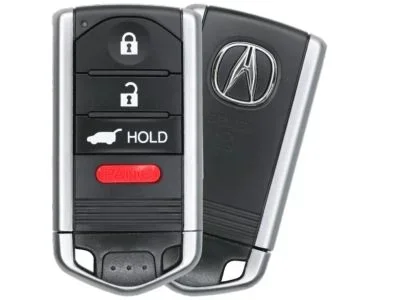
Your Acura RDX key fob has a hidden mechanical key inside it. This is your backup if the remote ever fails completely. To access it, look for a small button or sliding latch on the side or bottom of the fob. Press or slide it, and the thin metal mechanical key will pop out.
Set the mechanical key aside in a safe place. You will not need it for the battery replacement, but keep it nearby in case you need it later.
Step 2: Open the Key Fob Shell
This is the trickiest part. The key fob shell is held together by small clips, not screws. Here is how to do it safely:
- Place the fob face-down on a soft cloth.
- Find the seam where the two halves of the shell meet.
- Insert the flathead screwdriver gently into the seam, starting near the corner where the emergency key was housed.
- Work the screwdriver along the seam, popping the clips loose one by one.
- Be gentle. These clips are plastic and can break if you force them too much.
Once all the clips are released, carefully separate the two halves of the fob. Set the top half aside.
Step 3: Remove the Old Battery
You should now see the battery sitting in a small compartment. Note which side is facing up, positive or negative. Take a photo if it helps you remember the orientation.
Use the tip of your screwdriver or your fingernail to gently pry the old battery out. The battery will likely pop out easily since it is only held in by a slight pressure fit. Dispose of the old battery properly at a recycling center.
Step 4: Insert the New Battery
Take your fresh CR2032 battery and place it into the compartment with the same orientation as the old one. The positive side, marked with a plus sign, should face up in most Acura RDX key fobs.
Press the battery down gently until it clicks into place. Make sure it sits flat and secure. A loose battery can cause intermittent key fob problems.
Step 5: Reassemble the Key Fob
Align the two halves of the fob shell carefully. Press them together firmly until all the clips snap back into place. You should hear or feel a series of small clicks as each clip locks.
Test the fob by pressing the lock or unlock button. If the RDX responds, you are all set. If it does not work, open the fob again and double-check the battery orientation.
Step 6: Test All Functions
Do a complete test of every key fob function:
- Lock the car from several feet away.
- Unlock the car.
- Open the trunk if your model supports remote trunk release.
- Test the panic alarm button.
- If your RDX has push-button start, try starting the car with the key fob.
If all functions work, congratulations, you just saved yourself a trip to the dealership.
Common Problems After Replacing the Key Battery
Sometimes, even after installing a new battery, the key fob does not work right away. This is more common than you think, and it is usually easy to fix.
Key Fob Not Responding After Battery Swap
If the key fob does not respond after you replace the battery, the first thing to check is the battery orientation. A reversed battery will not power the fob. Open the shell, verify the positive and negative sides, and correct it if needed.
The second most common issue is a dirty battery contact. Over time, corrosion or grime can build up on the metal contacts inside the fob. Use a dry cloth or a cotton swab dipped in rubbing alcohol to clean the contacts gently. Let them dry completely before reassembling.
Reprogramming the Key Fob
In some cases, changing the battery can reset the key fob’s pairing with the car. If your RDX does not recognize the key after the battery swap, you may need to reprogram the key fob. Some owners have found that reprogramming a used key fob or a replacement fob follows a similar process, and understanding the general steps can help here. You can refer to your RDX owner’s manual for the specific reprogramming procedure for your model year.
For owners who have dealt with key fob pairing issues in the past, the experience of reprogramming a key fob to a different car can provide helpful general insight, even though the specific steps differ between manufacturers. The underlying process of syncing the fob to the vehicle’s computer system shares common principles.
Intermittent Function After Replacement
If the key fob works sometimes but not always after a battery change, the new battery may be defective. This sounds unlikely, but it happens. Try a different brand of CR2032 battery. Cheap off-brand batteries can have inconsistent performance and shorter lifespans.
Tips to Make Your Key Battery Last Longer
Once you have replaced the battery, you will want to make it last as long as possible. These simple habits can significantly extend the life of your new CR2032 battery.
- Avoid extreme temperatures: Do not leave your key fob in a hot car or a freezing garage for extended periods. Heat and cold both drain lithium batteries faster.
- Remove the fob from the ignition when not driving: Some owners leave the fob in the ignition ring. This keeps the fob powered and drains the battery over time.
- Do not press buttons unnecessarily: Every button press uses a small amount of battery power. Be deliberate with your key fob use.
- Keep spare batteries on hand: Stock up on CR2032 batteries so you are never caught off guard. A small pack costs just a few dollars and lasts for years.
- Clean the contacts annually: A quick wipe-down of the battery contacts once a year prevents corrosion buildup that can reduce battery life.
Following these tips can help your key fob battery last three to four years instead of two, saving you the hassle of frequent replacements.
When to Replace the Entire Key Fob Instead
A battery change fixes most key fob problems, but it is not a cure-all. There are situations where replacing the entire key fob is the better option.
Physical Damage to the Fob
If the key fob shell is cracked, the buttons are worn down, or the internal circuitry is damaged, a new battery will not solve the problem. In these cases, you need a full replacement fob.
Water Damage
Water damage can ruin the internal electronics of a key fob. If your fob has been submerged or exposed to significant moisture, the battery compartment may show signs of corrosion, and the electronics may be permanently damaged.
Outdated or Unsupported Fob
Older Acura RDX models may use key fobs that are no longer manufactured or supported. In these cases, a dealership can help you find a compatible replacement and program it to your vehicle.
If you find yourself needing a new key fob, the process of using a key fob for remote start functions highlights how important it is that your fob is in good working condition, since a damaged fob can affect multiple vehicle features beyond just locking and unlocking.
Key Battery Replacement: Acura RDX vs. Other Vehicles
Different vehicles use different key fob designs and battery types. Here is a quick comparison of how the Acura RDX stacks up against some popular competitors.
| Vehicle | Battery Type | Replacement Difficulty | Average Battery Life |
|---|---|---|---|
| Acura RDX | CR2032 | Easy | 2-4 years |
| Honda Accord | CR2032 | Easy | 2-4 years |
| Toyota Camry | CR2025 | Easy | 2-3 years |
| Ford F-150 | CR2032 | Easy to Moderate | 2-4 years |
| Chevrolet Silverado | CR2032 | Moderate | 2-3 years |
As you can see, the Acura RDX uses one of the most common and easily available batteries. The replacement process is straightforward and comparable to other vehicles in its class.
Expert Tips for a Smooth Battery Change
Here are some insider tips from experienced car owners and mechanics that make the process even easier:
- Work on a flat surface: A table or countertop gives you better control than a couch or bed where the fob can slip.
- Use a rubber grip: If the fob is hard to open, wrapping a rubber band around the shell gives you extra grip and prevents the screwdriver from slipping.
- Take photos during disassembly: Photos help you remember how everything fits back together, especially if you get interrupted mid-process.
- Buy name-brand batteries: Energizer and Duracell CR2032 batteries have the most consistent performance and longest shelf life.
- Keep the old battery as a backup: Even a drained battery can serve as a temporary substitute in emergencies.
These small habits make a big difference. They turn a potentially frustrating experience into a quick and satisfying DIY win.
Conclusion
Changing the key battery in your Acura RDX is one of the simplest and most rewarding DIY car maintenance tasks you can do. It takes less than five minutes, costs just a few dollars, and requires no special tools or expertise. By following the steps in this guide, you can keep your key fob working perfectly without ever setting foot in a dealership.
Remember to use a quality CR2032 battery, handle the fob clips gently, and test all functions after the swap. If you run into any issues, the troubleshooting tips above should help you resolve them quickly. And if your key fob is physically damaged or water-damaged, do not hesitate to invest in a replacement.
A well-maintained key fob means a smoother, more convenient driving experience every time you walk up to your Acura RDX. Keep spare batteries in your glove box, and you will never be caught off guard by a dead key fob again.
Frequently Asked Questions
What battery does the Acura RDX key fob use?
The Acura RDX key fob uses a CR2032 coin cell battery. This is a 3-volt lithium battery that is widely available at stores and online. It is one of the most common battery types used in car key fobs.
How long does the Acura RDX key battery last?
A key fob battery typically lasts between two and four years, depending on how frequently you use the remote functions. Extreme temperatures and heavy daily use can shorten the battery life.
Do I need to reprogram my Acura RDX key fob after changing the battery?
In most cases, no reprogramming is needed after a simple battery swap. However, some RDX models may require you to resync the key fob if it does not respond after the replacement. Check your owner’s manual for the specific procedure.
Can I use a rechargeable battery in my Acura RDX key fob?
It is not recommended. Rechargeable CR2032 batteries have a slightly lower voltage (usually 3.0 volts or less) compared to standard CR2032 batteries (3.3 volts). This can cause unreliable performance in your key fob.
What should I do if my key fob still does not work after replacing the battery?
First, double-check the battery orientation. Then clean the battery contacts with a dry cloth or cotton swab. If the fob still does not work, the battery may be defective, or the fob itself may be damaged and need replacement.
How much does it cost to change the key battery in an Acura RDX?
The cost is typically just one to five dollars for the CR2032 battery itself. There is no labor cost since you can do it yourself in minutes. Even if you pay a quick-service shop, the cost rarely exceeds ten dollars.