How to Change the Time on a Volkswagen Passat Easily
Changing the time on your Volkswagen Passat is simple once you know where to look. Whether you drive a newer model with a digital infotainment screen or an older Passat with button controls, this guide walks you through every method. You will learn how to adjust the clock, fix common issues, and keep your vehicle’s time accurate without visiting a dealer.
Your Volkswagen Passat clock might show the wrong time, and it is one of those small things that nags you every time you glance at the dashboard. Maybe you just got the battery replaced and the clock reset to midnight. Or perhaps you traveled across time zones and forgot to switch it back. Whatever the reason, learning how to change the time on a Volkswagen Passat takes just a few minutes and no mechanical skills at all.
This guide covers every method available across different Passat model years. You will find step-by-step instructions for the instrument cluster buttons, the infotainment display, and even some hidden menu tricks. We also explain why your clock might be wrong in the first place and how to prevent it from happening again. By the end, you will feel confident adjusting your Passat clock like a pro.
Let us be upfront about something. Changing the time on a Volkswagen Passat is not complicated, but the exact steps vary depending on your model year and trim level. A 2015 Passat works differently from a 2022 Passat. A base model may have different controls than a higher trim with the full infotainment system. Do not worry. We have broken everything down so you can find your specific situation quickly.
Key Takeaways
- Multiple methods exist: You can change the time through the instrument cluster, infotainment system, or manual button controls depending on your Passat model year.
- No tools needed: This is a DIY task anyone can do in under five minutes with no special equipment.
- Battery changes affect the clock: Replacing your car battery or key fob battery may reset the time, so knowing how to adjust it quickly saves trips to the dealer.
- Model years matter: Newer Passats use touchscreen menus while older models rely on steering wheel buttons and instrument panel controls.
- 24-hour format is optional: You can switch between 12-hour and 24-hour time display in your settings.
- Automatic time sync exists: Some Passat models feature GPS-based clock sync that updates the time zone automatically.
📑 Table of Contents
- Why Your Volkswagen Passat Clock Might Show the Wrong Time
- How to Change the Time on a Volkswagen Passat Using the Instrument Cluster
- How to Change the Time Through the Infotainment System
- How to Adjust the Time Using Steering Wheel Controls
- Troubleshooting Common Clock Problems on the Volkswagen Passat
- Preventing Clock Problems in the Future
- Do You Need to Visit a Dealer to Fix the Clock?
- Final Thoughts
Why Your Volkswagen Passat Clock Might Show the Wrong Time
Before you dive into the steps, it helps to understand what causes a wrong clock in the first place. Once you know the reason, you can fix it and even prevent it from happening again.
Battery Replacement Resets the Clock
Your car battery powers the memory in your vehicle’s computer. When you disconnect or replace the battery, the clock loses its stored time. This is completely normal and happens in every Volkswagen model. A dead battery can also cause the wrench light to come on, which might confuse you if you see multiple warning lights at once. The clock reset is harmless, but it is annoying if you do not know how to fix it.
Time Zone Changes After Travel
If you drive across state lines or international borders, your Passat clock might not update automatically. Some models have GPS-based time sync, but older ones do not. You will need to manually adjust the Volkswagen Passat clock settings after a long trip.
Key Fob Battery Replacement
Replacing the battery in your key fob can sometimes reset small electronic settings in the car. Do you have to do anything after replacing a key fob battery? Usually no, but the clock might lose its setting in rare cases. This is a minor side effect that happens more often than people think.
Infotainment System Glitch
Like any computer, the infotainment system in your Passat can occasionally glitch. A frozen screen or unresponsive menu might make the clock appear stuck. A simple system restart usually fixes this. We will cover how to do that below.
How to Change the Time on a Volkswagen Passat Using the Instrument Cluster
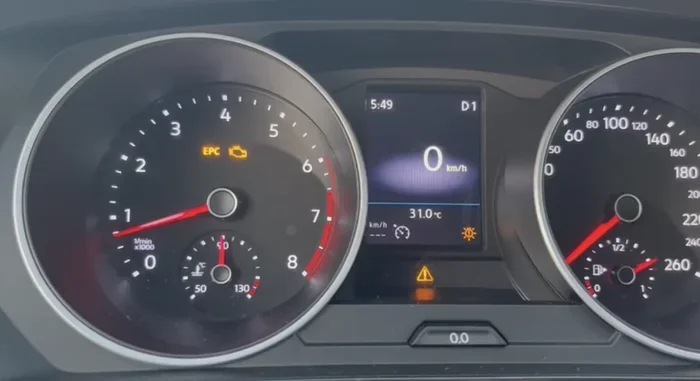
The instrument cluster is the panel directly behind your steering wheel that shows your speed, fuel level, and warning lights. On many Passat models, this is where you adjust the clock. This method works on older Passat models from roughly 2005 to 2014 and some base trim levels of newer cars.
Step-by-Step Instructions for the Instrument Cluster Method
Follow these steps carefully. The process is straightforward once you know which buttons to press.
- Turn the ignition to the “On” position. You do not need to start the engine. Just press the start button without pressing the brake pedal, or turn the key to the “On” position.
- Press and hold the “0.0” or “Set” button on the instrument cluster. This button is usually located on the left side of the cluster or near the trip odometer controls.
- Wait for the clock to flash. The hours digits should start blinking, which means the clock is now in adjustment mode.
- Use the “Set” or arrow buttons to change the hours. Press the button repeatedly until the correct hour appears.
- Press the “0.0” or “Set” button again to move to the minutes. The minutes digits will now flash.
- Adjust the minutes using the same buttons. Hold the button down for faster counting.
- Press “Set” one more time to save your changes. The clock will stop flashing and lock in the new time.
Quick tip: If the clock does not enter adjustment mode, try holding the button for a longer period. Some Passat models require a five-second hold. Also, make sure you are not accidentally pressing the trip reset buttons at the same time.
How to Change the Time Through the Infotainment System
Newer Volkswagen Passat models from 2015 onward come with a central touchscreen infotainment system. This screen controls music, navigation, phone connections, and yes, the vehicle clock settings. The touchscreen method is more intuitive, but the menus can be a little buried.
Step-by-Step Instructions for the Infotainment Method
- Tap the Settings icon on the home screen. It usually looks like a gear or cog symbol. On some models, you may need to swipe left to find it in the menu bar.
- Navigate to “Vehicle” or “Car Settings.” This section contains all the adjustments related to your car’s hardware, including lighting, mirrors, and yes, the Volkswagen Passat clock settings.
- Look for “Time & Date” or “Clock Settings.” Tap on this option to open the time adjustment screen.
- Toggle off “Automatic Time” if it is enabled. Some Passats sync the clock with GPS or mobile data. Turning this off lets you set the time manually.
- Adjust the hours and minutes using the on-screen controls. You can tap the up and down arrows or use the plus and minus buttons.
- Choose your preferred format. You can switch between 12-hour and 24-hour time display in this menu. Pick whichever feels more natural to you.
- Tap “Save” or “Apply” to confirm your changes. The clock will update immediately.
Expert insight: If the touchscreen is unresponsive, try restarting the infotainment system. Hold the power button on the screen for about 10 seconds until the system reboots. This fixes most minor software glitches that prevent you from accessing the clock settings. You can also check if a software update is available, since Volkswagen occasionally releases updates that improve system responsiveness.
How to Adjust the Time Using Steering Wheel Controls
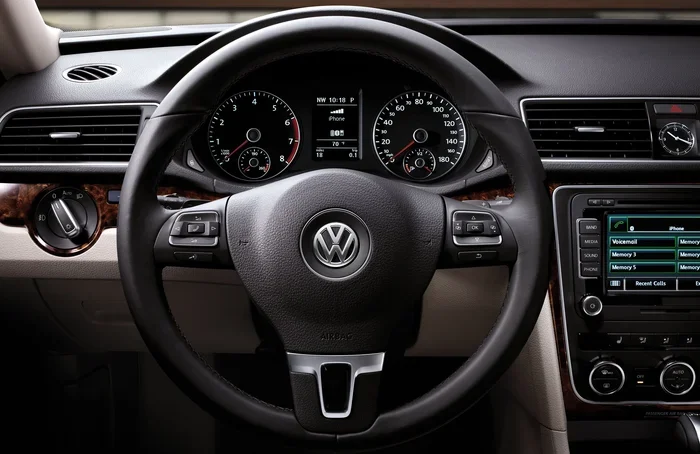
Some Passat models allow you to adjust the clock directly from the steering wheel. This is the fastest method if you are driving and need a quick fix. Not all Passats have this feature, so check your owner’s manual to confirm.
Steering Wheel Clock Adjustment Steps
- Locate the left steering wheel controls. Look for a button labeled “Menu,” “Set,” or a clock icon.
- Press the button once to open the quick settings menu. A small overlay should appear on the instrument display.
- Scroll to the clock option using the arrow buttons. The right arrow or scroll wheel moves through the menu items.
- Press “OK” or “Enter” to select the clock.
- Use the up and down arrows to adjust the time.
- Press “OK” again to save the new time.
This method is perfect for making quick adjustments on the go. You do not need to take your hands off the wheel for long, which makes it safer than pulling up the full infotainment menu while driving.
Troubleshooting Common Clock Problems on the Volkswagen Passat
Sometimes the clock just will not cooperate. Here are the most common issues Passat owners face and how to solve them.
The Clock Resets Every Time You Turn Off the Car
If your Passat clock resets to 12:00 every time you start the vehicle, the problem is likely a weak car battery. A bad battery can cause the wrench light to come on, and it can also prevent the clock from holding its memory. Have your battery tested at a parts store or dealership. Replacing a failing battery usually fixes this problem completely.
The Clock Will Not Enter Adjustment Mode
If pressing and holding the “Set” button does nothing, try these steps:
- Make sure the ignition is in the “On” position, not “Off” or “Accessory.”
- Try a different button. Some Passat models use the trip odometer button for clock adjustment.
- Check if the infotainment system is frozen. Restart it by holding the power button for 10 seconds.
- Consult your owner’s manual for model-specific instructions. The button layout changes between Passat generations.
The Clock Displays the Wrong Time Zone
If your Passat clock is off by exactly one or more hours, the time zone setting may be incorrect. Go to the infotainment “Time & Date” menu and check the time zone option. Set it to your current location. Some Passat models with GPS will update this automatically, but older models require manual input.
The Clock Screen Is Blank but the Car Works Otherwise
A blank clock screen usually means the display is dimmed or the instrument cluster has gone to sleep. Try turning the brightness up using the cluster controls. If the screen remains dark, the instrument cluster may need professional inspection. This is rare but can happen in high-mileage Passats.
Preventing Clock Problems in the Future
Once you have set the correct time, you probably want it to stay that way. Here are simple habits that keep your Volkswagen Passat clock settings working reliably.
- Keep your car battery healthy. A strong battery holds the clock memory even when the car sits parked for weeks. Have the battery tested annually, especially before winter.
- Avoid disconnecting the battery unnecessarily. Every time the battery is disconnected, the clock resets. If you must disconnect it, write down the correct time before you start.
- Update your infotainment software. Volkswagen releases updates that fix bugs and improve system stability. Check with your dealer or visit a service center for updates.
- Replace the key fob battery on schedule. A fresh key fob battery prevents unexpected electronic resets. Most key fob batteries last one to two years.
- Do not ignore warning lights. If your wrench light or check engine light comes on alongside a clock reset, get the car inspected. These lights together can signal a deeper electrical issue.
Do You Need to Visit a Dealer to Fix the Clock?
The short answer is no. Changing the time on a Volkswagen Passat is a simple DIY task that anyone can handle. You do not need to visit a dealer or pay for a service appointment just to fix the clock. The steps in this guide cover every method available across all Passat model years.
However, if you have tried every method and the clock still will not work, there may be a deeper electrical issue. In that case, visiting a dealership makes sense. You can take a Toyota to any Toyota dealership for service, but the same principle applies to Volkswagen. If the problem persists, a professional diagnosis is worth the time and money. Most dealers can check the instrument cluster and infotainment system quickly.
One more thing to keep in mind. If you recently had an oil change and the clock is off, you might wonder whether the reset process affected other settings. Do you have to reset the light after an oil change? Usually yes, but the oil change light is separate from the clock. They do not interfere with each other. If both the clock and the oil change light need resetting, handle them separately using their respective methods.
Final Thoughts
Knowing how to change the time on a Volkswagen Passat is one of those small skills that saves you frustration and keeps your daily driving smooth. Whether you use the instrument cluster buttons, the infotainment touchscreen, or the steering wheel controls, the process is quick and requires no special tools. You have everything you need right in your vehicle.
Start with the method that matches your Passat model year and follow the steps carefully. If the clock resets after a battery change or a key fob battery replacement, you now know exactly what to do. Keep this guide bookmarked for future reference. Your Passat clock will stay accurate, and you will never have to wonder why the time is wrong again.
Take five minutes today to check your clock. It is one of those small maintenance tasks that makes a big difference in how your car feels every single day. A correctly set clock is a small detail that adds up to a better driving experience.
Frequently Asked Questions
Why does my Volkswagen Passat clock keep resetting to 12:00?
This usually happens when the car battery is weak or has been recently disconnected. The clock loses its memory when the battery power drops. Replacing or charging the battery should fix the issue. If the problem continues, have the battery tested at a parts store.
Can I change the time on my Passat while driving?
Yes, but it is safer to use the steering wheel controls for quick adjustments. Using the infotainment touchscreen while driving can distract you. If possible, make adjustments when the car is parked or at a stoplight.
How do I switch my Passat clock to 24-hour format?
Go to the infotainment Settings menu, then select “Time & Date” or “Clock Settings.” Look for the format option and toggle it from 12-hour to 24-hour display. The change takes effect immediately.
What should I do if the clock adjustment buttons on my Passat do not work?
First, make sure the ignition is in the “On” position. Try restarting the infotainment system by holding the power button for 10 seconds. If the buttons still do not respond, consult your owner’s manual for model-specific instructions or visit a Volkswagen service center.
Does replacing the key fob battery affect the Passat clock?
In most cases, no. However, some Passat models may lose small electronic settings, including the clock, after a key fob battery replacement. If this happens, simply follow the clock adjustment steps in this guide to set the correct time again.
Can a dead car battery cause the clock to stop working entirely?
Yes. A fully dead battery will cut power to the instrument cluster and infotainment system, which stops the clock from displaying. Once the battery is recharged or replaced, the clock should turn back on. You may need to manually set the time again after a full battery failure.
=== CONCLUSION ===
Changing the time on your Volkswagen Passat is easy once you know the right method for your specific model. Whether you use the instrument cluster buttons, the touchscreen infotainment system, or the steering wheel controls, you can have the correct time set in just a few minutes. Keep your car battery healthy, replace your key fob battery on schedule, and do not ignore warning lights that might point to deeper electrical issues. With the tips in this guide, your Passat clock will stay accurate and reliable for years to come.