Remote Start Toyota Corolla with These Easy Tips Today
Remote starting your Toyota Corolla is simpler than you think. This guide walks you through every method, from factory key fob buttons to aftermarket systems. Whether you have a newer model or an older Corolla, you will find the right approach to warm up your engine on cold mornings and cool down your car in summer. We also cover common issues, model compatibility, and expert tips to help you get the most out of your Toyota Corolla remote start system.
There is nothing quite like stepping into a warm Toyota Corolla on a freezing winter morning. Or a cool car after a long day under the summer sun. Remote start Toyota Corolla systems make this possible with just the push of a button. But if you have never done it before, the process can feel confusing. Which button do you press? Does your model even support it? What if it does not work?
This guide answers all of those questions and more. We will walk you through every method to start your Toyota Corolla remotely. You will learn about factory features, aftermarket options, troubleshooting tips, and much more. By the end, you will feel confident using your Toyota Corolla remote start system like a pro.
Whether you own a brand new 2024 model or a older 2010 Corolla, this article has something for you. We keep things simple and practical so anyone can follow along. No jargon. No fluff. Just clear, helpful advice you can use today.
Key Takeaways
- Multiple methods exist: You can remote start using the factory key fob, the Toyota app, or an aftermarket remote start system depending on your model year.
- Model compatibility matters: Not all Toyota Corolla trims and years come with factory remote start built in, so check your specific model first.
- Key fob battery health is critical: A weak key fob battery is one of the most common reasons remote start fails, so replace it regularly.
- Aftermarket systems add flexibility: If your Corolla does not have factory remote start, a professional aftermarket installation can add this feature affordably.
- Safety and legal rules apply: Always follow local laws and Toyota safety guidelines when using remote start to avoid accidents or theft risks.
- Cold weather benefits are huge: Remote starting lets your engine warm up before you drive, improving comfort and reducing engine wear.
📑 Table of Contents
- Understanding Remote Start on the Toyota Corolla
- How to Remote Start Your Toyota Corolla Step by Step
- Which Toyota Corolla Models Support Remote Start
- Troubleshooting Common Remote Start Issues
- Benefits of Remote Starting Your Toyota Corolla
- Expert Tips for Getting the Most Out of Remote Start
- Common Mistakes to Avoid with Toyota Corolla Remote Start
- Conclusion
Understanding Remote Start on the Toyota Corolla
Before you try to remote start your car, it helps to understand what the feature actually does and how it works. Remote start Toyota Corolla systems allow you to start the engine from outside the vehicle using your key fob or a smartphone app. The engine runs, the heater or air conditioner kicks on, and your car becomes comfortable before you even sit inside.
How Does Factory Remote Start Work?
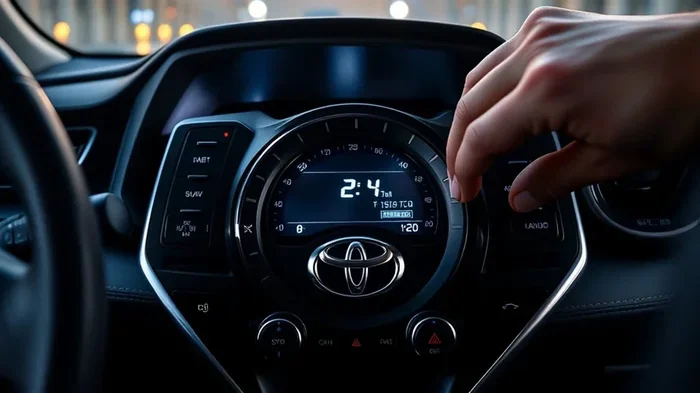
Most newer Toyota Corolla models come with a factory remote start feature built into the key fob. You simply press and hold a specific button for a few seconds, and the engine turns over. The system is designed to work within a certain range, usually around 200 to 600 feet from the vehicle. The car stays running for a set time, typically 10 to 20 minutes, before shutting off automatically for safety.
Toyota uses a secure system to prevent theft. The engine will only start if the key fob is within range and the car is in park. This means someone cannot steal your car by pressing buttons from far away. Toyota Corolla key fob technology has improved over the years, making remote start more reliable and secure with each new generation.
What Is an Aftermarket Remote Start System?
If your Toyota Corolla does not have factory remote start, you are not out of luck. An aftermarket remote start system is a device a professional installs in your car. It connects to your engine and allows you to start it remotely using a separate key fob or even your smartphone.
Aftermarket systems range from basic one-way remotes to advanced two-way systems that send confirmation back to you. Some popular brands include Compustar, Viper, and DroneMobile. Installation typically costs between $200 and $500 depending on the system you choose. If you want to learn more about Toyota key fob reprogramming, you can check this guide on reprogramming Toyota key fobs for additional tips.
How to Remote Start Your Toyota Corolla Step by Step
Now that you understand the basics, let us get into the actual steps. The process depends on whether you have a factory system or an aftermarket one. Here is how to do both.
Method 1: Using the Factory Key Fob
Follow these steps to remote start your Toyota Corolla with the factory key fob:
- Make sure you have the Toyota Corolla key fob on you and it is within range of the vehicle.
- Press the lock button on the key fob to secure all doors.
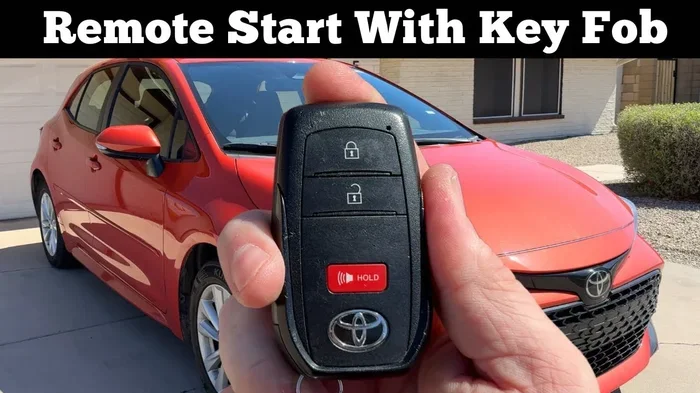
- Immediately press and hold the remote start button (usually marked with a curved arrow or a car icon with waves).
- Hold the button for about 2 to 3 seconds until you hear the engine start and see the parking lights flash.
- The engine will now run for the preset time. You can repeat the process to extend the run time if your model supports it.
That is it. It really is that simple. The whole process takes less than 10 seconds once you have done it a few times.
Method 2: Using the Toyota App
Some newer Toyota Corolla models support remote start through the Toyota app on your smartphone. Here is how it works:
- Download the Toyota app and connect it to your vehicle.
- Make sure your phone has a data or Wi-Fi connection.
- Open the app and select the remote start option.
- Confirm the command and wait for the engine to start.
This method is incredibly convenient because you can start your car from anywhere with cell service. It also lets you check your car status, lock doors, and even locate your vehicle on a map.
Method 3: Using an Aftermarket Remote Start
If you installed an aftermarket remote start system, the process varies by brand and model. Generally, you will:
- Make sure the system is armed (usually by pressing a lock button on the aftermarket fob).
- Press the start button on the remote fob.
- Wait for the engine to start and the lights to flash.
Aftermarket systems often come with additional features like two-way confirmation, smartphone control, and longer range. Check your specific system manual for detailed instructions.
Which Toyota Corolla Models Support Remote Start
Not every Toyota Corolla comes with factory remote start. The feature depends on your model year and trim level. Here is a breakdown to help you figure out if your car has it.
Model Years with Factory Remote Start
Toyota started offering remote start more widely on the Corolla around 2018 and newer models. Higher trims like the SE and XSE are more likely to include factory remote start as part of a package. Older models from 2017 and below typically do not have this feature unless an owner added it aftermarket.
If you are unsure whether your specific model has remote start, check your owner manual or look at your key fob for a dedicated remote start button. You can also visit your local Toyota dealership and ask a service advisor to confirm your car’s capabilities.
How to Check if Your Corolla Has Remote Start
- Look at your key fob for a remote start button (often a curved arrow icon).
- Check your owner manual under the “Remote Start” section.
- Search for your model year and trim online to see the factory features list.
- Ask a Toyota dealer or certified mechanic to confirm.
If your Corolla does not have factory remote start, do not worry. Aftermarket systems work on virtually any vehicle and are a great way to add this convenient feature. You can also check our guide on remote starting Toyota with the key fob for more model-specific details.
Troubleshooting Common Remote Start Issues
Even with a great system, things sometimes go wrong. Here are the most common problems and how to fix them.
Remote Start Does Not Respond
If your Toyota Corolla remote start does not respond at all, the first thing to check is your key fob battery. A weak battery is the number one cause of remote start failure. Replace the CR2032 battery in your fob and try again. You can find more information about key fob battery health in our guide on checking if your key battery is low.
Other reasons your remote start might not work include:
- The car doors or hood are not fully closed.
- The vehicle is not in park.
- The engine has not been turned off properly before attempting remote start.
- The remote start feature has reached its maximum run time limit.
- Your key fob is too far from the vehicle.
Engine Starts But Stops Immediately
If your engine cranks but shuts off right away, there could be a few causes. Check that the brake pedal was pressed when you started the car normally. Some Toyota models require a successful normal start before the remote start feature will work again. Also make sure your oil level and coolant are in good condition, as some systems will not remote start if there is a detected issue.
Remote Start Works Intermittently
Intermittent remote start problems are often caused by signal interference or a fading key fob battery. Try walking closer to the vehicle and pressing the button again. If the problem persists, replace the fob battery. Cold weather can also reduce fob range, so keep that in mind during winter months.
Benefits of Remote Starting Your Toyota Corolla
Remote start is more than just a luxury. It offers real, practical benefits that improve your daily driving experience.
Comfort in Extreme Weather
This is the biggest reason most people use remote start. On a cold winter morning, you can warm up your Toyota Corolla before you walk outside. In summer, you can cool down the interior so you do not have to sit in a hot car. This small convenience adds up to a much better daily experience.
Engine Health
Letting your engine warm up before driving reduces wear on internal components. Cold oil is thick and does not lubricate well. Remote start gives the engine time to circulate oil properly. Over time, this can help extend the life of your engine.
Safety and Security
Remote start systems are designed with safety in mind. The engine will not start unless the car is in park and the doors are locked. This reduces the risk of accidental movement. Some systems also allow you to lock and unlock doors remotely, adding an extra layer of security.
Time Savings
Instead of waiting for your car to warm up while you sit inside, remote start lets you handle that task while you finish getting ready. A few minutes saved every morning adds up over weeks and months.
Expert Tips for Getting the Most Out of Remote Start
To get the best experience with your Toyota Corolla remote start, keep these expert tips in mind:
Replace Your Key Fob Battery Regularly
Do not wait until your fob stops working completely. Replace the battery every 6 to 12 months to ensure consistent performance. A fresh battery gives you full range and reliable remote start operation every time.
Know Your Local Laws
Some areas have laws about idling vehicles or remote start usage. Check your local regulations to make sure you are following the rules. Never leave your car running unattended in a closed garage or restricted area.
Keep Your Car Maintained
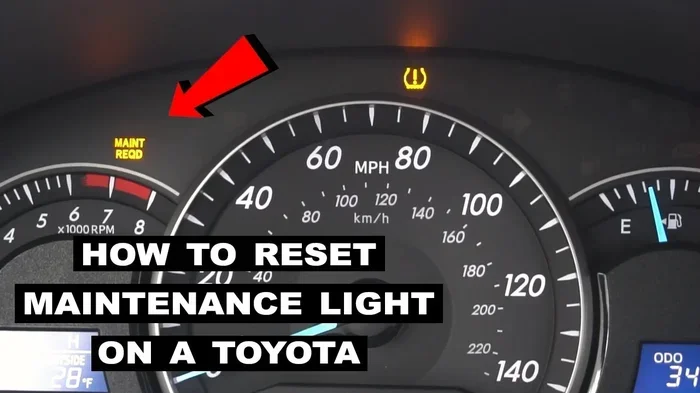
Remote start works best when your car is in good shape. Regular oil changes, coolant checks, and brake inspections keep everything running smoothly. If your car has maintenance alerts, address them promptly so they do not interfere with remote start.
Use Remote Start Wisely
Do not overuse remote start. Most factory systems limit run time to prevent fuel waste and engine strain. Use remote start only when you need comfort, not as a habit every time you leave the house. This saves fuel and reduces emissions.
Consider an Aftermarket Upgrade if Needed
If your older Corolla model does not have factory remote start, an aftermarket system is a worthwhile investment. Look for systems with good range, smartphone compatibility, and strong security features. Professional installation ensures everything works correctly and safely.
Common Mistakes to Avoid with Toyota Corolla Remote Start
Even experienced car owners make mistakes with remote start. Here are the ones to watch out for:
- Forgetting to put the car in park: This is the most common reason remote start fails. Always make sure your Corolla is fully in park before attempting remote start.
- Leaving the car running too long: Most factory systems shut off automatically, but aftermarket systems may not. Always set a timer or monitor your run time.
- Ignoring warning lights: If your dashboard shows a warning light after remote start, do not ignore it. Address the issue before driving.
- Using remote start in enclosed spaces: Never use remote start in a closed garage. Exhaust fumes contain carbon monoxide, which is dangerous and potentially fatal.
- Not locking the doors: Always lock your doors before or immediately after remote starting. This prevents unauthorized access while the engine runs.
Avoiding these simple mistakes keeps you safe, protects your vehicle, and ensures your Toyota Corolla remote start system works reliably for years to come.
Conclusion
Remote start Toyota Corolla systems are a fantastic feature that adds comfort, convenience, and a little luxury to your daily routine. Whether you use the factory key fob, the Toyota smartphone app, or an aftermarket system, the process is straightforward once you know the steps. We covered everything from how the system works, to model compatibility, troubleshooting tips, and expert advice to help you get the best results.
The key is to understand your specific model and its capabilities. Check your owner manual, keep your key fob battery fresh, and follow Toyota safety guidelines. If your Corolla does not have factory remote start, an aftermarket system is a great option that any qualified installer can add to your vehicle.
Now you have all the knowledge you need to remote start your Toyota Corolla with confidence. Try it out on your next cold morning and feel the difference. Your car will thank you, and so will you.
Frequently Asked Questions
Can I remote start my Toyota Corolla with the key fob?
Yes, most newer Toyota Corolla models support remote start using the factory key fob. Simply lock the doors and press and hold the remote start button for a few seconds. If your key fob does not have this button, your model may not include factory remote start.
How much does it cost to add remote start to a Toyota Corolla?
Aftermarket remote start systems typically cost between $200 and $500 for the equipment, plus installation fees. Factory remote start comes included in certain trims and model years, so there is no extra cost if your Corolla already has it.
Is it safe to remote start my Toyota Corolla?
Yes, it is safe when used correctly. Toyota designs remote start systems with built-in safety features like automatic shutoff timers and park-only activation. Always follow local laws and never leave your car running in an enclosed space.
Why won’t my Toyota Corolla remote start work?
The most common reasons are a weak key fob battery, the car not being in park, doors not fully closed, or the engine having a detected issue. Replace the fob battery first and try again. If the problem continues, consult a Toyota dealer or mechanic.
Can I remote start my older Toyota Corolla that does not have factory remote start?
Yes, you can add remote start to any Toyota Corolla using an aftermarket system. Professional installation ensures the system integrates safely with your vehicle’s electronics and engine. Check our guide on checking if a vehicle is stolen for free to learn about security considerations after installing any aftermarket system.
How long can I let my Toyota Corolla idle using remote start?
Factory Toyota remote start systems typically run for 10 to 20 minutes before automatically shutting off. Aftermarket systems vary by brand and model. Most allow you to set the run time, but it is best to limit idling to reduce fuel waste and engine wear.