How to Reset the Maintenance Required Light on Toyota Camry
Resetting the maintenance required light on a Toyota Camry is a simple process you can do at home in minutes. Whether you have a 2010, 2015, or 2020 Camry, the reset procedure is straightforward and does not require a mechanic. This guide covers every method, from the odometer trick to the trip meter reset, so your Toyota Camry maintenance light stays off until your next service.
This is a comprehensive guide about how to reset maintenance required light on toyota camry.
Key Takeaways
- Easy DIY Reset: You can reset the maintenance light on your Toyota Camry without any special tools or dealer visits.
- Multiple Methods Available: Different Camry model years use slightly different reset procedures, all covered here.
- Prevents Confusion: A stuck maintenance light can cause unnecessary worry about your vehicle’s health.
- Saves Money: Avoiding unnecessary trips to the dealer for a simple light reset keeps your wallet happy.
- Quick Process: Most resets take under five minutes to complete.
- Related to Oil Life: The maintenance light often ties into your oil life monitor system.
[FEATURED_IMAGE_PLACEHOLDER]
That little wrench icon on your Toyota Camry dashboard can be annoying. It pops up right when you least expect it, and suddenly you are wondering if something is seriously wrong with your car. The good news is that the maintenance required light on a Toyota Camry is not a sign of engine failure. It is simply a reminder that your vehicle is due for routine service. Whether you just changed your oil or you are past the recommended interval, this light needs to be reset. In this guide, we walk you through every method to turn off that light and keep your dashboard clean and calm.
Many Camry owners panic when they see this light. They think it means a serious problem. But in most cases, it is just a maintenance reminder tied to your mileage or oil life system. Understanding how this light works makes the reset process much easier. We will cover everything from the basics of what triggers the light to detailed step-by-step instructions for different model years. By the end of this article, you will know exactly how to handle the Toyota Camry maintenance light reset like a pro.
We have also included tips on when to actually worry about dashboard lights, how to create a maintenance schedule for your Camry, and answers to the most common questions drivers ask. This article is your complete resource for dealing with the maintenance required light on your Toyota Camry. Let us dive in and get that light off your dashboard for good.
What Is the Maintenance Required Light on a Toyota Camry?
The maintenance required light is a dashboard indicator that appears as a small wrench symbol. It is part of Toyota’s maintenance reminder system. This system tracks your mileage and alerts you when it is time for routine service. The light typically comes on every 5,000 miles or based on the oil life monitor in newer models.
How the System Works
Toyota designed this system to remind drivers about oil changes, tire rotations, and other scheduled services. The oil life monitor in modern Camrys uses algorithms to estimate when your oil is degrading. When the system determines service is due, it triggers the maintenance light. This is different from the check engine light, which signals an actual problem with your vehicle.
The maintenance light does not diagnose any specific issue. It is purely a timer-based reminder. Once you complete your service, you need to manually reset it. If you do not reset it, the light will stay on and keep reminding you. Some owners find this confusing because the light stays on even after they have serviced the car.
Maintenance Light vs Check Engine Light
It is important to understand the difference between the maintenance required light and the check engine light. The check engine light indicates a real problem detected by your car’s computer. The maintenance light is simply a schedule reminder. If your check engine light is on, you should address it immediately. If only the maintenance light is on, you can safely reset it after completing your routine service.
Sometimes drivers confuse these two lights. If you are unsure which light you are seeing, refer to your owner’s manual. The wrench symbol specifically represents the maintenance reminder. Understanding this distinction helps you respond appropriately to each dashboard warning light on your Camry.
Why You Need to Reset the Maintenance Light
After you complete your oil change or other scheduled service, the maintenance light will not turn off by itself. You must reset it manually. Leaving the light on can cause several problems for you as a driver.
Avoiding Unnecessary Worry
A constantly lit maintenance light can make you think something is wrong with your car. This causes unnecessary stress every time you look at your dashboard. Resetting the light gives you peace of mind and confirms that your service has been completed. It also keeps your dashboard clean and easy to read.
Keeping Track of Service Intervals
When the light is properly reset, it gives you an accurate baseline for your next service interval. If you never reset it, the light stays on indefinitely, and you lose the benefit of the reminder system. A proper reset ensures that your Toyota Camry service schedule remains accurate and useful.
Resale Value and Vehicle History
Keeping your maintenance records and dashboard indicators accurate matters when you sell or trade in your Camry. Buyers and dealers look at service history. A properly maintained vehicle with a clean dashboard makes a better impression. Resetting the maintenance light after each service shows that you take care of your car.
How to Reset the Maintenance Required Light on Toyota Camry
Now for the part you have been waiting for. Resetting the maintenance light on your Toyota Camry is easier than you might think. The exact steps vary slightly depending on your model year, but we cover the most common methods below. Pick the method that matches your Camry and follow along.
Method 1: The Odometer Reset Trick (Works on Most Model Years)
This is the most popular method and works on many Toyota Camry models from 2007 to 2023. Here is how to do it:
- Turn the ignition to the ON position without starting the engine. Press the start button once or turn the key to the ON position.
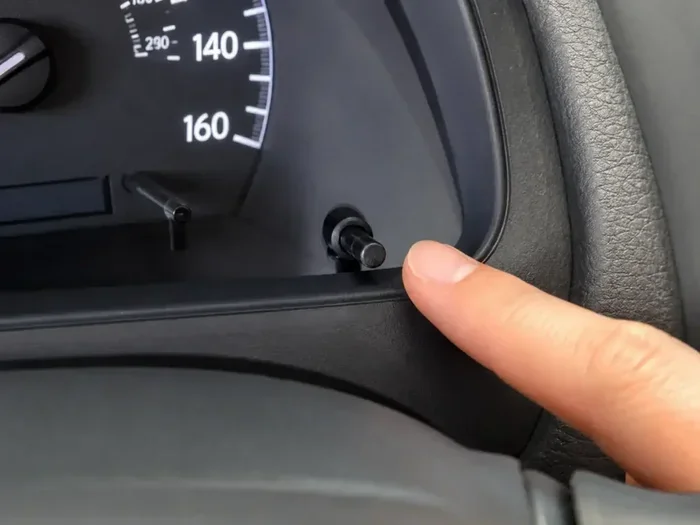
- Press the trip meter selector button until you see the odometer reading displayed on the instrument cluster.
- Turn the ignition OFF, then back to the ON position while holding the trip meter button.
- Continue holding the trip meter button for about 10 to 15 seconds.
- The maintenance light should start blinking, then turn off.
- Release the trip meter button. Turn the ignition OFF and then ON again to confirm the light is off.
This method resets the maintenance reminder and clears the oil life monitor on most Camry models. If the light does not turn off on the first try, repeat the process. Sometimes it takes two attempts for the system to fully reset.
Method 2: Using the Steering Wheel Controls (Newer Models)
If you have a Toyota Camry from 2018 or newer, you may have digital controls on the steering wheel. These models use a slightly different reset process:
- Press the MENU button on the steering wheel controls.
- Use the arrow buttons to navigate to the Vehicle Info or Maintenance menu.
- Select the Maintenance Reset option.
- Confirm the reset when prompted on the display.
- The maintenance light should turn off after confirmation.
Newer Camry models with touchscreens may also allow you to reset the maintenance light through the multi-information display. Navigate to Settings, then Vehicle Maintenance, and select Reset Maintenance. The exact menu path varies by model year and trim level.
Method 3: The Ignition Cycle Method
For some older Camry models, the ignition cycle method works best:
- Turn the ignition to the OFF position.
- Press and hold the trip meter reset button.
- While holding the button, turn the ignition to the ON position.
- Continue holding the button for 10 seconds.
- The light should blink and then turn off.
- Release the button and turn the ignition OFF, then back ON to verify.
This method is particularly effective for Camrys from 2007 through 2017. If your model year falls in this range, try this approach first before moving to other methods.
Common Mistakes When Resetting the Maintenance Light
Even though the reset process is simple, mistakes can happen. Here are the most common errors Camry owners make when trying to reset the maintenance light.
Not Completing the Full Reset Sequence
One of the biggest mistakes is releasing the trip meter button too early. You need to hold it for the full 10 to 15 seconds. If you release it too soon, the system does not register the reset command. Be patient and hold the button until you see the light blink.
Confusing the Maintenance Light with the Check Engine Light
Some drivers try to reset the maintenance light when the check engine light is on. These are two different systems. The methods described in this article work for the maintenance required light only. If your check engine light is on, you need to diagnose the underlying issue first. For more information on dashboard lights, check out our guide on how to get rid of the service light on your dashboard.
Not Resetting the Oil Life Monitor
On newer Camry models, the maintenance light is tied to the oil life monitor. Simply clearing the maintenance message may not reset the oil life percentage. You need to reset both systems to keep your dashboard clean. If you are unsure about your oil life system, our article on how to reset my oil life provides detailed instructions.
Skipping Actual Service Before Resetting
Never reset the maintenance light without actually completing the service. The light exists for a reason. Resetting it without performing oil changes or other scheduled maintenance can lead to engine problems over time. Always service your vehicle first, then reset the light.
When to Seek Professional Help
Most of the time, resetting the maintenance light is a DIY task. However, there are situations where professional help is the right choice.
If you have tried all the reset methods and the maintenance light stays on, there may be a deeper issue. A faulty sensor or a problem with the vehicle’s computer system could be preventing the reset. In these cases, visiting a Toyota dealership or certified mechanic is the best next step. You can also visit any Toyota dealer for service, as explained in our guide on whether you can take your Toyota to any dealer for service.
Another reason to seek professional help is if multiple dashboard lights are on at the same time. If the maintenance light comes with the check engine light or the VSC light, you should have the vehicle inspected. A technician can read the diagnostic codes and identify any real problems. Ignoring multiple warning lights can lead to costly repairs down the road.
Preventing the Maintenance Light from Coming Back Too Soon
Once you have successfully reset the maintenance light, you want it to stay off until your next service interval. Here are some tips to help you manage your Toyota Camry maintenance schedule effectively.
Keep a Service Log
Maintain a written or digital log of every oil change, tire rotation, and other service you perform. This log helps you track when the next service is due and prevents the maintenance light from surprising you. Many owners find that keeping a simple spreadsheet or using a phone app makes this task effortless.
Create a Maintenance Schedule
Setting up a regular maintenance schedule for your Camry ensures you never miss a service interval. You can find helpful guidance on creating a maintenance plan in our article on how to create a maintenance schedule. A good schedule includes oil changes every 5,000 to 7,500 miles, tire rotations every 5,000 miles, and regular inspections of brakes, fluids, and filters.
Use Quality Oil and Parts
Using the right grade of oil and quality replacement parts helps your Camry run smoothly between service intervals. Toyota recommends specific oil weights for different Camry model years. Using the correct oil helps the oil life monitor provide accurate readings, which in turn helps the maintenance light come on at the right time.
Pay Attention to Dashboard Messages
Modern Toyota Camrys display maintenance messages on the multi-information display. Pay attention to these messages before the maintenance light even comes on. If your display shows an oil life percentage of 15% or lower, it is time to schedule a service. Staying ahead of the reminder prevents the light from catching you off guard.
Maintenance Tips for Long-Term Toyota Camry Ownership
The Toyota Camry is known for its reliability and longevity. Many Camrys reach 200,000 miles or more with proper care. Keeping up with the maintenance schedule is one of the most important things you can do to ensure your Camry lasts for years to come.
Regular oil changes are the foundation of Camry maintenance. Clean oil keeps the engine lubricated and prevents wear. But maintenance goes beyond just oil changes. Your Camry also needs fresh coolant, transmission fluid, brake fluid, and power steering fluid at recommended intervals. Checking and replacing these fluids on schedule keeps all systems working properly.
Tire maintenance is another critical aspect. Rotate your tires every 5,000 miles and check the pressure monthly. Proper tire care improves fuel economy, handling, and safety. Brake inspections should also be part of your routine maintenance. Worn brake pads can damage rotors and lead to expensive repairs if not caught early.
Many Camry owners wonder about the long-term durability of their vehicles. With consistent maintenance, a Toyota Camry can absolutely last 300,000 miles or more. For more information on Camry longevity, check out our article on whether a Toyota Camry can last 30 years. The key is staying on top of every service interval and never ignoring warning lights or unusual sounds.
Conclusion
Resetting the maintenance required light on Toyota Camry is a simple process that every Camry owner should know. Whether you use the odometer trick, the steering wheel controls, or the ignition cycle method, the reset takes just a few minutes. The key is to complete your service first, then follow the correct reset procedure for your model year. A properly reset maintenance light gives you peace of mind and keeps your service schedule accurate.
Remember that the maintenance light is a helpful reminder, not a cause for alarm. It tells you when it is time for routine care, not when something is broken. By staying on top of your Camry’s maintenance schedule and resetting the light after each service, you keep your vehicle running at its best. If you ever run into trouble or the light refuses to go off, do not hesitate to consult a professional or visit your local Toyota dealer.
Take a few minutes today to reset your maintenance light if it is currently on. Your dashboard will look cleaner, and you will have the confidence that comes from knowing your Camry is properly maintained. Keep this guide bookmarked for future reference, and share it with fellow Camry owners who might need help with their maintenance light reset.
Frequently Asked Questions
Can I drive my Toyota Camry with the maintenance required light on?
Yes, you can safely drive your Camry with the maintenance light on. The light is only a reminder for scheduled service and does not indicate a mechanical problem. However, you should not ignore it for too long, as skipping oil changes and other services can lead to engine damage over time.
What is the difference between the maintenance light and the check engine light on a Toyota Camry?
The maintenance light is a schedule reminder that appears as a wrench symbol. The check engine light indicates a real problem detected by the vehicle’s computer. The maintenance light comes on at set mileage intervals, while the check engine light activates when the system detects a fault.
How often does the maintenance required light come on for a Toyota Camry?
The maintenance light typically comes on every 5,000 miles for older Camry models. Newer models with an oil life monitor may trigger the light based on driving conditions and oil quality rather than a fixed mileage interval. Check your owner’s manual for your specific model year’s recommended service interval.
Will resetting the maintenance light clear the oil life monitor on my Toyota Camry?
On most Toyota Camry models, resetting the maintenance light also resets the oil life monitor. However, on some newer models, you may need to reset both systems separately. If the oil life percentage is still low after resetting the maintenance light, you may need to perform a separate oil life reset.
Do I need any special tools to reset the maintenance light on a Toyota Camry?
No special tools are needed. You only need access to the trip meter or steering wheel controls, depending on your model year. The entire reset process can be completed in just a few minutes using buttons already located in your Camry’s cabin.
Can a Toyota dealership reset the maintenance light for me?
Yes, any Toyota dealership can reset the maintenance light for you. However, since the process is simple and free to do yourself, most owners prefer to handle it at home. If you prefer professional assistance, you can take your Camry to any Toyota dealer for service.