How to Reset the Computer on a Dodge Ram 1500 Truck
Resetting the computer on your Dodge Ram 1500 is a simple process that can fix warning lights, improve performance, and clear error codes. You can do it by disconnecting the battery, using an OBD2 scanner, or cycling the ignition. This guide walks you through every method with clear steps and practical tips.
Owning a Dodge Ram 1500 comes with great power and reliability. But sometimes the truck behaves strangely. Warning lights flash on the dash. The engine feels sluggish. Error codes pop up out of nowhere. In many of these cases, a simple computer reset can solve the problem. This guide shows you exactly how to reset the computer on a Dodge Ram 1500 truck, step by step.
Whether you are dealing with a stubborn check engine light or you just finished some repairs, knowing how to reset your truck’s computer saves time and money. You do not need to visit a dealership or pay a mechanic hundreds of dollars. With the right information, you can handle this at home in your garage or driveway.
We will cover every method you can use. We will also explain what happens during a reset and what you should do afterward. By the end of this article, you will feel confident tackling this job yourself. Let us get into it.
Key Takeaways
- Multiple reset methods exist: You can reset your Dodge Ram 1500 computer by disconnecting the battery, using a scan tool, or cycling the ignition key.
- Battery disconnect is the most common method: It takes about 15-30 minutes and requires basic tools like a wrench.
- Always reset your clock and radio settings: After a computer reset, you will need to re-enter personalized settings.
- Drive cycles matter after a reset: Your Dodge Ram needs a proper drive cycle to relearn settings and clear codes.
- Avoid common mistakes: Never reset while the engine is running, and always ensure your radio code is handy.
- Scan tools offer a targeted approach: They let you clear specific codes without a full reset.
📑 Table of Contents
- Why You Might Need to Reset the Computer on Your Dodge Ram 1500
- Understanding Your Dodge Ram 1500 Computer System
- How to Reset the Computer by Disconnecting the Battery
- Alternative Methods to Reset the Dodge Ram 1500 Computer
- What to Do After Resetting the Computer
- Common Mistakes to Avoid When Resetting Your Truck Computer
- When to See a Professional Instead of Resetting Yourself
- Conclusion
Why You Might Need to Reset the Computer on Your Dodge Ram 1500
Your Dodge Ram 1500 has a powerful onboard computer. It controls everything from fuel injection to transmission shifting. Over time, the computer stores data and error codes. Sometimes this data becomes outdated or incorrect. A reset clears this stored information and gives the computer a fresh start.
Here are the most common reasons you might need to reset the computer:
- Check engine light stays on: After repairing a problem, the light may not turn off on its own. A reset clears the code.
- Dashboard warning lights behave oddly: Lights that come on for no clear reason often respond to a reset.
- Rough idling or poor performance: The computer may have learned bad driving patterns that affect performance.
- After battery replacement: A new battery can cause the computer to lose its learned settings.
- After installing new parts: New sensors or components need the computer to relearn how they work.
- Transmission shifting problems: A reset can help the transmission adapt to new driving conditions.
It is important to understand that resetting the computer is not a magic fix. If there is a real mechanical problem, a reset will not repair it. But for many electronic glitches and stored error codes, a reset works wonders. Think of it like restarting your phone when it acts up.
If you have also dealt with warning lights on other vehicles, you know the frustration. For example, if you have an oil change light that will not go off, you might want to check how to reset the light after an oil change on different truck models. The concept is similar across vehicles.
Understanding Your Dodge Ram 1500 Computer System
Before you jump into the reset process, it helps to understand what you are working with. The Dodge Ram 1500 uses a Powertrain Control Module, commonly called the PCM. This is the main computer that manages your engine and transmission. It collects data from dozens of sensors throughout the truck.
What Does the PCM Do?
The PCM controls many important functions. It decides when to inject fuel into each cylinder. It manages the spark timing for combustion. It monitors the oxygen sensors to keep emissions low. It also controls the automatic transmission shifting points.
All of this happens in real time. The PCM constantly adjusts based on driving conditions. It learns your driving habits over time. This is called adaptive learning. Sometimes this learned data becomes a problem, and a reset clears it.
How the Computer Stores Data
When something goes wrong, the PCM stores a trouble code. These codes help mechanics diagnose problems. The codes stay in memory until they are cleared. A computer reset wipes these codes clean. But the codes will return if the underlying problem is not fixed.
The truck also stores short-term and long-term fuel trim values. These numbers tell the PCM how much fuel to add or reduce. After a reset, these values go back to zero. The PCM then relearns them as you drive.
It is worth noting that some people confuse a Dodge Ram 1500 reset with a full reprogramming. A reset clears stored data. Reprogramming updates the software. You usually only need a reset for everyday issues. Reprogramming is done by a dealer or specialist when there are software bugs.
How to Reset the Computer by Disconnecting the Battery
The battery disconnect method is the most popular way to reset the Dodge Ram 1500 computer. It is simple, free, and requires no special tools. Most truck owners can do it in under 30 minutes.
What You Will Need
Before you start, gather these items:
- A socket wrench set (usually 10mm for the battery terminal)
- A clean rag or paper towel
- A memory saver device (optional but recommended)
- Your radio security code (check the owner’s manual)
Step-by-Step Instructions
Follow these steps carefully to reset the computer safely:
Step 1: Turn off the engine. Park the truck on a level surface. Engage the parking brake. Turn the ignition off and remove the key from the ignition. This is the most important safety step. Never disconnect the battery while the engine is running.
Step 2: Locate the battery. On most Dodge Ram 1500 models, the battery sits in the engine bay on the passenger side. Open the hood and find the battery. You will see two terminals: positive (red) and negative (black).
Step 3: Disconnect the negative terminal first. Use your wrench to loosen the nut on the negative terminal. Carefully lift the cable off the battery post. Tuck the cable away so it cannot accidentally touch the terminal again. Always disconnect the negative terminal first to prevent short circuits.
Step 4: Wait for at least 15 to 30 minutes. This is when the magic happens. The computer drains its residual power and forgets stored codes. Some people wait longer, but 15 to 30 minutes is usually enough for a full Dodge Ram 1500 reset.
Step 5: Reconnect the negative terminal. Place the cable back on the battery post. Tighten the nut securely. Make sure the connection is tight and does not wobble.
Step 6: Reconnect the positive terminal. Repeat the same process for the positive terminal. Tighten it firmly.
Step 7: Start the engine. Turn the key to start the truck. You may notice the check engine light comes on briefly. This is normal. It means the computer is booting up and running a self-check.
After starting, let the truck idle for a few minutes. The computer will begin relearning your driving patterns. You may also need to enter your radio code again. Check your owner’s manual if you do not have it.
If you have ever dealt with a check engine light and wanted to avoid the battery disconnect method, you might be interested in how to reset the check engine light without disconnecting the battery. Both approaches have their place depending on your situation.
Important Tips for Battery Disconnect Reset
- Always disconnect the negative terminal first. This prevents electrical shorts.
- Do not let the terminals touch each other. This can cause sparks and damage.
- Clean the terminals before reconnecting. Use the rag to wipe away any corrosion.
- Have your radio code ready. After a reset, the radio will lock and ask for a code.
- Drive gently for the first 20 miles. Let the computer relearn your driving habits.
Alternative Methods to Reset the Dodge Ram 1500 Computer
The battery disconnect method works great for most situations. But it is not the only option. Depending on your tools and the problem you are facing, you might prefer a different approach.
Method 1: Using an OBD2 Scan Tool
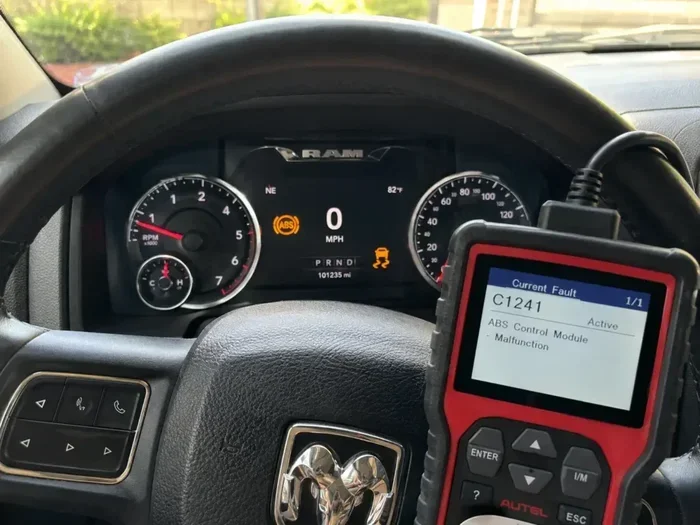
An OBD2 scan tool plugs directly into your truck’s diagnostic port. This port is usually located under the dashboard on the driver’s side. The scan tool communicates with the PCM and lets you clear codes without disconnecting the battery.
Here is how to use a scan tool to reset the computer:
- Locate the OBD2 port under the dashboard.
- Plug the scan tool into the port.
- Turn the ignition to the “On” position (do not start the engine).
- Wait for the scan tool to connect to the PCM.
- Select “Read Codes” to see what is stored.
- Select “Clear Codes” to erase them from memory.
- Turn the ignition off and then back on to verify the codes are gone.
A scan tool is great because it lets you target specific problems. You do not have to wipe all the computer data. You can also check live sensor data to make sure everything is working correctly after the reset.
Scan tools range from basic code readers to advanced professional units. A basic Bluetooth OBD2 adapter paired with a smartphone app costs around $20 to $30. More advanced tools with live data streams cost more but offer much more detail.
Method 2: The Ignition Cycle Method
This method uses the ignition key to cycle power to the computer. It works on older Dodge Ram models that do not have advanced onboard diagnostics. Here is what to do:
- Turn the ignition to the “On” position without starting the engine.
- Wait for 10 seconds.
- Turn the ignition off.
- Wait for 5 seconds.
- Repeat this cycle three times.
- Start the engine and let it idle for a few minutes.
This method is quick and does not require any tools. However, it does not work on all Dodge Ram 1500 models, especially newer ones with advanced computer systems.
Method 3: Using a Dodge Diagnostic Tool
For the most thorough reset, you can use a factory-level diagnostic tool. Tools like the Dodge DRB III or the WiTECH system connect directly to the truck’s diagnostic port. They allow you to perform a full PCM reset and even update the software.
These tools are expensive and are usually found in dealerships or professional shops. If you do not have access to one, the battery disconnect method or a basic OBD2 scanner will work just fine for most situations.
What to Do After Resetting the Computer
Resetting the computer is only half the job. What you do afterward matters just as much. Following the right post-reset steps ensures your Dodge Ram 1500 runs smoothly and the computer relearns properly.
Take a Proper Drive Cycle
A drive cycle is a specific driving pattern that helps the PCM relearn its settings. After a reset, the computer needs to collect fresh data from all the sensors. Here is a simple drive cycle you can follow:
- Start the truck and let it idle for 3 to 5 minutes.
- Drive at moderate speed (30 to 50 mph) for about 10 minutes.
- Accelerate gently to 55 mph and hold that speed for 5 minutes.
- Slow down gradually to 30 mph without braking hard.
- Repeat this cycle two or three times.
During this drive cycle, the computer will recalibrate the fuel trim values, adjust the idle speed, and update the transmission shift points. It is important to drive calmly and avoid aggressive acceleration.
Check for Returning Warning Lights
After completing the drive cycle, check your dashboard. Are the warning lights still off? If the check engine light comes back on, there is likely an underlying problem that a reset cannot fix. You will need to diagnose the root cause.
If a light returns, use your OBD2 scanner to read the new codes. The codes will tell you exactly what is wrong. Sometimes the problem is as simple as a loose gas cap. Other times it requires more serious repairs.
Reset Your Radio and Clock
A computer reset wipes all personalized settings. Your radio presets will be gone. The clock will reset to a default time. You may also need to re-enter your radio security code. Keep your owner’s manual handy for this information.
Some Dodge Ram 1500 models also store power window settings and mirror positions in the computer. After a reset, you may need to reprogram these features. The process is usually simple and is explained in the owner’s manual.
For related maintenance tips, you can also check whether you need to reset the oil change light after completing other service work on your truck.
Common Mistakes to Avoid When Resetting Your Truck Computer
Resetting the computer on a Dodge Ram 1500 is straightforward. But mistakes can cause problems. Here are the most common errors truck owners make and how to avoid them.
Mistake 1: Disconnecting the Battery While the Engine Is Running
This is the number one mistake. Disconnecting the battery while the engine is running can cause a voltage spike that damages the PCM and other electronic components. Always turn the engine off completely before you disconnect anything.
Mistake 2: Forgetting the Radio Code
After a reset, the radio will lock up and ask for a code. If you do not have this code, you may need to visit a dealership or a locksmith to get it unlocked. Write down your radio code and keep it somewhere safe before you start the reset.
Mistake 3: Not Fixing the Underlying Problem
A reset clears the codes, but it does not fix the problem that caused them. If you have a faulty oxygen sensor and you reset the computer, the check engine light will come back on once the computer detects the same fault again. Always diagnose and repair the root cause first.
Mistake 4: Reconnecting the Battery Too Soon
You need to wait at least 15 to 30 minutes after disconnecting the battery. If you reconnect it too quickly, the computer may not fully reset. Be patient and let the system drain completely.
Mistake 5: Ignoring the Check Engine Light After a Reset
If the check engine light returns shortly after a reset, do not ignore it. The light is telling you something is wrong. Keep a close eye on it and use a scanner to read any new codes promptly.
Sometimes warning lights on the dashboard can be related to other issues too. If you ever notice a wrench light or other unusual indicator, understanding what it means can help you decide whether a reset is the right solution.
When to See a Professional Instead of Resetting Yourself
Most computer resets are simple enough for any truck owner to handle. But there are times when you should leave it to the professionals. If you try a reset and the problem persists, there may be a deeper issue at play.
Consider seeing a mechanic if:
- The check engine light keeps coming back after multiple resets.
- You have a flashing check engine light, which indicates a serious problem.
- Your truck is running rough or stalling frequently.
- You notice a strong smell of fuel or burning.
- The transmission shifts roughly or slips between gears.
- You are not comfortable working with electrical components.
Professional mechanics have access to advanced diagnostic tools and factory software. They can pinpoint problems that a basic reset cannot fix. There is no shame in seeking help when you need it.
If you have ever wondered about the inner workings of your truck or how long it takes to build one from scratch, you can explore how long it takes a factory to build a car or how many man hours it takes to build a car for a fascinating look at truck manufacturing.
Conclusion
Resetting the computer on your Dodge Ram 1500 truck is a valuable skill every owner should know. Whether you use the battery disconnect method, an OBD2 scan tool, or the ignition cycle method, the process is straightforward and doable at home. A reset can clear stubborn warning lights, improve truck performance, and give your PCM a fresh start.
Remember to always follow safety precautions. Turn off the engine before disconnecting the battery. Wait long enough for the system to fully drain. Have your radio code ready. And most importantly, take a proper drive cycle after the reset so the computer can relearn your driving patterns.
If the problem persists after a reset, do not ignore it. There may be a real mechanical issue that needs professional attention. But for many common electronic glitches and stored codes, a simple reset does the trick. You just saved yourself a trip to the dealership and a hefty repair bill.
Keep this guide bookmarked for future reference. The next time your Dodge Ram 1500 acts up, you will know exactly what to do. Happy wrenching!
Frequently Asked Questions
How long should I disconnect the battery to reset the Dodge Ram 1500 computer?
You should disconnect the battery for at least 15 to 30 minutes. This gives the computer enough time to drain its residual power and clear all stored codes. Some owners wait up to an hour for a more thorough reset, but 15 to 30 minutes is usually sufficient.
Will resetting the computer erase my Dodge Ram’s saved settings?
Yes, a full computer reset will erase personalized settings like radio presets, clock, and power window adjustments. You will need to reprogram these after the reset. Always have your radio security code ready before you start the process.
Can I drive my Dodge Ram 1500 immediately after resetting the computer?
You can drive the truck immediately, but it is best to let it idle for a few minutes first. After starting, allow the computer to run its self-check. Then take a gentle drive cycle to help the PCM relearn your driving patterns and recalibrate sensor readings.
Do I need any special tools to reset the Dodge Ram 1500 computer?
For the battery disconnect method, you only need a basic socket wrench set, usually 10mm. For the scan tool method, you need an OBD2 scanner or adapter. The ignition cycle method requires no tools at all. Choose the method that works best for your situation.
Why did my check engine light come back after I reset the computer?
If the check engine light returns after a reset, it means the underlying problem has not been fixed. The computer detected the same fault again during its self-check. You should use an OBD2 scanner to read the codes and diagnose the root cause. A reset only clears the codes temporarily.
Is it safe to reset the computer on a Dodge Ram 1500 myself?
Yes, it is safe as long as you follow the proper steps. Always disconnect the negative terminal first. Never disconnect the battery while the engine is running. Wait the full 15 to 30 minutes before reconnecting. If you are unsure about any step, consult a professional mechanic for guidance.