how to reset toyota camry maintenance light step by step
Resetting the Toyota Camry maintenance light is a simple process you can do at home in minutes. This guide walks you through the exact steps for different model years, including how to reset the oil life indicator and service reminder. Whether you just changed your oil or are seeing the maintenance required light, we have you covered.
The Toyota Camry maintenance light is one of those dashboard symbols that can catch you off guard. You are driving along, minding your own business, when suddenly a little wrench icon or “MAINT REQD” message pops up on your dashboard. It is easy to feel a small spike of worry, but here is the good news. In most cases, you can handle this yourself.
This guide will show you exactly how to reset Toyota Camry maintenance light step by step. We will cover different model years, explain what the light actually means, and share practical tips to keep your Camry in great shape. No jargon. No confusing mechanics talk. Just clear, simple instructions anyone can follow.
Whether you are a first-time car owner or a seasoned Camry driver, this article has something for you. We will walk through the reset process, explain common mistakes, and answer frequently asked questions. By the end, you will feel confident tackling that maintenance light on your own.
Key Takeaways
- Easy DIY Process: You can reset the Toyota Camry maintenance light without visiting a dealership or mechanic.
- Model Year Matters: The reset steps vary slightly depending on your Toyota Camry model year and trim level.
- Oil Life vs. Service Light: Understanding the difference between the oil life indicator and the maintenance required light helps you reset the right one.
- Regular Maintenance Matters: Resetting the light is only half the battle. Following a proper maintenance schedule keeps your car running smoothly.
- Quick Tips Prevent Future Issues: Simple habits like checking your dashboard lights regularly can save you time and money.
- Professional Help When Needed: Some situations require a Toyota service center visit, especially if the light keeps coming back.
📑 Table of Contents
What Is the Toyota Camry Maintenance Light?
The maintenance light on a Toyota Camry is a dashboard indicator that reminds you about scheduled service. It is different from a warning light that signals a mechanical problem. Think of it as your car’s way of saying, “Hey, it is time for an oil change or routine checkup.”
Most Toyota Camry models display this light as a small wrench icon or the text “MAINT REQD.” The light typically activates based on mileage intervals, often every 5,000 miles. However, some newer models use a smart oil life monitoring system that adjusts the timing based on your driving habits.
Understanding the difference between the maintenance light and other dashboard warnings is important. For example, if you see a check engine light, that is a different issue entirely. If you are dealing with other dashboard warnings, check out our guide on how to get rid of the service light on your dashboard for additional help.
Types of Maintenance Indicators
Toyota Camry models use a few different indicators to remind you about service. Here are the most common ones you might see:
- MAINT REQD: This is the traditional maintenance required light. It appears on older Camry models and stays on until you reset it manually.
- Oil Life Indicator: Found on newer Camry models, this shows a percentage that drops as your oil life decreases. It is based on driving conditions and mileage.
- Wrench Icon: A small wrench symbol that serves the same purpose as the MAINT REQD text.
- Service Interval Reminder: Some models display a message in the multi-information display reminding you of upcoming service.
No matter which type your Camry has, the reset process is similar. The key is knowing which method matches your specific model year.
Why Does the Maintenance Light Come On?
The maintenance light comes on for a few straightforward reasons. Most of the time, it is simply time for routine service. But sometimes, other factors can trigger it unexpectedly.
Normal Reasons
- Scheduled Oil Change: This is the most common reason. Toyota recommends changing your oil every 5,000 to 10,000 miles depending on your model year and driving conditions.
- Routine Service Interval: Beyond oil changes, your Camry needs periodic inspections of brakes, tires, fluids, and filters.
- Time-Based Reminder: Even if you do not drive many miles, Toyota recommends service at least once a year.
Unexpected Triggers
- After an Oil Change: Sometimes the light stays on even after you have had your oil changed. This means the system needs to be manually reset.
- Battery Disconnection: If you recently disconnected your battery for any reason, the maintenance light may reset itself or behave unpredictably.
- Dashboard Reset: If you performed a dashboard or trip meter reset, the maintenance light might have been affected.
If you have recently changed your oil and the light is still on, you are not alone. This is a very common situation, and it is easy to fix. The next section will walk you through the exact steps.
How to Reset Toyota Camry Maintenance Light Step by Step
Here is the part you have been waiting for. The actual reset process. The steps vary slightly depending on your Camry model year, so we have broken it down into two main categories.
Method 1: Reset for Older Toyota Camry Models (2002-2011)
Older Camry models use a straightforward reset process. Follow these steps carefully:
- Turn the ignition to the ON position. Do not start the engine. Just press the start button or turn the key to the position where the dashboard lights up.
- Press the trip meter reset button. This is usually located on the dashboard or steering wheel. You may need to hold it down for a few seconds.
- Wait for the maintenance light to start flashing. Once it begins to flash, the system is ready for a reset.
- Release the trip meter button. Then press and hold it again for about 3 to 5 seconds.
- The light should turn off. If it does, you have successfully reset the maintenance light.
- Turn the ignition off and then back on. This confirms the reset was successful.
If the light does not turn off after these steps, try repeating the process. Sometimes it takes a second attempt. Also, make sure you are holding the button long enough. Patience is key here.
Method 2: Reset for Newer Toyota Camry Models (2012 and Newer)
Newer Camry models have a slightly different process, especially if your vehicle has an electronic maintenance reminder system. Here is what to do:
- Turn the ignition to the ON position. Press the start button without pressing the brake pedal, or turn the key to ON.
- Navigate to the maintenance menu. Use the steering wheel controls or the multi-information display to find the maintenance or vehicle settings menu.
- Select the maintenance reset option. This might be labeled as “Reset Maintenance” or “Reset Odometer.”
- Press and hold the OK or Enter button. Hold it for about 3 to 5 seconds until the display shows the reset is complete.
- Turn the ignition off and back on. Check that the maintenance light is no longer visible on the dashboard.
For Camry models with a digital display, the process is more menu-driven. Take your time navigating the options. If you are unsure, consult your Toyota Camry owner manual for model-specific instructions.
Method 3: Using the Odometer Trip Reset
Some Camry owners have found success using the trip odometer reset method. This works on many model years and is a reliable backup option:
- Step 1: Turn the ignition to OFF.
- Step 2: Press and hold the trip meter reset button.
- Step 3: While holding the button, turn the ignition to ON.
- Step 4: Continue holding the button for about 10 seconds.
- Step 5: The maintenance light should flash and then turn off.
- Step 6: Release the button and turn the ignition off and back on to confirm.
This method works well across many Camry generations. It is especially helpful if the other methods do not seem to work for your specific model.
Common Mistakes When Resetting the Maintenance Light
Resetting the maintenance light sounds simple, but small mistakes can cause frustration. Here are the most common errors people make and how to avoid them.
Mistake 1: Not Holding the Button Long Enough
This is the number one issue people run into. The system needs you to hold the button for a specific duration. A quick tap will not work. Count slowly to five in your head while holding the button.
Mistake 2: Starting the Engine During the Reset
You want the ignition in the ON position, not the START position. Starting the engine during the reset process can interrupt the sequence. Keep the engine off while you work through the steps.
Mistake 3: Confusing the Trip Meter Button with Other Buttons
Toyota Camry dashboards have several buttons. Make sure you are pressing the trip meter reset button, not the odometer button or any other control. The trip meter button is usually labeled “TRIP” or has a small arrow icon next to it.
Mistake 4: Forgetting to Confirm the Reset
After you think you have reset the light, always turn the ignition off and back on to confirm. Sometimes the light turns off during the process but comes right back on if the reset was not fully completed.
Mistake 5: Ignoring the Root Cause
Resetting the light is great, but it does not replace actual maintenance. If your Camry is due for an oil change or other service, do not just reset the light and ignore it. Regular upkeep keeps your vehicle running reliably for years. If you want to learn more about maintaining your Camry’s engine health, check out whether a Toyota Camry can take regular oil for helpful guidance.
Tips for Keeping Your Toyota Camry in Top Shape
Resetting the maintenance light is just one part of car ownership. Keeping your Toyota Camry in excellent condition requires a proactive approach. Here are some practical tips that make a real difference.
Follow the Recommended Maintenance Schedule
Toyota provides a detailed maintenance schedule for every Camry model year. Following this schedule ensures your car receives the right service at the right time. You can find this schedule in your owner manual or create your own tracking system. For a helpful template, see our guide on how to create a maintenance schedule.
Keep Track of Your Mileage
The maintenance light is mileage-based, so knowing your current mileage helps you anticipate when service is due. Make it a habit to check your odometer every time you fill up your gas tank. This simple habit prevents surprise maintenance reminders.
Use Quality Oil and Filters
The type of oil you use matters. Toyota generally recommends synthetic or conventional oil depending on your model year. Using the wrong oil can affect your engine’s performance and trigger maintenance warnings sooner than expected.
Pay Attention to Other Dashboard Lights
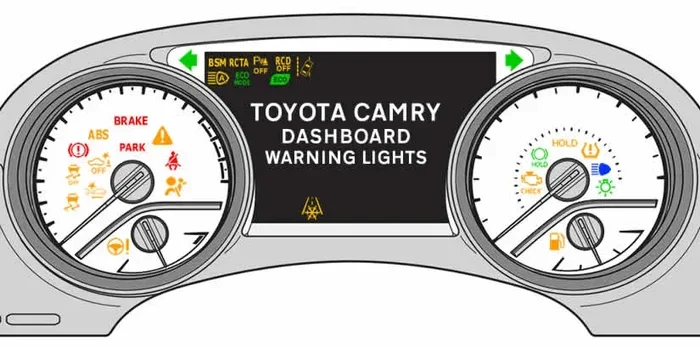
Your Camry’s dashboard has many lights, and each one communicates something specific. If you notice other lights staying on, address them promptly. For information about other dashboard indicators, our article on driving with the VSC light on offers useful insights.
Keep a Service Log
Write down every oil change, tire rotation, and service visit. This log helps you track your Camry’s maintenance history and makes it easier to know when the next service is due. It also comes in handy if you ever sell the vehicle.
Visit a Toyota Service Center Regularly
While you can handle many maintenance tasks yourself, regular visits to a Toyota service center ensure professional inspections. Certified technicians can spot issues before they become expensive repairs.
When Should You See a Professional?
Most of the time, resetting the maintenance light is a DIY task. But there are situations where professional help makes sense. Here are the signs that you should visit a Toyota service center:
- The light keeps coming back after you reset it. This could indicate an underlying issue that needs professional diagnosis.
- The maintenance light appears alongside other warning lights. Multiple dashboard warnings together suggest a more complex problem.
- You are unsure about the reset process for your specific model. A Toyota technician can walk you through it or handle the reset for you.
- Your Camry is still under warranty. Having a dealer perform maintenance ensures your warranty stays intact.
If the maintenance light is flashing rather than staying solid, that is a different situation. A flashing light often indicates a more urgent issue that needs immediate attention. Do not ignore a flashing maintenance light.
For general dashboard troubleshooting, our guide on reading ABS codes without a scanner can be a helpful resource for understanding what your car is trying to tell you.
Final Thoughts
Resetting the Toyota Camry maintenance light is a quick and satisfying DIY task. With the right steps, you can clear that dashboard reminder in just a few minutes. Whether you drive a 2005 Camry or a brand-new 2024 model, the process is straightforward once you know what to do.
Remember that resetting the light is not a substitute for actual maintenance. Your Camry needs regular oil changes, fluid checks, and inspections to stay reliable. Use the maintenance light as a helpful reminder, not just something to dismiss.
We hope this guide has given you the confidence to tackle the reset process on your own. Keep this article bookmarked for future reference, and share it with fellow Camry owners who might need a hand. A well-maintained Toyota Camry can last for hundreds of thousands of miles, and staying on top of that maintenance light is a big part of making that happen.
Drive safe, stay proactive, and enjoy the ride. Your Camry will thank you for it.
Frequently Asked Questions
How do I reset the maintenance light on a Toyota Camry after an oil change?
After an oil change, you can reset the maintenance light by turning the ignition to ON, pressing and holding the trip meter reset button, and waiting for the light to flash. Release the button, then press and hold it again for 3 to 5 seconds. The light should turn off. Confirm by turning the ignition off and back on.
Can I reset the Toyota Camry maintenance light without a scanner?
Yes, absolutely. You do not need any special tools or scanners to reset the maintenance light on a Toyota Camry. The process uses buttons on your dashboard or steering wheel. Just follow the step-by-step instructions in this guide for your specific model year.
Why does my Toyota Camry maintenance light keep coming back after I reset it?
If the maintenance light keeps returning, it usually means you have not yet reached the service interval the system is tracking. It could also indicate that the reset was not fully completed. Try resetting again following the correct steps. If the light persists, visit a Toyota service center to check for underlying issues.
What is the difference between the maintenance light and the check engine light on a Toyota Camry?
The maintenance light is a routine reminder for scheduled service like oil changes. The check engine light signals a potential mechanical or emissions problem that needs immediate attention. If your check engine light is on, it is a different issue that requires diagnosis.
How often should I reset the Toyota Camry maintenance light?
You should reset the maintenance light every time you complete a scheduled service, such as an oil change or tire rotation. This keeps the system accurately tracking your next service interval and ensures you stay on top of your Camry’s maintenance needs.
Will resetting the maintenance light affect my Toyota Camry’s warranty?
No, resetting the maintenance light does not affect your warranty. The light is simply a reminder tool. However, keeping records of your actual maintenance visits is important for warranty claims. Always follow Toyota’s recommended service intervals regardless of when you reset the light.
===