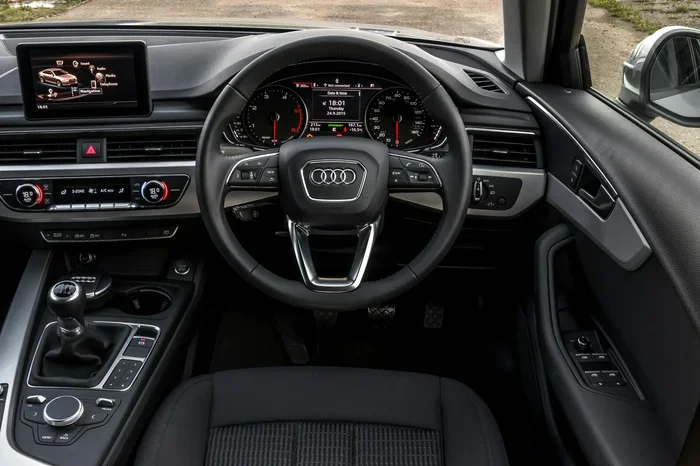
How to Set Radio Stations in Your Audi A4 Right Now
Setting up radio stations in your Audi A4 is simple once you know the right steps. This guide walks you through FM tuning, AM scanning, saving presets, and fixing common issues. Whether you have the latest MMI system or an older A4 radio, you will find clear instructions that work. Follow our tips to get the best sound quality and access your favorite stations in minutes.
There is something special about turning the key in your Audi A4 and hearing your favorite song come through the speakers. The car radio in your Audi is more than just a background noise maker. It is a carefully engineered system designed to bring you music, news, and entertainment on every drive. But if you have just bought a used A4 or are new to the Audi lineup, figuring out how to set radio stations can feel confusing at first.
The good news is that setting radio stations in Audi A4 models is much simpler than most people think. Whether you have the latest MMI infotainment system or an older analog radio, the process is straightforward. In this guide, we will walk you through every step. You will learn how to tune into FM and AM stations, save your favorites as presets, and fix common issues that might get in your way. By the end, you will be switching between stations like a pro.
Audi has been building cars for decades, and the way how long does a factory take to build a car has changed a lot over the years. Modern Audis come packed with technology, and the radio system is no exception. From digital tuners to Bluetooth integration, the A4 offers a range of features that make listening to the radio a premium experience. Let us dive into the details and help you get the most out of your Audi A4 radio.
Key Takeaways
- Easy Setup: Setting radio stations in the Audi A4 takes just a few minutes using the MMI system or manual controls.
- FM and AM Options: Your Audi A4 supports both FM and AM radio bands with clear reception when tuned correctly.
- Preset Saving: You can save up to 30 preset stations for quick access without retuning every time.
- Common Issues Have Simple Fixes: Most radio problems in the Audi A4 are easy to troubleshoot at home.
- Maintenance Matters: Regular upkeep of your car’s electrical system keeps your radio performing at its best.
- Sound Quality: A few simple adjustments can dramatically improve your listening experience.
📑 Table of Contents
Understanding Your Audi A4 Radio System
Before you start tuning stations, it helps to understand what kind of radio system your Audi A4 has. Different model years come with different setups, and knowing yours will make the process much easier. The Audi A4 radio setup is tied to the overall car electronics, so a basic understanding goes a long way.
Types of Radio Systems in the Audi A4
The Audi A4 has gone through several generations, and each generation brought updates to the radio system. Here are the main types you might encounter:
- Basic AM/FM Radio: Found in older A4 models. This is a simple radio with manual tuning knobs or buttons. It gives you access to standard FM and AM stations.
- MMI Radio System: The MMI (Multi Media Interface) system is Audi’s signature infotainment setup. It features a screen, dial controller, and digital tuning. Most A4 models from 2009 onward use some version of this system.
- MMI Navigation Plus: This is the top-tier system found in newer A4 models. It includes GPS navigation, internet radio, and advanced station management.
- Bang & Olufsen Sound System: Some A4 models come with premium audio from Bang & Olufsen. The radio setup is similar to the MMI system but with enhanced sound processing.
No matter which system you have, the basic principles of car radio stations setup remain the same. The controls might look different, but the steps are similar across all A4 models.
How the Radio Tuner Works
Your Audi A4 radio uses an electronic tuner to pick up radio frequencies. When you scan for stations, the tuner moves through the FM or AM band and locks onto active signals. The quality of reception depends on several factors, including your location, antenna condition, and interference from other electronics.
The FM band typically covers 87.5 to 108.0 MHz, while the AM band covers 530 to 1710 kHz. Your Audi A4 can tune into both bands, giving you access to a wide variety of stations. Understanding this basic car audio tuning concept helps you get better results when searching for stations.
How to Set Radio Stations in Audi A4: Step-by-Step Guide
Now that you understand your radio system, let us get into the actual steps. This section covers the process for both the MMI system and older manual radio setups.
Setting FM Radio Stations
FM radio is the most common way people listen to the radio in their cars. The sound quality is excellent, and there are thousands of stations to choose from. Here is how to set up FM stations in your Audi A4:
- Turn on the Radio: Press the radio button on the MMI screen or turn the radio knob. The system will power on and display the current frequency.
- Select FM Band: Make sure you are on the FM band. You can usually switch between FM and AM by pressing the “FM” or “AM” button on the console or screen.
- Tune to a Station: Use the tuning knob or the seek button to scan through frequencies. When the system finds a station, it will stop and display the station name and frequency.
- Adjust the Volume: Use the volume knob or the on-screen volume slider to set your preferred listening level.
- Save as a Preset: Once you find a station you like, hold down the preset number button (1 through 6 on most systems) until you hear a confirmation beep. The station is now saved.
That is all it takes to set up a basic FM station. The process is quick, and once you save a few presets, you can switch between your favorites with just a tap.
Setting AM Radio Stations
AM radio offers a different listening experience. The sound is more monotone, but AM stations often carry talk shows, sports commentary, and news programs that you cannot find on FM. Here is how to tune into AM stations:
- Switch to AM Band: Press the AM button to switch from FM to AM mode.
- Scan for Stations: Use the seek function to scan through the AM frequencies. The tuner will stop at each active station.
- Fine-Tune the Frequency: AM stations sometimes need fine-tuning for the best sound. Use the tuning knob to make small adjustments to the frequency.
- Save Your Station: Hold down a preset button to save the station. AM stations tend to have fewer presets available, so choose your favorites wisely.
AM radio reception can be affected by time of day and weather conditions. Stations often travel farther at night, so you might pick up new AM stations after sunset.
Saving and Managing Presets
One of the best features of the Audi A4 radio system is the ability to save preset stations. This means you never have to search for your favorite stations again. Here is how to manage your presets effectively:
- Saving a Station: Tune to the station you want, then press and hold the preset number until it saves.
- Accessing Presets: Press the preset number to instantly tune to that station.
- Deleting a Preset: Hold the preset number for a few seconds, and the system will usually ask if you want to delete it.
- Maximum Presets: Most Audi A4 systems allow up to 30 preset stations across both FM and AM bands.
Keeping your presets organized saves time and makes your driving experience more enjoyable. You can have a mix of music stations, talk radio, and sports channels all at your fingertips.
Tips for Getting the Best Sound Quality
Having stations set up is only half the battle. You also want to make sure they sound great. Here are some practical tips to improve your radio station presets listening experience in the Audi A4.
Position Your Antenna Correctly
The radio antenna Audi setup in your A4 plays a huge role in reception quality. If your reception is poor, the first thing to check is the antenna. Most A4 models have a fixed antenna built into the windshield or a retractable antenna on the fender. Make sure the antenna is fully extended and not damaged.
If you have a retractable antenna, pull it all the way out when listening to the radio. A partially retracted antenna can cause static and weak signals. For windshield-mounted antennas, make sure there are no obstructions like phone mounts or accessories blocking the signal path.
Minimize Interference
Electrical interference from other car devices can affect radio quality. Here are common sources of interference and how to reduce them:
- Phone Chargers: USB chargers and cigarette lighter adapters can create electrical noise. Try unplugging them to see if radio quality improves.
- Aftermarket Electronics: Dash cams, GPS devices, and other electronics can interfere with radio signals. Keep their cables away from the antenna cable.
- Engine Noise: Some engine noise can bleed into the radio speakers. This is usually a grounding issue and can be fixed with a simple ground loop isolator.
Adjust the Equalizer Settings
The Audi A4 MMI system includes an equalizer that lets you adjust the sound profile. Here are some settings to try for better car stereo settings and radio sound:
- Bass Boost: Increase the bass slightly for a fuller sound, especially for AM talk radio.
- Treble Adjustment: Boost the treble for clearer vocals and sharper highs on music stations.
- Balance and Fade: Adjust the balance between left and right speakers and the fade between front and rear for the best sound in your seating position.
These small adjustments can make a big difference in how your radio sounds. Spend a few minutes experimenting with the settings to find what works best for your ears.
Troubleshooting Common Radio Issues
Even with the best setup, you might run into issues with your Audi A4 radio from time to time. Here are the most common problems and how to fix them.
Radio Won’t Turn On
If your radio will not turn on at all, the first thing to check is the power supply. Make sure the car is running or in accessory mode. If the radio still does not power on, try turning the car off and back on again. Sometimes the infotainment system needs a reset, similar to how you might need to reset the light after an oil change to clear a warning on your dashboard.
If a simple restart does not work, check the fuse box. The radio fuse is usually located under the dashboard on the driver’s side. A blown fuse can completely kill the radio system. Replacing the fuse is inexpensive and easy to do.
Poor Reception or Static
Static and poor reception are the most common radio complaints. Here is what to check:
- Check the Antenna: A damaged or loose antenna is the number one cause of poor reception.
- Location: If you are in a tunnel, underground parking, or a remote area, reception will naturally be weaker.
- Weather: Thunderstorms and heavy rain can temporarily disrupt radio signals. This is normal and usually clears up once the weather improves.
- Electrical Issues: If you also notice that your car won’t start in cold weather but battery is good, there might be an underlying electrical problem affecting multiple systems, including the radio.
Station Keeps Changing or Skipping
If your radio jumps between stations on its own, the auto-scan feature may be activated. Look for a “SCAN” or “AUTO” button on your radio or MMI screen and press it to turn off auto-scan. You can also check if the tuning knob is stuck or sensitive. Sometimes a simple recalibration of the tuner fixes this issue.
No Sound from Speakers
If the radio turns on but there is no sound, check the volume first. It sounds obvious, but it happens more than you would think. If the volume is up and there is still no sound, try turning the balance and fade all the way forward. If that does not work, the speaker wiring or the head unit itself may need professional inspection.
Maintaining Your Audi A4 Radio System
Like any other car feature, your radio system needs regular care to perform at its best. Good maintenance habits keep your radio sounding clear and reliable for years to come.
Regular Cleaning
Dust and debris can build up around the radio controls and antenna connections. Use a soft, dry cloth to clean the radio screen and buttons regularly. Avoid using harsh chemical cleaners, as they can damage the screen and plastic trim.
Software Updates
If your Audi A4 has the MMI system, Audi occasionally releases software updates that improve radio performance and add new features. Check with your Audi dealer to see if any updates are available for your model. Keeping your system updated ensures the best possible vehicle audio controls experience.
Antenna Maintenance
The antenna is the most exposed part of your radio system. Check it regularly for damage, corrosion, or loose connections. A well-maintained antenna makes a noticeable difference in reception quality. If you notice persistent reception issues, a new antenna is a cheap and easy fix.
Professional Servicing
If you have tried all the troubleshooting steps and your radio still does not work properly, it is time to see a professional. Audi dealerships and qualified mechanics can diagnose deeper electrical issues. You can also turn off steering assist in a Toyota or adjust other car features with confidence, knowing that regular maintenance keeps all systems working smoothly together.
Final Thoughts
Setting radio stations in your Audi A4 is a simple process that anyone can do with the right guidance. We have covered everything from understanding your radio system to saving presets and troubleshooting common problems. The key is to understand your specific radio system, follow the steps carefully, and maintain your setup over time.
Your Audi A4 comes with a well-designed radio system that can provide hours of entertainment on the road. Whether you prefer FM music, AM talk shows, or internet radio, there is a way to set it up and make it work perfectly for you. Keep your system maintained, save your favorite stations, and let the good times roll.
Now that you know how to set radio stations in your Audi A4, go ahead and give it a try. You will be amazed at how quickly you can have your favorite stations playing. Happy listening!
Frequently Asked Questions
Can I listen to internet radio in my Audi A4?
Yes, if your Audi A4 has the MMI Navigation Plus system or Audi connect, you can access internet radio stations. This feature requires a data connection, which you can get through a built-in SIM card or by tethering your phone. Internet radio gives you access to thousands of stations from around the world.
How many preset stations can I save in the Audi A4?
Most Audi A4 models allow you to save up to 30 preset stations. This includes a mix of FM and AM stations. You can organize them by genre, talk show, or music type to make switching between stations quick and easy while driving.
Why does my Audi A4 radio sound distorted?
Distorted sound can be caused by several factors, including a weak signal, a damaged antenna, or interference from other electronics. Try moving to a different location, checking your antenna, and unplugging any aftermarket devices to see if the sound improves. If the problem persists, the head unit or speakers may need professional inspection.
Can I use my phone to control the radio in my Audi A4?
Yes, if your Audi A4 supports Apple CarPlay or Android Auto, you can use your phone to control the radio. These systems let you stream music, access internet radio, and control your car’s audio system directly from your phone screen. Check your model year and features to see if your A4 supports this capability.
What should I do if my Audi A4 radio stops working after a battery replacement?
After replacing your car battery, the radio system may need to be reset. This is similar to how you might need to take certain steps after replacing a key fob battery to get your car systems back to normal. Try turning the car off and back on, or check the owner’s manual for the radio reset procedure specific to your model.
Is it possible to add a radio upgrade to an older Audi A4?
Yes, you can upgrade the radio system in an older Audi A4. Aftermarket head units are available that offer better reception, Bluetooth connectivity, and even Apple CarPlay or Android Auto. A professional installer can help you choose and fit a unit that is compatible with your specific A4 model year.
=== CONCLUSION ===
Setting radio stations in your Audi A4 is a simple process that anyone can do with the right guidance. We have covered everything from understanding your radio system to saving presets and troubleshooting common problems. The key is to take your time, follow the steps, and enjoy the process.
Your Audi A4 comes with a well-designed car entertainment system that can provide hours of entertainment on the road. Whether you prefer FM music, AM talk shows, or internet radio, there is a way to set it up and make it work perfectly for you. Keep your system maintained, save your favorite stations, and let the good times roll.
Now that you know how to set radio stations in your Audi A4, go ahead and give it a try. You will be amazed at how quickly you can have your favorite stations playing. Happy listening!