How to Turn On a Mercedes-Benz Screen – Quick Guide
Turning on a Mercedes-Benz screen is simple once you know the right steps. Whether your infotainment display is unresponsive or won’t power up at all, this guide walks you through every method. You will also learn how to fix common screen problems and when to seek professional help.
You slide into your Mercedes-Benz, turn the key or press the start button, and… nothing. The screen stays dark. It is a frustrating moment that happens to many drivers. Whether you own a C-Class, an E-Class, or an SUV like the GLE, the infotainment screen is the heart of your driving experience. When it goes dark, the whole car feels disconnected.
Do not worry. This guide will show you exactly how to turn on a Mercedes-Benz screen in every situation. We will cover the normal startup process, what to do when the screen is unresponsive, and how to fix common problems. By the end, you will have the confidence to handle most screen issues on your own.
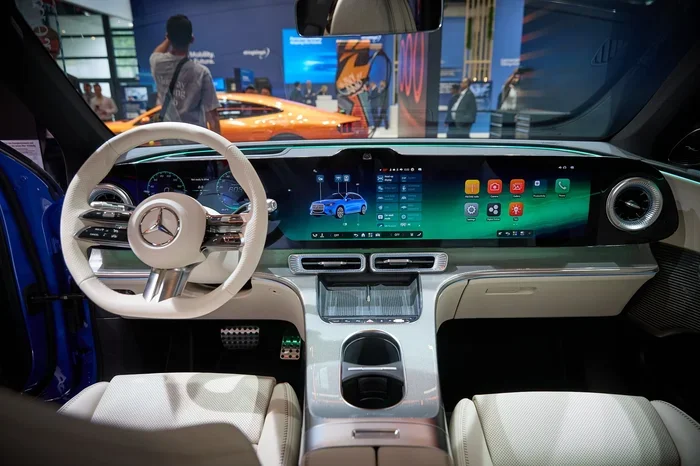
The Mercedes-Benz infotainment system, often called the MBUX system, is a sophisticated piece of technology. It controls your navigation, audio, climate settings, and more. Understanding how it works makes troubleshooting much easier. Let us dive right in.
Key Takeaways
- Multiple methods exist to turn on your Mercedes-Benz screen, including the start button, steering wheel controls, and touchscreen gestures.
- A dead or weak battery is one of the most common reasons the screen won’t turn on.
- Soft resets and hard resets can fix most screen freezing or unresponsive issues.
- Regular maintenance keeps your Mercedes-Benz display running smoothly and extends its lifespan.
- Knowing when to visit a dealer saves time and money when simple fixes don’t work.
📑 Table of Contents
- How to Turn On a Mercedes-Benz Screen the Normal Way
- Why Your Mercedes-Benz Screen Might Not Turn On
- How to Fix a Mercedes-Benz Screen That Will Not Turn On
- Preventing Mercedes-Benz Screen Problems
- When to Seek Professional Help for Your Mercedes-Benz Screen
- Quick Tips for Mercedes-Benz Screen Owners
- Final Thoughts
How to Turn On a Mercedes-Benz Screen the Normal Way
Before we troubleshoot, let us cover the basics. Most Mercedes-Benz models follow a similar startup process. Here is how it works in most vehicles.
Step 1: Enter the Vehicle and Buckle Up
Open the door and sit in the driver seat. Close the door firmly. Buckle your seatbelt. In many Mercedes models, the system performs a quick self-check when it detects the seatbelt is fastened. This is normal and part of the startup sequence.
Step 2: Press the Start Button
Press the start button on the dashboard without pressing the brake pedal first. This is called accessory mode. The screen will light up but the engine will not start. This is a great way to check if the display is working before you drive.
Step 3: Start the Engine
Now press the brake pedal and press the start button again. The engine turns over. Within a few seconds, the Mercedes-Benz screen should fully activate. You will see the home screen with your audio, navigation, and vehicle status options.
Step 4: Use the Steering Wheel Controls
Some Mercedes models let you wake the screen using the steering wheel controls. Press the menu button on the left side of the steering wheel. The display should respond within one to two seconds. This is a quick shortcut if you just want to check the time or change the radio station.
If your screen turns on normally using these steps, you are all set. If not, keep reading. We have solutions for every problem.
Why Your Mercedes-Benz Screen Might Not Turn On
A dark screen can mean several things. Let us look at the most common reasons. Understanding the cause helps you pick the right fix.
Dead or Weak Battery
The most common reason for a black screen is a dead battery. Your Mercedes-Benz needs enough electrical power to run the infotainment system. If the battery is old or weak, the screen may not get the power it needs.
Here are signs your battery might be the problem:
- The dashboard lights are dim or flickering.
- The engine cranks slowly when you turn the key.
- Other electrical features, like the windows, work slowly.
- You recently left lights on overnight.
If you suspect a battery issue, try jump-starting the car first. If the screen comes on after a jump, your battery needs replacement. A bad battery can also cause warning lights to appear, so it is worth checking if you see anything unusual on the dashboard.
Software Glitch or Freeze
Modern Mercedes-Benz screens run on complex software. Sometimes this software freezes or crashes. This happens more often than you might think. A frozen screen looks completely black or shows a frozen image from the last moment it was working.
Software glitches can happen after a software update, when you install a new app, or after the car sits unused for a long time. Temperature changes can also trigger freezes. Cold mornings are a common culprit.
Faulty Wiring or Connections
Behind your Mercedes dashboard, there are many cables connecting the screen to the car’s computer system. Over time, these connections can loosen. Vibration from driving can slowly work connections loose. Water damage is another cause of wiring problems.
If your screen works sometimes and not other times, a loose connection might be the issue. This is harder to diagnose at home, but it is a common problem in older Mercedes models.
Blown Fuse
Every car has fuses that protect the electrical system. If too much current flows through, a fuse blows and cuts power to that circuit. The infotainment screen has its own fuse. If it blows, the screen goes dark even though everything else works.
Checking a fuse is easy. Open your owner manual and find the fuse box diagram. Look for the fuse labeled “infotainment” or “display.” Pull it out and inspect it. If the metal strip inside is broken, replace the fuse. This is a cheap and easy fix.
How to Fix a Mercedes-Benz Screen That Will Not Turn On
Now let us get into the solutions. These steps work for most screen problems. Try them in order, starting with the simplest fix.
Method 1: Perform a Soft Reset
A soft reset restarts the infotainment system without losing any settings. This is the first thing you should try.
- Press and hold the power button on the screen for 10 to 15 seconds.
- The screen will go black for a moment.
- Release the button and wait 30 seconds.
- The system will restart automatically.
Most software glitches go away after a soft reset. It is like restarting a computer. This simple trick solves the problem more often than people realize.
Method 2: Try the Steering Wheel Power Button
Some Mercedes models have a dedicated power button on the steering wheel. This button controls the infotainment display separately from the engine. Press it once to wake the screen. Press and hold it for five seconds to force a shutdown, then press it again to turn it back on.
If you are not sure where this button is on your model, check your owner manual. It is usually located on the left side of the steering wheel, near the volume controls.
Method 3: Disconnect and Reconnect the Battery
If a soft reset does not work, try disconnecting the battery. This resets the entire electrical system, including the infotainment display.
- Turn off the engine and remove the key.
- Open the hood and locate the battery.
- Use a wrench to loosen the negative terminal cable first.
- Wait 5 to 10 minutes.
- Reconnect the negative terminal and tighten it.
- Start the engine and check the screen.
This method works because it clears any temporary electrical errors in the system. It is similar to unplugging a router when the internet stops working.
Method 4: Check for Software Updates
Mercedes-Benz regularly releases software updates for the MBUX system. An outdated system can cause screen problems. You can check for updates through the Mercedes me app on your phone or by visiting a dealer.
Some updates can be installed over Wi-Fi while you sleep. Others require a dealer visit. Keeping your software up to date prevents many screen issues from developing in the first place.
Method 5: Visit a Mercedes-Benz Dealer
If none of the above methods work, it is time to see a professional. A certified Mercedes-Benz technician has diagnostic tools that can read error codes from the system. They can identify hardware failures that are not visible from the outside.
Before you visit, check if your vehicle is still under warranty. Many screen repairs are covered under the bumper-to-bumper warranty for the first few years. This can save you hundreds of dollars.
Also, if you have questions about service, you might wonder whether you can take your Mercedes to any dealer. The answer depends on your warranty and service plan. Some owners also ask about taking their vehicle to different service centers for non-warranty work.
Preventing Mercedes-Benz Screen Problems
Prevention is always better than repair. Here are simple steps to keep your Mercedes-Benz screen working perfectly for years.
Keep Your Software Updated
Software updates fix bugs and improve performance. Check for updates at least once a month. If your car supports over-the-air updates, make sure your Wi-Fi connection is stable during the update process. A failed update can cause screen problems.
Protect the Screen from Extreme Temperatures
Extreme heat and cold can damage the display over time. In summer, try to park in the shade or use a windshield sunshade. In winter, let the car warm up for a minute before turning on the screen. This reduces thermal stress on the electronics.
Use the Screen Gently
The touchscreen is sensitive but not indestructible. Use a soft cloth to clean it. Avoid pressing too hard. Do not use harsh cleaning chemicals. A microfiber cloth with a little water works best for routine cleaning.
Keep the Electrical System Healthy
A healthy electrical system means a healthy screen. Get your battery tested at every service visit. Check for corroded terminals. Make sure all connections are tight. If you notice dim lights or slow power windows, get the electrical system checked right away.
Avoid Leaving Accessories Plugged In
USB devices, chargers, and aftermarket accessories draw power from the same electrical system as the screen. Unplug them when not in use, especially if you park your car for long periods. This prevents unnecessary drain on the battery.
When to Seek Professional Help for Your Mercedes-Benz Screen
Most screen problems can be fixed at home with the methods we covered. But some situations require a professional touch. Here is when you should stop troubleshooting and call a dealer.
If the screen shows cracks or physical damage, do not try to fix it yourself. Replacing a damaged display requires special tools and calibration. A dealer can handle this properly and ensure the new screen is programmed correctly.
If you notice a burning smell or see smoke coming from the screen area, turn off the car immediately. This could indicate a serious electrical fault. Do not attempt to restart the vehicle. Call for roadside assistance or a tow truck.
Also, if your screen keeps freezing or restarting repeatedly, there may be a deeper software issue. A dealer can perform a full system restore or flash new software to fix the problem. Repeated resets are a sign that something is wrong internally.
For owners who are unsure about service options, it helps to understand your warranty coverage. Some owners also wonder whether they can bring water or other items to the service center, which is generally not recommended but sometimes necessary depending on the situation.
Regular maintenance goes a long way in preventing screen issues. Keeping up with your service schedule ensures that small problems are caught before they become big ones. If you are curious about how long certain car processes take or what maintenance tasks are involved, there are many resources available to help you understand your vehicle better.
Quick Tips for Mercedes-Benz Screen Owners
- Restart the screen monthly to clear temporary files and keep the system running smoothly.
- Update your software as soon as updates become available.
- Keep a portable jump starter in your trunk for emergencies.
- Use only genuine Mercedes accessories to avoid compatibility issues.
- Clean the screen weekly with a microfiber cloth to prevent dust buildup.
- Save your favorite presets after any reset so you do not lose your settings.
These small habits add up. They keep your Mercedes-Benz screen looking and working like new. A well-maintained screen also holds its resale value better if you ever decide to sell the car.
Final Thoughts
Knowing how to turn on a Mercedes-Benz screen and fix common problems gives you real confidence as a car owner. You do not need to be a mechanic. Most issues are simple and take just a few minutes to fix. Start with a soft reset. Check your battery. Update your software. These three steps solve the vast majority of screen problems.
If the problem persists, do not hesitate to visit a dealer. Your Mercedes-Benz is a premium vehicle, and it deserves premium care. Keep this guide saved on your phone for the next time your screen gives you trouble. You will be back on the road in no time.
Remember, a dark screen is rarely a sign of a serious problem. Stay calm, follow the steps in this guide, and you will have your display back up and running. Safe travels and enjoy the drive.
Frequently Asked Questions
Why won’t my Mercedes-Benz screen turn on even after a soft reset?
If a soft reset does not work, the issue may be a dead battery, a blown fuse, or a deeper software problem. Try disconnecting the battery for a few minutes and then reconnecting it. If the screen still does not respond, visit a certified Mercedes-Benz dealer for a full diagnostic check.
How often should I update my Mercedes-Benz infotainment software?
You should check for updates at least once a month. Many newer Mercedes models support over-the-air updates that download automatically when connected to Wi-Fi. Keeping your software current prevents bugs and improves screen performance.
Can a weak car battery cause the Mercedes screen to go black?
Yes, absolutely. A weak or dying battery does not provide enough power to run the infotainment system properly. If your screen goes dark and other electrical features are also acting up, the battery is the first thing to check.
Is it safe to disconnect the battery to reset the Mercedes screen?
Yes, it is safe and is a common troubleshooting step. Just make sure to turn off the engine and remove the key first. Disconnect the negative terminal, wait 5 to 10 minutes, and reconnect it. This resets the electrical system and often fixes screen issues.
How much does it cost to replace a Mercedes-Benz infotainment screen?
The cost varies by model and year. A replacement screen can range from $500 to $2,000 or more, including labor. If your vehicle is under warranty, the cost may be fully covered. Always check with your dealer before proceeding with any paid repair.
Can cold weather prevent my Mercedes-Benz screen from turning on?
Yes, cold weather can slow down the electrical system and cause the screen to take longer to start or not turn on at all. Let the car warm up for a minute or two in cold weather before expecting the screen to respond normally.
=== CONCLUSION ===
Turning on a Mercedes-Benz screen should be a simple process. When it is not, it can feel like a major problem. But as you have learned, most screen issues have straightforward solutions. A soft reset, a battery check, or a software update often does the trick.
Keep the tips from this guide handy. Share them with fellow Mercedes owners. A little knowledge goes a long way in keeping your car running at its best. Your Mercedes-Benz screen is designed to make driving more enjoyable. Take care of it, and it will take care of you on every journey.