Why Is My Phone No Longer Connecting to Car Bluetooth
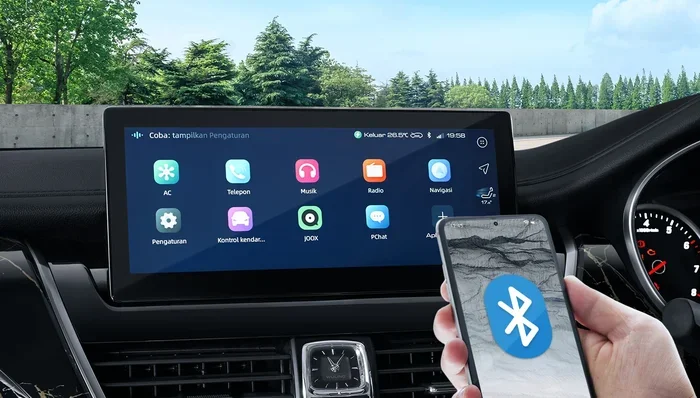
Why Is My Phone No Longer Connecting to Car Bluetooth is a common frustration for drivers. This guide covers the most common causes, from Bluetooth settings glitches to software compatibility issues. You will learn quick fixes, reset steps, and prevention tips to restore your wireless connection fast. Whether you use hands-free calling or audio streaming, these solutions work for all car models and phone types.
You get in your car, tap the Bluetooth icon on your phone, and… nothing. No connection. No music. No hands-free calling. It is a moment every driver knows too well. You used to connect effortlessly, and now your phone just sits there, stubbornly refusing to pair with your car audio system.
The good news? This problem is almost always fixable. Whether you are dealing with a simple Bluetooth settings glitch or a deeper compatibility issue, there is a solution waiting for you. Let us walk through exactly why your phone is no longer connecting to car Bluetooth and how you can get back on the road with seamless wireless audio in minutes.
Key Takeaways
- Bluetooth Settings Glitches: Simple toggles and restarts often fix connection problems instantly.
- Software Updates Matter: Outdated phone or car firmware is a leading cause of pairing failures.
- Device Memory Limits: Your car system can only store a set number of paired devices, causing new connections to fail.
- Reset Procedures: A full Bluetooth reset on both devices clears cache and resolves deep connection issues.
- Signal Interference: Physical barriers and other wireless devices can block your Bluetooth range and disrupt pairing.
- Prevention Is Easy: Regular maintenance and smart habits keep your car infotainment system running smoothly.
📑 Table of Contents
- Common Reasons Your Phone Won’t Connect to Car Bluetooth
- Quick Fixes to Restore Bluetooth Connection
- How to Reset Bluetooth on Your Phone and Car
- Preventing Future Bluetooth Connection Problems
- When to Seek Professional Help
- Understanding How Car Bluetooth Works
- Common Mistakes That Break Bluetooth Connections
- Quick Tips for the Best Bluetooth Experience in Your Car
- Comparison: Common Bluetooth Connection Issues and Solutions
- Final Thoughts
Common Reasons Your Phone Won’t Connect to Car Bluetooth
Before you start pulling your hair out, it helps to understand what is actually going wrong. Bluetooth connectivity problems usually fall into a few predictable categories. Once you identify the root cause, the fix becomes much simpler.
Bluetooth Settings Glitches
Sometimes the simplest explanation is the right one. Your phone’s Bluetooth settings can develop minor glitches that break the connection without any obvious reason. This happens when the Bluetooth cache on your device gets overloaded or corrupted.
Think of it like a browser that has too many tabs open. Things start to slow down, and eventually, something stops working. The same thing can happen with your wireless connection to the car. A quick toggle of Bluetooth off and back on often clears this up.
Software Compatibility Issues
Phone manufacturers release software updates regularly. These updates can change how your device handles Bluetooth pairing. Similarly, your car’s infotainment system runs on its own software. If one device updates and the other does not, they may no longer communicate properly.
This is especially common when you switch to a new phone model. Different Bluetooth versions and device compatibility standards can create friction. Your old car system might not recognize the new phone’s connection protocol, even though both devices support Bluetooth in general.
Paired Device Memory Limits
Here is something many people do not realize. Your car’s infotainment system can only store a limited number of paired devices. Most systems hold between five and twenty connections at a time. When that memory fills up, new phone pairing attempts will fail.
If you have ever paired a friend’s phone, a rental car device, or a family member’s tablet, those old connections take up valuable space. Your phone may be trying to connect, but the car system simply has no room for it. Clearing out old paired devices is often the overlooked fix.
Signal Interference and Range Problems
Bluetooth works on a specific wireless frequency. Other electronic devices nearby can create signal interference that disrupts the connection. Things like USB chargers, dash cams, or even other phones in the vehicle can cause problems.
Physical barriers matter too. A thick phone case, a metal mount, or even your own body can weaken the Bluetooth range between your phone and the car system. The signal has to travel from your pocket or console to the car’s antenna, and anything in the way can weaken it.
Quick Fixes to Restore Bluetooth Connection
Before you try anything complicated, start with these simple steps. Most Bluetooth troubleshooting begins right here, and they solve the problem more often than you might think.
- Turn Bluetooth off and back on. This clears temporary glitches and forces your phone to re-scan for available devices.
- Restart your phone. A full reboot refreshes all wireless connections and clears temporary memory issues.
- Restart your car’s infotainment system. Turn the car off, wait thirty seconds, and turn it back on. This resets the car audio system without losing any settings.
- Toggle Airplane Mode on and off. This resets all wireless radios on your phone, including Bluetooth.
- Move your phone closer to the car’s antenna. Try placing it on the center console or dashboard during pairing.
These steps take less than two minutes combined. Try them in order before moving on to more advanced fixes. You will be surprised how often the simple restart does the trick.
How to Reset Bluetooth on Your Phone and Car
When the quick fixes do not work, it is time for a deeper reset. A Bluetooth reset clears all cached pairing data and forces both devices to start fresh. This is the most effective way to solve stubborn connection problems.
Resetting Your Phone’s Bluetooth
On most phones, you can reset Bluetooth settings without losing any other data. Go to your phone’s Settings app, find the Bluetooth section, and look for an option to clear cached paired devices or reset network settings. On iPhone, you can go to Settings, then General, then Transfer or Reset iPhone, and tap Reset All Settings. This does not delete your photos or apps, but it does clear all Bluetooth pairings.
On Android, the path varies slightly by manufacturer. Generally, you go to Settings, then System, then Reset Options, and tap Reset Wi-Fi, Mobile, and Bluetooth. This clears all saved wireless connections and forces you to re-pair your devices.
Resetting Your Car’s Infotainment System
Resetting the car system depends on your vehicle’s make and model. Most systems allow you to hold the power button for ten to fifteen seconds to force a reboot. Some cars have a dedicated factory reset option in the settings menu, but use this with caution. A factory reset on your car will erase all saved radio stations, paired phones, and custom settings.
After resetting both devices, turn Bluetooth back on and try pairing again. Your phone should appear in the car’s list of available devices. Select it, enter any required PIN, and your hands-free calling and audio streaming should work again.
Preventing Future Bluetooth Connection Problems
Once you get your Bluetooth connection working again, you want to keep it that way. Prevention is always easier than troubleshooting. A few simple habits can save you from future frustration.
- Keep your phone and car software updated. Regular updates fix known compatibility bugs and improve Bluetooth performance.
- Delete old paired devices regularly. Clean out your car’s paired device list every few months to free up memory.
- Avoid pairing too many devices. Only keep the devices you actually use in your car’s memory.
- Remove thick phone cases during pairing. Metal cases or cases with magnetic closures can block the Bluetooth signal.
- Turn off Bluetooth when not in use. This saves battery and reduces the chance of accidental interference from other devices.
- Keep your phone charged. Low battery can weaken your phone’s wireless connection power and cause dropouts.
These small habits take almost no effort but make a huge difference. Think of them as routine car care, just like checking your tire pressure or oil level.
When to Seek Professional Help
Most Bluetooth connection issues are user-fixable. But sometimes, the problem runs deeper than a simple reset. Knowing when to call for help saves you time and prevents unnecessary frustration.
If you have tried every fix in this guide and your phone still will not connect, the issue might be hardware-related. Your car’s Bluetooth antenna could be failing. The car audio system might have a faulty module. Or your phone’s Bluetooth chip could be damaged.
Here are signs you need professional help:
- Bluetooth fails on every car you try, not just yours.
- Your phone connects to other Bluetooth devices fine but not your car.
- The car’s infotainment system shows no Bluetooth option at all.
- You hear static or crackling even when the connection appears active.
- Hands-free calling works but audio streaming does not, or vice versa.
A dealership or qualified auto electrician can diagnose these issues with specialized tools. They can check whether your car’s Bluetooth module needs replacement or if a firmware update from the manufacturer will solve the problem. Do not hesitate to reach out if the basic fixes do not work. You deserve a reliable connection on every drive.
Understanding How Car Bluetooth Works
To truly appreciate the fixes, it helps to understand how Bluetooth connects your phone to your car. Bluetooth is a short-range wireless technology that uses radio waves to transmit data between devices. When you pair your phone with your car, the two devices exchange encryption keys and establish a dedicated wireless connection.
There are two main types of Bluetooth connections in cars. The first is Hands-Free Profile, which handles phone calls. The second is Advanced Audio Distribution Profile, which handles music and audio streaming. Some cars support both, while older models only support one. If one type stops working, it does not always mean the entire Bluetooth connection is broken.
Your phone and car also negotiate the best Bluetooth version they both support. Newer versions offer faster data transfer and better range. But if your car has an older Bluetooth module, it may not support the latest features your new phone offers. This compatibility gap is normal and does not mean anything is broken. It just means you get the features supported by the older device.
Common Mistakes That Break Bluetooth Connections
We all make mistakes with our Bluetooth settings without realizing it. Here are the most common ones that lead to connection problems:
- Leaving Bluetooth on in crowded areas. Malls, airports, and busy streets have dozens of Bluetooth signals competing for attention. This can confuse your phone and car system.
- Ignoring update notifications. Both your phone and car need the latest software for the best Bluetooth performance.
- Pairing too many devices at once. Each new pairing adds to the device memory load and increases the chance of conflicts.
- Not restarting the car system after updates. If your car receives a firmware update, it needs a reboot to apply the changes properly.
- Using third-party Bluetooth adapters incorrectly. Cheap adapters can cause signal interference and confuse your car’s infotainment system.
Avoiding these mistakes keeps your wireless connection strong and reliable. It is like maintaining good driving habits, they prevent problems before they start.
Quick Tips for the Best Bluetooth Experience in Your Car
Want the smoothest Bluetooth connection possible? Follow these tips every time you get behind the wheel:
- Delete and re-pair your phone every few months to keep the connection fresh.
- Place your phone on a non-metallic surface near the car’s center console during pairing.
- Use the car manufacturer’s official app if one is available. These apps often include Bluetooth troubleshooting tools.
- Check your phone’s battery optimization settings. Some phones restrict Bluetooth activity to save power, which can cause connection drops.
- Keep your phone case simple during use. Thin, non-metallic cases work best for Bluetooth signal strength.
These small adjustments take seconds but deliver a noticeably better experience. Your car audio system will reward you with clearer calls and smoother music playback.
Comparison: Common Bluetooth Connection Issues and Solutions
| Problem | Likely Cause | Best Fix |
|---|---|---|
| Phone not showing up in car list | Bluetooth not discoverable | Turn on visibility in phone Bluetooth settings |
| Pairs but no audio plays | Wrong audio profile selected | Check A2DP profile in car settings |
| Connection drops frequently | Signal interference or low battery | Move phone closer, charge both devices |
| Pairs then disconnects immediately | Paired device memory full | Delete old devices from car system |
| No Bluetooth option in car at all | System glitch or hardware failure | Reset car infotainment or visit dealer |
| Works on one phone but not another | Device compatibility issue | Update both phone and car software |
This table covers the most common scenarios drivers face every day. If your issue matches one of these, the fix is probably already listed. The key is to work through them systematically rather than guessing.
Final Thoughts
Why Is My Phone No Longer Connecting to Car Bluetooth is a question with a surprisingly simple answer in most cases. Whether it is a Bluetooth settings glitch, a software update conflict, or a full paired device memory, the solutions are almost always within your reach. You do not need to be a tech expert to fix this. You just need to know the right steps.
Start with the quick fixes. Move to a full Bluetooth reset if needed. And remember that prevention through regular maintenance keeps problems from returning. Your car infotainment system and your phone are designed to work together. When they do, hands-free calling and audio streaming make every drive safer and more enjoyable.
Take a few minutes today to apply the tips in this guide. Your future self, stuck in traffic with your favorite playlist playing through your car speakers, will thank you. A reliable wireless connection between your phone and car is not a luxury. It is a daily necessity. And now you have the knowledge to keep it working perfectly.
Frequently Asked Questions
Why won’t my phone connect to my car Bluetooth even after restarting both devices?
This usually means the Bluetooth cache on one or both devices is corrupted. Try deleting the old pairing from your car’s system and your phone, then pair fresh. If that does not work, a full factory reset of your car’s infotainment system may be needed.
Can too many paired devices cause connection problems?
Yes, absolutely. Most car infotainment systems have a limited device memory. When the list fills up, new phone pairing attempts fail or existing connections become unstable. Delete devices you no longer use to keep things running smoothly.
Does a thick phone case affect Bluetooth connection?
It can. Cases with metal components, magnetic closures, or extra thick materials can weaken the Bluetooth signal between your phone and car. Try removing the case during pairing to see if the connection improves.
Is it normal for Bluetooth to disconnect when I answer a phone call?
Not usually. If this happens, it may indicate a software compatibility issue between your phone and car. Make sure both devices have the latest updates installed. Also check that your car’s Bluetooth profile settings are configured correctly for both calls and audio.
How often should I update my car’s software?
Check for updates at least once a month. Many modern cars notify you when updates are available, but some require you to check manually. Regular updates fix Bluetooth bugs and improve device compatibility with newer phones.
Can signal interference from other devices break my Bluetooth connection?
Yes. USB chargers, dash cams, GPS trackers, and even other phones in the vehicle can create signal interference on the same wireless frequency. Try turning off or moving other electronic devices to see if your Bluetooth connection improves.