Here Is Why My Toyota Corolla Key Fob Is Not Working
Your Toyota Corolla key fob stops working for a few simple reasons: a dead battery, signal interference, or a need for reprogramming. Most fixes take just minutes and cost under $10. This guide walks you through every common cause and the exact steps to get your Toyota Corolla key fob working again.
You press the button on your Toyota Corolla key fob, but nothing happens. No lights. No chirp. The car stays silent. It is frustrating, especially when you are in a hurry. The good news is that a Toyota Corolla key fob not working problem is almost always fixable. In most cases, the cause is simple and the fix takes just a few minutes. This guide explains every reason your key fob might fail and shows you exactly how to solve it.
Whether you own a 2010 Corolla or a brand-new 2024 model, the key fob works the same way. It sends a radio signal to the car’s computer. When the signal is weak or missing, the car does not recognize the fob. You will learn how to check the battery, reset the fob, and know when to visit a dealer. By the end of this article, you will have the confidence to handle the problem yourself and save time and money.
Key Takeaways
- Dead battery is the #1 cause: A low or dead CR2032 battery stops the fob from sending signals.
- Signal interference can mimic a broken fob: Parking near cell towers or other electronics may block the key fob signal.
- Reprogramming is often simple: You can reset many Toyota key fobs at home with the ignition cycle method.
- You can still drive without a working fob: Use the hidden mechanical key to start the car manually.
- Replacement cost is low: A new battery costs a few dollars, and professional reprogramming is usually under $100.
- Prevent future issues: Keep a spare battery in your glove box and avoid exposing the fob to extreme heat or moisture.
📑 Table of Contents
- Why Your Toyota Corolla Key Fob Might Stop Working
- How to Troubleshoot a Non-Working Toyota Corolla Key Fob
- When to Seek Professional Help
- Preventing Future Key Fob Problems
- Quick Tips for Toyota Corolla Key Fob Owners
- Comparison: Key Fob Battery Types for Toyota Corolla
- Common Mistakes People Make with a Toyota Corolla Key Fob
- Expert Insight: How Toyota Key Fobs Work
- Conclusion
Why Your Toyota Corolla Key Fob Might Stop Working
A Toyota Corolla key fob can stop working for several reasons. Most of them are easy to fix. Here are the most common causes.
Dead or Weak Battery
The number one reason a key fob fails is a dead battery. The fob uses a small coin cell battery, usually a CR2032. These batteries last two to three years. When the battery drops below a certain voltage, the signal becomes too weak to reach the car. You might still get a working distance of a few feet, but the car will not start or unlock from across the parking lot.
If you suspect a dead battery, you can learn how to check if your key battery is low. It explains the warning signs and how to test the battery with a multimeter. Catching a low battery early prevents you from being locked out.
Signal Interference
Sometimes the key fob is fine, but something blocks the signal. Electronic devices, metal structures, and even other key fobs can cause interference. If you leave your fob next to a cell phone or a laptop, the radio frequency might get disrupted. Parking under a large metal awning or near a cell tower can also weaken the signal. Try moving away from other electronics and press the button again. If the car responds from a few steps back, interference was the problem. This is a common reason people think their Toyota Corolla key fob is broken when it is actually just a temporary signal block.
Another source of interference is a crowded parking lot. Many cars and key fobs operating at the same frequency can create confusion. The car’s computer may not pick out your fob’s signal among all the others. Moving to a less crowded area often solves this instantly.
Key Fob Needs Reprogramming
After a battery change, the key fob sometimes loses its pairing with the car. The car’s computer no longer recognizes the unique code. You will notice that the fob works intermittently or not at all. Reprogramming re-establishes the connection. Most Toyota models allow you to reprogram the fob yourself without special tools. If you have a push-to-start Toyota Corolla, the process involves a specific ignition cycle. You can find the steps in your owner’s manual or search online for your exact year. If you are unsure, a Toyota dealer can reprogram it quickly. The remote start feature also depends on a properly paired fob, so keeping the fob programmed ensures all functions work.
Physical Damage to the Key Fob
Key fobs take a beating. They drop, get stepped on, and sit in pockets with coins and keys. Over time, the internal circuit board can crack. Water damage is another common issue. If your fob has been in the washing machine or dropped in a puddle, the electronics may be fried. In this case, no battery change will help. You will need a replacement fob.
Physical damage often shows up as a fob that works sometimes and sometimes it doesn’t. If you notice the buttons feel mushy or the casing is cracked, the fob is likely damaged. It is important to note that water damage often happens gradually. Moisture from rain or sweat can seep into the fob over time. The battery contacts may corrode, leading to intermittent failures. If you notice rust on the contacts, clean them with a cotton swab dipped in rubbing alcohol. This simple step can restore the connection and save you from buying a new fob.
How to Troubleshoot a Non-Working Toyota Corolla Key Fob
Before you assume the worst, try these troubleshooting steps in order. Most problems are solved in the first three steps.
Step 1: Replace the Battery
Open the fob using a small flathead screwdriver or a coin. Slide the cover off carefully. Remove the old battery and note the orientation. Insert a new CR2032 battery with the positive side facing up. Snap the cover back on. Test the fob by standing right next to the car and pressing the unlock button. If the fob still does not work after a fresh battery, move to the next step. A new battery should solve the problem about 80% of the time. Always use a fresh battery from a trusted brand like Energizer or Duracell. Cheap generic batteries may have a shorter lifespan and could leak, damaging the fob.
Step 2: Reset the Key Fob
Resetting the fob clears any temporary glitches. For most Toyota Corollas, you can do this by sitting in the car with all doors closed. Insert the key into the ignition and turn it to the ON position without starting the engine. Press and hold the unlock button on the fob for five seconds. Then turn the ignition off and remove the key. Wait 30 seconds and try the fob again. This simple reset often fixes a Toyota Corolla key fob not working issue that started after a battery change.
Step 3: Check for a Mechanical Key
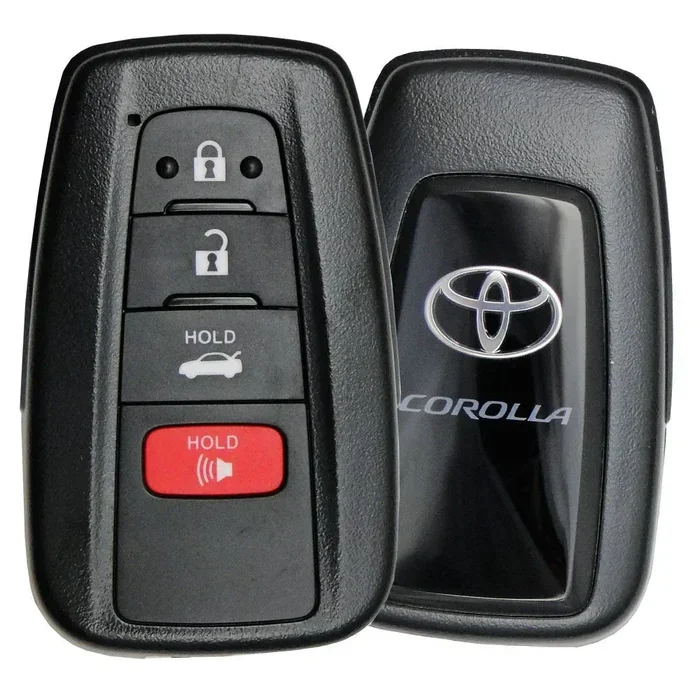
Every Toyota Corolla key fob contains a hidden mechanical key. You can use it to unlock the driver’s door manually. Slide the small release button on the fob to pop out the metal key. Insert it into the door lock and turn it. Once inside, you can use the push-to-start button with the fob placed on the start/stop pad. Even if the fob battery is completely dead, the car can still start this way. If you want to know more about driving without a working fob, you can read about how you can drive your Toyota without a key fob in an emergency. It covers the exact steps for every Toyota model and helps you avoid panic.
Step 4: Try the Spare Fob
If you have a second key fob, use it. If the spare works, the problem is with the first fob, not the car. If neither fob works, the issue is likely in the car’s antenna or computer module. That is a less common but possible cause. A spare fob is a great insurance policy. If you only have one fob, consider ordering a second one. It is much cheaper to have a spare than to be stranded.
When to Seek Professional Help
Most key fob problems are DIY-friendly. However, some situations require a professional. Here is when to call for help.
The Fob Works but the Car Does Not Respond
If you press the button and the fob lights up or makes a sound, but the car does not unlock or start, the problem is in the car’s receiver. The antenna that reads the fob signal may be faulty. This is not a fob issue. A Toyota dealer can scan the system and replace the antenna if needed. This type of problem is rare but can happen after a car accident or electrical short.
You Need a New Key Fob
If the fob is physically damaged or the circuit board is broken, you need a replacement. You can order a new fob online or from a Toyota dealer. Aftermarket fobs are cheaper but may need programming. A dealer can program the new fob for you. Having a new fob programmed at the dealer typically costs between $75 and $150. It is a worthwhile investment if the original fob is beyond repair.
You Want to Remote Start Your Toyota
If your key fob is working again, you might want to add remote start functionality. You can learn how to remote start your Toyota with the key fob and what systems are compatible. Remote start is a great comfort feature, especially in cold weather. It lets you warm up or cool down the car before you get in. Many Toyota models come with remote start as a factory option, and it can often be added to older models with a simple module.
Preventing Future Key Fob Problems
A little prevention goes a long way. Follow these simple habits to keep your Toyota Corolla key fob working reliably for years.
- Keep a spare battery in your glove box. A CR2032 battery costs less than $5. Having one on hand means you are never stranded.
- Avoid extreme temperatures. Do not leave the fob on the dashboard in direct sunlight. Heat damages the battery and the circuitry.
- Store the fob away from other electronics. Keep it in a dedicated pocket or pouch. This reduces signal interference and battery drain.
- Replace the battery every two years. Even if the fob still works, a proactive battery change prevents sudden failure.
- Clean the contacts. Use a dry cloth to wipe the battery contacts inside the fob. Corrosion can cause intermittent failure.
- Be mindful of where you place your fob at home. Some people keep it on a wireless charging pad, which can slowly drain the battery. Store it in a cool, dry drawer. If you live in a humid climate, consider using a silica gel packet in the fob case to absorb moisture.
Quick Tips for Toyota Corolla Key Fob Owners
Here are some fast, practical tips that every Toyota Corolla owner should know.
- Tip 1: If the fob battery dies, you can still unlock the car with the mechanical key. The trunk release is also built into the fob, so you may need to open the trunk from the outside using the key.
- Tip 2: Some Toyota models let you extend the key fob range by holding the unlock button for three seconds. This activates the panic alarm and can help you locate the car in a large parking lot. The panic button on the fob is not just for emergencies. It can also help you find your car by honking the horn and flashing the lights.
- Tip 3: If you buy a used Toyota, always ask for both key fobs. A single fob means you will need to buy and program a second one, which adds cost.
- Tip 4: You can also use the Toyota app to unlock your car if the fob fails. Learn how to unlock your car with the Toyota app as a backup plan. Note that the app requires a working internet connection and a subscription.
Comparison: Key Fob Battery Types for Toyota Corolla
Toyota Corollas use different battery types depending on the year and fob model. Here is a quick comparison.
| Battery Type | Voltage | Typical Lifespan | Common Models |
|---|---|---|---|
| CR2032 | 3V | 2-3 years | Most 2010-2024 Corollas |
| CR2025 | 3V | 2-3 years | Some older models |
| CR2016 | 3V | 1-2 years | Compact fobs |
Always check your owner’s manual for the exact battery type. Using the wrong battery can damage the fob. The CR2032 is the most common and easiest to find at any grocery or auto parts store. When buying replacement batteries, stick with trusted brands like Energizer or Duracell. Cheap generic batteries may have a shorter lifespan and could leak, damaging the fob.
Common Mistakes People Make with a Toyota Corolla Key Fob
Avoid these mistakes to save time and money.
- Assuming the fob is dead when it is just the car’s antenna. If both fobs fail, the car’s receiver might be the issue. Check the fuse box first.
- Using a rechargeable battery. Key fobs need a lithium disposable battery. Rechargeable AAs do not work and can leak.
- Forcing the fob open. Use the correct tool to avoid cracking the casing. A guitar pick or plastic spudger works well.
- Ignoring the mechanical key. Many people forget the hidden key and call a locksmith unnecessarily. The mechanical key is always there if you know where to look.
- Leaving the fob near a wireless charger. Wireless charging pads can slowly drain the fob battery. Store the fob away from charging devices when not in use.
Expert Insight: How Toyota Key Fobs Work
Toyota key fobs use a rolling code system. Each time you press a button, the fob sends a new, unique code. The car’s computer matches that code. This prevents someone from copying your signal and stealing your car. The system relies on a small chip inside the fob. When the battery dies, the chip cannot generate the code. That is why the car does not respond even though the fob looks fine.
Understanding this helps you troubleshoot. If the fob lights up but the car does not respond, the chip might be damaged. If the fob does nothing at all, the battery is the first suspect. The rolling code system is a security feature that changes the code every time you use the fob. The car and the fob synchronize a sequence of codes. If the fob and car get out of sync, the fob will stop working. This is rare but can happen after a battery change if you do not reset the fob properly. A simple reset usually fixes this.
Conclusion
A Toyota Corolla key fob not working is a minor inconvenience that you can usually fix yourself. Start with the battery. Replace it with a fresh CR2032 and reset the fob. If that does not work, check for interference or physical damage. Keep a spare fob and a spare battery in your glove box. These simple habits prevent most problems.
If you are ever stuck, remember that you can still drive your Toyota without a working fob. Use the mechanical key and the push-to-start pad. And if you need professional help, a Toyota dealer can reprogram or replace the fob quickly. Your Toyota Corolla key fob will be back in working order in no time.
Taking care of your Toyota Corolla key fob is one of the easiest ways to avoid lockouts and frustration. A few minutes of maintenance each year keeps everything running smoothly. You will never have to worry about being stranded again. Take a few minutes today to check your fob battery. It is one of the easiest maintenance tasks you can do. A little prevention now saves you from a big headache later. Drive safely and enjoy your Toyota.
Frequently Asked Questions
Why did my Toyota Corolla key fob stop working suddenly?
The most common reason is a dead battery. The CR2032 battery inside the fob lasts about two to three years. When it dies, the fob cannot send a signal. Replacing the battery usually fixes the problem immediately. If a new battery does not help, the fob may need reprogramming or the car’s antenna may be faulty.
Can I drive my Toyota Corolla if the key fob is completely dead?
Yes. Every Toyota Corolla key fob has a hidden mechanical key. Pop it out and use it to unlock the driver’s door. Once inside, place the dead fob on the push-to-start button and press it. The car’s antenna can read the fob even with a dead battery, as long as the key is in the cabin.
How much does it cost to replace a Toyota Corolla key fob battery?
A CR2032 battery costs about $3 to $5 at any grocery store or pharmacy. You can replace it yourself in under two minutes. No special tools are needed. If you go to a dealer for battery replacement, they may charge a service fee, so doing it yourself saves money.
How do I reprogram my Toyota Corolla key fob after a battery change?
Sit in the car with all doors closed. Insert the key into the ignition and turn it to the ON position. Press and hold the unlock button on the fob for five seconds. Turn the ignition off and remove the key. Wait 30 seconds and test the fob. This simple reset re-pairs the fob with the car’s computer.
What should I do if both key fobs stop working at the same time?
If both fobs fail, the problem is likely not the batteries. It could be a faulty antenna in the car, a blown fuse, or an issue with the body control module. Check the fuse box first. If the fuses are fine, you will need to visit a Toyota dealer for diagnosis. They can scan the system and pinpoint the exact cause.
Can I use the Toyota app to unlock my car if the key fob is dead?
Yes, if your Toyota has the connected services package. You can use the Toyota app on your phone to lock, unlock, and even start the car remotely. This is a great backup when the physical fob fails. You can learn more about using the app here. Note that the app requires a working internet connection and a subscription.