How Do You Reset the Maintenance Light on Toyota Camry
Resetting the maintenance light on a Toyota Camry is a quick and easy process you can do at home. Whether you have a 2007, 2012, or 2020 model, the steps are simple and require no special tools. This guide walks you through every method so your dashboard stays clean and your car stays on track.
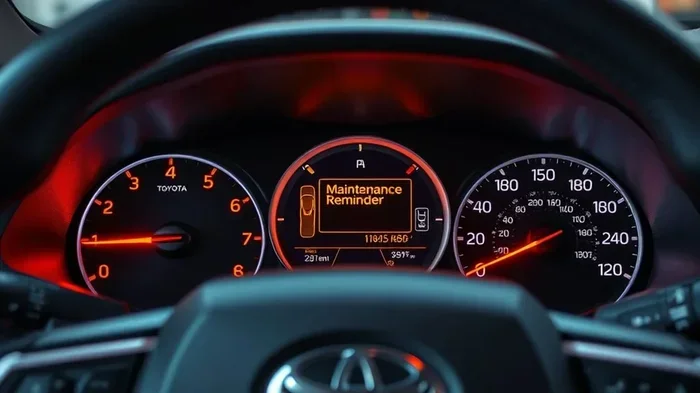
That little wrench icon on your Toyota Camry dashboard can be annoying. It pops up right when you least expect it. You know the one — it means your car is due for service. But here is the good news. You do not need to visit a dealer or pay a mechanic just to make it go away. You can reset the maintenance light on your Toyota Camry yourself, right from the driver’s seat.
This guide covers everything you need to know. We will walk through the exact steps for different Camry model years. You will learn why the light comes on in the first place. And we will share tips to keep your car running strong between services. Whether you drive a 2007 Camry or a brand-new 2024 model, this article has you covered.
So grab your coffee, sit in the driver’s seat, and let us get that light cleared up. By the end of this read, you will know exactly what to do. No guesswork. No confusing jargon. Just simple, clear steps that actually work.
Key Takeaways
- Easy DIY Process: You can reset the maintenance light on your Toyota Camry in under five minutes without visiting a mechanic.
- Multiple Methods Available: Different Toyota Camry model years use different reset procedures, but all are straightforward.
- Regular Maintenance Matters: Resetting the light is just the first step — following a proper maintenance schedule keeps your car healthy.
- No Special Tools Needed: All you need is access to the dashboard and a few button presses on the steering wheel or trip meter.
- Oil Life Reset Is Similar: The process for resetting your oil life is very similar to resetting the maintenance light.
- Know Your Model Year: The exact steps vary slightly depending on whether you have an older or newer Toyota Camry.
📑 Table of Contents
- Why Does the Maintenance Light Come On?
- How to Reset the Maintenance Light on Toyota Camry by Model Year
- Tools and Tips You Will Need
- Common Mistakes When Resetting the Maintenance Light
- How Often Should You Reset the Maintenance Light?
- What to Do If the Maintenance Light Won’t Turn Off
- Expert Tips for Keeping Your Toyota Camry in Great Shape
- Frequently Asked Questions
- Final Thoughts
Why Does the Maintenance Light Come On?
The maintenance light on your Toyota Camry is not a warning about a broken part. It is a reminder. Toyota designed this light to tell you when it is time for routine service. Most often, it means your car is due for an oil change or a general inspection.
Here are the most common reasons the light activates:
- Oil change interval reached: Toyota tracks your mileage and triggers the light after a set number of miles.
- Time-based service reminder: Even if you do not drive much, time can trigger the light.
- Dashboard reset needed: Sometimes the light stays on after a service because it was not properly reset.
- System reminder: The car’s computer monitors driving habits and flags service when needed.
Understanding why the light is on helps you know what to do next. It is not an emergency in most cases. But ignoring it for too long is not a great idea either. Regular service keeps your Toyota Camry running smoothly and prevents bigger problems down the road.
Also, if you are curious about how much oil is actually left in your tank, you can learn how to check your oil level easily at home. This is a great habit to build alongside resetting your maintenance light.
How to Reset the Maintenance Light on Toyota Camry by Model Year
The reset process depends on your Camry’s model year. Toyota changed the dashboard controls over the years. So the steps for a 2005 model are different from a 2020 model. Below, we break it down by generation.
Resetting the Maintenance Light on 2002–2006 Toyota Camry
Older Camry models use a simple button-based method. Here is how to do it:
- Turn the ignition to the “ON” position. Do not start the engine. Just press the start button or turn the key to the accessory position.
- Locate the trip meter reset button on the dashboard. It is usually near the speedometer or on the steering wheel controls.
- Press and hold the trip reset button.
- While holding the button, turn the ignition off and then back to “ON.”
- Keep holding the button for about five seconds.
- The maintenance light should blink and then turn off.
- Release the button. Start the engine to confirm the light is gone.
If the light does not go off the first time, try the process again. Sometimes it takes two attempts. Be patient and make sure you are holding the button long enough.
Resetting the Maintenance Light on 2007–2011 Toyota Camry
The 2007 to 2011 Camry models use a slightly different approach. These steps work well for this generation:
- Turn the ignition to “ON” without starting the engine.
- Use the steering wheel controls to navigate to the trip meter display.
- Press the “Trip” button to switch to the odometer screen.
- Turn the ignition off completely.
- Press and hold the trip meter reset button.
- While still holding the button, turn the ignition back to “ON.”
- Hold the button for about five to ten seconds.
- The maintenance light should reset and turn off.
These models have a more digital dashboard. So the button sequences can feel a little different. Just follow the steps slowly and you will get it.
Resetting the Maintenance Light on 2012–2017 Toyota Camry
The 2012 and newer Camry models have a more streamlined process. Toyota simplified the reset procedure in these generations:
- Make sure the car is off. Press the engine start/stop button without pressing the brake pedal.
- Navigate to the “Maintenance” menu using the steering wheel arrow buttons.
- Press and hold the “Enter” or “Reset” button on the steering wheel.
- Scroll to find the option that says “Maintenance Reset.”
- Confirm your selection.
- The maintenance light should turn off immediately.
These models also let you reset the oil life indicator at the same time. If you want a full guide on that process, check out our article on how to reset your oil life. The steps are very similar.
Resetting the Maintenance Light on 2018–2024 Toyota Camry
The newest Camry models use a touchscreen interface. Here is how to reset the maintenance light on these models:
- Start the car or press the engine button without the brake.
- Go to the home screen on the touchscreen.
- Swipe to find “Settings” or “Vehicle Information.”
- Look for the “Maintenance” or “Service” menu.
- Select “Reset Maintenance Reminder.”
- Confirm the reset when prompted.
- The maintenance light will turn off.
Toyota also added voice command features in newer models. You may be able to say “reset maintenance” and let the car do the work. Check your owner’s manual for voice commands specific to your model.
Tools and Tips You Will Need
Resetting the maintenance light requires almost nothing. But having a few things ready makes the process smoother:
- Your Toyota Camry owner’s manual: This is your best friend. It has model-specific instructions and diagrams.
- A working key or key fob: You need the ignition to turn on.
- Steering wheel controls: Most reset procedures use the buttons on the steering wheel.
- Patience: Some methods require holding buttons for several seconds. Do not let go too early.
One quick tip: always reset the maintenance light right after an oil change or service. This ensures the light clears properly and your service records stay accurate. If you are also wondering about whether your Camry can use regular oil, we have a helpful guide on whether a Toyota Camry can take regular oil that you should check out.
Common Mistakes When Resetting the Maintenance Light
Even though the process is simple, people make mistakes. Here are the most common ones to avoid:
- Starting the engine during the reset: You must keep the engine off while pressing the reset buttons. Starting the engine too early cancels the process.
- Releasing the button too soon: Toyota’s reset process requires a long hold. Letting go after two seconds will not work. Hold it for at least five seconds.
- Confusing the trip meter with the maintenance reset: These are different functions. Make sure you are in the right menu or holding the correct button.
- Not turning the ignition off between steps: Some model years require you to cycle the ignition off and back on. Skipping this step is the most common reason the reset fails.
- Ignoring the root cause: Resetting the light does not fix the actual service need. Always complete your oil change or maintenance first.
Avoiding these mistakes saves time and frustration. If the light still does not go off after trying the correct steps, there may be a deeper issue. In that case, it is worth visiting a Toyota dealership to have the system scanned.
How Often Should You Reset the Maintenance Light?
You should reset the maintenance light every time you complete a scheduled service. For most Toyota Camry models, this means every 5,000 to 10,000 miles. The exact interval depends on your driving conditions and the type of oil you use.
Here is a simple breakdown of typical service intervals:
- Normal driving conditions: Reset every 10,000 miles or once a year.
- Severe driving conditions: Reset every 5,000 miles. This includes stop-and-go traffic, towing, or extreme temperatures.
- Synthetic oil users: You may be able to go 10,000 to 15,000 miles between resets.
- Older Camry models: Check every 3,000 to 5,000 miles for conventional oil.
If you want help planning your service schedule, our article on how to create a maintenance schedule gives you a simple framework you can follow.
Also, keeping track of your mileage between resets helps you spot patterns. If the light keeps coming on too early, it might be time to inspect your driving habits or your vehicle’s condition.
What to Do If the Maintenance Light Won’t Turn Off
Sometimes the light stays on even after you follow all the steps correctly. This can be frustrating, but it is usually fixable. Here is what to do:
First, double-check your owner’s manual. Toyota includes model-specific reset instructions in every Camry manual. The steps might be slightly different from what we outlined above.
Second, try the reset process twice. Some older models require two consecutive reset attempts to clear the light completely. Turn the ignition off, wait ten seconds, and try again.
Third, check if there are other dashboard warning lights on. If the maintenance light is accompanied by a check engine light or a VSC warning, you may have a separate issue. For example, if you see the VSC light on, read our guide on whether it is safe to drive with the VSC light on.
Fourth, disconnect the battery for a few minutes. This can reset the entire electrical system and clear stubborn lights. Just remember that disconnecting the battery may also reset your radio presets and clock settings.
If none of these steps work, take your Camry to a Toyota dealership. A technician can run a diagnostic scan and clear the light professionally. This is especially important if the light comes back immediately after resetting it.
Expert Tips for Keeping Your Toyota Camry in Great Shape
Resetting the maintenance light is just one piece of the puzzle. Here are some expert tips to keep your Camry running strong for years:
- Change your oil on time: Fresh oil is the lifeblood of your engine. Do not skip oil changes, even if the light is off.
- Monitor your dashboard: Pay attention to all warning lights, not just the maintenance light. Each one tells you something important.
- Keep a service log: Write down every oil change, tire rotation, and inspection. This helps you stay organized and track your car’s health.
- Use quality parts: Whether you are changing oil or filters, always use parts that meet Toyota specifications.
- Check your cabin air filter: A dirty cabin air filter affects air quality inside your car. Learn how to tell if your cabin air filter needs replacing.
These habits take just a few minutes each month. But they add up to thousands of miles of trouble-free driving. Your Toyota Camry is built to last, and proper maintenance is the key to unlocking that longevity.
Frequently Asked Questions
Can I reset the maintenance light without starting the engine?
Yes, in most Toyota Camry models you can reset the maintenance light without starting the engine. You simply turn the ignition to the “ON” position, which powers up the dashboard without firing up the engine. Then you follow the button sequence for your specific model year. The engine does not need to be running for the reset to work.
How do I know which reset method my Toyota Camry uses?
The reset method depends on your Camry’s model year. Older models from 2002 to 2006 use a physical trip meter button. Models from 2012 to 2017 use steering wheel controls. The newest models from 2018 onward use a touchscreen menu. Your owner’s manual will confirm the exact method for your specific year and trim level.
Will resetting the maintenance light clear any error codes?
No, resetting the maintenance light only clears the service reminder. It does not clear diagnostic trouble codes or error codes stored in your car’s computer system. If you have a check engine light or other warning, you will need a diagnostic scanner or a visit to a Toyota dealership to clear those codes.
How often should I reset the maintenance light on my Toyota Camry?
You should reset the maintenance light every time you complete a scheduled service. For most Camry models, this means every 5,000 to 10,000 miles depending on your driving conditions and the type of oil you use. Always complete the actual service before resetting the light so your car stays properly maintained.
What should I do if the maintenance light keeps coming back?
If the maintenance light keeps returning after you reset it, there may be an underlying issue. First, make sure you completed the scheduled service. If the service was done, try resetting the light again using the correct method for your model year. If the light persists, visit a Toyota dealership for a diagnostic scan to check for system faults.
Can I drive my Toyota Camry with the maintenance light on?
Yes, you can safely drive your Toyota Camry with the maintenance light on. The light is a reminder, not an emergency warning. It means your car is due for routine service like an oil change. However, you should not ignore it for extended periods, as delayed maintenance can lead to engine wear and other problems over time.
Final Thoughts
Resetting the maintenance light on your Toyota Camry is one of the simplest things you can do as a car owner. It takes just a few minutes, requires no special tools, and saves you a trip to the dealership. Whether you have a 2005 model or a 2024 model, the process is straightforward once you know the right steps.
Remember that resetting the light is not a substitute for actual maintenance. Always complete your oil changes, inspections, and other scheduled services first. The maintenance light is a helpful nudge, not something to fear. With the right routine and a little attention, your Toyota Camry will serve you well for many miles to come.
Now that you know how to reset the light, take a moment to check your mileage and see if your Camry is due for service. Staying on top of maintenance is the best way to keep your car running strong. And if you ever need help with other Toyota Camry questions, you know where to find us. Happy driving.