How to Remote Start a Hyundai Palisade the Easy Way
How to Remote Start a Hyundai Palisade is simple once you know the steps. This guide covers both the key fob method and the Hyundai Bluelink app. You’ll learn troubleshooting tips, battery replacement, and expert advice to keep your Palisade running smoothly.
Ever stepped out into a freezing morning and wished your Hyundai Palisade could warm up before you got in? Remote start makes that dream a reality. The How to Remote Start a Hyundai Palisade process is simpler than you think. Whether you use the key fob or the Hyundai Bluelink app, you can preheat the cabin and defrost the windshield in minutes. This guide covers everything you need to know, from the basic button sequence to troubleshooting common problems. You will also learn how to care for your key fob and when to seek help.
The Hyundai Palisade is a family-friendly SUV with many smart features. Remote start is one of the most convenient. It lets you start the engine from outside. You can set the temperature before you step inside. This is especially useful in cold winters or hot summers. Many Palisade owners want to know the exact steps. They also want to avoid mistakes that could cause issues. This article answers all those questions. We will walk you through each method clearly. You will feel confident after reading this guide.
Remote start is not just a luxury. It is a practical tool. It saves time. It improves comfort. It can even help your engine warm up faster in cold weather. The Palisade supports remote start through the factory key fob. It also supports remote start through the Bluelink smartphone app. Both methods are easy to use. The key fob method works without a phone. The app method gives you more control. You can set timers and check vehicle status. We will explain both in detail.
Key Takeaways
- Key Fob Remote Start Is Quick: Press lock, then hold remote start for two seconds to fire up the engine.
- Bluelink App Adds Flexibility: Start your Palisade from anywhere with cellular service and set a schedule.
- Replace the Key Fob Battery Yearly: A weak battery stops remote start. Swap it with a CR2032.
- Reprogramming a Used Fob Is Possible: You can sync a new fob to enable remote start on a used Palisade.
- Safety First: Never remote start in an enclosed garage. Always ensure the vehicle is in Park and doors are locked.
- Troubleshooting Is Simple: Most remote start issues are solved by checking the battery, locks, and gear position.
📑 Table of Contents
- What Is Remote Start and Why You’ll Love It on the Palisade
- How to Remote Start a Hyundai Palisade Using the Key Fob
- Using the Hyundai Bluelink App for Remote Start
- Key Fob Battery Replacement and Maintenance
- Common Remote Start Issues and How to Fix Them
- Expert Tips to Get the Most Out of Remote Start
- Conclusion
What Is Remote Start and Why You’ll Love It on the Palisade
Remote start is a feature that lets you start your vehicle from outside. You press a button on the key fob or use the app. The engine turns on. The climate control system activates. Your Palisade begins to warm up or cool down. You can sit in a comfortable cabin before you drive. This feature is available on many Hyundai models. The Palisade makes it easy to use.
How Remote Start Works on the Palisade
The Palisade uses a push-button start system. You do not need to insert a key. The remote start function works with the smart key fob. When you press the remote start button, the system checks several conditions. The vehicle must be in Park. The doors must be locked. The key fob must be within range. Once these conditions are met, the engine starts. The climate control runs for a set time. Usually, it runs for 10 to 15 minutes. You can extend the time if needed.
Quick Tips for First-Time Users
- Always lock the doors before remote starting.
- Make sure the key fob is inside the vehicle or very close.
- The engine will stop if you open a door.
- You can remote start in cold and hot weather.
- The system will not work if the battery is too low.
These tips help you avoid confusion. They keep the system working smoothly.
Extreme Weather Benefits
In winter, remote start melts ice on the windshield. It warms the seats and the steering wheel. In summer, it cools the cabin before you enter. The Palisade has a powerful climate control system. Remote start lets you take full advantage of it. You can set the temperature to your liking before you leave the house. This is a game-changer for families with young children.
How to Remote Start a Hyundai Palisade Using the Key Fob
The key fob method is the most direct way. You do not need a phone or internet. Just press the buttons on the fob. Here is the exact sequence.
The Exact Button Sequence
- Make sure your Palisade is parked and the engine is off.
- Press the lock button on the key fob. The doors lock.
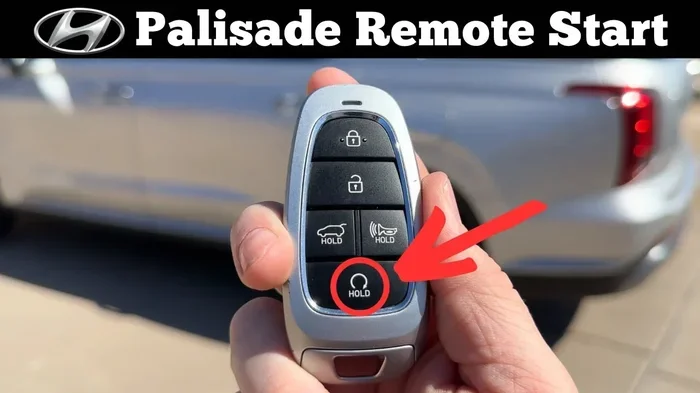
- Immediately press and hold the remote start button. It is usually marked with a curved arrow.
- Hold the button for about two seconds.
- The engine starts. The parking lights flash.
- The climate control turns on automatically.
You can repeat the process to extend the runtime. Most Palisades allow two cycles of 10 minutes each. After the second cycle, the engine shuts off. You must be within 200 feet of the vehicle for remote start to work.
Common Mistakes When Using the Key Fob
Many owners make small mistakes. Here are a few to avoid.
- Pressing the start button too quickly. You need to hold it for a full two seconds.
- Forgetting to lock the doors first. Remote start requires the doors to be locked.
- Standing too far away. The range is about 200 feet. Go outside and try again if it fails.
- Not checking the key fob battery. A weak battery causes remote start to fail.
If you follow these steps, remote start will work every time. It is a simple process once you get used to it.
Using the Hyundai Bluelink App for Remote Start
The Bluelink app turns your smartphone into a remote control. You can start the Palisade from anywhere with cellular service. This is very handy if you are at work or running errands.
Setting Up Bluelink Remote Start
First, you need a Bluelink subscription. The Palisade comes with a free trial. After that, you pay a monthly or annual fee. Once subscribed, follow these steps.
- Download the Hyundai Bluelink app on your phone.
- Create an account and pair your Palisade.
- Go to the vehicle settings.
- Select Remote Start.
- Set your preferred temperature and run time.
- Press the Start button in the app.
The app will send a command to your Palisade. The engine starts within seconds. You can also lock and unlock doors, honk the horn, and check fuel levels.
Understanding the Bluelink Subscription Plans
Hyundai offers different Bluelink plans. The basic plan includes remote start and vehicle diagnostics. The premium plan adds features like geofencing and smart alerts. Check your current plan in the app. You can upgrade or cancel at any time. The subscription is required for remote start to work through the app.
App vs. Key Fob: Which Is Better?
Both methods have advantages. The key fob is fast and does not need a phone signal. The app gives you more features and works from far away. The table below compares them side by side.
| Feature | Key Fob | Bluelink App |
|---|---|---|
| Range | Up to 200 feet | Anywhere with cellular service |
| Setup | No setup needed | Requires app and subscription |
| Climate Control | Basic on/off | Set specific temperature |
| Works Without Phone | Yes | No |
| Security | Basic | Alerts and tracking |
If you’ve used Toyota’s remote start system, you’ll find Hyundai’s process just as intuitive. The key fob is better for quick trips in cold weather. The app is better when you want to pre-condition the cabin before a long drive. Many owners use both.
Key Fob Battery Replacement and Maintenance
The key fob runs on a small coin battery. It lasts about one to two years. When the battery dies, remote start stops working. Replacing it is easy.
How to Replace the Key Fob Battery
- Use a small flathead screwdriver or a coin.
- Insert it into the groove on the back of the fob.
- Twist gently to pop open the back cover.
- Remove the old CR2032 battery.
- Insert a new CR2032 battery with the positive side up.
- Snap the cover back into place.
Test the fob after replacement. Press the lock and start buttons. If the fob works, you are all set.
What to Do After Replacing the Key Fob Battery
If you’re wondering what to do after replacing a key fob battery on your Palisade, the answer is simple. You do not need to reprogram the fob. The new battery will work right away. Just make sure the battery is inserted correctly. Check the remote start function to confirm. If the fob still does not work, try holding it very close to the start button. This can help if the signal is weak.
Common Remote Start Issues and How to Fix Them
Remote start is reliable, but problems can happen. Here are the most common ones and how to solve them.
Remote Start Won’t Activate
If the engine does not start, check a few things first.
- Is the key fob battery dead? Replace it.
- Are the doors locked? Lock them manually.
- Is the vehicle in Park? Press the brake pedal and shift to Park.
- Is the fob within 200 feet? Move closer to the vehicle.
- Is the hood latch closed? The system checks this too.
Sometimes the system needs a reset. Turn the ignition on and off with the push button. Then try remote start again.
The Engine Turns Off Immediately
This can happen if a door is open. The system shuts down for safety. Check all doors and the trunk. Also, make sure the key fob is inside the vehicle. If the fob is too far away, the engine will turn off. Some Palisades have a setting that limits remote start time. Check your owner’s manual for details.
Remote Start Works Intermittently
If remote start works sometimes but not always, the key fob battery is likely weak. Replace it and see if the problem stops. Also check for interference from other key fobs or electronic devices. Keep the fob away from metal objects when pressing the button.
When to Seek Professional Help
If you’ve tried everything and remote start still fails, it may be a deeper issue. If your Palisade won’t start remotely, check if you’ve properly started the ignition without a key using the push-button system. This ensures the main ignition is not the problem. A professional can check the remote start module, the fob signal, and the vehicle’s computer. Do not ignore warning lights on the dashboard. They can point to the real cause.
Expert Tips to Get the Most Out of Remote Start
Remote start is more than just warming the car. You can use it to improve your driving experience.
Maximizing Climate Control Pre-Conditioning
In winter, remote start warms the engine and the cabin. In summer, it cools the interior. You can set the temperature before you leave the house. This is great for the Palisade because it has three rows of seats. The whole cabin can be comfortable by the time you get in. Use the app to set a schedule. You can start the car 10 minutes before you leave.
Reprogramming a Used Key Fob
If you bought a used Palisade, the previous owner’s key fob may not work with remote start. You may need to reprogram a used key fob to a different car to enable remote start. The process involves putting the vehicle in programming mode and syncing the fob. You can find detailed steps in the Palisade owner’s manual. If you are unsure, a dealership can help.
Safety Precautions You Must Follow
- Never remote start in an enclosed garage. Carbon monoxide can build up quickly.
- Always ensure the vehicle is in Park before remote starting.
- Keep the key fob away from water and extreme heat.
- Do not let children play with the remote start feature.
- Replace the key fob battery once a year if you use remote start often.
Expert Insights
Many Palisade owners report that remote start becomes second nature within a week. The biggest tip from long-time owners is to always lock the doors first. This small habit prevents the engine from shutting off unexpectedly. Another pro tip is to use the app to check whether remote start was successful. The app shows the engine status and remaining run time. This gives you peace of mind when you are away from the vehicle.
Conclusion
How to Remote Start a Hyundai Palisade is a skill every Palisade owner should master. It is easy to do with the key fob or the Bluelink app. You simply lock the doors, press the start button, and the engine turns on. Remember to maintain the key fob battery and follow the safety tips. Remote start adds comfort and convenience to your daily routine. It is one of the best features of the Palisade. Try it today and enjoy a pre-conditioned cabin every time you drive.
Frequently Asked Questions
Can I remote start my Hyundai Palisade with the key fob?
Yes, the Palisade supports remote start via the key fob. Just lock the doors, press and hold the remote start button for two seconds, and the engine will start. Make sure you are within 200 feet of the vehicle.
Do I need a subscription to use the Bluelink app for remote start?
Yes, you need an active Bluelink subscription. The Palisade comes with a free trial, but after that, you must pay a monthly or annual fee to use remote start through the app.
How long does the remote start engine run on a Hyundai Palisade?
By default, the engine runs for 10 minutes. You can extend it for another 10 minutes by repeating the remote start sequence. After the second cycle, the engine shuts off automatically.
What should I do if remote start does not work?
First, check the key fob battery and lock the doors manually. Make sure the vehicle is in Park and the fob is within range. If the problem persists, consult your owner’s manual or visit a Hyundai dealership.
Can I remote start my Palisade in a closed garage?
No, you should never remote start a vehicle in an enclosed garage. The exhaust contains carbon monoxide, which can be dangerous. Always remote start in an open, well-ventilated area.
How do I reprogram a used key fob for my Palisade?
You can reprogram a used key fob by following the programming steps in the Palisade owner’s manual. The process puts the vehicle in pairing mode so the fob can sync. If you are unsure, a Hyundai dealership can assist you.