How to Turn on the Cargo Light on Your New GMC Sierra
The cargo light on your GMC Sierra illuminates the truck bed for safe loading in the dark. This guide shows you exactly where the switch is located on every model year and how to turn on the cargo light on your GMC Sierra in seconds. You’ll also learn quick fixes for burned-out bulbs, blown fuses, and battery issues that keep the light from working.
Knowing how to turn on the cargo light on your GMC Sierra is one of those small skills that saves you time and frustration. Whether you are loading groceries after sunset or searching for a tool in the bed, a working cargo light makes the job faster and safer. The good news is that the system is simple, and most owners can handle the switch location and basic fixes in just a few minutes. This guide walks you through every step, from finding the switch to upgrading the bulb. By the end, you will have full control over your truck’s bed illumination.
The GMC Sierra has been a popular full-size pickup for years, and its cargo light design has evolved with each generation. Older models often used a basic bulb mounted on the inside of the tailgate, while newer trucks feature LED strips that span the entire bed. No matter which year you drive, the core idea remains the same: a small switch completes the circuit and lights up the cargo area. Understanding this basic setup helps you troubleshoot quickly when the light does not work. Let us start by exploring exactly where the cargo light lives on your truck.
Key Takeaways
- Switch Location Varies: The cargo light switch can be on the dashboard, inside the tailgate, or on the bed ceiling depending on your model year.
- Bulb Type Matters: Most newer Sierras use long-lasting LED bulbs, while older models may still have traditional incandescent bulbs.
- Troubleshooting Is Simple: Start with the bulb, then check the fuse box, and finally inspect the battery if the light still fails.
- Upgrades Boost Visibility: Retrofitting an LED kit or adding a motion sensor can turn your cargo area into a well-lit workspace.
- Daily Habits Help: Keep the lens clean and always close the tailgate fully to prevent the light from staying on and draining the battery.
- Model Year Differences: Extended cab and crew cab models may have slightly different switch placements, so knowing your specific layout is key.
📑 Table of Contents
Understanding Your GMC Sierra’s Cargo Light System
Where Is the Cargo Light Located?
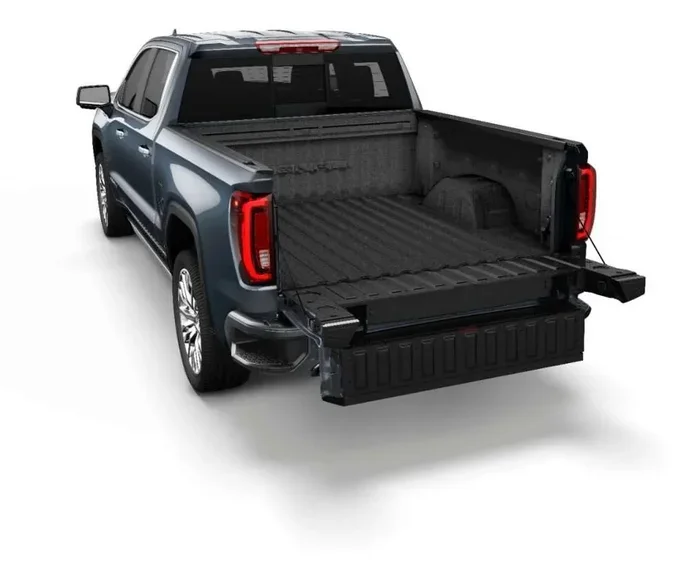
The cargo light on a GMC Sierra is almost always inside the truck bed. On most models, you will find it mounted on the inside of the tailgate, near the top edge. Some older Sierras place the bulb housing on the ceiling of the bed, right above the rear window. In newer trucks, the light often comes as an LED strip that runs along the bed rail or under the tailgate lip. The exact position can change based on whether you have a short bed, standard bed, or long bed. If you are curious about bed dimensions, our guide on how long a 6.5 foot truck bed is offers detailed measurements for a common Sierra configuration.
What Type of Bulb Does It Use?
Most GMC Sierra models from the last decade use a standard wedge-base bulb, often a 194 or 168 size. These are small, inexpensive, and easy to replace. Newer Sierra trims, especially those with LED bed lighting, use a sealed LED module that lasts much longer than a traditional bulb. The LED strips provide bright, even illumination across the entire bed floor. If you have an older model and the light is dim, swapping in a fresh bulb is the first thing to try. You can find the correct bulb number in your owner’s manual or on the old bulb itself.
| Model Year Range | Switch Location | Light Type |
|---|---|---|
| 2007–2013 | On the dashboard, near the headlight switch | Incandescent 194 bulb |
| 2014–2018 | Inside the tailgate, on the light housing | Incandescent or early LED |
| 2019–Present | On the instrument panel or via the Infotainment system | LED strip or multi-point LED |
| Denali and High Country (all years) | Often integrated with the power tailgate module | LED with auto-on feature |
The table above shows that the switch location has shifted over the years. In older trucks, you look for a small toggle on the dash. In newer models, the light may turn on automatically when you open the tailgate, controlled by a module. If your Sierra has a power tailgate, the cargo light often shares a circuit with the tailgate motor. Always refer to your specific owner’s manual for the exact layout.
Step-by-Step Guide to Turning On the Cargo Light
Turning on the cargo light is straightforward once you know where to look. The process differs slightly depending on whether your switch is on the dashboard or mounted in the tailgate. Follow these steps carefully, and you will have the bed lit up in no time.
For Models with a Dashboard Switch
Start by sitting in the driver’s seat and looking at the lower dash panel to the left of the steering column. You will see a row of small switches that control things like the dome light, the map lights, and the cargo light. The cargo light switch is often marked with a truck bed icon or the word “Cargo.” If you cannot find it, check the owner’s manual for the exact symbol. Move the switch to the “On” position. Now open the tailgate. The cargo light should illuminate immediately. If it does not, move to the troubleshooting section below.
For Models with a Bed Mounted Switch
On some Sierra models, especially those from the mid-2010s, the switch is actually on the inside of the tailgate. Open the tailgate fully and look at the top inner panel, near the latch. You will see a small rocker switch or a sliding tab. Flip it to the “On” position. Close and reopen the tailgate to test the light. This design keeps the switch close to the bulb, which can reduce wiring issues. If the switch feels loose or sticky, it may need cleaning with a contact-safe electrical cleaner.
Quick Tip: If you cannot find the switch, try opening the tailgate while the ignition is on. Many GMC Sierra models have a body control module that automatically turns the cargo light on when the tailgate opens. This feature is normal and does not mean the switch is broken.
Common Mistake to Avoid
A frequent error is assuming the cargo light is burned out when the real issue is a simple switch position. Before you buy a new bulb, make sure the switch is fully in the “On” position. Also check that the tailgate is completely closed and latched. A tailgate that is even slightly open can trigger a warning in the body module, which might disable the cargo light to prevent battery drain. Always start with the simplest explanation.
Troubleshooting Common Cargo Light Problems
Even with the switch in the right place, the cargo light might not come on. Do not worry. Most issues are easy to fix with a few simple checks. Work through the list below in order, and you will solve the problem in most cases.
Check the Bulb First
The bulb is the most common point of failure. Open the tailgate and locate the bulb housing. On most models, you can twist the housing counterclockwise and pull it straight out. Inspect the filament inside the bulb. If it is broken or the glass is blackened, the bulb is dead. Replace it with a new bulb of the same wattage and base type. For LED models, the entire LED strip may need replacement if one diode fails. Always disconnect the negative battery terminal before touching any electrical parts to stay safe.
Inspect the Fuse Box
If the bulb looks fine, the next suspect is a blown fuse. The fuse box in a GMC Sierra is located under the dashboard on the driver’s side and also in the engine bay. Open the interior fuse box door, which has a diagram printed on it. Look for the fuse labeled “Cargo Light,” “Bed Lamp,” or “Tail Lamp.” Pull the fuse out and inspect the metal strip inside. If it is broken or melted, replace it with a new fuse of the exact same amperage. After installing the new fuse, turn the switch on and test the light.
Battery and Electrical Issues
A weak or dying battery can cause all sorts of electrical gremlins, including a cargo light that will not turn on. The cargo light draws power directly from the battery through the fuse box, so low voltage can prevent it from working. If you have tried the bulb and fuse and still have no light, a battery problem could be the answer. Learn more about how a bad battery can cause the wrench light to come on, which also applies to other electrical failures in your truck. A simple battery test with a multimeter can confirm whether the voltage is below 12 volts. If so, charge the battery or replace it.
Expert Insight: Corrosion on the bulb socket contacts is a hidden cause of cargo light failure. Use a small wire brush or fine sandpaper to gently clean the metal contacts inside the socket before reinserting the bulb. This restores solid electrical contact and often fixes a light that flickers or does not turn on at all.
Upgrading and Enhancing Your Cargo Light
Once your cargo light is working, you might want to make it even better. Upgrades can turn the truck bed into a well-lit workspace for camping, jobsite tasks, or late-night hauls. The good news is that most upgrades are simple bolt-in projects that do not require professional help.
LED Retrofit Kits
Swapping an old incandescent bulb for an LED bulb is one of the best upgrades you can make. LED bulbs use a fraction of the power and last for decades. Look for a direct-fit LED bulb that matches the base type of your original bulb, such as a 194 LED wedge. The light output is significantly brighter, and the color temperature is often a crisp white that makes the bed easier to see. Installation is as simple as removing the old bulb and twisting in the new one. Always make sure the LED bulb is compatible with the truck’s CAN bus system to avoid error messages on the dashboard.
Adding a Motion-Activated Switch
If you frequently load gear in the dark, a motion-activated switch is a game changer. These small devices plug into the existing cargo light wiring and turn the light on automatically when they detect movement. You can mount the sensor near the tailgate latch so it triggers every time you open the bed. Some kits also include a dimmer setting, so the light is not blinding when you step out of the truck at night. This upgrade is especially useful for people who use their Sierra as a work vehicle or for overland camping trips.
For those with a longer bed, adding extra lights can eliminate dark spots. A standard 6.5 foot truck bed is a common size, and you can find additional mounting points along the bed rails. If you want to understand the exact dimensions of your bed, check out our detailed breakdown of how long a 6.5 foot truck bed is to plan your lighting layout effectively.
Cargo Light Best Practices for Everyday Use
Proper use and care of the cargo light will keep it working reliably for years. A few simple habits make a big difference.
Keeping the Bed Clean and Organized
Dirt, mud, and debris can build up around the light lens and block the output. Wipe the lens with a damp cloth whenever you wash the truck bed. If the light is mounted on the tailgate, make sure the tailgate seal is clean so water does not seep into the housing. A clean light not only looks better but also provides maximum illumination when you need it most.
Using the Light for Off-Road Adventures
The cargo light is surprisingly useful on the trail. When you are unloading gear at a campsite or checking your skid plates in the dark, a bright bed light saves the day. Some owners add a second cargo light to the opposite side of the bed for even coverage. If you have an extended cab model, the bed might be shorter, which changes the lighting spread. You can find the exact cab and bed dimensions in our guide on how long an extended cab truck is to help you plan the best lighting setup.
Quick Tip: If you leave the cargo light on accidentally, it will drain the battery over time. Get into the habit of visually confirming the light is off before walking away from the truck. Many newer Sierras have an automatic shutoff that turns the light off after a set time or when the tailgate closes, but older models do not.
Common Mistakes That Shorten Bulb Life
- Touching the glass part of a halogen or incandescent bulb with bare hands. The oils from your skin create hot spots that cause the bulb to burn out prematurely. Always handle bulbs with a clean cloth or gloves.
- Using a higher wattage bulb than specified. This can overload the wiring and melt the socket. Stick to the manufacturer’s recommended bulb rating.
- Ignoring a flickering light. A flicker usually means a loose connection or a failing bulb. Fix it quickly to avoid being stranded with a dark bed.
- Leaving the tailgate slightly open. This can keep the light on and slowly drain the battery, especially on older models without an auto-off feature.
Final Thoughts: Enjoy Your Illuminated Bed
Learning how to turn on the cargo light on your GMC Sierra is a quick and satisfying job that pays off every time you load the truck. Whether you have a dashboard switch, a tailgate-mounted rocker, or an automatic system, the steps are simple and the reward is a well-lit cargo area. Remember to check the bulb and fuse first when problems arise, and consider an LED upgrade for long-lasting brightness. With the right maintenance and a few smart upgrades, your Sierra’s cargo light will serve you reliably for years to come. Now go out there and enjoy the convenience of a truck that is always ready to light the way.
Frequently Asked Questions
Where is the cargo light switch on a GMC Sierra?
The switch location depends on your model year. Most older Sierras have a toggle switch on the dashboard near the headlight controls. Newer models often place the switch on the inside of the tailgate or use an automatic system that turns the light on when the tailgate opens. Check the inside of the tailgate or the lower dash panel to find it.
Why won’t my GMC Sierra cargo light turn on?
The most common reasons are a burned-out bulb, a blown fuse, or a faulty switch. Start by inspecting the bulb and replacing it if the filament is broken. Then check the cargo light fuse in the interior fuse box. If both are good, the switch itself may need replacement, or the body control module could have an issue.
Can I replace the cargo light bulb myself?
Yes, replacing the cargo light bulb is a simple DIY task. Open the tailgate, twist the bulb housing counterclockwise, and pull it out. Insert a new bulb of the same type and twist the housing back in. Always disconnect the negative battery terminal first to avoid any electrical shorts.
Do all GMC Sierra models have a cargo light?
Yes, every GMC Sierra comes with a cargo light as standard equipment. The type of light has changed over the years, with newer models using LED strips instead of traditional bulbs. Even base trims include this essential feature for illuminating the truck bed.
How do I know if the cargo light fuse is blown?
You can tell by visually inspecting the fuse. Pull the cargo light fuse from the interior fuse box and look at the metal strip inside. If the strip is broken or the glass cover is cloudy, the fuse is blown. Replace it with a new fuse of the exact same amperage rating, which is printed on the fuse box lid.
Can I add an LED upgrade to my cargo light?
Absolutely. Upgrading to an LED bulb or LED strip is one of the best improvements you can make. LEDs draw less power, last much longer, and provide brighter, whiter light. Make sure the LED bulb has the same base type as your original bulb, and check that it is compatible with your truck’s electrical system to avoid warning lights on the dash.