How to Reset the Maintenance Light on a Toyota 4Runner
Resetting the maintenance light on a Toyota 4Runner is a simple process you can do at home in minutes. Whether you have a 2003, 2010, or 2024 model, this guide walks you through every step. We also cover troubleshooting tips, common mistakes, and how to keep your 4Runner running smoothly between service appointments.
That little yellow or orange light on your dashboard just started blinking, and now you are wondering what to do. If you own a Toyota 4Runner, there is a good chance this is your maintenance light telling you it is time for an oil change or routine service. The good news? You do not need a mechanic or a trip to the dealership to turn it off. In this guide, we will walk you through exactly how to reset the maintenance light on a Toyota 4Runner in just a few simple steps.
We will cover every model year, explain why this light comes on in the first place, and share tips that most guides leave out. Whether you drive a 2005 4Runner or a brand-new 2024 model, you will find everything you need right here. Let us get into it.
Key Takeaways
- Easy DIY Process: You can reset the maintenance light on your Toyota 4Runner without visiting a dealership or mechanic.
- Model Year Matters: The reset procedure varies slightly depending on your 4Runner’s model year and trim.
- Common Mistakes Happen: Holding the wrong button or resetting too early are the most frequent errors people make.
- Maintenance Schedule Is Key: Regular resets work best when paired with a consistent maintenance schedule.
- Oil Life Reset vs. Maintenance Light: These are different systems, and knowing the difference saves time and frustration.
- When to Seek Help: If the light persists after resetting, there may be an underlying issue that needs professional attention.
📑 Table of Contents
Why Does the Maintenance Light Come On?
The maintenance light on your Toyota 4Runner is a service reminder. It is not the same as a check engine light, which signals a serious problem. Instead, the maintenance light simply reminds you that your vehicle is due for routine care. Most Toyota models use a mileage-based system that tracks how far you have driven since the last service.
Here are the most common reasons the maintenance light activates:
- Oil Change Due: Your 4Runner is typically due for an oil change every 5,000 to 10,000 miles, depending on driving conditions.
- Tire Rotation Needed: Regular tire rotations help your tires wear evenly and last longer.
- Fluid Check: Brake fluid, coolant, and transmission fluid all need periodic inspection.
- Air Filter Replacement: A dirty air filter can reduce fuel efficiency and engine performance.
- General Service Interval: Toyota uses this light to remind you of the overall maintenance schedule for your vehicle.
The light does not mean something is broken. It means your 4Runner is asking for attention at a regular interval. Think of it like a calendar reminder for your truck. Ignoring it for a short time is usually fine, but staying on top of your service keeps your engine healthy and your resale value strong.
Maintenance Light vs. Check Engine Light
It is important to know the difference. The maintenance light is usually yellow or orange and shows a wrench icon or the words “MAINT” or “SERVICE.” The check engine light is typically red or orange and shaped like an engine. The check engine light demands immediate attention. The maintenance light is more of a friendly nudge. If you are unsure which light you are seeing, it is always safe to check your owner’s manual.
Tools and Preparation You Will Need
Before you start, you do not need any fancy tools. Resetting the maintenance light on a Toyota 4Runner is one of the easiest DIY tasks you can do. Here is what you should have ready:
- Your 4Runner Owner’s Manual: This is your best friend. It contains the exact reset procedure for your specific model year.
- A Clean Workspace: You do not need a garage, but a flat surface with good lighting helps.
- Your Key or Push-Start Fob: You will need access to the ignition or push-start button.
- Patience: Some model years require precise timing with button presses. Do not rush it.
Before starting the reset process, you should also check your oil level if it has been a while. If you have not checked your oil recently, now is a great time. You can learn more about checking your oil in our guide on how to check the oil level in your oil tank. This way, you can handle both tasks at once and get back on the road confidently.
Step-by-Step Reset Guide for Different 4Runner Years
The reset process varies a bit depending on your model year. Toyota changed the dashboard and steering controls over the years, so we have broken it down into three main groups.
Resetting the Maintenance Light on 2003–2009 4Runner Models
These older 4Runner models use a straightforward button-based method. Here is how to do it:
- Turn the ignition to the “ON” position without starting the engine. You can do this by pressing the start button without stepping on the brake, or by turning the key to the “ON” position.
- Press the odometer or trip meter button until you see the maintenance message or the mileage display.
- Turn the ignition to the “OFF” position.
- Press and hold the odometer or trip meter button.
- While still holding the button, turn the ignition back to “ON.”
- Hold the button for about 10 to 15 seconds until the light flashes or the message resets.
- Release the button. The maintenance light should now be off.
If the light does not go off, try the process again. Sometimes it takes two attempts, especially if the vehicle’s computer needs a moment to register the reset.
Resetting the Maintenance Light on 2010–2023 4Runner Models
The 2010 and later models have a slightly different approach, mostly because of updated steering wheel controls and dashboard displays.
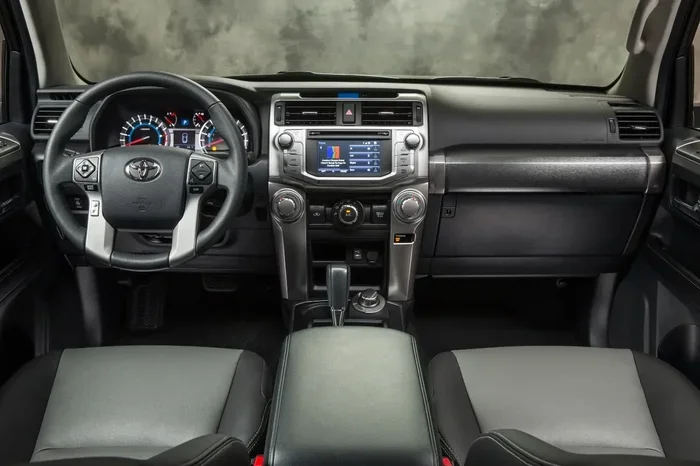
- Press the steering wheel menu button to access the vehicle information display.
- Navigate to the maintenance or service menu using the arrow buttons on the steering wheel.
- Select “Reset Maintenance” or “Service Reset.”
- Hold the OK or reset button for several seconds until the display confirms the reset.
- Turn the vehicle off and back on to verify the light has been cleared.
For some 2010–2014 models, you can also use the trip meter method similar to the older models. Just remember that the exact steps can vary slightly, so always refer to your owner’s manual if you are unsure.
Resetting the Maintenance Light on 2024 and Newer 4Runner Models
The newest 4Runner models feature updated tech and digital displays. The process is even simpler:
- Access the settings menu on the touchscreen display.
- Navigate to “Vehicle Maintenance” or “Service Information.”
- Select “Reset Service Indicators.”
- Confirm the reset when prompted.
The newer models also support Toyota’s connected services, which can send maintenance reminders directly to your phone. This is a nice feature that helps you stay on top of your service without relying solely on the dashboard light.
Quick Tips for a Successful Reset
- Do the reset after completing your service. Always change the oil or perform the needed maintenance first, then reset the light.
- Make sure the vehicle is in park. This is a safety requirement for most reset procedures.
- Do not rush the button holds. Holding the button for the full 10 to 15 seconds is important for older models.
- Take note of your mileage. Write down the current odometer reading after resetting. This helps you track when the next service is due.
Common Mistakes When Resetting the Maintenance Light
Even though this is a simple process, people make mistakes all the time. Here are the most common errors and how to avoid them:
Resetting Before Completing Service
This is the number one mistake. Some people reset the light right away without actually doing the oil change or service. Yes, the light turns off, but you have not fixed the actual problem. Your 4Runner still needs that oil change, and ignoring it can lead to engine wear and reduced performance. Always complete the service first, then reset.
Using the Wrong Button Sequence
Every model year has its own sequence. If you follow the wrong steps, you might accidentally reset something else or do nothing at all. Double-check which year group your 4Runner falls into before you start pressing buttons.
Not Holding the Button Long Enough
On older models, a quick tap will not work. You need to hold the trip meter or odometer button for the full duration. If you release too early, the reset will not register. Count slowly to 15 in your head if you need to.
Ignoring Other Warning Lights
Resetting the maintenance light does not clear other dashboard warnings. If you also have a check engine light or an oil pressure warning, those need separate attention. The maintenance light is just one piece of the puzzle.
Forgetting to Check the Oil Life System
Some Toyota models have a separate oil life indicator that tracks oil quality rather than just mileage. If your 4Runner has this system, you may need to reset it separately. You can find more details on how to reset your oil life indicator in our dedicated guide.
How Often Should You Reset the Maintenance Light?
The maintenance light on your Toyota 4Runner is designed to come on at specific service intervals. Most Toyotas use a 5,000-mile or 10,000-mile interval for basic maintenance, depending on the model year and driving conditions.
Here is a general timeline to follow:
- Every 5,000 miles: Standard oil change for most older 4Runner models, especially if you drive in severe conditions like extreme heat, dust, or short trips.
- Every 7,500 to 10,000 miles: Newer 4Runner models and those using synthetic oil can often go longer between changes.
- Every 15,000 to 30,000 miles: Larger maintenance items like air filter replacement, cabin filter replacement, and brake inspections fall into this range.
- Every 60,000 to 100,000 miles: Major service items including transmission fluid, spark plugs, and coolant flushes.
The key is to reset the light after each service so the system accurately tracks your next due date. If you never reset it, the light will stay on indefinitely, and you will lose the benefit of the reminder system.
Keeping a consistent maintenance schedule also helps protect your investment. The Toyota 4Runner is known for its durability and longevity, and many well-maintained examples easily surpass 200,000 miles. To learn more about how long your 4Runner can last, check out our article on the average life expectancy of a Toyota 4Runner.
What If You Sell or Transfer the Vehicle?
If you sell your 4Runner or pass it on to a family member, you do not need to leave the maintenance light on as a reminder. Reset it before handing over the keys. The new owner can set their own service schedule from that point forward.
When the Maintenance Light Will Not Turn Off
Sometimes, despite following all the steps correctly, the maintenance light on your Toyota 4Runner stays on. This can be frustrating, but it usually has a simple explanation. Here are the most common reasons the light will not turn off:
Incomplete Reset Sequence
The most likely cause is that the reset sequence was not completed properly. Go back and carefully repeat the steps for your specific model year. Make sure you hold the buttons for the full duration and follow each step in order.
Underlying Service Issue
On some Toyota models, the maintenance light will not reset if the vehicle’s computer detects that a service has not been completed. For example, if the system knows the oil has not been changed, it may refuse to clear the light. In this case, complete the service first and try again.
Faulty Dashboard or Computer Module
In rare cases, a faulty dashboard display or a glitch in the vehicle’s computer module can prevent the light from resetting. This is more common in higher-mileage 4Runners or vehicles that have been in accidents. If you have tried everything and the light stays on, a visit to a Toyota dealership or qualified mechanic is a good next step.
Corroded Connectors or Wiring
Older 4Runner models are sometimes affected by corroded connectors behind the dashboard. This can interfere with the reset process and cause persistent warning lights. A mechanic can inspect the wiring and connectors if you suspect this is the issue.
Software Update Needed
Some Toyota vehicles require a software update to clear stubborn maintenance lights. Toyota dealerships have the tools and software to perform this update quickly. It is usually a free or low-cost service if your vehicle is still under warranty.
If none of these solutions work, do not panic. A persistent maintenance light is rarely an emergency, but it is worth addressing to keep your 4Runner running at its best.
Final Thoughts
Resetting the maintenance light on a Toyota 4Runner is a quick, easy task that anyone can do at home. Whether you have a classic 2005 model or a sleek 2024 4Runner, the process follows a similar pattern. The key is to know your model year, follow the correct sequence, and always complete the actual service before resetting the light.
Keep in mind that the maintenance light is your friend, not your enemy. It is a simple reminder that helps you stay on top of routine care. By resetting it after each service and following a consistent schedule, you keep your 4Runner in excellent shape for years to come. And if you ever run into trouble, the steps in this guide should help you get back on track.
Take a moment after your next oil change to reset that light. Your 4Runner will thank you, and so will your wallet. Happy wrenching!
Frequently Asked Questions
Can I reset the maintenance light without completing the oil change?
Technically, yes, you can reset the light without changing the oil. However, this is not recommended. The maintenance light exists to remind you of needed service, and clearing it without completing the work means your 4Runner will not get the care it needs. Always perform the service first, then reset.
How do I know which reset method my 4Runner uses?
The reset method depends on your model year. Older models from 2003 to 2009 typically use the trip meter button method. Models from 2010 to 2023 often use steering wheel controls or a menu-based system. The newest 2024 and later models use the touchscreen display. Your owner’s manual will confirm the exact process for your vehicle.
Will resetting the maintenance light clear the check engine light?
No. The maintenance light and the check engine light are completely separate systems. Resetting the maintenance light has no effect on the check engine light. If your check engine light is on, you need to diagnose and address the underlying issue separately.
How often does the maintenance light come on for a Toyota 4Runner?
Most Toyota 4Runner models trigger the maintenance light every 5,000 to 10,000 miles, depending on the model year and driving conditions. Severe driving conditions like towing, extreme heat, or short trips may require more frequent service intervals.
What should I do if the maintenance light keeps coming back after resetting?
If the light returns shortly after resetting, your 4Runner likely still needs service. Check your oil level, inspect for leaks, and verify that you have completed all due maintenance items. If the light persists even after completing service, there may be a sensor or computer issue that needs professional diagnosis.
Can a dead battery cause the maintenance light to stay on?
Yes. A dead or weak battery can sometimes cause the maintenance light to remain on because the vehicle’s computer loses its settings. If you recently had a battery replacement or a jump start, try resetting the maintenance light again. If it still will not go off, inspect the battery voltage and connections.
=== CONCLUSION ===
Resetting the maintenance light on a Toyota 4Runner is one of the simplest and most satisfying DIY tasks you can tackle. It takes just a few minutes, requires no special tools, and keeps your dashboard clean and your service schedule on track. We covered the reset process for every major 4Runner generation, highlighted common mistakes to avoid, and gave you troubleshooting tips for when the light refuses to cooperate.
The most important takeaway is this: always complete your service before resetting the light. The light is a reminder, not a substitute for actual maintenance. Pair your resets with a solid maintenance schedule, stay consistent with your oil changes, and your 4Runner will reward you with years of reliable performance.
Now that you know exactly how to handle that maintenance light, go ahead and take care of it the next time it comes on. Your 4Runner is built to last, and a little regular attention goes a long way. Keep that truck running strong and enjoy every mile.