How To Change The Battery In A Dodge Key Fob
Changing the battery in your Dodge key fob is a quick, easy job you can do at home in just a few minutes. Most Dodge key fobs use a common CR2032 battery that you can find at any store. This guide walks you through every step, from picking the right battery to getting your remote working again.
Your Dodge key fob is one of those things you probably do not think about until it stops working. Suddenly, you are standing by your truck or SUV, pressing the button over and over, wondering why the doors will not unlock. The most common reason is simple: the battery is dead. The good news is that swapping out a dead battery takes just a few minutes, and you do not need to visit a dealership or pay a mechanic.
In this guide, we walk you through every single step to change the battery in a Dodge key fob. Whether you drive a Dodge Challenger, a Dodge Charger, a Dodge Durango, or any other model, the process is very similar. We will cover what battery you need, how to open the fob, how to put the new battery in, and what to do if things still do not work after the swap.
By the time you finish reading this article, you will feel confident handling the job yourself. No more waiting on hold with a dealer. No more paying someone else to do something so simple. Let us get started.
Key Takeaways
- Easy DIY Fix: You can replace the battery in your Dodge key fob yourself without any special tools or help.
- CR2032 Battery: Most Dodge key fobs use a standard CR2032 coin cell battery that costs just a few dollars.
- Quick Process: The entire battery swap takes less than five minutes once you know the steps.
- Reset May Be Needed: Some Dodge models require a simple reset after you put in the new battery.
- Know When to Replace: If the fob still fails after a battery change, it may be time for a full replacement or professional repair.
📑 Table of Contents
What You Need Before You Start
Before you dive in, gather a few things. You do not need any fancy tools or special equipment. Here is your quick shopping list:
- A replacement battery: Most Dodge key fobs use a CR2032 coin cell battery. This is a very common battery size, and you can find it at grocery stores, pharmacies, and online.
- A small flathead screwdriver or a coin: You need something thin and flat to pry open the fob shell.
- A clean, flat workspace: A table or countertop works great. Lay down a soft cloth so you do not scratch the fob.
- A well-lit area: You want to see the tiny internal parts clearly.
That is it. Seriously. You do not need any technical skills or prior experience. If you can open a battery compartment on a TV remote, you can handle this. For more details on how to do it yourself, check out our guide on can you replace a car key fob battery yourself, which covers the general process for all vehicle types.
Step-by-Step Guide to Changing the Battery
Now let us get into the actual process. Follow these steps carefully, and your Dodge key fob will be working like new in no time.
Step 1: Locate the Battery Compartment
Flip your Dodge key fob over. Look at the back side, where the buttons are. You will see a small seam running along the edge of the fob. This seam marks where the two halves of the fob shell come apart. Some Dodge models have a tiny slot or notch near the seam where you can insert your screwdriver or coin.
Take your flathead screwdriver or a thin coin and gently slide it into the notch. Do not force it. The shell should pop open with very little pressure. If it does not, try a different spot along the seam. The plastic clips that hold the fob together are not very tight, so you do not need much leverage.
Step 2: Open the Fob Carefully
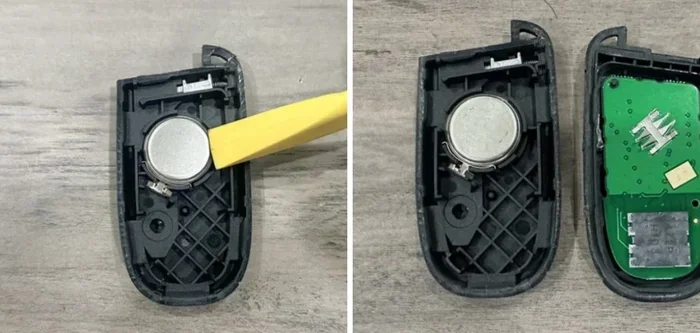
Once you have popped the seam open, carefully separate the two halves of the fob. The top half will lift off, revealing the internal circuit board and the battery. Be gentle here. There is usually a small ribbon cable or connector linking the two halves, especially in newer Dodge models with push-button start.
Set the top half aside on your clean cloth. You should now see the old battery sitting in its compartment. It will be held in place by a small metal clip or just by the tight fit of the compartment.
Step 3: Remove the Old Battery
Look at the old battery. You will see a positive (+) side and a negative (-) side. Note which way the battery is facing before you remove it. This matters when you put in the new one. Use your screwdriver or a small pair of tweezers to gently pry the battery out of its slot.
Dispose of the old battery properly. Do not just throw it in the trash. Many stores that sell batteries have recycling bins, and some communities have battery recycling centers. It is a small step that helps the environment.
Step 4: Insert the New Battery
Take your new CR2032 battery. Check the markings on it to confirm it is the right type. Hold the battery with the positive (+) side facing up, matching the orientation of the old battery. Slide it gently into the compartment until it clicks into place under the metal clip.
Make sure the battery sits flat and snug. A loose battery will not make proper contact, and your fob will not work. Double-check that the positive and negative sides match the markings inside the compartment.
Step 5: Reassemble the Fob
Place the top half of the fob back onto the bottom half. Press gently along the seam until you hear the clips click into place. The fob should feel solid and smooth, with no gaps between the two halves.
Now test it. Stand near your Dodge vehicle and press the unlock button. The doors should respond immediately. If they do not, try pressing the lock button too. Both should work. If you are unsure about the reset process for your specific model, our article on do you have to do anything after replacing a key fob battery covers common post-replacement steps.
Step 6: Test All Functions
Do not just test the lock and unlock buttons. If your Dodge key fob has other features, test those too. Many newer Dodge models come with remote start, trunk release, or panic alarm functions. Make sure each one works with the new battery.
If everything works, you are done. Congratulations. You just saved yourself a trip to the dealership and probably around $50 to $100 in service fees.
Common Dodge Key Fob Models and Their Battery Types
Not all Dodge key fobs are exactly the same. Different models and model years may use slightly different fob designs, but the battery type is almost always the same. Here is a quick look at what to expect:
- Dodge Challenger (2008-2023): Uses a CR2032 battery. The fob has a standard three-button design with lock, unlock, and trunk release.
- Dodge Charger (2006-2023): Also uses a CR2032 battery. The fob design is very similar to the Challenger.
- Dodge Durango (2011-2023): Uses a CR2032 battery. Some higher-end trims may have a fob with a flip-out key blade.
- Dodge Journey (2011-2020): Uses a CR2032 battery with a basic two-button remote.
- Dodge Dart (2013-2016): Uses a CR2032 battery in a compact fob design.
No matter which Dodge model you drive, the CR2032 battery is almost certainly what you need. If you are ever unsure, check the owner’s manual or look on the back of the old battery itself. The number “CR2032” will be printed right on it. You can also visit our page on can a bad key fob drain your car battery to understand how a weak fob battery can affect your vehicle’s electrical systems.
| Dodge Model | Battery Type | Fob Buttons | Approximate Cost |
|---|---|---|---|
| Challenger | CR2032 | 3 (lock, unlock, trunk) | $3-$5 for battery |
| Charger | CR2032 | 3 (lock, unlock, trunk) | $3-$5 for battery |
| Durango | CR2032 | 3-4 (lock, unlock, trunk, panic) | $3-$5 for battery |
| Journey | CR2032 | 2 (lock, unlock) | $3-$5 for battery |
| Dart | CR2032 | 2 (lock, unlock) | $3-$5 for battery |
What to Do If the Key Fob Still Won’t Work After Replacement
Sometimes, even after you put in a brand-new battery, the fob does not work. This can be frustrating, but do not panic. There are several common reasons this happens, and most of them are easy to fix.
The Battery May Be Installed Backwards
This is the number one mistake people make. The positive and negative sides of the battery must face the correct direction inside the compartment. If the battery is upside down, the fob will not get power. Remove the battery, flip it over, and put it back in the correct orientation.
The Battery May Not Be Making Proper Contact
Sometimes the new battery does not sit snugly in the compartment. The metal contacts inside the fob need to touch both sides of the battery firmly. Press down on the battery gently to make sure it is seated properly. You can also use a clean, dry cloth to wipe the contacts inside the fob before inserting the new battery.
The Fob May Need to Be Reset
Some Dodge vehicles require a simple reset after you change the battery. To do this, sit in your Dodge with the doors closed. Insert the key fob into the ignition slot (if your model has one) and turn it to the “On” position. Wait for a few seconds, then turn it back to “Off.” Remove the fob from the ignition. Try pressing the lock and unlock buttons again. This process re-establishes the connection between the fob and the vehicle’s computer system.
If you find that your fob is frequently losing power or draining quickly, it could be a sign of a deeper issue. Check out our article on can a bad key fob drain your car battery to learn more about how a failing fob battery can impact your vehicle.
The Battery May Be Defective
It happens more often than you would think. A brand-new battery straight from the package can sometimes be dead or weak. This is especially true with cheap off-brand batteries from dollar stores. Try a different brand of CR2032 battery. Name brands like Energizer, Duracell, and Panasonic tend to be more reliable.
The Fob May Be Damaged
If none of the above fixes work, the fob itself may be damaged. Water damage, drops, and general wear and tear can harm the internal circuit board. In this case, you may need to replace the entire fob or have it repaired by a professional. A dealership can help you with a new key fob if the old one is beyond repair.
Tips to Make Your Dodge Key Fob Battery Last Longer
Nobody wants to be stranded with a dead key fob battery. Here are some simple tips to help your new battery last as long as possible.
- Keep the fob away from extreme heat: Do not leave your key fob sitting on the dashboard in direct sunlight. Heat degrades batteries faster than almost anything else.
- Do not store the fob near other electronics: Other electronic devices can sometimes interfere with the fob’s signal and cause it to use more power than normal.
- Replace the battery at the first sign of weakness: If you notice the fob range getting shorter or the buttons feeling less responsive, change the battery right away. Waiting too long can put extra strain on the internal components.
- Use quality batteries: Name-brand CR2032 batteries tend to last longer and perform more consistently than generic brands. The extra cost is worth it.
- Keep spare batteries on hand: Store a spare CR2032 battery in your glove box. This way, you are always prepared if the fob dies unexpectedly.
Most Dodge key fob batteries last between two and four years, depending on how often you use the remote functions. If you find yourself changing the battery more frequently than that, it may be worth investigating whether something in your vehicle’s electrical system is causing excess drain. You can learn more about this in our article on can I drive my car with a low key battery, which explores the relationship between fob battery health and vehicle operation.
When to Replace the Entire Key Fob Instead
Changing the battery fixes most fob problems. But there are times when a battery swap is not enough. Here are some signs that you may need a completely new key fob:
- The fob is physically damaged: Cracks, broken buttons, or water damage that you can see are clear signs the fob needs replacement.
- The fob still does not work after two battery changes: If a fresh battery does not solve the problem, the internal electronics are likely faulty.
- The fob range has gotten extremely short: If you need to be within a foot of the car for the fob to work, something is wrong beyond the battery.
- The buttons feel sticky or unresponsive: Worn-out buttons often indicate internal damage that a new battery cannot fix.
Replacing a Dodge key fob can cost anywhere from $50 to $200 or more, depending on the model and where you get it done. A dealership is usually the most expensive option, but they can program the new fob to your specific vehicle. Some locksmiths and online retailers also sell pre-programmed fobs at lower prices. Always check compatibility with your specific Dodge model before purchasing a replacement.
Final Thoughts
Changing the battery in your Dodge key fob is one of the easiest and most satisfying DIY car maintenance tasks you can do. It takes less than five minutes, costs just a few dollars, and does not require any special skills or tools. You do not need to make an appointment at the dealership, sit in a waiting room, or spend money on labor charges.
We have covered everything you need to know in this guide. You now know what battery to buy, how to open your fob, how to swap the old battery for the new one, and what to do if things do not work right away. You also know how to keep your fob battery lasting longer and when it is time to replace the entire fob instead of just the battery.
Keep a spare CR2032 battery in your glove box today. The next time your Dodge key fob starts acting up, you will be ready. You will fix it in minutes, and you will wonder why you ever worried about it in the first place.
Remember, taking care of small things like this keeps your Dodge running smoothly and saves you time and money in the long run. Share this guide with a friend who might need it, and keep our site bookmarked for more helpful Dodge tips and guides.
Frequently Asked Questions
What type of battery does a Dodge key fob use?
Most Dodge key fobs use a CR2032 coin cell battery. This is a very common battery size that you can find at almost any store. Check the back of your old battery to confirm the exact type before purchasing a replacement.
How do I know when my Dodge key fob battery needs replacing?
The most common sign is reduced range. If you need to be closer to your vehicle for the fob to work, the battery is likely weakening. Other signs include buttons that feel less responsive or a fob that stops working entirely. Some Dodge models also display a low battery warning on the dashboard.
Can I use any brand of CR2032 battery for my Dodge key fob?
Yes, you can use any brand of CR2032 battery, but name brands like Energizer, Duracell, and Panasonic tend to be more reliable and last longer. Cheap generic batteries from dollar stores may be defective or have a shorter lifespan, so it is worth spending a little extra on a quality brand.
Do I need to reprogram my Dodge key fob after changing the battery?
In most cases, no. Simply replacing the battery should restore full function immediately. However, some Dodge models may require a quick reset. To do this, insert the fob into the ignition slot, turn to “On,” wait a few seconds, turn to “Off,” and remove the fob. Try pressing the buttons again to confirm it works.
How long does a Dodge key fob battery typically last?
A Dodge key fob battery usually lasts between two and four years, depending on how frequently you use the remote functions. If you use features like remote start or trunk release often, the battery may drain faster. Keeping spare batteries on hand is a smart habit.
What should I do if my Dodge key fob still does not work after a battery change?
First, double-check that the battery is installed in the correct orientation. Then make sure the battery is seated firmly and making proper contact. Try resetting the fob by following the ignition procedure. If none of these steps work, the fob’s internal electronics may be damaged, and you may need to replace the entire fob or seek professional help.